# GPT 101 — full content
> Documentation for Prompt Engineering 101 Workshop
------------------------------------------------------------------------------
# Generative AI & Prompt Engineering
URL: https://tyson-swetnam.github.io/intro-gpt/
Source: https://tyson-swetnam.github.io/intro-gpt/index.md
------------------------------------------------------------------------------
# Generative AI & Prompt Engineering
This work is licensed under a Creative Commons Attribution 4.0 International License.

{width=1000}
## Welcome
Welcome to this **self-paced, asynchronous online workshop** on generative AI and prompt engineering for academic research and education.
Generative AI tools are now deeply integrated into how we work, conduct research, teach, and learn. This workshop will help you develop the skills to effectively utilize these powerful tools, focusing on the art of crafting "prompts" — the instructions that guide AI models — and exploring how to integrate AI into daily productivity.
!!! Success "Learning Objectives"
After completing this workshop, you will be able to:
* Understand the current generative AI landscape and how it impacts the workplace and classroom
* Create effective prompts for leading AI platforms including Claude, ChatGPT, Gemini, and Copilot
* Apply AI tools to enhance teaching, research, and daily productivity
* Make informed decisions about when and how to integrate AI into your work
* Navigate ethical considerations and responsible AI use in academic contexts
## [:material-calendar-clock: Workshop Agenda & Learning Paths](agenda.md)
This workshop is organized into **five main modules** with an estimated **8-12 hours** of content. You can complete them in order or skip to sections most relevant to your needs.
| Module | Topic | Time |
|--------|-------|------|
| **0** | [Getting Started](agenda.md#module-0-getting-started-30-60-minutes) - AI landscape and orientation | 30-60 min |
| **1** | [Platform Setup](agenda.md#module-1-platform-setup-1-2-hours) - Claude, ChatGPT, Gemini, Copilot | 1-2 hours |
| **2** | [Prompt Engineering & Productivity](agenda.md#module-2-prompt-engineering-productivity-2-3-hours) - Core skills and daily use | 2-3 hours |
| **3** | [AI in Education](agenda.md#module-3-ai-in-education-2-3-hours) - Teaching, tutoring, and academic administration | 2-3 hours |
| **4** | [AI for Research](agenda.md#module-4-ai-for-research-3-4-hours) - Advanced tools and techniques | 3-4 hours |
| **5** | [Ethics & Responsible AI](agenda.md#module-5-ethics-responsible-ai-1-2-hours) - Ethical frameworks and considerations | 1-2 hours |
[:material-arrow-right: View the full agenda with detailed topics and learning paths](agenda.md){ .md-button .md-button--primary }
## Quick Start
!!! example "Choose Your Path"
=== "Beginners"
New to AI? Start here:
1. [:material-compass: AI Landscape Overview](ai_landscape.md) - Understand the AI ecosystem
2. [:simple-anthropic: Set up Claude](claude.md) or [:fontawesome-brands-openai: ChatGPT](chatgpt.md) - Get your first AI account
3. [:material-pencil: Writing Effective Prompts](prompts.md) - Learn core prompting techniques
4. [:material-scale-balance: Ethics Overview](ethics.md) - Understand responsible AI use
=== "Educators"
Focus on teaching applications:
1. [:material-school: Education Overview](education.md) - AI's role in modern education
2. [:material-human-male-board: Teaching with AI](teaching.md) - Course design and content creation
3. [:material-account-school: AI Tutoring](tutoring.md) - Personalized learning assistance
4. [:material-file-document-alert: Plagiarism & Detection](plagiarism.md) - Academic integrity
=== "Researchers"
Focus on research applications:
1. [:material-flask: Research Overview](research.md) - AI in academic research
2. [:material-chart-bar: Data Analysis](daily-productivity.md#data-analysis-without-writing-code) - AI-powered data analysis without coding
3. [:material-robot: Agentic AI](agentic.md) - Autonomous AI workflows
4. [:material-database-search: RAG](rag.md) - Custom knowledge bases
=== "Developers"
Focus on technical integration:
1. [:simple-githubcopilot: GitHub Copilot](copilot.md) - AI pair programming
2. [:material-palette-swatch: Vibe Coding](vibe.md) - AI-assisted development
3. [:material-link-variant: Model Context Protocol](mcp.md) - Tool integration
4. [:material-api: OpenAI API](chatgpt.md) - Programmatic access
## Prerequisites
:material-check: **A computer** with internet connection
:material-check: **At least one AI platform account** - Free tiers are available for all major platforms:
- [:simple-anthropic: Claude](claude.md) - Free or Pro ($20/month)
- [:fontawesome-brands-openai: ChatGPT](chatgpt.md) - Free or Plus ($20/month)
- [:simple-google: Google Gemini](gemini.md) - Free or AI Pro ($19.99/month)
- [:material-microsoft: Microsoft Copilot](microsoft.md) - Free with Microsoft 365
:material-check: **No prior AI experience required** - This workshop starts with the basics and progresses to advanced topics
!!! tip "Platform Recommendations"
Not sure which platform to choose? See our [Platform Comparison Guide](choose.md) for detailed feature comparisons, pricing, and use-case recommendations.
## Workshop Sections
### [:material-cog: Setup](claude.md)
Get started with major AI platforms. Each guide includes account setup, interface overview, and platform-specific tips.
| Platform | Description |
|----------|-------------|
| [:simple-anthropic: Claude](claude.md) | Anthropic's AI with Projects, Artifacts, and MCP support |
| [:fontawesome-brands-openai: ChatGPT](chatgpt.md) | OpenAI's ChatGPT with GPTs, Canvas, and Advanced Voice |
| [:simple-google: Gemini](gemini.md) | Google's AI with workspace integration and multimodal capabilities |
| [:material-microsoft: Microsoft Copilot](microsoft.md) | AI integrated into Microsoft 365 applications |
| [:simple-githubcopilot: GitHub Copilot](copilot.md) | AI pair programming for developers |
### [:material-text-box-edit: Prompt Engineering](prompts.md)
Master the core skills for effective AI interaction.
| Topic | Description |
|-------|-------------|
| [:material-pencil: Writing Prompts](prompts.md) | Core techniques: chain-of-thought, few-shot learning, role-based prompting |
| [:material-briefcase: Daily Productivity](daily-productivity.md) | AI for emails, writing, summarization, data analysis, and workflow automation |
| [:material-palette-swatch: Vibe Coding](vibe.md) | AI-assisted software development, plus code-safety guidance |
| [:material-compare: Choosing a Platform](choose.md) | Compare features, pricing, and use cases |
### [:material-school: Education](education.md)
Explore how AI can enhance teaching, learning, and academic administration.
| Topic | Description |
|-------|-------------|
| [:material-book-open: Overview](education.md) | AI's transformative role in modern education |
| [:material-human-male-board: Teaching with AI](teaching.md) | Course design, content creation, and assessment |
| [:material-account-school: AI Tutoring](tutoring.md) | Using AI as a personalized learning assistant |
| [:material-account-group: Admissions & Recruiting](admissions.md) | AI for student recruitment and admissions |
| [:material-file-document-alert: Plagiarism & Detection](plagiarism.md) | AI detection tools and academic integrity |
### [:material-flask: Research](research.md)
Advanced topics for researchers using AI in their work.
| Topic | Description |
|-------|-------------|
| [:material-book-open: Overview](research.md) | AI applications in academic research |
| [:material-robot: Agentic AI](agentic.md) | Autonomous AI agents and workflows |
| [:material-shield-lock: AI Sandboxes](ai_sandboxes.md) | Safe environments for AI experimentation |
| [:simple-jupyter: Jupyter AI](jupyter.md) | AI integration in Jupyter notebooks |
| [:material-link-variant: Model Context Protocol](mcp.md) | Claude's MCP for tool integration |
| [:simple-google: NotebookLM](notebooklm.md) | Google's AI research assistant |
| [:material-server: Ollama](ollama.md) | Running LLMs locally |
| [:material-database-search: RAG](rag.md) | Retrieval Augmented Generation for custom knowledge bases |
| [:material-api: OpenAI API](chatgpt.md) | Programming with OpenAI's API |
| [:hugging: HuggingFace](huggingface.md) | Open-source models and datasets |
| [:hugging: Gradio](gradio.md) | Building AI interfaces |
| [:material-chart-box: Posit (RStudio)](posit.md) | AI tools for R users |
| [:material-microsoft-visual-studio-code: VS Code & AI Tools](vscode.md) | AI extensions for VS Code |
| [:material-text-search: Text Mining](text_mining.md) | AI for text analysis and NLP |
### [:material-scale-balance: Ethics](ethics.md)
Critical considerations for responsible AI use in academia.
| Topic | Description |
|-------|-------------|
| [:material-book-open: Overview](ethics.md) | Ethical frameworks and principles for AI use |
| [:material-scale-unbalanced: Bias](bias.md) | Understanding and mitigating AI bias |
| [:material-gavel: Legal](legal.md) | Copyright, privacy, and legal considerations |
| [:material-eye: Transparency](transparency.md) | Disclosing AI use and maintaining integrity |
| [:material-leaf: Environment](environment.md) | Environmental and health impacts of AI |
### [:material-notebook-edit: Hands-On Tutorials](claude-code.md)
Apply your learning with practical case studies and tutorials.
| Tutorial | Description |
|----------|-------------|
| [:simple-anthropic: Claude Code Workflow](claude-code.md) | Complete workflow using Claude Code |
| [:material-key: KEYS Internship (BIO5)](tutorials/keys.md) | AI-assisted research skills for BIO5 summer interns |
| [:material-presentation: Presentations](tutorials/presentations/overview.md) | Workshop slide decks for classroom delivery |
| [:material-hospital-building: Public Health AI Lab](tutorials/publichealth/casestudy.md) | Hands-on lab: SMS triage, outbreak synthesis, chart abstraction |
| [:material-map: GIS & Map Making](tutorials/publichealth/gis.md) | Creating maps with AI assistance |
## About This Workshop
This workshop is maintained and taught by the [University of New Mexico Center for Advanced Research Computing (CARC)](https://carc.unm.edu/){target=_blank}. CARC's research-computing documentation — high-performance computing, storage, and research software — lives at [unm-carc.github.io/docs](https://unm-carc.github.io/docs/){target=_blank}.
The workshop was originally developed at the University of Arizona by the [BIO5 Institute](https://bio5.org/){target=_blank}, [AI2S](https://responsibleai.arizona.edu/ai2s){target=_blank}, & [College of Information Science](https://infosci.arizona.edu){target=_blank}.
This website follows the [FAIR](https://www.go-fair.org/fair-principles/){target=_blank} and [CARE](https://www.gida-global.org/care){target=_blank} data principles and hopes to help further open science.
All materials are freely available and licensed under [Creative Commons Attribution 4.0](http://creativecommons.org/licenses/by/4.0/).
This site is also machine-readable: every page is published in the Open Knowledge Format with a raw markdown source, and an `llms.txt` index is provided — see the [For AI Agents](agents.md) guide.
[:material-arrow-right: Get started with the full agenda](agenda.md){ .md-button .md-button--primary }
------------------------------------------------------------------------------
# Self-Paced Online Workshop
URL: https://tyson-swetnam.github.io/intro-gpt/agenda/
Source: https://tyson-swetnam.github.io/intro-gpt/agenda.md
------------------------------------------------------------------------------
# Self-Paced Online Workshop
This work is licensed under a Creative Commons Attribution 4.0 International License.
{width=1000}
### Format
This is a **self-paced, asynchronous online workshop** designed to help academics, researchers, and educators learn to effectively use generative AI tools. All materials are freely available online and can be completed at your own pace.
### Time Commitment
We recommend dedicating **8-12 hours** to complete the full workshop, though you can work through sections as needed based on your interests and experience level.
#### Creators/Instructors:
[Greg Chism PhD](https://gregtchism.com/){target=_blank} [](https://orcid.org/0000-0002-5478-2445){target=_blank}
[Michele Cosi](https://cosimichele.github.io/){target=_blank} [](https://orcid.org/0000-0001-7609-1939){target=_blank}
[Jeffrey K. Gillan PhD](https://www.gillanscience.com/){target=_blank} [](https://orcid.org/0000-0002-0731-3048){target=_blank}
[Megh Krishnaswamy PhD](https://meghavarshini.github.io/){target=_blank} [](https://orcid.org/0000-0002-0205-9298?lang=en){target=_blank}
[Carlos Lizárraga-Celaya PhD](https://carloslizarragac.github.io/){target=_blank} [](https://orcid.org/0000-0002-0893-4268){target=_blank}
[Enrique Noriega PhD](https://www.linkedin.com/in/enoriega/){target=_blank} [](https://orcid.org/0000-0001-7150-2989){target=_blank}
[Tyson Lee Swetnam PhD](https://tysonswetnam.com/){target=_blank} [](http://orcid.org/0000-0002-6639-7181){target=_blank}
## About
This website follows the [FAIR](https://www.go-fair.org/fair-principles/){target=_blank} and [CARE](https://www.gida-global.org/care){target=_blank} data principles and hopes to help further open science.
## Learning Path
This workshop is organized into five main modules. You can complete them in order or skip to sections most relevant to your needs.
### :material-hand-wave: Module 0: Getting Started (30-60 minutes)
**If participating in an organized workshop, before you begin, please review our [Code of Conduct](#code-of-conduct).**
Start here to understand the AI landscape and set up your accounts.
| Topic | Description | Link |
|-------|-------------|------|
| Welcome & Overview | Introduction to the workshop and learning objectives | [Welcome](index.md) |
| AI Landscape | Understanding generative AI, LLMs, and the current ecosystem | [AI Landscape](ai_landscape.md) |
| Code of Conduct | Community guidelines and ethical AI use | [Code of Conduct](#code-of-conduct) |
### :material-account-plus: Module 1: Platform Setup (1-2 hours)
Set up accounts and learn the basics of major AI platforms. Choose the platforms most relevant to your work.
| Platform | Description | Link |
|----------|-------------|------|
| Claude | Anthropic's Claude AI with MCP support | [Claude Setup](claude.md) |
| ChatGPT | OpenAI's ChatGPT Plus and API access | [ChatGPT Setup](chatgpt.md) |
| Gemini | Google's Gemini AI with workspace integration | [Gemini Setup](gemini.md) |
| Microsoft Copilot | Microsoft 365 Copilot integration | [Copilot Setup](microsoft.md) |
| GitHub Copilot | AI pair programming for developers | [GitHub Copilot](copilot.md) |
| Choosing a Platform | Compare features, pricing, and use cases | [Comparison Guide](choose.md) |
### :material-text-box-edit: Module 2: Prompt Engineering & Productivity (2-3 hours)
Learn core skills for effective AI interaction and daily productivity.
| Topic | Description | Link |
|-------|-------------|------|
| Writing Effective Prompts | Core techniques for prompt engineering | [Prompt Engineering](prompts.md) |
| Daily Productivity | AI for emails, writing, research, data analysis, and workflow | [Daily Productivity](daily-productivity.md) |
| Vibe Coding | AI-assisted software development, plus code-safety guidance | [Vibe Coding](vibe.md) |
### :material-school: Module 3: AI in Education (2-3 hours)
Explore how AI can enhance teaching, learning, and academic administration.
| Topic | Description | Link |
|-------|-------------|------|
| Education Overview | AI's role in modern education | [Education Overview](education.md) |
| Teaching with AI | Course design, content creation, and assessment | [Teaching](teaching.md) |
| AI Tutoring | Using AI as a personalized learning assistant | [Tutoring](tutoring.md) |
| Admissions & Recruiting | AI for student recruitment and admissions | [Admissions](admissions.md) |
| Plagiarism & Detection | Understanding AI detection and academic integrity | [Plagiarism](plagiarism.md) |
### :material-flask: Module 4: AI for Research (3-4 hours)
Advanced topics for researchers using AI in their work.
| Topic | Description | Link |
|-------|-------------|------|
| Research Overview | AI applications in academic research | [Research Overview](research.md) |
| Agentic AI | Autonomous AI agents and workflows | [Agentic AI](agentic.md) |
| AI Sandboxes | Safe environments for AI experimentation | [AI Sandboxes](ai_sandboxes.md) |
| Jupyter AI | AI integration in Jupyter notebooks | [Jupyter AI](jupyter.md) |
| Model Context Protocol | Claude's MCP for tool integration | [MCP](mcp.md) |
| NotebookLM | Google's AI research assistant | [NotebookLM](notebooklm.md) |
| Ollama | Running LLMs locally | [Ollama](ollama.md) |
| RAG (Retrieval Augmented Generation) | Building AI with custom knowledge bases | [RAG](rag.md) |
| OpenAI API | Programming with OpenAI's API | [OpenAI API](chatgpt.md) |
| HuggingFace | Open-source models and datasets | [HuggingFace](huggingface.md) |
| Gradio | Building AI interfaces | [Gradio](gradio.md) |
| Posit (RStudio) | AI tools for R users | [Posit](posit.md) |
| VS Code & AI Tools | AI extensions for VS Code | [VS Code](vscode.md) |
| Text Mining | AI for text analysis and NLP | [Text Mining](text_mining.md) |
### :material-scale-balance: Module 5: Ethics & Responsible AI (1-2 hours)
Critical considerations for responsible AI use in academia.
| Topic | Description | Link |
|-------|-------------|------|
| Ethics Overview | Ethical frameworks for AI use | [Ethics Overview](ethics.md) |
| Bias | Understanding and mitigating AI bias | [Bias](bias.md) |
| Legal Considerations | Copyright, privacy, and legal issues | [Legal](legal.md) |
| Transparency | Disclosing AI use and maintaining integrity | [Transparency](transparency.md) |
| Environment | Environmental and health impacts of AI | [Environment](environment.md) |
### :material-notebook-edit: Hands-On Tutorials
Apply your learning with practical case studies and tutorials.
| Tutorial | Description | Link |
|----------|-------------|------|
| Claude Code Workflow | Complete workflow using Claude Code | [Claude Code Tutorial](claude-code.md) |
| Public Health AI Lab | Hands-on lab: SMS triage, outbreak synthesis, chart abstraction | [Public Health](tutorials/publichealth/casestudy.md) |
| GIS & Map Making | Creating maps with AI assistance | [Map Making](tutorials/publichealth/gis.md) |
### :material-lightbulb: Recommended Learning Paths
**For Beginners:**
1. Module 0: Getting Started
2. Module 1: Set up 1-2 platforms
3. Module 2: Focus on Writing Prompts and Daily Productivity
4. Module 5: Ethics Overview
**For Educators:**
1. Module 0: Getting Started
2. Module 1: Platform Setup
3. Module 2: Prompt Engineering
4. Module 3: Complete Education section
5. Module 5: Ethics & Responsible AI
**For Researchers:**
1. Module 0: Getting Started
2. Module 1: Platform Setup
3. Module 2: Prompt Engineering
4. Module 4: Select relevant research topics
5. Module 5: Ethics & Responsible AI
6. Hands-On Tutorials
## Prerequisites
To get the most out of this workshop, you'll need:
:material-check: **A computer** with internet connection
:material-check: **At least one AI platform account** - We recommend starting with:
- [ChatGPT](chatgpt.md) (Free or Plus)
- [Claude](claude.md) (Free or Pro)
- [Google Gemini](gemini.md) (Free or Advanced)
- [Microsoft Copilot](microsoft.md) (with Microsoft 365)
:material-check: **Optional for developers**: [GitHub](copilot.md) account with GitHub Copilot access
:material-check: **No prior AI experience required** - This workshop starts with the basics and progresses to advanced topics
## Code of Conduct
This Code of Conduct applies to all Event participants, instructors, and activities during the workshop.
Data Science Institute (DSI) is dedicated to providing professional computational research
and educational experiences for all of our users, regardless of domain
focus, academic status, educational level, gender/gender
identity/expression, age, sexual orientation, mental or physical
ability, physical appearance, body size, race, ethnicity, religion (or
lack thereof), technology choices, dietary preferences, or any other
personal characteristic.
While participating at an Event, we expect you to:
- Interact with others and use GPTs professionally and ethically by
complying with our Policies.
- Constructively criticize ideas and processes, not people.
- Follow the Golden Rule (treat others as you want to be treated) when
interacting online or in-person with collaborators, trainers, and
support staff.
- Comply with this Code in spirit as much as the letter, as it is
neither exhaustive nor complete in identifying any and all possible
unacceptable conduct.
We do not tolerate harassment of other users or staff in any form
(including, but not limited to, violent threats or language, derogatory
language or jokes, doxing, insults, advocating for or encouraging any of
these behaviors). Sexual language and imagery are not appropriate at any
time (excludes Protected Health Information in compliance with HIPAA).
Any user violating this Code may be expelled from the platform and the
workshop at DSI's sole discretion without warning.
To report a violation of this Code, directly speak to a trainer. If you are not comfortable
speaking to a trainer, or the trainer is who you are reporting, email with the following information:
- Your contact information
- Names (real, username, pseudonyms) of any individuals involved, and
or witness(es) if any.
- Your account of what occurred and if the incident is ongoing. If
there is a publicly available record (a tweet, public chat log,
etc.), please include a link or attachment.
- Any additional information that may be helpful in resolving the
issue.
------------------------------------------------------------------------------
# The Landscape
URL: https://tyson-swetnam.github.io/intro-gpt/ai_landscape/
Source: https://tyson-swetnam.github.io/intro-gpt/ai_landscape.md
------------------------------------------------------------------------------
# The Landscape
This work is licensed under a Creative Commons Attribution 4.0 International License.
??? Info "Where Generative AI and LLMs fit in the broader AI family"
Generative AI and Large Language Models (LLMs) are **one branch** of a much older, broader field. The lay-of-the-land:
- **Artificial Intelligence (AI)** — the umbrella: any system that performs tasks normally requiring human intelligence.
- **Machine Learning (ML)** — AI systems that learn patterns from data instead of following hand-coded rules.
- **Supervised Learning** — learn from labeled examples (classification, regression, most disease-prediction models).
- **Unsupervised Learning** — find structure in unlabeled data (clustering, dimensionality reduction).
- **Reinforcement Learning (RL)** — learn from rewards and penalties (game-playing, robotics, RLHF for chatbot alignment).
- **Deep Learning** — ML using deep, multi-layer neural networks; the foundation of nearly every modern AI capability.
- **Natural Language Processing (NLP)** — AI for human language; modern NLP is dominated by transformer-based deep-learning models.
- **Computer Vision** — AI for images and video.
- **Generative AI** — models that produce *new* content (text, images, code, audio, video).
- **Large Language Models (LLMs)** — generative models trained on text. ChatGPT, Claude, Gemini, Llama. The primary subject of this workshop.
- **Diffusion Models** — generative models for images and video (Stable Diffusion 3.5, GPT Image, Imagen 4, Nano Banana, Veo 3).
The categories blur in practice. Most "agentic AI" in 2026 combines an LLM (generative AI) with reinforcement-learning techniques (RLHF for alignment, RL for tool-use training) and classical search/planning algorithms. Use the map to locate where a specific tool sits — not to draw neat fences around it.
## The Generative AI Landscape in 2026
The generative AI landscape has transformed dramatically since the release of ChatGPT in November 2022. What began as text-generation models has exploded into a diverse ecosystem of platforms capable of creating text, images, video, code, and music—while also evolving from simple chatbots into sophisticated **agentic systems** that can autonomously complete complex tasks.
This page provides an overview of the generative AI landscape as of May 2026, focusing on three key perspectives:
1. **The Evolution of Foundation Models** - How we arrived at today's capable AI systems
2. **Platform Comparison** - Choosing the right tool for your needs
3. **The Age of Agentic AI** - How AI has evolved from conversation to autonomous action
---
## Evolution of Foundation Models
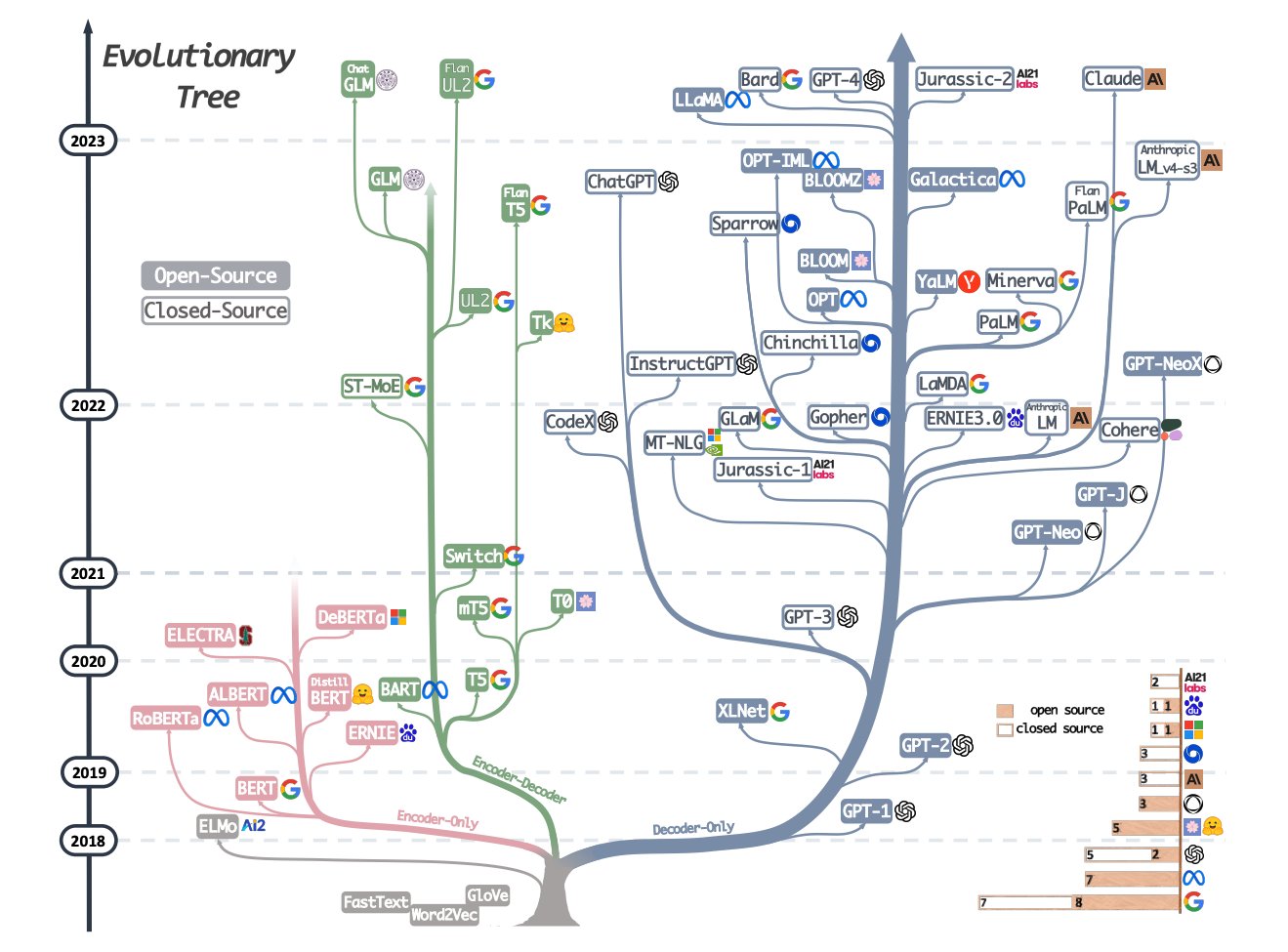
### The LLM Family Tree (2018-2023)
[{width=800}](https://arxiv.org/abs/2304.13712){target=_blank}
Image Credit: [Yang et al. 2023 :simple-arxiv:](https://arxiv.org/abs/2304.13712){target=_blank}
This diagram traces the lineage of large language models from 2018-2023, showing how modern models like GPT, Claude, and Gemini descended from earlier architectures. Key milestones include:
- **2017**: [Transformer architecture](https://arxiv.org/abs/1706.03762){target=_blank} introduced ("Attention is All You Need")
- **2018-2019**: BERT, GPT-2 demonstrate transfer learning potential
- **2020**: GPT-3 shows few-shot learning at scale (175B parameters)
- **2021-2022**: Model scaling continues (PaLM, GPT-3.5, ChatGPT)
- **2023**: Multimodal models emerge (GPT-4 with vision, Gemini)
- **2024-2026**: Agent capabilities, reasoning models, and specialized tools
---
### The Pace of Progress: AI's "Time Horizon"
The clearest single picture of *how fast* capabilities are advancing comes from [METR](https://metr.org){target=_blank}, which measures the length of task — in **human** time — that an AI agent can finish on its own (at a 50% success rate). That horizon has been **doubling roughly every seven months — and, on the latest models, faster still**: from tasks a skilled person could do in seconds a few years ago to **multi-hour** tasks in 2026.
**[AI's task-completion time horizon is doubling — interactive chart (AI Digest)](https://theaidigest.org/time-horizons){target=_blank}**
On a log scale the trend is close to a straight line — steeper than the curves that defined earlier technology waves, and a major reason independent forecasters keep revising their timelines *forward* (a point Rutger Bregman presses in ["Is AI denial the new climate denial?"](ethics.md#is-ai-denial-the-new-climate-denial)). *If the embed doesn't load, open the [interactive version](https://theaidigest.org/time-horizons){target=_blank}.*
---
### From Text Generation to World Simulation
The evolution of generative AI has progressed through distinct phases:
**Phase 1: Text Generation (2018-2022)**
- Models like GPT-3, BERT, and T5 focused on understanding and generating text
- Primary use cases: chatbots, summarization, translation
- Interaction model: single-turn question-and-answer
**Phase 2: Multimodal Integration (2022-2024)**
- Models gained ability to process images, audio, and eventually video
- GPT-4 Vision, Gemini, and Claude 3 could analyze charts, diagrams, and photos
- Enabled new use cases: visual analysis, document understanding, accessibility
**Phase 3: Agentic Systems (2024-Present)**
- AI evolved from responding to acting
- Systems can now plan, use tools, and complete multi-step tasks autonomously
- Examples: Claude Code, GitHub Copilot Workspace, ChatGPT with Canvas
**Phase 4: Interactive World Models (Emerging)**
The frontier of generative AI research focuses on systems that not only generate content but simulate interactive environments:
**Self-Evolving AI Agents**
[{width=700}](https://arxiv.org/abs/2508.07407){target=_blank}
Image: Self-Evolving Agent Taxonomy from [Fang et al. 2025 :simple-arxiv:](https://arxiv.org/abs/2508.07407){target=_blank}
Research is exploring agents that improve their own capabilities through experience, optimizing:
- **Behavior**: Learning better action strategies through reinforcement learning
- **Prompts**: Refining self-instructions iteratively
- **Memory**: Improving information storage and retrieval
- **Tool Use**: Learning when and how to leverage external capabilities
- **Collaboration**: Optimizing workflows across multiple specialized agents
For more on agentic AI systems, see our dedicated [Agentic AI documentation](agentic.md).
**Interactive Generative Video (IGV)**
[{width=700}](https://arxiv.org/abs/2504.21853){target=_blank}
Image: IGV System Architecture from [Yu et al. 2025 :simple-arxiv:](https://arxiv.org/abs/2504.21853){target=_blank}
Unlike traditional video generation (Veo 3, Runway, Kling), **Interactive Generative Video** systems generate video content that responds to user input in real-time—essentially creating playable worlds from text descriptions.
IGV systems combine five key modules:
| Module | Function | Challenge |
|--------|----------|-----------|
| **Generation** | Creates high-quality video frames | Real-time performance |
| **Control** | Handles user input (keyboard, mouse, natural language) | Open-domain control |
| **Memory** | Maintains temporal consistency | Long-term coherence |
| **Dynamics** | Simulates realistic physics | Accurate simulation |
| **Intelligence** | Makes autonomous decisions | Causal reasoning |
Applications include:
- **Gaming**: Procedurally generated worlds that respond to player actions
- **Embodied AI**: Robots training in safe, scalable simulated environments
- **Autonomous Driving**: Testing edge cases in synthetic scenarios
- **Education**: Interactive science simulations
- **Entertainment**: Choose-your-own-adventure video content
**Example: Genie 3 (Google DeepMind)**
[Genie 3](https://deepmind.google/blog/genie-3-a-new-frontier-for-world-models/){target=_blank} represents a breakthrough in interactive world models—capable of generating playable 3D environments from a single image or text description. Unlike traditional video generation that creates fixed sequences, Genie 3 produces controllable, interactive worlds where users can navigate and interact in real-time.
Key capabilities:
- **Image-to-World**: Upload a single image → explore it as a playable 3D environment
- **Text-to-World**: Describe a scene → generate an interactive world from scratch
- **Real-time Control**: WASD navigation, camera control, physics simulation
- **Temporal Consistency**: Maintains coherent world state across extended interactions
!!! info "Mote: Interactive Ecosystem Simulation"
**[Mote](https://www.youtube.com/watch?v=Hju0H3NHxVI){target=_blank}** is an interactive ecosystem simulation that combines elements from games and research, creating a sandbox for computational biology, machine learning, and physics. It uses a custom GPU-based physics engine (1:07) to model many simple behaviors at a massive scale, leading to emergent phenomena.
---
## AI Platform Comparison
The AI landscape now includes dozens of platforms, each optimized for different use cases. Rather than duplicate extensive comparison tables here, we've consolidated all platform comparisons into a single comprehensive guide:
**📊 [Choosing the Right AI Platform](choose.md)** includes:
- **Platform Comparison Tables** by use case (Chat, Research, Code, Image/Video)
- **Agentic Browsers** - AI-powered web browsers (Perplexity Comet, Dia, Fellou, etc.)
- **API Pricing for Developers** - Token-level costs for Claude, Gemini, OpenAI, Mistral, etc.
- **Educational Platforms** - IXL, Khan Academy, Codecademy, Duolingo, and more
- **Student Discounts** - Special pricing for students and educators
- **Federal Restrictions** - Important compliance information for US-based researchers
All pricing verified **May 2026** (core AI vendors).
### Quick Recommendations
**For Academic Research:**
- **Literature Review**: Perplexity, Claude, ScholarAI, Consensus
- **Data Analysis**: Claude (200K context), ChatGPT (Advanced Data Analysis)
- **Writing Assistance**: Claude (strong reasoning), ChatGPT Plus (plugins)
- **Citation Management**: NotebookLM (RAG capabilities)
**For Education:**
- **Students (Budget)**: Free options - HuggingFace Chat, Google AI Pro (1 yr free for students), Perplexity Education ($10/mo with SheerID verification)
- **Teachers**: GitHub Copilot (free for educators), Claude (strong pedagogy), ChatGPT
- **Tutoring**: Khan Academy (free AI tutor Khanmigo), Claude, ChatGPT
**For Coding:**
- **IDE Integration**: [Claude Code](claude-code.md), GitHub Copilot, Continue.dev
- **Learning to Code**: ChatGPT (interactive execution), Replit AI
- **Code Review**: Claude (strong analysis), GitHub Copilot
- **See also**: Our [Vibe Coding guide](vibe.md) for detailed agentic coding workflows
**For Creative Work:**
- **Images**: Midjourney (quality), ChatGPT Image (convenience), Stable Diffusion (control)
- **Video**: Veo 3 (Google), Runway Gen-4.5, Kling AI (OpenAI's Sora was discontinued April 2026)
- **Music**: Suno, Udio
- **Writing**: Claude (creative writing), ChatGPT, Jasper (marketing)
---
## The Age of Agentic AI
The most significant shift in the AI landscape over the past two years has been the evolution from **conversational AI** to **agentic AI**—systems that don't just respond to questions but take autonomous actions to accomplish goals.
### What Makes AI "Agentic"?
| Traditional Chatbot | Agentic AI System |
|---------------------|-------------------|
| Responds to questions | Pursues goals |
| Single-turn interactions | Multi-step planning |
| Text-only output | Uses tools (search, code, APIs) |
| Stateless | Maintains memory across sessions |
| Reactive | Proactive |
| Requires explicit instructions for each step | Breaks down complex tasks autonomously |
**Example Comparison:**
- **Chatbot**: "How do I fix a bug in my Python code?" → Explains debugging steps
- **Agent**: "Fix the bug in checkout.py" → Searches codebase, identifies issue, implements fix, runs tests, commits changes
### The Agent Capability Spectrum
Agentic AI systems operate across five levels of autonomy:
#### Level 1: Conversational AI
Basic question-answering chatbots like early ChatGPT, Gemini web interface, or Claude without tools.
**Capabilities**: Answer questions, summarize text, explain concepts
**Limitations**: Cannot take actions or use external tools
#### Level 2: Tool-Using LLMs
AI assistants that can search the web, execute code, or access plugins when prompted.
**Capabilities**: Web search, calculations, code execution (sandboxed), API calls
**Examples**: ChatGPT with plugins, Claude with MCP, Gemini with search
#### Level 3: Autonomous Task Completion
Single agents that can complete multi-step tasks independently.
**Capabilities**: Break down goals, iterate on solutions, use multiple tools in sequence
**Examples**: Claude Code (with agentic coding), GitHub Copilot Workspace, Devin
**Use Cases**:
- Writing and deploying a feature from a description
- Conducting research and compiling a report
- Debugging an application end-to-end
#### Level 4: Multi-Agent Collaboration
Multiple specialized agents working together on complex tasks.
**Capabilities**: Task decomposition, specialization, inter-agent communication
**Frameworks**: CrewAI, AutoGen, LangGraph
**Examples**:
- Software team simulation (product manager + engineers + QA)
- Research team (literature review + data analysis + writing)
- Business workflow automation
#### Level 5: Self-Evolving Systems
Agents that improve their own capabilities through experience.
**Capabilities**: Self-optimization, lifelong learning, capability expansion
**Status**: Research frontier (2025-present)
**Examples**: Experimental systems from [EvoAgentX](https://github.com/EvoAgentX){target=_blank}, academic research
**Where are we today?** Most commercial AI platforms (ChatGPT, Claude, Gemini) operate at Levels 2-3. Developer frameworks enable Level 4. Level 5 remains primarily in research labs.
### Agentic Platforms in 2026
Several platforms now offer agentic capabilities beyond simple chat:
**[Claude Code](claude-code.md)** (Anthropic)
- CLI and IDE integration for autonomous coding
- Can read files, execute commands, make multi-file edits
- Integrated with [Model Context Protocol (MCP)](mcp.md) for tool extensibility
- Best for: Complex refactoring, feature implementation, debugging
**GitHub Copilot Workspace**
- Agentic coding environment in GitHub
- Plans implementation, edits multiple files, creates PRs
- Best for: Issue resolution, feature development
**ChatGPT with Canvas / Projects**
- Artifact-based interaction for iterative creation
- Can maintain context across sessions with Projects
- Best for: Writing, planning, iterative document creation
**Perplexity Comet / Dia / Fellou** (Agentic Browsers)
- Browsers with AI agents that can navigate, extract data, complete forms
- See [Agentic Browsers comparison](choose.md#agentic-browsers-ai-powered-web-browsers)
**CrewAI / AutoGen** (Multi-Agent Frameworks)
- Developer tools for building multi-agent systems
- Best for: Custom workflows, specialized automation
For detailed guidance on using agentic coding tools, see our [Vibe Coding documentation](vibe.md).
### The Model Context Protocol (MCP)
A key enabler of agentic AI is the **[Model Context Protocol (MCP)](mcp.md)**—an open standard developed by Anthropic that allows AI assistants to securely connect to external tools and data sources.
MCP enables agents to:
- Access local file systems and databases
- Execute terminal commands
- Interact with Git repositories
- Connect to web APIs and services
- Query cloud services (GitHub, Slack, Google Drive, etc.)
**Security Note**: MCP runs locally with explicit user permission for each connection. See our [MCP documentation](mcp.md) for setup instructions.
---
## Digital Twins
A **[digital twin](https://en.wikipedia.org/wiki/Digital_twin){target=_blank}** is a virtual replica of a physical system — a factory, an aircraft engine, a supply chain, a city, an organ, an ecosystem — kept in sync with the real thing through live sensor data. The concept predates the current AI wave (the term goes back to NASA's Apollo program), but generative AI and large multimodal models have changed what twins can do.
### Where AI plugs into a digital twin
- **Anomaly detection** on streaming telemetry — flag unusual sensor patterns before failures cascade.
- **Synthetic data generation** — train models on rare-event scenarios that would be unsafe or impossible to collect on the real system.
- **Natural-language interfaces** — LLMs let domain experts query a complex twin in plain English ("show me the bearings that have drifted >2σ in the last 24 hours").
- **Forward simulation** — agentic systems can rehearse plans inside the twin before executing them on the real asset.
### Examples deployed in 2026
| Domain | System | What it twins |
|---|---|---|
| Earth science | NVIDIA Earth-2 | Global climate at km-scale resolution |
| Manufacturing | NVIDIA Omniverse | Factories, robots, production lines |
| Industrial | Siemens Xcelerator | Power grids, rail networks, building systems |
| Healthcare | Patient and organ twins (heart, lung, tumor) | Personalized treatment simulation |
| Urban | Virtual Singapore, Helsinki 3D+ | City-scale traffic, energy, planning |
Digital twins are most useful when they're **instrumented** (live data flowing in) and **actionable** (decisions flow back out). An LLM that talks to a twin without those two loops is just a chatbot with extra steps.
---
## World Models
A **world model** is an AI system that learns an internal representation of how the world behaves — physics, causality, agent interactions — and can simulate forward in time to predict the consequences of actions. The modern formulation is from [Ha & Schmidhuber (2018)](https://arxiv.org/abs/1803.10122){target=_blank}; the idea has become tractable at scale only in the last two years.
World models matter because they're the missing piece between today's reactive agents and tomorrow's agents that can *plan*: a system with a good enough world model can rehearse hundreds of candidate plans against its internal simulation before committing to one in reality.
### How world models differ from generative video
[Interactive Generative Video](#from-text-generation-to-world-simulation) (covered earlier in this page) is one expression of world-model research, but the broader category covers more than video output:
| Property | Generative video | World model |
|---|---|---|
| Primary output | Video frames | Internal state representation; output can be video, language, action, or all three |
| Training goal | Plausible-looking content | Accurate forward prediction of consequences |
| Typical use | Entertainment, content creation | Planning, control, embodied AI, robotics |
### Examples in 2026
- **[Genie 3](https://deepmind.google/blog/genie-3-a-new-frontier-for-world-models/){target=_blank}** (Google DeepMind) — generates playable 3D environments from a single image or text prompt. Covered in detail in the [Interactive Generative Video](#from-text-generation-to-world-simulation) section above.
- **V-JEPA 2** (Meta) — learns physical-world dynamics from video and is used for robot planning.
- **GAIA-1** (Wayve) — autonomous-driving world model that predicts how a driving scene unfolds given the ego-vehicle's actions.
- **NVIDIA Cosmos** — open foundation models for "physical AI"; the platform layer being used to build world models for robotics and autonomous systems.
- **Veo 3** (Google DeepMind) and **Sora** (OpenAI, discontinued April 2026) — video generators that learn implicit world physics. Their failure modes (object-permanence violations, gravity slips, hands with too many fingers) are diagnostic of how complete the implicit world model actually is. Sora pioneered this framing; the discontinuation reflected economics rather than technical failure (operating costs of $8–12M/month against under $2M/month in revenue).
A useful rule of thumb: if you can ask the system "what happens if I do X?" and the answer can be acted on, it's a world model. If you can only ask "what does this scene look like?", it's still generative video.
---
## Industry Landscape Resources
**[Matt Turck's MAD (ML/AI/Data) Landscape](https://mad.firstmark.com/){target=_blank}**
An annually updated overview of the machine learning, AI, and data ecosystem—covering infrastructure, tools, applications, and industry trends.
**[HuggingFace Arena LLM Leaderboard](https://lmarena.ai/leaderboard){target=_blank}**
A community-driven leaderboard ranking AI models based on blind human evaluations (users vote on responses without knowing which model generated them).
---
## Glossary
!!! Info "External Glossaries"
[:simple-google: Google's Machine Learning Glossary](https://developers.google.com/machine-learning/glossary){target=_blank}
[:simple-nvidia: NVIDIA's Data Science Glossary](https://www.nvidia.com/en-us/glossary){target=_blank}
**Agentic AI:**
AI systems that use reasoning and iterative planning to autonomously solve complex, multi-step problems. Agentic systems can break down tasks, use tools, and make decisions to achieve goals with minimal human intervention. See: [Agentic AI documentation](agentic.md).
**AI Agent:**
An AI system that can perceive its environment, make decisions, and take actions to achieve specified goals. Unlike chatbots, agents use tools, maintain memory across interactions, and execute multi-step plans autonomously.
**Attention Mechanism:**
A neural network technique that allows models to focus on relevant parts of input data when processing information. The foundation of transformer architectures used in modern LLMs.
**Chain-of-Thought (CoT):**
A prompting technique that encourages AI models to break down complex problems into intermediate reasoning steps, improving accuracy on tasks requiring logic and multi-step reasoning.
**Context Window:**
The maximum amount of text (measured in tokens) that an LLM can process at once, including both input and output. Modern models range from 8K to over 1M tokens (Claude's context window).
**Diffusion Models:**
A class of generative models that create images by iteratively denoising random noise. Used in Stable Diffusion, DALL-E, and Midjourney for text-to-image generation.
**Embeddings:**
Numerical vector representations of data (text, images, audio) that capture semantic meaning and relationships. Used for search, clustering, recommendations, and RAG systems.
**Few-Shot Learning:**
The ability of an AI model to learn new tasks from just a few examples in the prompt, without additional training or fine-tuning.
**Fine-Tuning:**
The process of further training a pre-trained model on a specific dataset or task to specialize its capabilities for particular domains or use cases.
**Foundation Models:**
Large-scale AI models (LLMs, vision models, multimodal models) trained on massive datasets. They serve as a base for many downstream tasks via transfer learning and rapid adaptation. Examples: GPT, Claude, Gemini, Llama.
**Hallucination:**
When an AI model generates false, nonsensical, or unfaithful information presented as fact. A key challenge in LLM reliability, especially for factual domains.
**Interactive Generative Video (IGV):**
AI systems that generate video content in real-time based on user input, combining video generation with interactive control. Unlike passive video generation (Veo 3, Runway, Kling), IGV systems respond to user actions in real-time, enabling gaming, simulation, and embodied AI applications.
**Large Language Models (LLMs):**
A subset of foundation models trained on extensive text corpora, enabling them to generate human-like text, summarize information, reason about topics, and perform various NLP tasks. Examples: GPT, Claude, Gemini, Llama.
**Lifelong Learning:**
The capability of an AI system to continuously learn and adapt from new experiences after initial training, accumulating knowledge over time. Enables agents to improve through environmental feedback and adapt to changing contexts without catastrophic forgetting.
**LoRA (Low-Rank Adaptation):**
An efficient fine-tuning technique that modifies only a small subset of model parameters, reducing computational costs while maintaining performance for specialized tasks.
**MCP (Model Context Protocol):**
An open standard protocol developed by Anthropic for connecting AI assistants to external data sources and tools. Enables LLMs to access databases, APIs, and live information while maintaining security and privacy. See: [MCP documentation](mcp.md).
**Mixture of Experts (MoE):**
A neural network architecture that uses multiple specialized sub-models (experts) and activates only relevant ones for each input, improving efficiency and scalability in large models.
**Multimodal Models:**
AI systems that can process and generate multiple types of data (text, images, audio, video) in combination. Examples: GPT with vision, Gemini, Claude.
**Multi-Agent System:**
An AI architecture where multiple specialized agents collaborate to complete complex tasks, with each agent handling specific subtasks and coordinating with others. Examples: CrewAI, AutoGen frameworks.
**Parameters:**
The trainable values within a neural network that determine the model's learned behavior. Model size is often described by parameter count (e.g., 7B, 70B, 405B parameters).
**Prompt Engineering:**
The practice of crafting, refining, and optimizing instructions (prompts) given to AI models to guide their outputs toward desired results.
**Quantization:**
A technique that reduces the precision of model weights (e.g., from 16-bit to 4-bit) to decrease memory usage and computational requirements, enabling deployment on resource-constrained devices.
**RAG (Retrieval-Augmented Generation):**
A technique that enhances LLM responses by retrieving relevant information from external knowledge bases or documents before generating answers, reducing hallucinations and improving factual accuracy. See: [RAG documentation](rag.md).
**RLHF (Reinforcement Learning from Human Feedback):**
A training method that uses human preferences to fine-tune AI models, improving their alignment with human values and desired behaviors. Used extensively in ChatGPT and Claude development.
**Self-Evolving Agent:**
An AI agent capable of improving its own performance through experience, optimizing aspects like behavior strategies, prompts, memory systems, or tool usage without explicit human retraining. Represents the frontier of agentic AI research.
**System Prompt:**
Initial instructions given to an AI model that define its role, behavior, constraints, and capabilities for a conversation or task. Often invisible to end users but shapes all responses.
**Temperature:**
A parameter controlling randomness in AI-generated outputs. Lower temperatures (0.0-0.3) produce deterministic responses; higher temperatures (0.7-1.0) increase creativity and variability.
**Token:**
A fundamental unit of text—often a word, subword, or character—that LLMs process. Pricing and context limits are typically measured in tokens.
**Transformer:**
The neural network architecture that powers modern LLMs, introduced in "Attention is All You Need" (2017). Uses attention mechanisms to process sequences efficiently.
**Vector Database:**
A specialized database optimized for storing and querying high-dimensional embedding vectors, enabling fast semantic search and similarity matching for RAG applications.
**Zero-shot Learning:**
The capability of an AI model to perform tasks it has never been explicitly trained on, often made possible by large-scale pretraining on diverse datasets.
---
## Further Reading
**Foundation Model Evolution:**
- [Yang et al. 2023: Harnessing the Power of LLMs in Practice](https://arxiv.org/abs/2304.13712){target=_blank}
- [Attention is All You Need (Transformer paper)](https://arxiv.org/abs/1706.03762){target=_blank}
**Agentic AI Research:**
- [Fang et al. 2025: A Comprehensive Survey of Self-Evolving AI Agents](https://arxiv.org/abs/2508.07407){target=_blank}
- [Awesome Self-Evolving Agents](https://github.com/EvoAgentX/Awesome-Self-Evolving-Agents){target=_blank} - Collection of 100+ papers
**Interactive Generative Video:**
- [Yu et al. 2025: A Survey of Interactive Generative Video](https://arxiv.org/abs/2504.21853){target=_blank}
**Agentic Frameworks:**
- [EvoAgentX](https://github.com/EvoAgentX){target=_blank} - Framework for automated evolving agentic workflows
- [MASLab](https://github.com/microsoft/MASLab){target=_blank} - Unified codebase for LLM-based multi-agent systems
- [CrewAI](https://www.crewai.com/){target=_blank} - Framework for orchestrating role-playing autonomous AI agents
- [AutoGen](https://microsoft.github.io/autogen/){target=_blank} - Microsoft's multi-agent conversation framework
------------------------------------------------------------------------------
# For AI Agents
URL: https://tyson-swetnam.github.io/intro-gpt/agents/
Source: https://tyson-swetnam.github.io/intro-gpt/agents.md
------------------------------------------------------------------------------
# :material-robot: For AI Agents
This work is licensed under a
Creative Commons Attribution 4.0 International License.
This site is published for people **and** for AI agents. The documentation
source is an [Open Knowledge Format (OKF) v0.2](https://github.com/GoogleCloudPlatform/knowledge-catalog/blob/main/okf/SPEC.md){target=_blank}
knowledge bundle, and the deployed site exposes that structure directly. If
you are an agent (or you are wiring one up), consume the content through
these endpoints rather than scraping rendered HTML.
## Entry points
| Endpoint | What you get |
|----------|--------------|
| [`/intro-gpt/llms.txt`](https://tyson-swetnam.github.io/intro-gpt/llms.txt) | Linked outline of every page with one-line descriptions, per the [llms.txt convention](https://llmstxt.org/){target=_blank} |
| [`/intro-gpt/llms-full.txt`](https://tyson-swetnam.github.io/intro-gpt/llms-full.txt) | The entire corpus in one file — every page's markdown, prefixed by its canonical and source URLs |
| Page URL with the trailing `/` replaced by `.md` | That page's markdown source with full OKF frontmatter — e.g. [`/intro-gpt/chatgpt.md`](https://tyson-swetnam.github.io/intro-gpt/chatgpt.md) for `/intro-gpt/chatgpt/` (the homepage source is [`/intro-gpt/index.md`](https://tyson-swetnam.github.io/intro-gpt/index.md)) |
| [`/intro-gpt/log/`](log.md) | The bundle's OKF-reserved change history, newest first |
| [`/intro-gpt/sitemap.xml`](https://tyson-swetnam.github.io/intro-gpt/sitemap.xml) | Standard crawl surface |
| [Source repository](https://github.com/tyson-swetnam/intro-gpt){target=_blank} | The OKF bundle itself, its validator (`scripts/validate_okf.py`), and build pipeline |
Every rendered page also declares its markdown twin and structured metadata
in its HTML head:
```html
```
## Reading the OKF frontmatter
Each page's YAML frontmatter answers the questions an agent should ask
before relying on content:
- **What is this?** — `type` (one of `Index`, `Overview`, `Setup Guide`,
`Prompting Guide`, `Education Guide`, `Research Guide`, `Ethics Guide`,
`Tutorial`, `Log`), plus `title`, `description`, and controlled `tags`.
- **Where did it come from?** — `generated: { by, at }` and `sources`, the
external references each page's claims depend on.
- **How much should I trust it?** — the `verified` list. Pages on this site
carry human verification (`human:tswetnam`), which places them in OKF's
highest **human-reviewed** trust tier.
- **Is it current?** — `status` (`stable` unless marked otherwise) and, on
pages carrying vendor pricing, `stale_after`. Treat pricing on a page
whose `stale_after` has passed as needing re-verification; a monthly
automated audit normally refreshes these before that happens.
## Related OKF bundles
The [UNM Center for Advanced Research Computing](https://carc.unm.edu/){target=_blank},
which maintains and teaches this workshop, publishes its own sites as OKF
bundles with the same agent conventions:
- [CARC center site llms.txt](https://unm-carc.github.io/llms.txt){target=_blank} — mission, research services, CSE certificate program
- [CARC documentation llms.txt](https://unm-carc.github.io/docs/llms.txt){target=_blank} — HPC clusters, Slurm, storage, research software
!!! info "Ground rules for agents"
All content is [CC-BY-4.0](http://creativecommons.org/licenses/by/4.0/){target=_blank} —
reuse freely with attribution. Crawling, indexing, and AI grounding are
welcome (see the host [robots.txt](https://tyson-swetnam.github.io/robots.txt){target=_blank}).
Prefer `llms-full.txt` for one-shot ingestion over crawling the site,
and cite the canonical page URL (the `resource` field), not the `.md`
source URL, when referencing this material for humans.
------------------------------------------------------------------------------
# Anthropic Claude
URL: https://tyson-swetnam.github.io/intro-gpt/claude/
Source: https://tyson-swetnam.github.io/intro-gpt/claude.md
------------------------------------------------------------------------------
# :simple-claude: Anthropic Claude
This work is licensed under a Creative Commons Attribution 4.0 International License.
## Ways to Access Claude
There are multiple ways to access Claude:
**1. Claude Chat Interface (claude.ai):**
* **Go to:** [https://claude.ai/](https://claude.ai/){target=_blank}
* **Sign up:** Create an account using your email address or with a Google account
* **Log in:** If you already have an account, log in with your credentials
**2. Claude Code (VS Code Extension):**
* **Install:** Search for "Claude Code" in VS Code Extensions marketplace or visit [claude.ai/code](https://claude.ai/code){target=_blank}
* **Features:** AI pair programming, code generation, debugging, and refactoring directly in VS Code
* **Authentication:** Requires Anthropic API key or Claude Pro subscription
**3. Claude Desktop App:**
* **Download:** Available for macOS and Windows at [claude.ai/download](https://claude.ai/download){target=_blank}
* **Features:** Native desktop experience with keyboard shortcuts, file handling, and system integration
* **Model Context Protocol:** Built-in MCP support for connecting to local tools and services
**4. Anthropic API (for Developers):**
* **Sign Up:** Go to [https://console.anthropic.com/](https://console.anthropic.com/){target=_blank} to create an account
* **API Key:** Generate an API key from your console dashboard
* **Documentation:** [https://docs.anthropic.com/](https://docs.anthropic.com/){target=_blank}
!!! Warning "**Treat your API key like a password**"
Do not share it publicly or commit it to version control platforms (like GitHub).
## Model Context Protocol (MCP)
The Model Context Protocol is an open standard that enables Claude to interact with external tools and data sources:
**What is MCP?**
* **Purpose:** Allows Claude to connect to databases, APIs, files, and other tools on your computer
* **Security:** Runs locally with your explicit permission for each connection
* **Open Standard:** Developed by Anthropic and available as open-source
**Installing MCP:**
1. **For Claude Desktop:**
- MCP support is built into Claude Desktop
- Configure servers in Settings → Developer → Model Context Protocol
- Add server configurations in JSON format
2. **Example MCP Configuration:**
```json
{
"mcpServers": {
"filesystem": {
"command": "npx",
"args": ["-y", "@modelcontextprotocol/server-filesystem", "/path/to/allowed/directory"]
},
"github": {
"command": "npx",
"args": ["-y", "@modelcontextprotocol/server-github"],
"env": {
"GITHUB_PERSONAL_ACCESS_TOKEN": "your-token-here"
}
}
}
}
```
3. **Popular MCP Servers:**
- **Filesystem:** Access local files and directories
- **GitHub:** Interact with GitHub repositories
- **PostgreSQL:** Query databases
- **Slack:** Read Slack messages
- **Google Drive:** Access Google Drive files
**Learn More:** [modelcontextprotocol.io](https://modelcontextprotocol.io){target=_blank}
!!! info "Subscription Plans and Pricing"
* **Claude Free:** Access to the Sonnet tier with usage limits
* **Claude Pro ($20/month):**
- 5x more usage vs free tier
- Access to the Opus and Haiku tiers
- Priority access during high-traffic periods
- Early access to new features
- Includes Claude Code
* **Claude Max ($100/month, 5x Pro; $200/month, 20x Pro):**
- Extended usage limits
- Priority access to newest models
* **Claude Team Standard ($25/user/month, 5–150 users):**
- Everything in Pro (does NOT include Claude Code)
- SAML SSO and admin controls
- Central billing and administration
- Team collaboration features
* **Claude Team Premium ($125/seat/month, or $100/seat/month annual; 5-seat min) `(verify)`:**
- 5x Team Standard usage
- Includes Claude Code `(verify)`
* **Claude Enterprise:** Custom pricing — contact sales
* **API Pricing (per million tokens, as of May 2026 — check [docs.claude.com](https://docs.claude.com/en/docs/about-claude/models){target=_blank} for current rates):**
- Sonnet (balanced): $3 input / $15 output
- Opus (flagship, Opus 4.5+): $5 input / $25 output
- Haiku (Haiku 4.5, fast & cost-efficient): $1 input / $5 output
- Prompt caching: 90% discount on cache reads (0.10x); cache write 1.25x (5min) or 2x (1hr)
- Batch API: 50% off input + output
**Compare with other AI platforms:** See [Choosing the Right AI Platform](choose.md) for detailed comparisons with ChatGPT, Gemini, and more.
## Using Claude
**Web Chat Interface (claude.ai):**
* **Prompting:** Type your requests or questions into the chat box. Be clear and specific in your prompts
* **Conversation History:** Claude remembers the context of your conversation within the current chat
* **Projects:** Organize chats into projects with custom instructions and shared knowledge
* **Artifacts:** Claude can create and edit code, documents, and diagrams in a dedicated panel
* **File Uploads:** Upload images, PDFs, and text files (up to 5 files, 10MB each)
**Claude Code (VS Code Extension):**
* **Installation:**
1. Open VS Code
2. Go to Extensions (Ctrl/Cmd + Shift + X)
3. Search for "Claude Code"
4. Click Install
* **Features:**
- Inline code completion
- Chat interface within VS Code
- Code explanation and refactoring
- Multi-file context awareness
- Terminal command suggestions
**Claude Desktop App:**
* **Installation:**
- **macOS:** Download from [claude.ai/download](https://claude.ai/download){target=_blank} and drag to Applications
- **Windows:** Download installer and follow setup wizard
* **Features:**
- Native OS integration
- Global keyboard shortcuts
- MCP server connections
- Local file access (with permission)
- Offline viewing of past conversations
**Anthropic API:**
* **Quick Start (Python):**
```python
from anthropic import Anthropic
client = Anthropic(api_key="your-api-key")
response = client.messages.create(
model="claude-sonnet-latest", # alias; for production, pin to a dated ID — see https://docs.claude.com/en/docs/about-claude/models
max_tokens=1000,
messages=[
{"role": "user", "content": "Hello, Claude!"}
]
)
print(response.content[0].text)
```
* **SDKs Available:** Python, TypeScript/JavaScript, Go, and community SDKs
* **Use Cases:** Chatbots, content generation, code assistance, data analysis
## Tips for Using Claude
* **Be Specific:** Provide clear instructions and context in your prompts.
* **Iterate:** Refine your prompts based on Claude's responses to improve the results.
* **Use System Prompts:** For complex or multi-step tasks, consider using system prompts to provide overall instructions to guide Claude's behavior.
* **Experiment:** Try different prompting techniques and model settings to find what works best for your use case.
## About Claude
Claude is a family of large language models (LLMs) developed by Anthropic, a company focused on AI safety and research. Claude is known for:
* **Helpful and Honest Responses:** Designed with Constitutional AI for safer, more aligned outputs
* **Advanced Reasoning:** Excels at complex analysis, math, and multi-step problem-solving
* **Strong Coding Abilities:** Excellent for software development, debugging, and code review
* **Large Context Window:** Up to 200,000 tokens (approximately 150,000 words or 500 pages)
* **Vision Capabilities:** Can analyze images, charts, diagrams, and screenshots
## Claude Model Family
Anthropic publishes Claude in three tiers. For an authoritative, up-to-date list of model IDs, see the [Anthropic models documentation](https://docs.claude.com/en/docs/about-claude/models){target=_blank}.
* **Sonnet:**
- Balanced tier
- Best for coding, analysis, and creative tasks
- Excellent performance-to-cost ratio
- Alias: `claude-sonnet-latest` (pin a dated ID for production)
* **Opus:**
- Flagship tier
- Best for complex reasoning and advanced tasks
- Highest intelligence and capability
- Alias: `claude-opus-latest` (pin a dated ID for production)
* **Haiku:**
- Fast and cost-effective tier
- Great for simple tasks and high-volume applications
- Optimized for speed and efficiency
- Alias: `claude-haiku-latest` (pin a dated ID for production)
!!! note "Model Selection"
The Sonnet tier is recommended for most use cases as it offers the best combination of capability, speed, and cost. Use Opus for tasks requiring maximum intelligence and reasoning, and Haiku for high-volume, simple tasks.
## Further Resources
* **Anthropic Website:** [https://www.anthropic.com/](https://www.anthropic.com/){target=_blank}
* **Claude Documentation:** [https://docs.anthropic.com/](https://docs.anthropic.com/){target=_blank}
* **API Reference:** [https://docs.anthropic.com/en/api/](https://docs.anthropic.com/en/api/){target=_blank}
* **Prompt Engineering Guide:** [https://docs.anthropic.com/en/docs/build-with-claude/prompt-engineering](https://docs.anthropic.com/en/docs/build-with-claude/prompt-engineering){target=_blank}
* **Claude Code Documentation:** [https://docs.anthropic.com/en/docs/claude-code](https://docs.anthropic.com/en/docs/claude-code){target=_blank}
* **Model Context Protocol:** [https://modelcontextprotocol.io](https://modelcontextprotocol.io){target=_blank}
* **Anthropic Cookbook:** [https://github.com/anthropics/anthropic-cookbook](https://github.com/anthropics/anthropic-cookbook){target=_blank}
* **Community Discord:** [https://discord.gg/anthropic](https://discord.gg/anthropic){target=_blank}
!!! tip "Getting Started Recommendations"
1. Start with the free tier at [claude.ai](https://claude.ai) to explore Claude's capabilities
2. For developers, try Claude Code in VS Code for an enhanced coding experience
3. Install Claude Desktop if you want MCP integration and native OS features
4. Experiment with different models to find the right balance of capability and cost for your needs
------------------------------------------------------------------------------
# Google Gemini
URL: https://tyson-swetnam.github.io/intro-gpt/gemini/
Source: https://tyson-swetnam.github.io/intro-gpt/gemini.md
------------------------------------------------------------------------------
# :simple-googlegemini: Google Gemini
This work is licensed under a Creative Commons Attribution 4.0 International License.
## Creating a Gemini account
There are multiple ways to access and use Google Gemini:
**1. Through the Gemini Web Application:**
* Visit [gemini.google.com](https://gemini.google.com/){target=_blank}.
* Sign in with your Google Account. If you don't have one, create one at [accounts.google.com](https://accounts.google.com/){target=_blank}.
* You can start interacting with Gemini through the chat interface. The free tier includes Gemini Flash (unlimited) and limited Gemini Pro access.
!!! Info "Gemini Pricing & Comparisons"
**Subscription Options:**
- **Free:** Gemini Flash unlimited
- **AI Plus ($7.99/mo):** Lighter paid tier with expanded Gemini Pro limits (US, new May 2026)
- **AI Pro ($19.99/mo):** Gemini Pro access, NotebookLM Plus, 2TB storage - **Discounted $9.99/mo for verified university students (free 1-year tier closed to new signups March 11, 2026)**
- **AI Ultra ($249.99/mo):** Gemini Pro unlimited, Deep Think, Veo video generation
- **AI Ultra Lite:** announced May 5 2026, price TBD `(verify)`
**Compare with other AI platforms:** See [Choosing the Right AI Platform](choose.md) for detailed comparisons
**2. Through Google AI Studio (for Developers):**
* Go to [aistudio.google.com](https://aistudio.google.com){target=_blank}
* Sign in with your Google Account.
* There you can access the Gemini API and experiment with different model sizes and parameters. You'll get a certain number of free API calls per month.
**3. Integrated into Google Products:**
* Gemini features are gradually rolling out to Google Workspace, Google Search, and other products.
* [NotebookLM](https://notebooklm.google.com/){target=_blank} is a document based chat interface that allows you to load your own knowledge base and have chatbot conversations.
**4. On Android Devices:**
* Gemini Nano will be available on select Android devices, enabling on-device AI capabilities.
## Troubleshooting Sign-In Issues
If you encounter issues signing in to your Google Account, follow the steps outlined in Google's [support documentation](https://support.google.com/accounts/answer/7682439){target=_blank}.
## Availability
Google Gemini is continuously expanding its availability in [more countries and languages](https://support.google.com/gemini/answer/14525875){target=_blank}.
For University managed accounts (`netid@arizona.edu`), Gemini access may depend on whether UArizona administrators have enabled it for the Google Workspace. You can also use Gemini through a personal `name@gmail.com` address.
## What is Gemini?
Gemini is designed to understand and generate text, code, images, audio, and video.
While Google initially launched Bard as its conversational AI, it has since been rebranded and significantly upgraded as **Gemini**. The Gemini models are being integrated into various Google products and services, including:
* [**Google AI Studio:**](https://aistudio.google.com/){target=_blank} A web-based IDE for developers to prototype and build with generative AI models.
* [**Google Search:**](https://google.com){target=_blank} Enhancing search results with AI-generated summaries and insights.
* [**Google Workspace:**](https://workspace.google.com/solutions/ai/){target=_blank} AI features to Google Docs, Sheets, Slides, Gmail, and Meet. (Similar to [Microsoft's Copilot](https://copilot.microsoft.com/){target=_blank} integration with Office 365).
* **Android:** [Gemini Nano](https://deepmind.google/technologies/gemini/nano/){target=_blank} will power on-device AI features in Android devices.
!!! tip "Setting up your Gemini API Key"
To use the Gemini API in your own applications, you'll need an API key. This key is linked to a Google Cloud project. Here’s how to set one up:
1. **Go to the Google Cloud Console:**
* Open your web browser and navigate to [console.cloud.google.com](https://console.cloud.google.com/){target=_blank}.
* Sign in with your Google Account.
2. **Create or Select a Google Cloud Project:**
* At the top of the page, click the project selector dropdown menu (it might show an existing project name).
* In the "Select a project" window that appears, click **"New Project"**.
* Give your project a descriptive name (e.g., `gemini-api-project`) and click **"Create"**.
3. **Enable the Gemini API:**
* Once your project is created and selected, use the navigation menu (☰) on the left to go to **"APIs & Services"** > **"Enabled APIs & services"**.
* Click on **"+ ENABLE APIS AND SERVICES"**.
* In the search bar, type `Gemini API` and press Enter.
* Select the **"Gemini API"** from the search results (it may also be listed as "Generative Language API").
* Click the **"Enable"** button. It might take a few moments to complete.
4. **Get Your API Key from Google AI Studio:**
* Now, go to [aistudio.google.com](https://aistudio.google.com){target=_blank}.
* Click on **"Get API key"** in the top left corner.
* A new window will open. Click on **"Create API key in new project"** or select the project you created earlier.
* Your new API key will be generated and displayed. **Copy this key and store it securely.** You will need it to make calls to the Gemini API.
Your API key is now ready to use! Remember to keep it confidential and not expose it in client-side code or public repositories.
------------------------------------------------------------------------------
# OpenAI ChatGPT
URL: https://tyson-swetnam.github.io/intro-gpt/chatgpt/
Source: https://tyson-swetnam.github.io/intro-gpt/chatgpt.md
------------------------------------------------------------------------------
# :fontawesome-brands-openai: OpenAI ChatGPT
This work is licensed under a
Creative Commons Attribution 4.0 International License.
## About OpenAI and ChatGPT
**OpenAI** is an artificial intelligence research company founded in 2015, known for developing some of the most influential AI models in recent years. Their flagship product, **ChatGPT**, launched in November 2022 and quickly became the fastest-growing consumer application in history.
ChatGPT is powered by a family of large language models (LLMs) spanning flagship multimodal models, cost-efficient variants, and frontier reasoning models. These models can understand and generate human-like text, analyze images, write code, and assist with a wide range of tasks. For the current lineup, see [OpenAI's models page](https://platform.openai.com/docs/models){target=_blank}.
## Creating a ChatGPT Account
**Log In to Your Account**
- Visit [chatgpt.com](https://chatgpt.com/){target=_blank} and log in using your existing credentials or create a new account.
**Access Account Settings:**
- Once logged in, look for the sidebar (usually on the left).
- Click on the **"Upgrade to Plus"** or **"Manage my plan"** button.
- If you do not see this option, try refreshing the page or updating your browser.
**Initiate Upgrade:**
- Click **"Upgrade to Plus"** ($20/mo), or **"Upgrade to Pro"** ($200/mo).
- A pricing page will appear with current subscription options.
!!! Info "Compare ChatGPT with Other AI Platforms"
For comprehensive pricing comparisons and to see how ChatGPT stacks up against Claude, Gemini, and other AI platforms, visit:
**[Choosing the Right AI Platform](choose.md)** - Compare features, pricing, and use cases
**Enter Payment Information:**
- Provide the required billing details.
- Review the payment terms and confirm your subscription.
**Confirmation and Billing Cycle:**
- After completing the payment process, you will receive a confirmation email.
- Your Plus account should be active immediately.
- You can now enjoy features like priority access, faster response times, and the latest model updates.
## ChatGPT Subscription Plans
!!! info "Pricing tiers, as of May 2026 (check [OpenAI's pricing page](https://openai.com/chatgpt/pricing/){target=_blank} for current rates)"
**Free Tier ($0)**
- Limited GPT-5.x access; reasoning models throttled
- Standard response speed
- **Shows ads on US accounts** (rolled out Feb 9, 2026)
- Good for casual users exploring AI capabilities
**ChatGPT Go ($8/month)**
- Launched globally Jan 15, 2026
- Higher limits than Free
- Ads on US accounts
**ChatGPT Plus ($20/month)**
- Priority access during peak hours
- Faster response speeds
- Access to flagship multimodal and reasoning-focused models
- Image generation
- File uploads, voice mode, and data analysis
- Custom GPTs and GPT Store access
- Advanced Voice mode with natural conversation
**ChatGPT Pro ($100/month) `(verify)`**
- NEW tier launched April 9, 2026 (sits between Plus and $200) `(verify)`
- Higher limits than Plus, below the $200 Pro tier
**ChatGPT Pro ($200/month)**
- Everything in Plus
- ~20x Plus usage
- Unlimited access to frontier reasoning models
- Unlimited access to the flagship multimodal model
- Higher limits on advanced features
- Deep Research tool for comprehensive analysis
- Priority access to newest features
**ChatGPT Team / Business ($25/user/month annual, or $30/user/month monthly)**
- Everything in Plus
- Admin controls and workspace management
- Higher usage limits per user
- Data excluded from training by default
- Minimum 2 users required
**ChatGPT Enterprise (Custom pricing)**
- Unlimited high-speed access to flagship models
- Enterprise-grade security and compliance
- Admin console with SSO and domain verification
- Custom data retention policies
- Priority support
**ChatGPT Edu** — contact sales
!!! note "Heads-up (May 2026)"
- The **Free tier shows ads on US accounts** (since Feb 9, 2026).
- **Sora discontinued.** OpenAI shut down the Sora web and app on April 26, 2026; the API will sunset September 24, 2026. Video generation in ChatGPT is in transition; a successor model ("Spud") is reportedly in development. For video work today, migrate to [Veo 3](https://deepmind.google/technologies/veo/){target=_blank}, [Runway](https://runwayml.com/){target=_blank}, or [Kling](https://klingai.com/){target=_blank}.
- A **new ChatGPT Pro $100/month tier** launched April 9, 2026, sitting between Plus and the $200 tier `(verify)`.
!!! info "API Pricing (per million tokens, May 2026) `(verify)`"
OpenAI's pricing page returned 403 at verification time; values below carry verify markers.
- **GPT-5.4** (flagship): $2.50 input / $15 output `(verify)`
- **GPT-5** (prev-gen flagship): $1.25 input / $10 output
- **GPT-5-mini**: $0.25 input / $2 output
- **o3 / o4-mini** (reasoning): ~$2.00 / $1.10 input rates `(verify)`
## Using ChatGPT
**Web Interface (chatgpt.com):**
- **Prompting:** Type your requests or questions into the chat box. Be clear and specific in your prompts.
- **Conversation History:** ChatGPT remembers context within the current chat session.
- **Model Selection:** Plus and Pro users can switch between models (flagship multimodal, reasoning-focused, etc.) using the model selector.
- **File Uploads:** Upload images, PDFs, documents, and data files for analysis.
- **Voice Mode:** Use voice input and receive spoken responses (Plus feature).
- **Canvas:** Collaborative editing workspace for writing and coding projects.
**Custom GPTs:**
- **GPT Store:** Browse and use specialized GPTs created by OpenAI and the community.
- **Create Your Own:** Build custom GPTs with specific instructions, knowledge, and capabilities.
- **Use Cases:** Research assistants, writing helpers, coding tutors, language learning, and more.
**Advanced Features:**
- **Web Browsing:** Search the internet for current information (enabled by default for Plus users).
- **Sandboxed Python:** Run Python code, analyze data, create visualizations, and process files in a browser-based sandbox.
- **GPT Image 1.5 / 2:** Generate and edit images from text descriptions (DALL-E 3 was sunset May 2026).
- **Advanced Voice:** Natural, conversational voice interactions with low latency.
---
## OpenAI Platform and API
Beyond ChatGPT, OpenAI provides a developer platform for programmatic access to their AI models.
[OpenAI Platform](https://platform.openai.com){target=_blank} allows developers to access the API and integrate powerful AI models into custom applications or systems.
### OpenAI API Access
The OpenAI API provides programmatic access to OpenAI's full model lineup — including flagship multimodal, cost-efficient, and frontier reasoning models, plus image and audio models — enabling integration into applications and research workflows. See [OpenAI's models page](https://platform.openai.com/docs/models){target=_blank} for the current lineup.
**Signing up for the OpenAI API:**
1. **Open the OpenAI Platform:** Go to [platform.openai.com](https://platform.openai.com/){target=_blank}.
2. **Sign up or Log in:**
- **Sign up:** If you don't have an OpenAI account, create one. You can reuse your ChatGPT account credentials.
- **Log in:** If you already have an account, log in.
**Creating API Keys:**
1. **Navigate to the API Keys page:** Click on your profile icon in the top-right corner and select "API keys."
2. **Create a new API key:** Click on "Create new secret key."
3. **Name your key (optional):** Give it a descriptive name for tracking purposes.
4. **Copy and securely store your API key:**
**Important:** You will not be able to view the full API key again. Store it in a password manager or a secure environment variable.
!!! Warning "**Treat your API key like a password**"
Do not share it publicly or commit it to version control platforms (like GitHub).
### Using the OpenAI API
**Quick Start (Python):**
```python
from openai import OpenAI
client = OpenAI(api_key="your-api-key")
response = client.chat.completions.create(
model="", # see https://platform.openai.com/docs/models
messages=[
{"role": "user", "content": "Hello, GPT!"}
]
)
print(response.choices[0].message.content)
```
**Available SDKs:** Python, Node.js/TypeScript, and community libraries for other languages.
**Developer Resources:**
- **Documentation:** Visit the [OpenAI API Documentation](https://platform.openai.com/docs/overview){target=_blank} for guidance, code examples, and model parameters.
- **Pricing:** Review the [OpenAI API Pricing](https://openai.com/api/pricing/){target=_blank} page for cost details, which are based on tokens processed.
- **Rate Limits:** Familiarize yourself with [API rate limits](https://platform.openai.com/docs/guides/rate-limits){target=_blank} to prevent disruptions.
- **Playground:** [:fontawesome-brands-openai: OpenAI Playground](https://platform.openai.com/playground){target=_blank} allows you to experiment with models for Chat, Text Completion, Image generation, Embedding, Speech-to-Text, and Fine Tuning.
!!! tip "Context Windows and Costs"
Large context windows allow for more extensive prompt engineering and large-document analysis but can increase costs significantly. Plan your usage accordingly.
### OpenAI Cookbook
Check out the [:simple-github: openai/openai-cookbook](https://github.com/openai/openai-cookbook){target=_blank} repository for Jupyter Notebook lessons and examples on using the OpenAI API.
[](https://github.com/codespaces/new?hide_repo_select=true&ref=main&repo=468576060&machine=basicLinux32gb&location=EastUs)
The cookbook is also available at [cookbook.openai.com](https://cookbook.openai.com){target=_blank}.
---
## Tips for Using ChatGPT
- **Be Specific:** Provide clear instructions and context in your prompts for better results.
- **Iterate:** Refine your prompts based on ChatGPT's responses to improve outcomes.
- **Use System Instructions:** For custom GPTs or API usage, system prompts guide the model's behavior.
- **Leverage Context:** Upload relevant documents or provide background information for complex tasks.
- **Experiment with Models:** Different models excel at different tasks — frontier reasoning models for complex problem-solving, flagship multimodal models for general use, and image/audio models for specialized media tasks.
---
## Additional Resources
**OpenAI Official Resources:**
- **OpenAI Website:** [openai.com](https://openai.com){target=_blank}
- **ChatGPT:** [chatgpt.com](https://chatgpt.com){target=_blank}
- **API Documentation:** [platform.openai.com/docs](https://platform.openai.com/docs/overview){target=_blank}
- **OpenAI Research:** [openai.com/research](https://openai.com/research/){target=_blank}
- **Developer Forum:** [community.openai.com](https://community.openai.com){target=_blank}
**Research and Technical Papers:**
- **GPT-4 Technical Report:** [arxiv.org/abs/2303.08774](https://arxiv.org/abs/2303.08774){target=_blank}
- **OpenAI Publications:** [openai.com/research/index/publication](https://openai.com/research/index/publication/){target=_blank}
**Privacy and Security:**
- Review OpenAI's [Privacy Policy](https://openai.com/policies/privacy-policy){target=_blank} and ensure compliance with your institution's guidelines.
- **Teaching Resources:** Some institutions have specific guidance on using AI tools in education. Check your local teaching center or ask your institution's IT or library services.
---
**Next Steps:**
- After setting up your account, proceed to the [Writing Prompts](prompts.md) section for hands-on prompt engineering exercises and best practices.
- Explore [Choosing the Right AI Platform](choose.md) to compare ChatGPT with Claude, Gemini, and other options.
------------------------------------------------------------------------------
# Microsoft Copilot
URL: https://tyson-swetnam.github.io/intro-gpt/microsoft/
Source: https://tyson-swetnam.github.io/intro-gpt/microsoft.md
------------------------------------------------------------------------------
# :material-microsoft: Microsoft Copilot
This work is licensed under a Creative Commons Attribution 4.0 International License.
## Connect through your University Account
Make sure you're logged into your Arizona account in the browser, for example through [Outlook](https://outlook.office.com/mail/) or [Microsoft Office 365](https://www.microsoft365.com/?auth=2&home=1){target=_blank}
Go to [https://copilot.cloud.microsoft/](https://copilot.cloud.microsoft/){:target="_blank"}
Select the "Enterprise" option to log in with your `@arizona.edu` email address
## Enterprise data protection
Once logged in, you should see a :material-shield-check: shield icon that shows that you have [Enterprise Data Protection](https://learn.microsoft.com/en-us/copilot/microsoft-365/enterprise-data-protection){target=_blank} turned on.
## Integration with Microsoft 365
The Microsoft 365 app is migrating to Microsoft Copilot at [m365.cloud.microsoft.](https://m365.cloud.microsoft){target=_blank}
[Announcements made by Microsoft in fall 2024 suggest Copilot release in OneDrive early 2025](https://techcommunity.microsoft.com/blog/microsoft365copilotblog/microsoft-365-copilot-wave-2-ai-innovations-in-sharepoint-and-onedrive/4245159){target=_blank}.
------------------------------------------------------------------------------
# GitHub Copilot
URL: https://tyson-swetnam.github.io/intro-gpt/copilot/
Source: https://tyson-swetnam.github.io/intro-gpt/copilot.md
------------------------------------------------------------------------------
# :octicons-copilot-48: GitHub Copilot
This work is licensed under a Creative Commons Attribution 4.0 International License.
## Create a GitHub Account
* **GitHub Account:** You need a GitHub account to use GitHub Copilot. [Sign up here](https://github.com/signup){target=_blank}
* **GitHub Education** As a university faculty or staff, you can enroll as an educator through [GitHub's Education space](https://education.github.com/discount_requests/application){target=_blank}. As a student, you can also get access to GitHub features, like [Codespaces](https://github.com/codespaces){target=_blank} and [Classroom](https://classroom.github.com/){target=_blank}.
* **Supported IDE:** You'll need a compatible IDE. Currently, the most popular supported IDEs are:
* [Visual Studio Code](https://code.visualstudio.com/){target=_blank} (VS Code)
* [Neovim](https://neovim.io/){target=_blank}
* [JetBrains IDEs](https://www.jetbrains.com/){target=_blank} (IntelliJ IDEA, PyCharm, WebStorm, etc.)
* [Visual Studio](https://visualstudio.microsoft.com/){target=_blank}
* **GitHub Copilot Subscription:** GitHub Copilot is a paid service. You'll need an active subscription to use it. There are plans for individuals and businesses. There is a limited free trial so you can try it out. GitHub Copilot is free for verified students and maintainers of popular open source projects on GitHub.
## Installation and Setup
The installation process varies slightly depending on your IDE. Here's a general overview:
**Visual Studio Code (VS Code):**
* **Install the Extension:**
1. Open VS Code on your local or virtual machine.
2. Go to the Extensions Marketplace (click the Extensions icon in the Activity Bar on the side of the window or press `Ctrl+Shift+X` / `Cmd+Shift+X`).
3. Search for "GitHub Copilot".
4. Click "Install" on the official GitHub Copilot extension.
* **Sign in to GitHub:**
* You'll be prompted to sign in to GitHub to authorize the extension. Follow the on-screen instructions.
**Visual Studio:**
* **Install the Extension:**
Open Visual Studio.
Go to `Extensions` > `Manage Extensions`.
Search for "GitHub Copilot" in the online tab.
Click "Download" and follow the prompts to install it. Restart Visual Studio when done.
* **Sign in to GitHub:** You will need to sign in to your GitHub account to authorize the extension.
------------------------------------------------------------------------------
# Prompt Engineering
URL: https://tyson-swetnam.github.io/intro-gpt/prompts/
Source: https://tyson-swetnam.github.io/intro-gpt/prompts.md
------------------------------------------------------------------------------
# Prompt Engineering
This work is licensed under a Creative Commons Attribution 4.0 International License.
{width=1000}
## Introduction to Prompt Engineering
**Prompt Engineering** is a technique of crafting effective instructions using AI large language models. With modern AI-powered tools like Claude Desktop, ChatGPT, Gemini, and NotebookLM offering capabilities to upload documents, search the web, and process multiple file types, mastering prompt engineering has become essential for productive AI interactions.
!!! info "What You'll Learn"
- **Fundamentals**: How AI models process and respond to prompts
- **Modern Features**: Leveraging document uploads, web search, and multi-modal inputs
- **Best Practices**: Structured approaches to writing effective prompts
- **Advanced Techniques**: Context management, chaining, and custom instructions
## Understanding Modern AI Capabilities
### Core Features of Today's AI Tools
Modern AI assistants have evolved beyond simple text chat:
| Feature | :simple-claude: Claude | :fontawesome-brands-openai: ChatGPT | :simple-googlegemini: Gemini | NotebookLM | :material-microsoft: CoPilot |
|---------|--------|---------|--------|------------|---------|
| **Document Upload** | PDFs, text, code | PDFs, images, data | PDFs, images, GDrive | PDFs, Google Docs | PDFs, OneDrive |
| **Web Search** | Via MCP | Yes | Yes | Yes | Yes |
| **Context Window (tokens)** | 200K | 128K| 2M | Document-based | 128K |
| **File Analysis** | Yes | Yes | Yes | Deep analysis | Yes |
| **Code Execution** | Yes (MCP) | Yes | Yes | No | Yes |
### How AI Models Process Your Input
!!! info "The Processing Pipeline"
1. **Tokenization**: Your prompt is broken into smaller units (tokens)
2. **Context Assembly**: Uploaded documents and conversation history are included
3. **Attention Mechanism**: The model identifies relevant information
4. **Generation**: Response is produced token by token
5. **Formatting**: Output is structured according to your specifications
## Getting Started: Basic Prompt Structure
### The Foundation: Clear Instructions
Start with simple, direct prompts before advancing to complex techniques:
```markdown
# Basic Prompt
"Summarize this research paper in 3 bullet points"
```
```markdown
# Better Prompt
"As a research scientist, summarize the key findings from this paper
in 3 bullet points, focusing on methodology and results"
```
```markdown
# Best Prompt
"You are a research scientist reviewing papers for a journal.
Summarize the attached PDF in 3 bullet points that cover:
1. Research question and hypothesis
2. Methodology and sample size
3. Key findings and limitations
Format as a bullet list with sub-points for clarity."
```
### Working with Documents
Modern AI tools excel at document analysis. Here's how to maximize their potential:
!!! success "Document Upload Best Practices"
- **Specify the document**: "In the attached PDF..." or "Based on the uploaded spreadsheet..."
- **Direct attention**: "Focus on Section 3.2 of the document"
- **Request specific outputs**: "Create a table comparing the methods described in chapters 2 and 5"
- **Combine multiple sources**: "Compare the findings in these three papers"
#### Example: Multi-Document Analysis
```markdown
I've uploaded three research papers on climate change. Please:
1. Create a comparison table with columns for:
- Paper title and authors
- Methodology
- Key findings
- Limitations
2. Identify common themes across all papers
3. Highlight any contradictory findings
Format the response with clear headers and use markdown tables.
```
## The CRAFT Framework
For consistent, high-quality results, use the [CRAFT framework](https://www.geeky-gadgets.com/craft-prompt-framework/){target=_blank}:
### **Context**
Provide background information and set the scene
### **Role**
Define who the AI should act as
### **Action**
Specify exactly what you want done
### **Format**
Describe how the output should be structured
### **Tone**
Indicate the style and voice to use
#### CRAFT Example
```markdown
Context: I'm preparing a grant proposal for NSF funding on AI in education
Role: Act as an experienced grant writer and education researcher
Action: Review my draft introduction and suggest improvements
Format: Provide feedback as tracked changes with explanations
Tone: Professional, constructive, and encouraging
```
## Advanced Techniques
### 1. Custom Instructions and System Prompts
Modern AI platforms allow you to set persistent instructions:
!!! example "'Custom Instructions' or 'System Instructions'"
Platforms like Gemini and Claude allow you to add "Custom Instructions" or "System Instructions" as prior prompts, which act as a global rule to subsequent prompt chaining.
For example:
```markdown
# Project Context
I'm a data scientist working on machine learning projects.
Always provide Python code examples using scikit-learn and pandas.
Include docstrings and type hints in all code.
# Response Preferences
- Be concise but thorough
- Explain complex concepts with analogies
- Always cite sources when making factual claims
```
### 2. Leveraging Web Search
Most featured GPTs now feature a web browse or search engine capability.
Enabling search allows the GPT to use document retrieval on websites and PDFs when reasoning out its response.
```markdown
Search for the latest research on the public health benefits of vaccination published in 2024.
Focus on:
- Papers from top conferences (AHA, ASPPH, NRHA, ICFMDP)
- mRNA
- Bird Flu and COVID
Summarize the top 5 papers with links to the originals.
```
### 3. Multi-Modal Prompting
Combine different input types for richer interactions:
```markdown
I've uploaded:
1. A screenshot of my dashboard
2. The underlying data in CSV format
3. Our brand guidelines PDF
Create a redesigned dashboard that:
- Improves data visualization based on best practices
- Adheres to our brand colors and fonts
- Highlights the KPIs mentioned in the data dictionary
```
### 4. Prompt Chaining
Build complex outputs through sequential prompts:
!!! tip "Effective Chaining Strategy"
1. **Start broad**: "Outline a research paper on sustainable AI"
2. **Zoom in**: "Expand section 3 on energy-efficient training methods"
3. **Refine**: "Add citations and make the tone more academic"
4. **Polish**: "Format according to IEEE standards"
### 5. Using Examples (Few-Shot Learning)
Provide examples to guide the AI's output:
```markdown
I need to classify customer feedback. Here are examples:
"The product arrived damaged" → Category: Shipping Issue
"Can't log into my account" → Category: Technical Support
"Love the new features!" → Category: Positive Feedback
Now classify these:
1. "The app keeps crashing on startup"
2. "Best purchase I've made this year"
3. "Package was left in the rain"
```
## Practical Applications
### Research and Analysis
```markdown
Analyze the attached dataset (CSV) and:
1. Identify statistical patterns and outliers
2. Create visualizations for the top 3 insights
3. Write a methods section describing the analysis
4. Suggest additional analyses based on the data
Use pandas profiling techniques and create matplotlib visualizations.
Include code that I can run locally.
```
### Writing and Editing
```markdown
I've uploaded my draft manuscript. Please:
1. Check for consistency in terminology throughout
2. Ensure all figures are referenced in the text
3. Verify the citation format matches APA 7th edition
4. Highlight any unclear passages
5. Suggest improvements for flow between sections
Provide a tracked-changes version and a summary of major edits.
```
### Code Development
```markdown
Based on the uploaded requirements document:
1. Create a Python class structure for the described system
2. Include comprehensive docstrings and type hints
3. Add unit tests for each method
4. Create a README with installation and usage instructions
5. Follow PEP 8 style guidelines
Use modern Python features (3.10+) and include error handling.
```
## Common Pitfalls and Solutions
### Pitfall 1: Vague Instructions
❌ **Poor**: "Make this better"
✅ **Better**: "Improve this abstract by making it more concise (under 250 words), adding keywords, and ensuring it follows the journal's structure: background, methods, results, conclusions"
### Pitfall 2: Information Overload
❌ **Poor**: Uploading 50 documents without guidance
✅ **Better**: "Focus on documents 1-3 which contain the methodology. Ignore the appendices."
### Pitfall 3: Assuming Knowledge
❌ **Poor**: "Fix the usual issues"
✅ **Better**: "Check for: passive voice, sentences over 25 words, undefined acronyms, and missing Oxford commas"
### Pitfall 4: No Output Format
❌ **Poor**: "Summarize this"
✅ **Better**: "Create an executive summary with:
- 3-sentence overview
- 5 key points as bullets
- 1 paragraph on implications
- Formatted with markdown headers"
## Quick Reference Card
!!! success "Prompt Engineering Checklist"
- [ ] **Clear objective**: What do you want to achieve?
- [ ] **Context provided**: Background information included?
- [ ] **Role defined**: Who should the AI act as?
- [ ] **Specific action**: Exact task described?
- [ ] **Output format**: Structure specified?
- [ ] **Examples given**: For complex tasks?
- [ ] **Constraints noted**: Length, style, or content limits?
- [ ] **Documents referenced**: If using uploads?
- [ ] **Follow-up planned**: For iterative improvement?
## Assessment Questions
??? question "How do modern AI tools handle uploaded documents?"
!!! success "Answer"
Modern AI tools process uploaded documents by:
- Converting them to text (OCR for images/PDFs)
- Adding them to the context window
- Allowing specific references ("In section 2.3...")
- Enabling cross-document analysis
- Maintaining document structure awareness
??? question "What's the most important element of an effective prompt?"
!!! success "Answer"
**Clarity of instruction** is paramount. The AI needs to understand:
- What you want done (action)
- How you want it done (format)
- Why you want it done (context)
Without clear instructions, even the most advanced AI will produce suboptimal results.
??? question "How can you ensure consistent outputs across multiple sessions?"
!!! success "Answer"
1. **Use custom instructions** (ChatGPT, Claude) or system prompts
2. **Create templates** for common tasks
3. **Save successful prompts** for reuse
4. **Use platform features** like GPTs or Projects
5. **Include examples** in your prompts
6. **Specify exact formats** with templates
??? question "True or False: Longer prompts always produce better results"
!!! failure "False"
Prompt quality matters more than length. A well-structured, concise prompt often outperforms a lengthy, unfocused one. However, providing sufficient context and clear instructions is important. Aim for:
- **Completeness** over brevity
- **Clarity** over complexity
- **Structure** over stream-of-consciousness
## Further Resources
- [:simple-claude: Anthropic's Prompt Engineering Guide](https://docs.anthropic.com/claude/docs/prompt-engineering){target=_blank}
- [:fontawesome-brands-openai: OpenAI's Best Practices](https://platform.openai.com/docs/guides/prompt-engineering){target=_blank}
- [:simple-googlegemini: Google's Gemini Prompting Strategies](https://ai.google.dev/gemini-api/docs/prompting-strategies){target=_blank}
- [:simple-github: Awesome ChatGPT Prompts](https://github.com/f/awesome-chatgpt-prompts){target=_blank}
- [Learn Prompting Online Courses](https://learnprompting.org/){target=_blank}
------------------------------------------------------------------------------
# General Productivity
URL: https://tyson-swetnam.github.io/intro-gpt/daily-productivity/
Source: https://tyson-swetnam.github.io/intro-gpt/daily-productivity.md
------------------------------------------------------------------------------
# General Productivity
This work is licensed under a Creative Commons Attribution 4.0 International License.
{width=1000}
## When to use a GPT
!!! note "About AI Model Names and Capabilities"
Throughout this document, you'll see references to specific AI models and platforms (ChatGPT, Gemini, Copilot, Claude). Model names, versions, and capabilities evolve frequently as AI technology advances. The examples provided demonstrate general capabilities that may be available across multiple platforms, though specific features and integration options vary by provider and subscription level.
Prompt engineering can significantly enhance your productivity. In particular when Enterprise GPTs are integrated into your Microsoft Office Suite or Google Drive, and have secure access to your documents and data, GPTs can be used to:
* **Draft Emails and manage inboxes:** Automate the creation of routine emails, summarize long email threads, and even prioritize your inbox based on sender and content.
* **Meeting Summarization:** Quickly get the gist of meeting transcripts, identify action items, and track decisions made.
* **Task Prioritization and Planning:** Organize tasks based on urgency and importance, create daily or weekly schedules, and set reminders.
* **Content Creation and Brainstorming:** Generate ideas for articles, blog posts, social media content, and marketing campaigns.
* **Language Translation:** Translate documents or conversations in real-time, facilitating communication with international colleagues or clients.
* **Learning and Skill Development:** Get quick explanations of complex topics, find learning resources, and even practice new skills through simulated scenarios.
---
## Data analysis without writing code
Every major chat LLM now ships with built-in sandboxed code execution. You upload a file (CSV, spreadsheet, image), ask a question in plain English, and the model writes Python, runs it, and shows you the result. That makes statistical analysis, data cleaning, and chart generation accessible without programming experience — useful when you want results, not code.
**What it's good for:**
- **Data analysis and visualization** — process datasets and create charts without writing code
- **File conversions** — transform formats (CSV to JSON, image format conversions)
- **Mathematical computations** — solve equations and perform statistical analyses
- **Prototyping** — quickly test algorithms or data-processing workflows
- **Learning** — experiment with programming concepts in a safe sandbox
**Available on:**
- :fontawesome-brands-openai: ChatGPT — Advanced Data Analysis (Plus/Team)
- :simple-anthropic: Claude — Artifacts (Pro+, Python sandbox)
- :simple-google: Gemini — chat plus Workspace integration
- :material-brain: Perplexity Pro — web search plus Python execution
For a current side-by-side comparison of pricing, file-size limits, and supported file types, see [Choosing a Platform](choose.md). For software development (where the AI runs code on *your* machine, not a sandbox), see [Vibe Coding](vibe.md).
!!! example "Data analysis on the Palmer Penguins dataset"
Imagine you're a researcher with a dataset of measurements. You could upload a CSV to ChatGPT, Claude, or Gemini and prompt:
```
Analyze the CSV https://raw.githubusercontent.com/allisonhorst/palmerpenguins/main/inst/extdata/penguins.csv
1. Load the dataset into a Pandas DataFrame.
2. Clean the data by handling any missing values.
3. Generate a scatter plot to visualize the relationship between key variables.
4. Calculate the Pearson correlation coefficient between these two variables.
5. Interpret the results and provide a brief summary.
```
The platform will write and run Python to perform each step, showing you the code, the output, and the final analysis — no local Python install required.
---
## Meeting Summary
[:simple-zoom: AI Companion](https://www.zoom.com/en/ai-assistant/){target=_blank}, along with other AI-powered meeting summary tools, can significantly boost productivity by automating note-taking and extracting key information from meetings. To effectively use these tools, it's important to understand best practices and institutional policies.
**Getting Started and Optimizing Use**
Begin by ensuring that the AI Companion feature is enabled in your Zoom settings. You can customize settings, such as choosing between brief and detailed summaries or specifying keywords for emphasis.
Before meetings, set clear agendas to provide context for the AI.
During the meeting, speak clearly, emphasize important terms, and encourage active participation to enrich the AI's analysis.
While in a meeting you can ask the AI Companion for a summary or specific details, for example, "Has a decision been made about X?".
After a meeting ends, Zoom will send an email summary to the host, which can be edited and shared with participants.
Zoom can also highlight key parts of the meeting recording, or break down the recording into smart chapters.
!!! Danger "**Institutional Policies and Data Security**"
It's crucial to adhere to institutional policies regarding the use of AI tools in official communications.
**Only use approved plug-ins such as Zoom AI Companion.**
Third-party software may not comply with the university's data security and privacy requirements.
Using unapproved third-party AI tools can pose significant risks.
Unofficial tools may **Compromise Data Security** -- they may store or process meeting data on external servers without adequate security measures, potentially exposing sensitive information to breaches.
**Violate Data Privacy** -- they might not adhere to data privacy regulations or institutional policies regarding the handling of personal and confidential data, such as student FERPA.
**Lack of Accountability:** The university may have limited recourse or control over third-party vendors in case of data breaches or misuse.
**Integration Issues:** 3rd party plug-ins may not integrate seamlessly with existing university systems, leading to inefficiencies and compatibility problems.
Therefore, to maintain data security, privacy, and compliance with institutional policies, it is essential to use only officially sanctioned AI tools and plug-ins provided or approved by the university for official communication. Always consult your institution's IT department or relevant policies for guidance on approved tools and their proper usage.
!!! Example ":fontawesome-brands-openai: ChatGPT integrations"
ChatGPT Plus and Pro versions offer multiple integrations to enhance productivity:
- **Cloud Storage:** Microsoft OneDrive and Google Drive integrations allow you to attach documents directly to prompts
- **Canvas:** A collaborative workspace for writing and coding projects with iterative editing
- **Memory:** Remembers preferences and context across conversations for personalized assistance
- **Custom GPTs:** Access specialized GPTs from the GPT Store or create your own for specific workflows
- **Plugins:** Extend functionality with third-party tools (calendar, web browsing, data analysis, etc.)
!!! Danger "**Make certain these integrations meet University security requirements**"
Never submit student information, private conversations (Zoom AI Summaries), or other sensitive information through ChatGPT unless using a University of Arizona Enterprise license.
!!! Example ":material-microsoft: Microsoft Copilot integration in Microsoft Office 365"
University of Arizona officially uses Microsoft Office Online for office productivity. This includes integration with Microsoft Copilot into Office 365.
Microsoft Copilot features are available through the [https://m365.cloud.microsoft/](https://m365.cloud.microsoft/){target=_blank} domain and directly within Microsoft 365 applications.
Access to Copilot features may be controlled by your department or UITS. If you need access, contact your department's system administrator.
!!! Example ":simple-google: Google Gemini integration in Google Workspaces"
University of Arizona continues to have access to [Google Workspace](https://workspace.google.com/discover), but may be limited by your department or UITS.
[Google for Education](https://edu.google.com/intl/ALL_us/) also has integration with Gemini, which needs to be authorized by a system administrator.
## Chat Use Cases
### Example 1: Personal Planner
Suppose you're using an AI assistant as a personal planner. This prompt involves three tasks: **retrieving calendar data**, **creating an itinerary**, and **arranging tasks based on priority**.
??? example "Planning your day"
**Prompt:**
```
I need your help planning my day tomorrow.
First, please list all my scheduled meetings and deadlines from my calendar.
Then, taking into account 2 hours of break time, could you suggest a time-managed itinerary for me?
Lastly, based on the priority of the tasks, can you create a task list in the order I should tackle them?
```
**Response:**
I would be happy to help you plan your day, but I need to clarify something first: I do not currently have access to your calendar or scheduling system.
**To help you effectively, please share:**
- Your scheduled meetings and their times
- Any deadlines you have tomorrow
- Tasks you need to complete
- Your preferred working hours (e.g., 8 AM - 6 PM)
Once you provide this information, I will:
1. **Organize your schedule** with meetings as fixed anchor points
2. **Create a time-blocked itinerary** that includes your 2 hours of break time strategically placed (ideally after cognitively demanding tasks and around lunch)
3. **Prioritize your tasks** using the Eisenhower Matrix approach (urgent/important, important/not urgent, etc.)
**Alternatively**, if you are using a platform with calendar integration enabled (such as Microsoft Copilot with Outlook, Google Gemini with Google Calendar, or a ChatGPT calendar plugin), you can use this same prompt there for automatic calendar access.
Would you like to share your schedule details so I can create a personalized plan?
!!! info "Calendar Integration Availability"
Modern AI assistants offer varying levels of calendar integration. Here's how to enable calendar access for each platform:
**:material-microsoft: Microsoft Copilot with Microsoft 365**
- **Requirements:** Enterprise Microsoft 365 account with Copilot access
- **Setup:** Calendar integration is enabled by default for M365 Copilot users
- **Access:** Available through [m365.cloud.microsoft](https://m365.cloud.microsoft/){target=_blank} or Copilot in Outlook
- **Note:** Access may be controlled by your department or UITS administrator
**:fontawesome-brands-openai: ChatGPT Plus/Pro Calendar Plugins**
- **Requirements:** ChatGPT Plus or Pro subscription
- **Setup:**
1. Open ChatGPT and start a new chat
2. Click the GPT Store icon or search for calendar plugins
3. Install "Google Calendar" or "Outlook Calendar" plugin
4. Authorize the plugin to access your calendar
- **Limitations:** Plugin availability may change; check the GPT Store for current options
**:simple-google: Google Gemini with Google Workspace**
- **Requirements:** Google One AI Premium subscription or Google Workspace account
- **Setup:** Calendar integration is built-in when signed in with a Google account
- **Access:** Available at [gemini.google.com](https://gemini.google.com){target=_blank}
- **Note:** May require system administrator authorization for Google Workspace for Education accounts
**:simple-claude: Claude Desktop with MCP Calendar Server**
- **Requirements:** Claude Pro subscription and Claude Desktop app
- **Setup:**
1. Install Claude Desktop from [claude.ai/download](https://claude.ai/download){target=_blank}
2. Configure MCP server in Settings → Developer → Model Context Protocol
3. Add Google Calendar MCP server (requires API credentials)
4. See [modelcontextprotocol.io](https://modelcontextprotocol.io){target=_blank} for configuration details
- **Note:** Requires technical setup; consult MCP documentation
!!! warning "University Data Security"
When integrating calendar access with AI assistants:
- **Only use platforms approved by your institution** for university-related calendars
- **Never share calendars containing FERPA-protected student information** through non-enterprise AI tools
- **Review your institution's IT policies** before enabling calendar integrations
- **Use enterprise/education licenses** rather than personal accounts when available
For University of Arizona users, consult UITS policies and use officially sanctioned integrations (primarily Microsoft 365 Copilot).
### Example 2: Drafting Emails with AI
Modern email platforms include built-in AI assistants that can help you draft, refine, and improve your emails directly within your email client. This is especially useful for composing professional messages, summarizing information, or adjusting tone.
??? example "Drafting emails with AI assistance"
=== "Microsoft Copilot (Outlook Online - UA Users)"
**Accessing Copilot in Outlook:**
University of Arizona users have access to Microsoft Copilot through Office 365 Online.
1. Go to [outlook.office.com](https://outlook.office.com){target=_blank} and sign in with your UA NetID
2. Click **"New mail"** to start composing an email
3. In the compose window, look for the **Copilot icon** (sparkle/star icon) in the toolbar
4. Click the Copilot icon and select **"Draft with Copilot"**
**Example: Meeting Recap Email**
**Copilot Prompt:**
```
Draft an email to my team summarizing today's meeting. Include:
- New project timeline with July 30th deadline
- Weekly client status updates rotating among team members
- Brainstorming session next Wednesday for marketing strategies
- Reminder to submit expense reports by Friday
Use a professional but friendly tone.
```
**Copilot Generated Email:**
**Subject:** Meeting Recap - Action Items and Next Steps
Hi Team,
Thank you for your participation in today's productive meeting. Here's a summary of our key decisions and action items:
**Project Timeline**
We've finalized our project timeline with a deadline of **July 30th**. Please align your deliverables with this date and flag any potential conflicts early.
**Client Status Updates**
Our client has requested weekly status updates. We'll implement a rotating schedule—details on assignments will be shared shortly. Each team member will draft and send updates during their assigned week.
**Marketing Strategy Session**
We'll hold a brainstorming session next **Wednesday** to develop new marketing strategies. Please come prepared with ideas to share.
**Expense Reports**
Reminder: Submit all expense reports by **end of day Friday**.
Please reach out if you have questions or need clarification.
Best regards
---
**Refining with Copilot:**
After Copilot generates the draft, you can:
- Click **"Regenerate"** for a different version
- Click **"Adjust tone"** to make it more formal or casual
- Click **"Make it shorter"** or **"Make it longer"**
- Manually edit the text and ask Copilot to **"Improve selected text"**
!!! tip "Copilot Features in Outlook"
- **Draft with Copilot:** Generate emails from prompts
- **Coaching by Copilot:** Get suggestions for tone, clarity, and sentiment
- **Summarize:** Condense long email threads
- **Available to:** All UA students, faculty, and staff through Office 365
=== "Google Gmail (Non-UA Users)"
**Accessing "Help me write" in Gmail:**
Gmail's AI writing assistant is available to Google Workspace users and some personal Gmail accounts.
1. Go to [mail.google.com](https://mail.google.com){target=_blank}
2. Click **"Compose"** to start a new email
3. Look for the **"Help me write" icon** (sparkle icon with pen) in the compose window
4. Click the icon to open the AI writing assistant
**Example: Meeting Recap Email**
**Gmail Prompt:**
```
Write a professional email to my team summarizing our meeting today:
- New deadline: July 30th
- Weekly client updates will rotate among team
- Marketing brainstorming session next Wednesday
- Expense reports due this Friday
```
**Gmail Generated Email:**
Subject: Today's Meeting - Key Takeaways
Hi team,
Thanks for a great meeting today. Here are the key points we discussed:
**New Project Deadline:** We've set a firm deadline of July 30th for project completion. Please ensure all your work aligns with this timeline.
**Client Updates:** Going forward, we'll provide weekly status updates to the client. We'll rotate responsibility for these updates among the team. More details on the rotation schedule coming soon.
**Marketing Brainstorm:** We'll meet next Wednesday for a brainstorming session focused on new marketing strategies. Come ready to share your ideas!
**Expense Reports:** Please submit your expense reports by end of day Friday.
Let me know if you have any questions.
Thanks,
---
**Refining with Gmail AI:**
After Gmail generates the draft, you can:
- Click **"Recreate"** to generate a new version
- Click **"Formalize"** to make it more professional
- Click **"Elaborate"** to add more details
- Click **"Shorten"** to make it more concise
- Manually edit and highlight text to ask for specific improvements
!!! tip "Gmail AI Writing Features"
- **Help me write:** Generate full email drafts from prompts
- **Refine my draft:** Improve tone, length, or formality
- **Available to:** Google Workspace users and select Gmail accounts
- **Mobile:** Also available in the Gmail mobile app
!!! warning "Best Practices for AI-Drafted Emails"
- **Always review and edit:** AI-generated emails should be reviewed for accuracy and appropriateness
- **Verify facts:** Check that all details (dates, names, numbers) are correct
- **Personalize:** Add personal touches that reflect your voice and relationship with recipients
- **Sensitive content:** Avoid using AI for highly sensitive, confidential, or legally significant emails
- **Privacy:** Don't include confidential information in prompts sent to AI services
## Advanced Research Capabilities
Modern AI platforms offer sophisticated research capabilities that go far beyond simple web searches. Four notable approaches are **Extended Thinking** (available in Claude Opus), **Deep Research** (available in Google Gemini Pro and ChatGPT), and **Google Scholar Labs** (an experimental AI-powered academic search tool). Understanding when and how to use these features can dramatically improve your research productivity.
!!! info "What Are Extended Thinking, Deep Research, and Scholar Labs?"
**Extended Thinking (Claude Opus)** allows the AI to engage in deeper, more deliberate reasoning before responding. Instead of generating an immediate answer, Claude "thinks through" complex problems step-by-step, similar to how a researcher might work through a difficult problem on a whiteboard before presenting conclusions.
**Deep Research (Google Gemini Pro and ChatGPT)** is an agentic research mode where the AI autonomously searches the web, reads multiple sources, synthesizes information, and produces comprehensive research reports. Both platforms can spend several minutes gathering and analyzing information before delivering results:
- **Gemini Deep Research:** Produces longer, more formal research reports (~3,500+ words) with extensive sources including news, policy, and academic literature
- **ChatGPT Deep Research:** Produces concise academic syntheses (~1,000 words) with focus on consensus findings and numerical data from peer-reviewed sources
**Google Scholar Labs** is an experimental AI-powered search assistant specifically designed for academic research. Unlike traditional keyword-based search, it analyzes complex research questions, identifies key relationships, and surfaces papers based on how well they answer your overall question rather than simple keyword matches.
All these approaches are designed for tasks that benefit from sustained, careful analysis rather than quick responses.
#### Extended Thinking with Claude Opus 4.5
Extended Thinking is particularly valuable when you need the AI to work through complex reasoning, analyze nuanced problems, or consider multiple perspectives before responding. When enabled, Claude shows you its "thinking" process, making its reasoning transparent and verifiable.
**When to use Extended Thinking:**
- Complex analytical problems requiring multi-step reasoning
- Evaluating arguments with competing perspectives
- Technical problem-solving where you need to see the reasoning process
- Research design and methodology questions
- Ethical dilemmas with multiple stakeholder considerations
??? example "Using Extended Thinking for research methodology"
**Scenario:** You are designing a mixed-methods study on faculty adoption of AI tools in teaching and want Claude to help you think through potential methodological challenges.
**Prompt:**
```
I'm designing a mixed-methods study to investigate how faculty at research universities
are integrating generative AI tools into their teaching practices. The study will combine
surveys with semi-structured interviews.
Please think carefully about the methodological challenges I might face and how to
address them. Consider issues of sampling, bias, validity, and the rapidly changing
nature of AI technology.
```
**Claude's Extended Thinking Process** (visible to you):
*Let me think through this systematically...*
*First, sampling challenges: Faculty who respond to surveys about AI might be those already
interested in technology - this creates self-selection bias. Also, "research universities"
varies widely - R1 vs R2, public vs private, STEM-heavy vs liberal arts...*
*The temporal dimension is tricky. AI tools are evolving so rapidly that practices from
even 6 months ago may be obsolete. Interview data collected in January might not reflect
practices by the time the study is published...*
*Validity concerns: Faculty might overreport AI use due to social desirability, or
underreport due to institutional policies they're uncertain about...*
**Claude's Response:**
Your study design faces several interconnected methodological challenges. Here is my analysis with recommendations:
**1. Sampling and Selection Bias**
- **Challenge:** Faculty who volunteer for AI-related studies likely skew toward early adopters, creating non-representative samples
- **Mitigation:** Use stratified sampling across disciplines, rank, and known technology adoption patterns. Consider incentivizing participation from technology-hesitant faculty. Partner with faculty development offices who can facilitate broader recruitment
**2. Temporal Validity**
- **Challenge:** The AI landscape evolves monthly. Data collected now may not reflect practices 6-12 months later when you publish
- **Mitigation:** Explicitly timestamp your data collection period. Frame findings as capturing a specific moment in a trajectory. Consider a longitudinal design with follow-up interviews. Focus on underlying adoption patterns rather than specific tool usage
**3. Social Desirability and Institutional Climate**
- **Challenge:** Faculty may underreport AI use if uncertain about institutional policies, or overreport to appear innovative
- **Mitigation:** Ensure anonymity in surveys. In interviews, normalize both adoption and non-adoption. Include questions about institutional climate and policy clarity. Consider asking about colleague practices (indirect questioning)
**4. Defining Key Constructs**
- **Challenge:** "Integration into teaching" could mean anything from using ChatGPT for lecture prep to teaching students prompt engineering
- **Mitigation:** Develop a clear taxonomy of AI use in teaching. Pilot your definitions with faculty before full deployment. Include behavioral anchors in survey questions
**5. Mixed-Methods Integration**
- **Recommendation:** Use an explanatory sequential design - let quantitative findings guide interview protocol development. This allows you to probe unexpected survey results and achieve genuine triangulation
Would you like me to elaborate on any of these areas or help develop specific survey items?
!!! tip "Enabling Extended Thinking"
In Claude (claude.ai or Claude Desktop):
- Extended Thinking is available with Claude Opus for Pro subscribers
- Click the model selector and choose "Claude Opus"
- For complex problems, Claude may automatically engage in extended thinking
- You can encourage deeper reasoning by asking Claude to "think carefully" or "reason through this step-by-step"
- The thinking process appears in a collapsible section above the response
#### Deep Research with Google Gemini Pro
Deep Research transforms Gemini into an autonomous research assistant that can spend several minutes (sometimes longer) exploring a topic across the web. Rather than providing an instant response, Gemini creates a research plan, searches multiple sources, reads and analyzes content, and synthesizes findings into a comprehensive report.
**When to use Deep Research:**
- Literature reviews and background research
- Investigating unfamiliar topics where you need comprehensive coverage
- Comparing multiple products, policies, or approaches
- Fact-finding missions requiring multiple authoritative sources
- Preparing for grant proposals or comprehensive reports
#### Google Scholar Labs
Google Scholar Labs represents a new approach to academic literature search by using AI to understand the multidimensional nature of research questions. Rather than treating your query as a simple keyword search, Scholar Labs analyzes your question, identifies key topics and relationships, and surfaces papers based on their relevance to your overall research question.
**When to use Scholar Labs:**
- Literature reviews requiring nuanced understanding of research questions
- Exploring connections between different research areas or methodologies
- Finding papers that address specific aspects of complex research questions
- Discovering relevant work that might not use your exact keywords
- Getting contextual summaries explaining why each paper is relevant
??? example "Using Scholar Labs for a literature review"
**Scenario:** You're preparing a literature review for your dissertation on the effectiveness of peer-led instruction in undergraduate STEM courses.
**Research Question:**
```
What evidence exists about the effectiveness of peer-led instruction (also called
peer-led team learning or PLTL) in improving learning outcomes for underrepresented
students in undergraduate STEM courses, particularly in gateway courses like
introductory biology, chemistry, and physics?
```
**What Scholar Labs Does:**
Instead of searching for papers that simply contain "peer-led instruction" and "underrepresented students," Scholar Labs:
1. **Analyzes the question** to identify multiple dimensions:
- Instructional method: peer-led instruction, PLTL, peer learning
- Population: underrepresented students, diversity in STEM
- Context: undergraduate, gateway courses, introductory science
- Outcomes: learning effectiveness, academic performance, retention
2. **Searches comprehensively** across these dimensions simultaneously
3. **Surfaces relevant papers** even if they use different terminology (e.g., "supplemental instruction," "peer teaching," "collaborative learning")
**Example Results:**
Scholar Labs might return papers with contextual descriptions like:
- **"Peer-Led Team Learning in General Chemistry: Implementation and Evaluation"** (Wilson & Varma-Nelson, 2016)
*This paper reports on PLTL effectiveness in a gateway chemistry course and includes disaggregated data showing differential impacts for first-generation college students.*
- **"Supplemental Instruction and the Performance of Hispanic Students in Developmental Mathematics"** (Peterfreund et al., 2007)
*While using different terminology ("supplemental instruction"), this paper addresses peer-led learning with a specific focus on Hispanic students in a foundational STEM course.*
- **"The Role of Near-Peer Mentoring in STEM Persistence for Underrepresented Students"** (Johnson & Stage, 2018)
*This study examines peer mentorship structures in biology courses, providing insights into mechanisms that make peer-led instruction effective for underrepresented students.*
**Follow-up Questions:**
Scholar Labs allows you to ask follow-up questions to narrow or expand your search:
```
Which of these studies include control groups and experimental designs rather than
observational studies?
```
```
Are there any meta-analyses or systematic reviews synthesizing this evidence?
```
```
What critiques or limitations have researchers identified about peer-led instruction
for diverse student populations?
```
!!! tip "Accessing Google Scholar Labs"
Google Scholar Labs is currently experimental (as of May 2026):
- Visit [https://scholar.google.com/scholar_labs/search](https://scholar.google.com/scholar_labs/search){target=_blank}
- Requires logging in with a Google account
- Currently available to limited users; you may need to join a waitlist
- Currently supports English-language questions only
- Results retain all familiar Google Scholar features (citations, "cited by," related articles)
- You can ask follow-up questions to refine your search
!!! warning "Scholar Labs Limitations"
As an experimental tool, Scholar Labs has some important limitations:
- **No citation ranking:** Scholar Labs deliberately ignores citation counts and journal prestige, ranking papers solely by relevance to your question. This can surface valuable but less-cited work, but you'll need to evaluate quality yourself
- **Limited availability:** Not all Google Scholar users have access yet
- **Experimental status:** Features and behavior may change as Google refines the tool
- **Verification needed:** Always read the actual papers—AI-generated summaries may mischaracterize findings
- **Transparency:** Unlike Deep Research, Scholar Labs doesn't show you its search process or all sources considered
#### Comparing the Research Approaches
!!! note "Deep Research Availability"
Deep Research is available in both **ChatGPT** and **Gemini**. Both produce comprehensive research reports but differ in length and scope:
- **ChatGPT Deep Research:** Concise synthesis (~1,000 words), strong consensus focus
- **Gemini Deep Research:** Longer formal reports (~3,500+ words), broader source diversity
| Aspect | Extended Thinking (Claude) | Deep Research (ChatGPT/Gemini) | Scholar Labs (Google) |
|--------|---------------------------|-------------------------------|----------------------|
| **Primary Purpose** | Deep reasoning and analysis | Comprehensive information gathering | Academic literature discovery |
| **Time Investment** | Seconds to minutes | 3-10 minutes | Seconds (instant results) |
| **Information Source** | Claude's training knowledge | Live web searches | Google Scholar database |
| **Best For** | Analytical problems, methodology, logic | Literature reviews, fact-finding, comparisons | Finding peer-reviewed research papers |
| **Output Style** | Reasoned analysis with visible thinking | Research report with citations | Ranked paper list with contextual summaries |
| **Verification** | Check reasoning logic | Check source links | Read actual papers |
| **Word Count** | Varies | 1,000-3,500+ words | N/A (paper list) |
??? example "Real-world comparison: Researching polar ice melt rates"
To illustrate the differences between these research tools, here's a side-by-side comparison using the same research question across four different platforms: Scholar Labs, ChatGPT Deep Research, Gemini Deep Research, and Claude.
**Research Question:**
```
Find recent and highly cited peer-reviewed articles from top-ranked journals that
report the rate of polar ice melt.
```
---
### Google Scholar Labs Results
**Processing time:** Instant (seconds)
**Output:** 10 highly cited papers with contextual summaries
Scholar Labs returned highly relevant papers with citation metrics and contextual summaries explaining why each is relevant to the query:
**Key papers found:**
- **Otosaka et al. (2023)** - *Mass balance of the Greenland and Antarctic ice sheets from 1992 to 2020*
Earth System Science Data · **Cited by 196**
Mass loss accelerated from 105 Gt/yr (1992-1996) to 372 Gt/yr (2016-2020)
- **Edwards et al. (2021)** - *Projected land ice contributions to twenty-first-century sea level rise*
Nature · **Cited by 441**
Limiting warming to 1.5°C would halve land ice contribution from 25 to 13 cm by 2100
- **Hanna et al. (2024)** - *Short-and long-term variability of the Antarctic and Greenland ice sheets*
Nature Reviews Earth & Environment · **Cited by 68**
Total polar ice loss: -382 ± 42 Gt/year (2002-2022) = 1.1 mm/year SLE
- **Greene et al. (2024)** - *Ubiquitous acceleration in Greenland Ice Sheet calving from 1985 to 2022*
Nature · **Cited by 35**
AI-powered terminus mapping reveals 20% underestimate of Greenland mass loss
- **Millan et al. (2023)** - *Rapid disintegration and weakening of ice shelves in North Greenland*
Nature Communications · **Cited by 35**
North Greenland ice shelves lost 35% of volume since 1978
**Strengths:**
- ✓ Instant results (seconds)
- ✓ Citation counts immediately visible ("Cited by 441")
- ✓ Contextual summaries explain *why* each paper is relevant
- ✓ Direct links to PDFs and institutional library access
- ✓ 100% peer-reviewed academic sources
- ✓ Clean interface for literature discovery
---
### Gemini Deep Research Results
**Processing time:** ~5-15 minutes
**Output:** Comprehensive research report (~3,500 words)
[**View Full Gemini Deep Research Report**](https://gemini.google.com/share/a8db263da4d6){target=_blank}
**Report Structure:**
- **Executive Abstract:** High-level synthesis of cryospheric state and committed changes
- **Methodological Convergence:** Detailed explanation of GRACE, altimetry, and input-output methods
- **Greenland Analysis:** Greene et al. 20% underestimate, 2023 vs 2024 atmospheric variability, firn degradation
- **Antarctic Analysis:** WAIS committed collapse (van den Akker et al.), Thwaites tipping point, sea ice regime shift
- **Global Teleconnections:** AMOC impacts, New Zealand climate effects, Southern Hemisphere circulation
- **Comparative Tables:** Greenland metrics (2023-2025), polar ice sheet dynamics comparison
- **25+ Citations:** Nature, Science, The Cryosphere, PNAS, plus news and policy sources
**Strengths:**
- ✓ Formal research report structure with executive abstract
- ✓ 25+ sources including academic papers, government reports, and news
- ✓ Mathematical equations and technical depth
- ✓ Comparative tables and data synthesis
- ✓ Broader context (AMOC impacts, teleconnections, New Zealand climate)
- ✓ Methodological explanations (GRACE vs. altimetry)
- ✓ Export-ready format for grant proposals
---
### Claude Results
**Processing time:** 5-10 minutes (this example took 6 minutes)
**Output:** Annotated bibliography with 23 papers organized thematically
[**View Full Claude Annotated Bibliography**](https://claude.site/artifacts/6defa816-ea1e-4628-82c4-1efd48769a0d){target=_blank}
**Content Organization:**
- **Greenland Ice Sheet Studies (7 papers):** IMBIE 2020/2023, Greene et al. calving acceleration, Box et al. committed losses, Briner et al. Holocene context
- **Antarctic Ice Sheet Studies (6 papers):** Smith et al. 2020, Milillo et al. rapid retreat, Naughten et al. unavoidable warming, Schmidt et al. Thwaites robotic observations
- **Sea Ice Studies (7 papers):** Arctic ice-free projections (Jahn et al.), Antarctic regime shift (Purich & Doddridge), 2023 record lows (Josey et al.)
- **Sea Level Rise Studies (3 papers):** Edwards et al. projections, Bamber et al. expert elicitation, IMBIE 2018
**Strengths:**
- ✓ Most papers found (23 comprehensive sources)
- ✓ Excellent thematic organization (Greenland → Antarctica → Sea Ice → SLR)
- ✓ Citation counts + DOIs + impact metrics included
- ✓ Balanced technical detail with accessibility
- ✓ 100% peer-reviewed academic sources
- ✓ Fast comprehensive synthesis
---
### ChatGPT Deep Research Results
**Processing time:** ~3 minutes
**Output:** Structured synthesis (~1,000 words) with in-text citations
[View ChatGPT Deep Research Results](https://chatgpt.com/s/dr_696c2de0ba6881918bcefec2f0c6da8c){target=_blank}
**Key findings presented:**
- **Greenland:** 3,900 ± 340 Gt lost (1992-2018), peaking at 345 ± 66 Gt/yr in 2011
- **Antarctica:** Loss grew six-fold from ~40 Gt/yr (1979-1990) to 252 Gt/yr (2009-2017)
- **Combined:** Ice loss quadrupled since 1990s, rising from 105 Gt/yr to 372 Gt/yr (2016-2020)
- **Methods:** IMBIE consortium data fusion of altimetry, gravimetry, and ice-velocity mapping
**Strengths:**
- ✓ Clear numerical data presentation with uncertainties
- ✓ Strong focus on consensus findings (IMBIE consortium)
- ✓ In-text citations with superscripts
- ✓ Accessible academic writing style
- ✓ Methods explained for each study
- ✓ 10 peer-reviewed sources from Nature, Science, PNAS
- ✓ Concise synthesis format
---
### Four-Way Comparison
| Aspect | Scholar Labs | ChatGPT Deep Research | Gemini Deep Research | Claude |
|--------|--------------|----------------------|---------------------|---------|
| **Papers Found** | 10 | 10 | ~15 academic + 10 other | 23 |
| **Time to Results** | Instant | ~3 minutes | ~5 minutes | Seconds |
| **Format** | Annotated list | Academic synthesis | Formal research report | Annotated bibliography |
| **Word Count** | N/A (list) | ~1,000 words | ~3,500 words | N/A (list) |
| **Source Types** | Academic only | Academic only | Academic + news + reports | Academic only |
| **Citation Style** | Visible counts | In-text superscripts | Bibliography | With DOIs |
| **Organization** | Relevance-ranked | By region/topic | Narrative sections | Thematic sections |
| **Best For** | Finding papers | Consensus data | Grant proposals | Comprehensive review |
**Papers all four tools found:**
- ✓ **Otosaka et al. (2023)** - IMBIE mass balance study (1992-2020)
- ✓ **Greene et al. (2024)** - Greenland calving acceleration (20% underestimate)
- ✓ **Edwards et al. (2021)** - Land ice projections
- ✓ **Smith et al. (2020)** - Science, ICESat altimetry
**Unique contributions by tool:**
- **Scholar Labs:** Best citation metrics ("Cited by 441"), fastest access to papers, institutional library links
- **ChatGPT:** Strong IMBIE consortium focus, clear numerical consensus, concise synthesis (~1,000 words)
- **Gemini:** Most comprehensive coverage, news sources (Guardian), policy reports (NOAA), teleconnection studies, formal report structure (~3,500 words)
- **Claude:** Most papers (23), sea ice regime shift studies, expert elicitation (Bamber et al.), thematic organization
---
### Workflow Recommendation
For a comprehensive research project, use multiple tools strategically:
**Quick Start (10 minutes total):**
1. **Scholar Labs** (instant) → Get 10 high-impact papers with citation counts
2. **Claude** (30 seconds) → Get 23 papers organized thematically
3. **ChatGPT Deep Research** (3 min) → Get consensus numerical data and IMBIE focus
**Comprehensive Research (15-20 minutes total):**
1. **Scholar Labs** (instant) → Identify highest-impact papers with institutional access
2. **Claude** (30 seconds) → Get broad academic coverage across all aspects
3. **ChatGPT Deep Research** (3 min) → Get clear consensus findings with uncertainties
4. **Gemini Deep Research** (5 min) → Get formal report with news, policy, and broader context
**Result:** 35+ unique sources spanning peer-reviewed literature, policy reports, news coverage, and consensus data—ready for synthesis into grant proposals, literature reviews, or background sections.
**Best tool for specific needs:**
- Need papers NOW? → **Scholar Labs**
- Writing a grant background? → **Gemini Deep Research**
- Need consensus numbers? → **ChatGPT Deep Research**
- Comprehensive literature review? → **Claude**
??? example "Choosing the right approach"
**Use Extended Thinking when:**
- You have a complex analytical question: *"What are the trade-offs between different approaches to measuring student engagement in online courses?"*
- You need to work through methodology: *"Help me think through the validity threats to my proposed quasi-experimental design."*
- You want transparent reasoning: *"Analyze the arguments for and against requiring AI literacy in general education."*
**Use Deep Research when:**
- You need current information: *"What are the latest developments in AI-assisted grading tools?"*
- You want comprehensive coverage: *"Survey the landscape of open educational resources for teaching data science."*
- You need citations and sources: *"Find recent studies on the effectiveness of flipped classroom approaches in STEM education."*
**Use Scholar Labs when:**
- You need peer-reviewed academic literature: *"Find recent research on the rate of polar ice melt from top-ranked journals."*
- Your research question has multiple dimensions: *"What evidence exists about peer-led instruction effectiveness for underrepresented students in STEM gateway courses?"*
- You want papers that address your *specific question* rather than just containing keywords: *"How do community colleges support adult learners returning to higher education after career changes?"*
- You need to explore connections across subfields: *"What interdisciplinary research exists on climate change communication in K-12 education?"*
**Combine all three when:**
- Start with **Scholar Labs** to find relevant peer-reviewed literature on your topic
- Use **Deep Research** to gather broader context, including grey literature, policy documents, and recent developments not yet in academic journals
- Apply **Extended Thinking** to synthesize findings, identify gaps, and develop your research questions or methodology
- **Example workflow:** Use Scholar Labs to find studies on AI in peer review → Use Deep Research to survey publisher policies and recent news → Use Extended Thinking to analyze the ethical implications and design interview questions for journal editors
!!! warning "Verification and Critical Evaluation"
All three research tools are powerful but require critical evaluation:
- **Extended Thinking:** The reasoning may be flawed even when it appears logical. Verify key claims and check that the reasoning applies to your specific context
- **Deep Research:** Sources may be misinterpreted or selectively presented. Always click through to original sources for important claims
- **Scholar Labs:** AI-generated paper summaries may mischaracterize findings. Always read the actual papers, especially methodology and conclusions sections
- **None replaces expertise:** These tools augment research but cannot substitute for domain knowledge and scholarly judgment
- **Cite appropriately:** If using AI-generated research in academic work, follow your institution's guidelines for AI disclosure and citation
- **Verify recency:** Check publication dates—Scholar Labs and Deep Research may surface older work alongside recent studies
------------------------------------------------------------------------------
# Vibe Coding
URL: https://tyson-swetnam.github.io/intro-gpt/vibe/
Source: https://tyson-swetnam.github.io/intro-gpt/vibe.md
------------------------------------------------------------------------------
# Vibe Coding
This work is licensed under a Creative Commons Attribution 4.0 International License.
"**Vibe coding**" refers to using an LLM to generate and edit code directly within your IDE (e.g., VS Code). This approach allows for a more fluid and interactive coding experience, where the LLM acts as a collaborative partner.
??? Info "Who coined the term 'vibe coding'?"
The term "vibe coding" originated with a tweet by Andrej Karpathy in February 2025,
There's a new kind of coding I call "vibe coding", where you fully give in to the vibes, embrace exponentials, and forget that the code even exists. It's possible because the LLMs (e.g. Cursor Composer w Sonnet) are getting too good. I just mass chat, mass accept, skip to errors,…
Vibe coding hands an AI agent meaningful authority over your machine. Before turning one loose on a project that matters, read the [Coding safely with AI](#coding-safely-with-ai) section at the bottom of this page — it covers code review, local execution risk, licensing, privacy, and accessibility.
## Available Platforms
| Emoji | Meaning |
|-------|---------|
| :material-microsoft-visual-studio-code: | VS Code |
| :octicons-codespaces-16: | GitHub CodeSpace |
| :material-apple: | Apple OS |
| :material-microsoft-windows: | Windows |
| :simple-linux: | Linux |
| :simple-gnubash: | Command Line Interface |
| :material-open-source-initiative: | Open Source |
| :material-license: | Licensed |
| :material-api: | API based |
### Desktop IDEs and Standalone Editors
#### [:simple-anthropic: Claude Desktop](https://claude.ai/download){target=_blank}
:material-apple: :material-microsoft-windows: :simple-linux: :material-api:
An easy-to-install desktop platform that connects to Anthropic's powerful LLM API, and allows you to connect to MCP servers.
#### [:material-microsoft-visual-studio-code: VS Code](https://code.visualstudio.com/){target=_blank}
:material-apple: :material-microsoft-windows: :simple-linux: :material-open-source-initiative:
Microsoft's popular open-source code editor with extensive extension ecosystem, including numerous AI coding assistants (see VS Code Extensions section below).
#### [:material-cursor-default-click: Cursor](https://www.cursor.com/en){target=_blank}
:material-apple: :material-microsoft-windows: :simple-linux: :material-license: :material-api:
A popular standalone fork of VS Code, focused on integrating new models with stability and offering a flat-fee pricing model.
#### [:simple-posit: Positron](https://github.com/posit-dev/positron){target=_blank}
:material-apple: :material-microsoft-windows: :simple-linux: :material-open-source-initiative:
A next-generation data science IDE built on VS Code, developed by Posit (formerly RStudio), with native support for Python, R, and AI-assisted coding.
#### [:simple-firebase: Firebase Studio](https://firebase.google.com/products/app-hosting){target=_blank}
:material-web: :material-license: :material-api:
Firebase's integrated development environment for building and deploying Firebase apps with AI-powered code generation and assistance.
#### [:simple-google: Google Antigravity](https://antigravity.google/){target=_blank}
:material-apple: :material-microsoft-windows: :simple-linux: :material-license: :material-api:
Google's experimental AI-powered standalone IDE with advanced Gemini integration for next-generation development workflows.
#### [:material-surfing: Windsurf](https://windsurf.com/editor){target=_blank}
:material-apple: :material-microsoft-windows: :simple-linux: :material-license: :material-api:
Standalone editor offering similar agentic and inline features with tiered pricing and a "just works" usability orientation.
### VS Code Extensions
#### [:simple-anthropic: Claude Code](https://marketplace.visualstudio.com/items?itemName=anthropic.claude-code){target=_blank}
:material-microsoft-visual-studio-code: :material-license: :material-api:
Official Anthropic VS Code extension providing AI pair programming with Claude models, featuring multi-file editing, debugging, and terminal integration.
#### [:simple-google: Gemini CLI Companion](https://marketplace.visualstudio.com/items?itemName=Google.gemini-cli-vscode-ide-companion){target=_blank}
:material-microsoft-visual-studio-code: :material-license: :material-api:
Google's VS Code extension powered by Gemini models, offering code completion, generation, and chat assistance with Google Cloud integration.
#### [:fontawesome-brands-openai: OpenAI Codex](https://marketplace.visualstudio.com/items?itemName=openai.chatgpt){target=_blank}
:material-microsoft-visual-studio-code: :octicons-codespaces-16: :material-license: :material-api:
Codex is integrated as an extension in VS Code
#### [:octicons-copilot-16: GitHub Copilot](https://marketplace.visualstudio.com/items?itemName=GitHub.copilot){target=_blank}
:material-microsoft-visual-studio-code: :octicons-codespaces-16: :material-license: :material-api:
Integrated with VS Code and GitHub CodeSpaces, provides agentic coding with periodic performance fluctuations and tiered pricing.
#### [:material-robot: Cline](https://marketplace.visualstudio.com/items?itemName=saoudrizwan.claude-dev){target=_blank}
:material-microsoft-visual-studio-code: :material-open-source-initiative: :material-api:
VS Code extension that's open-source and model-agnostic, pioneering features like "bring your own model" (BYOM) and operating on a per-request billing structure.
#### [:material-kangaroo: Roo Code](https://marketplace.visualstudio.com/items?itemName=RooVeterinaryInc.roo-cline){target=_blank}
:material-microsoft-visual-studio-code: :material-open-source-initiative: :material-api:
VS Code extension derived from Cline, prioritizes rapid feature development and customization, serving users interested in experimental capabilities.
### Command Line Interface (CLI) Tools
#### [:octicons-command-palette-16: Aider](https://aider.chat/){target=_blank}
:simple-gnubash: :material-open-source-initiative:
A popular command-line tool for AI-driven coding, often used with local or remote LLMs.
#### [:simple-anthropic: Claude Code CLI](https://docs.anthropic.com/en/docs/claude-code){target=_blank}
:simple-gnubash: :material-license: :material-api:
Official Anthropic command-line interface for Claude, enabling AI-assisted development directly from the terminal with support for MCP servers.
#### [:fontawesome-brands-openai: OpenAI Codex CLI](https://github.com/features/copilot){target=_blank}
:simple-gnubash: :material-license: :material-api:
Command-line access to OpenAI's Codex models, integrated with GitHub Copilot for terminal-based AI assistance.
#### [:simple-google: Google Gemini CLI](https://ai.google.dev/gemini-api/docs/get-started/tutorial?lang=python){target=_blank}
:simple-gnubash: :material-license: :material-api:
Google's command-line interface for Gemini models, providing AI coding assistance and integration with Google Cloud services.
#### [:material-code-braces: OpenCode.ai](https://opencode.ai/){target=_blank}
:simple-gnubash: :material-open-source-initiative: :material-api:
Open-source CLI tool supporting multiple AI models for code generation, analysis, and refactoring from the command line.
### Browser-based Vibe Coding
#### [:simple-anthropic: Claude Code](https://claude.ai/code){target=_blank}
:material-web: :material-license: :material-api:
Browser-based version of Claude Code providing AI pair programming capabilities through the web, featuring multi-file editing, code generation, and debugging without requiring a desktop installation.
#### [:fontawesome-brands-openai: ChatGPT](https://chat.openai.com){target=_blank}
:material-web: :material-license: :material-api:
OpenAI's ChatGPT runs a sandboxed Python environment for executing code, analyzing data, and generating visualizations directly in the browser. Available on Plus and Team tiers.
#### [:simple-google: Google Gemini](https://gemini.google.com){target=_blank}
:material-web: :material-license: :material-api:
Google Gemini's web interface features code execution capabilities, allowing you to run Python code and see results inline with AI-generated explanations.
#### [:material-web: OpenWebUI](https://openwebui.com){target=_blank}
:material-web: :material-open-source-initiative:
Self-hostable, open-source web interface supporting multiple LLM providers (OpenAI, Anthropic, Ollama) with built-in code execution, function calling, and customizable workflows.
---
## Coding safely with AI
Vibe coding hands an AI agent real authority over your machine — your files, your network, your shell, sometimes your credentials. Most of the safety questions you'll face fall into six buckets: code review, local execution risk, bias and licensing, privacy, accessibility, and environmental footprint. Work through them in order before pointing an agent at code that matters.
### Review every line
**Never trust generated code blindly.**
- Always review for correctness, efficiency, and maintainability.
- Test thoroughly with unit tests, integration tests, and edge cases.
- Check for common security flaws: SQL injection, XSS, weak authentication, secret leakage.
- Verify the code matches your project's coding standards and existing patterns.
**Understand before using.** If you don't understand a generated block, ask the AI to explain it or research the libraries it pulls in. Will you be able to debug this code in six months?
**Refine iteratively.** Start with a basic implementation, test it, then refine. Use the AI to help debug and improve, not just to generate-and-walk-away.
### Local execution risks
!!! danger "What an agent on your machine can actually do"
Desktop apps like Claude Desktop and ChatGPT Desktop, plus IDE-integrated agents like Cursor, Cline, and Claude Code, can run code on your laptop. Once you grant that capability, the agent can:
- **File system access:** read, modify, and delete files anywhere your user has permission
- **Network access:** make API calls and external connections from your machine
- **Terminal access:** execute arbitrary shell commands
- **Environment variables:** read sensitive credentials your shell exposes
**Practices that keep this manageable:**
- Review commands before approving them — most tools prompt; don't auto-approve everything.
- Work inside project-specific virtual environments rather than at user-root.
- Never store secrets in code. Use environment variables and secret managers.
- Be cautious with `sudo` or administrator privileges; agents rarely need them.
- Monitor agent actions actively when you're learning a new tool.
- Follow your institution's security and privacy policies.
- Consider sandboxed development environments (containers, VMs) for sensitive work — see [ai_sandboxes.md](ai_sandboxes.md).
!!! warning "Malicious code lives on the internet, and your agent might install it"
LLMs occasionally hallucinate package names that an attacker can register on PyPI or npm. If your agent installs dependencies without review, it can pull in malicious code from a "false package." Read commands and `requirements.txt` / `package.json` diffs before approving them. ([Vibe Check: False Packages — Hackaday](https://hackaday.com/2025/04/12/vibe-check-false-packages-a-new-llm-security-risk/){target=_blank})
**Institutional policies.** Universities and employers often restrict which AI tools may run against work code or sensitive data. Check with your IT or security team about approved tools, data classifications, code-review requirements for AI-generated code, and network access policies.
### Bias, licensing, and intellectual property
AI coding models are trained on public code repositories. That training data carries baggage:
- **Biased implementations** — non-inclusive variable names, accessibility blind spots
- **Licensed code** that may conflict with your project's license
- **Outdated patterns** or deprecated APIs
- **Historical security flaws** that the model has learned to reproduce
**Practices that limit the damage:**
- Review generated code for inclusive language and accessibility — see [bias.md](bias.md).
- Check license compatibility for any libraries the AI suggests.
- Validate that patterns are current and recommended, not historical.
- Don't assume AI-generated code is "best practice" — it's "common practice."
**Intellectual property.** Most AI providers claim no copyright on generated output, but generated code can inadvertently replicate licensed code from training data. Your organization may have its own policies on AI-generated code ownership and disclosure. Document when and how you used AI tools during development. See [legal.md](legal.md) for institutional and academic considerations.
### Privacy and data handling
When you use a cloud AI agent, the following typically leaves your machine:
- Your prompts and code snippets
- File contents (with MCP, when explicitly attached, or when the agent reads files autonomously)
- Error messages and terminal output
- Project structure and metadata
**Privacy best practices:**
- Don't share sensitive data, credentials, or personal information in prompts.
- Review your organization's data classification policies before connecting agents to sensitive directories.
- Use local or self-hosted models for highly sensitive code when possible — Cline and Roo Code support BYOM via Ollama; Aider and OpenCode.ai work with local LLMs. See [ollama.md](ollama.md).
- Be aware of each service's data retention policy.
- Consider anonymizing or redacting data before sharing with AI tools.
### Accessibility and inclusive development
**Use AI to improve accessibility.**
- Ask for WCAG compliance review on UI code.
- Generate accessible alternatives for visual content (alt text, ARIA labels, descriptive captions).
- Check color contrast and screen-reader compatibility.
- Implement keyboard navigation as a default, not an afterthought.
**Avoid perpetuating bias.**
- Review generated identifiers and comments for inclusive language.
- Ask the AI to suggest alternatives if you spot problematic patterns.
- Consider diverse user needs when prompting for UI/UX implementations.
### Environmental footprint
LLM inference is energy-intensive. Don't use a frontier model when a smaller one will do, cache results when you can, and avoid agentic loops that fire off speculative requests. Cumulative compute is the cost.
---
# Model Context Protocol (MCP)
[:link: Model Context Protocol (MCP)](https://modelcontextprotocol.io/introduction){target=_blank} is an open protocol that standardizes how applications provide context to LLMs. Think of MCP like a USB-C port for AI applications. Just as USB-C provides a standardized way to connect your devices to various peripherals and accessories, MCP provides a standardized way to connect AI models to different data sources and tools. This ensures interoperability and allows developers to more easily swap out models or context sources without re-engineering their entire application.
---
------------------------------------------------------------------------------
# Choosing the Right AI Platform
URL: https://tyson-swetnam.github.io/intro-gpt/choose/
Source: https://tyson-swetnam.github.io/intro-gpt/choose.md
------------------------------------------------------------------------------
# Choosing the Right AI Platform
This work is licensed under a Creative Commons Attribution 4.0 International License.
This comprehensive guide helps you choose the right AI platform for your needs. All pricing information has been verified as of **May 2026**.
---
## Platform Comparison Tables
Below are tables that rank popular AI platforms by use case, organized by Chat, Research, Code, and Image/Video generation capabilities.
### Best for Chat
| **Platform** | **Strength** | **Weakness** | **Cost** | **Interface** | **Docs** |
|--------------|--------------|--------------|----------|---------------|----------|
| **Claude (Anthropic)** | - Fast, coherent dialogue - Large context window - Strong reasoning | - API can be expensive - Limited third-party integrations | Free, $20/mo (Pro), $100-200/mo (Max), $30+/seat (Team) | [**Claude**](https://claude.ai){target=_blank} | [**Anthropic Docs**](https://docs.anthropic.com/){target=_blank} |
| **Gemini (Google)** | - Multimodal (images + text + video) - Strong Google integration | - Some features Beta/experimental - Pricing tiers complex | Free, $7.99/mo (AI Plus), $19.99/mo (AI Pro), $249.99/mo (AI Ultra) | [**Gemini**](https://gemini.google.com/){target=_blank} | [**Gemini Docs**](https://ai.google.dev/gemini-api/docs){target=_blank} |
| **ChatGPT (OpenAI)** | - Strong reasoning (o-series) - Extensive plugin ecosystem - Multi-turn conversation | - Subscription required for best models - Usage caps on free tier - Free tier shows ads in US (Feb 9, 2026) | Free (now ad-supported in US), $8/mo (Go with ads), $20/mo (Plus), $100/mo (NEW Pro tier as of April 2026, verify), $200/mo (Pro), Team/Enterprise | [**ChatGPT**](https://chatgpt.com/){target=_blank} | [**OpenAI Docs**](https://platform.openai.com/docs/){target=_blank} |
| **DeepSeek (Open Source)** | - Extremely affordable API - Open source models | - Smaller dev community - Data stored in China | Free (Web Chat) / Free (Open Source) / API from $0.28 per 1M tokens | [**DeepSeek Chat**](https://chat.deepseek.com/){target=_blank} | [**DeepSeek Docs**](https://api-docs.deepseek.com/){target=_blank} |
| **Microsoft 365 Copilot** | - Deep MS Office integration - Enterprise features | - Requires M365 license - Premium pricing | Free (Chat), $21/mo (Business), $30/mo (Enterprise) | [**Copilot**](https://copilot.microsoft.com/){target=_blank} | [**Copilot Docs**](https://learn.microsoft.com/en-us/copilot/microsoft-365/){target=_blank} |
| **Grok (xAI)** | - Multimodal capabilities - X platform integration | - Premium pricing - Content restrictions | Free (limited), $40/mo (X Premium+), API from $0.20 per 1M tokens | [**Grok**](https://grok.com){target=_blank} | [**xAI Docs**](https://docs.x.ai/docs/overview){target=_blank} |
| **HuggingFace Chat** | - 113+ open source models - Free access | - Quality varies by model - Some features need Pro | Free, $9/mo (Pro), $20/user/mo (Team), $50+/mo (Enterprise) | [**HF Chat**](https://huggingface.co/chat/){target=_blank} | [**HF Docs**](https://huggingface.co/docs){target=_blank} |
| **Jasper** | - Marketing-focused - Content workflows | - Expensive for individual use - Less technical depth | $59/mo (Pro), $69/mo (monthly billing) | [**Jasper**](https://www.jasper.ai/){target=_blank} | [**Jasper Docs**](https://developers.jasper.ai/){target=_blank} |
| **Perplexity** | - Research + search - Citation backing | - Subscription for advanced features | Free, $20/mo (Pro), $200/mo (Max) | [**Perplexity**](https://www.perplexity.ai/){target=_blank} | [**Perplexity Docs**](https://docs.perplexity.ai/){target=_blank} |
| **NotebookLM (Google)** | - RAG capabilities - Google Drive integration | - Still evolving features | Free, $19.99/mo (Plus via Google One AI Premium) | [**NotebookLM**](https://notebooklm.google.com/){target=_blank} | [**NotebookLM Docs**](https://support.google.com/notebooklm){target=_blank} |
| **Vicuna** | - Open source - Free to use | - Smaller than frontier models - Self-hosting required | Free (self-host) or free demos | [**Vicuna Demo**](https://chat.lmsys.org/){target=_blank} | [**Vicuna GitHub**](https://github.com/lm-sys/FastChat){target=_blank} |
| **Pi (Inflection AI)** | - Empathetic conversation style - Personal AI | - Rate limited - No coding support | Free (personal use, rate limits) | [**Pi**](https://pi.ai){target=_blank} | N/A (Enterprise API only) |
| **Poe (Quora)** | - Access to multiple models - Single subscription | - Usage caps on free tier | $4.99/mo (Lite, 10k daily points), $19.99/mo (Standard, 1M monthly points), $249.99/mo (Power, 12.5M monthly points) | [**Poe**](https://poe.com/){target=_blank} | [**Poe Docs**](https://help.poe.com/){target=_blank} |
| **Mistral AI** | - European LLMs - Multilingual | - Still evolving ecosystem | Free + API from $0.02-$6 per 1M tokens, Le Chat Pro $14.99/mo | [**Mistral**](https://mistral.ai/){target=_blank} | [**Mistral Docs**](https://docs.mistral.ai/){target=_blank} |
| **Latimer** | - Diversity-focused training - Inclusive perspective | - Smaller user base | Free (100 interactions), $9.99/mo (Individual) | [**Latimer**](https://app.latimer.ai/){target=_blank} | Email: support@latimer.ai |
| **Meta AI (Llama)** | - Open source - Multiple model sizes available | - Self-hosting requires resources | Free (self-host) or enterprise | [**Llama**](https://www.llama.com/){target=_blank} | [**Meta GitHub**](https://github.com/facebookresearch/llama){target=_blank} |
| **Apple Intelligence** | - iOS/macOS integration - Privacy-focused | - Apple ecosystem only | Included on Apple devices (iOS 18.1+, M1+ Macs) | [**Apple Intelligence**](https://www.apple.com/apple-intelligence/){target=_blank} | [**Apple Dev Docs**](https://developer.apple.com/apple-intelligence/){target=_blank} |
| **Amazon Titan** | - AWS ecosystem - Bedrock integration | - Enterprise-focused | Pay-per-use on Bedrock | [**Titan**](https://aws.amazon.com/bedrock/titan/){target=_blank} | [**AWS Docs**](https://docs.aws.amazon.com/bedrock/){target=_blank} |
| **Amazon Bedrock** | - Multi-model platform - 100+ models | - Requires AWS account | Pay-per-use (varies by model) | [**Bedrock**](https://aws.amazon.com/bedrock/){target=_blank} | [**Bedrock Docs**](https://docs.aws.amazon.com/bedrock/){target=_blank} |
| **Azure OpenAI Service** | - Enterprise security - Azure integration | - Azure subscription required | Pay-per-use (Azure pricing) | [**Azure OpenAI**](https://azure.microsoft.com/en-us/products/ai-services/openai-service){target=_blank} | [**Azure Docs**](https://learn.microsoft.com/en-us/azure/ai-services/openai/){target=_blank} |
| **Merlin AI** | - Multi-function tool - Browser extension | - "Unlimited" has hidden caps | Free (limited), $19/mo (Pro with $100/mo usage cap) | [**Merlin**](https://www.getmerlin.in/){target=_blank} | [**Merlin Help**](https://www.getmerlin.in/help){target=_blank} |
---
### Best for Research
| **Platform** | **Strength** | **Weakness** | **Cost** | **Interface** | **Docs** |
|--------------|--------------|--------------|----------|---------------|----------|
| **Perplexity** | - Citation-backed answers - Web search integration | - Subscription for Pro searches | Free, $20/mo (Pro), $200/mo (Max) | [**Perplexity**](https://www.perplexity.ai/){target=_blank} | [**Perplexity Docs**](https://docs.perplexity.ai/){target=_blank} |
| **Gemini (Google)** | - In-depth analysis - Chain-of-thought reasoning | - Can be slow for complex queries | Free, $7.99/mo (AI Plus), $19.99/mo (AI Pro), $249.99/mo (AI Ultra) | [**Gemini**](https://gemini.google.com/){target=_blank} | [**Gemini Docs**](https://ai.google.dev/gemini-api/docs){target=_blank} |
| **ChatGPT (OpenAI)** | - Advanced reasoning - Multi-step problems | - Requires Plus/Pro subscription | $20/mo (Plus), $200/mo (Pro) | [**ChatGPT**](https://chatgpt.com/){target=_blank} | [**OpenAI Docs**](https://platform.openai.com/docs/){target=_blank} |
| **Claude (Anthropic)** | - Strong analysis - 200K context window | - Higher API costs | Free, $20/mo (Pro), $100-200/mo (Max) | [**Claude**](https://claude.ai){target=_blank} | [**Anthropic Docs**](https://docs.anthropic.com/){target=_blank} |
| **ScholarAI** | - 200M+ papers - Academic focus | - Requires ChatGPT Plus or standalone subscription | Free (5 credits), $9.99/mo (Basic), $18.99/mo (Premium) | [**Scholar AI GPT**](https://chatgpt.com/g/g-L2HknCZTC-scholar-ai){target=_blank} / [**Web App**](https://app.scholarai.io){target=_blank} | [**ScholarAI Docs**](https://docs.scholarai.io){target=_blank} |
| **Scholar GPT** | - Academic database access - ChatGPT integration | - Requires ChatGPT Plus | $20/mo (ChatGPT Plus required) | [**Scholar GPT**](https://chatgpt.com/g/g-kZ0eYXlJe-scholar-gpt){target=_blank} | [**User Guide**](https://test.scholar-ai.net/gpt-guide){target=_blank} |
| **Semantic Scholar** | - 232M+ papers - Free API | - Not a conversational AI - Search-focused | Free | [**Semantic Scholar**](https://www.semanticscholar.org/){target=_blank} | [**API Docs**](https://api.semanticscholar.org/){target=_blank} |
| **Elicit** | - AI literature review - 138M+ papers | - Premium features expensive | Free (limited), $12/mo (Plus), $49/mo (Pro), $79/seat/mo (Team) | [**Elicit**](https://elicit.org/){target=_blank} | [**Elicit Support**](https://support.elicit.com/){target=_blank} |
| **Consensus** | - AI research summaries - 200M+ papers | - Limited free tier | Free (limited), $12-15/mo (Pro), $12.99/seat/mo (Teams) | [**Consensus**](https://consensus.app/){target=_blank} | [**Consensus Help**](https://help.consensus.app/){target=_blank} |
| **Scite** | - Smart Citations - 1.5B citations analyzed | - Subscription required for full access | Free (limited), $20/mo | [**Scite**](https://scite.ai/){target=_blank} | [**Scite API**](https://api.scite.ai/docs){target=_blank} |
| **Ai2 OpenScholar** | - 45M+ open-access papers - Citation accuracy | - Open-access content only | Free | [**OpenScholar Demo**](https://openscholar.allen.ai){target=_blank} | [**GitHub**](https://github.com/AkariAsai/OpenScholar){target=_blank} |
| **Polymathic AI** | - Scientific research focus - 72 models on HuggingFace | - Specialized for STEM | Free (Open Source) | [**Polymathic AI**](https://polymathic-ai.org/){target=_blank} | [**GitHub**](https://github.com/PolymathicAI){target=_blank} / [**HuggingFace**](https://huggingface.co/polymathic-ai){target=_blank} |
| **You.com** | - Multi-model access - Customizable AI agents | - Paid subscription for advanced | Free, $20/mo (Pro), $200/mo (Max) | [**You.com**](https://you.com/){target=_blank} | [**You.com Docs**](https://documentation.you.com/){target=_blank} |
| **OpenResearcher** | - arXiv integration - Open source | - arXiv-only corpus - Requires self-hosting | Free (Open Source) | [**arXiv Paper**](https://arxiv.org/abs/2408.06941){target=_blank} | [**GitHub**](https://github.com/GAIR-NLP/OpenResearcher){target=_blank} |
---
### Best for Code
| **Platform** | **Strength** | **Weakness** | **Cost** | **Interface** | **Docs** |
|--------------|--------------|--------------|----------|---------------|----------|
| **Claude Code (Anthropic)** | - CLI/IDE integration - Strong code generation | - Requires Pro+ subscription | Included with Pro ($20/mo) or higher | [**Claude**](https://claude.ai){target=_blank} | [**Anthropic Docs**](https://docs.anthropic.com/){target=_blank} |
| **Gemini (Google)** | - Code + text synergy - Fast responses | - Less specialized than dedicated coding tools | Free, $7.99/mo (AI Plus), $19.99/mo (AI Pro) | [**Gemini**](https://gemini.google.com/){target=_blank} | [**Gemini Docs**](https://ai.google.dev/gemini-api/docs){target=_blank} |
| **GitHub Copilot** | - Seamless IDE integration - Code completions | - Subscription required for unlimited | Free (students/OSS), $10/mo (Pro), $39/mo (Pro+), $19/user/mo (Business) Transitions to usage-based billing June 1, 2026 | [**GitHub Copilot**](https://github.com/features/copilot){target=_blank} | [**Copilot Docs**](https://docs.github.com/en/copilot){target=_blank} |
| **ChatGPT (OpenAI)** | - Interactive code execution - Good for learning | - Requires Plus/Pro for best experience - Free tier shows ads in US (Feb 9, 2026) | Free (now ad-supported in US), $20/mo (Plus), $100/mo (NEW Pro tier as of April 2026, verify), $200/mo (Pro) | [**ChatGPT**](https://chatgpt.com/){target=_blank} | [**OpenAI Docs**](https://platform.openai.com/docs/guides/code){target=_blank} |
| **Continue.dev** | - Open source - Multiple model support | - Requires technical setup - Users pay LLM API costs | Free (Open Source, users pay API costs) | [**Continue.dev**](https://continue.dev/){target=_blank} | [**Continue Docs**](https://continue.dev/docs/){target=_blank} |
| **Codeium (Windsurf)** | - Free tier available - IDE integration | - Rebranded to Windsurf (acquired by Cognition AI Dec 2025) - Credit-based limits | Free (5 sessions/day), $15/mo (Pro), $35/mo (Pro Plus) (verify), $25-35/user/mo (Teams) (verify), $60/user/mo (Enterprise) (verify) | [**Windsurf**](https://www.codeium.com/){target=_blank} | [**Codeium Docs**](https://docs.codeium.com/){target=_blank} |
| **Phind** | - Code search + AI chat | **Discontinued January 16, 2026** | **Discontinued January 16, 2026** — alternatives: Cursor, GitHub Copilot, Perplexity | [**Phind**](https://www.phind.com/){target=_blank} | [**Phind Help**](https://help.phind.com/hc/en-us){target=_blank} |
| **Replit AI** | - Cloud IDE + AI - Multi-language support | - Subscription for full features | Free tier, $20/mo (Core, ~5 collaborators), $100/mo (Pro, ~15 builders), Enterprise custom | [**Replit AI**](https://replit.com/ai){target=_blank} | [**Replit Docs**](https://docs.replit.com/){target=_blank} |
| **StarCoder** | - Open source - Multiple model sizes | - Self-hosting required | Free (Open Source) | [**StarCoder2**](https://huggingface.co/bigcode){target=_blank} | [**BigCode**](https://www.bigcode-project.org/){target=_blank} |
| **Code Llama (Meta)** | - Specialized for coding - Multiple variants | ⚠️ **Repository archived July 2025** - consider StarCoder2 instead | Free (Open Source, archived) | [**Code Llama**](https://ai.meta.com/blog/code-llama-large-language-model-coding/){target=_blank} | [**Meta GitHub**](https://github.com/facebookresearch/llama){target=_blank} |
---
### Best for Image/Video
| **Platform** | **Strength** | **Weakness** | **Cost** | **Interface** | **Docs** |
|--------------|--------------|--------------|----------|---------------|----------|
| **Gemini Nano Banana 2 (Google)** | - State-of-the-art image editing - Multi-image fusion, character consistency - Conversational refinement - SynthID watermark on every output | - Editing-first model; pure txt2img not always best | ~$0.039/image (Gemini API) or included in Gemini AI Pro/Ultra | [**Gemini**](https://gemini.google.com/){target=_blank} | [**Nano Banana Docs**](https://ai.google.dev/gemini-api/docs/image-generation){target=_blank} |
| **GPT Image 1.5 / 2 (OpenAI)** | - Top-ranked on human-vote leaderboards (May 2026) - Native ChatGPT integration - Strong text rendering and instruction following | - Higher per-image cost than Gemini - Geographic restrictions on some features | $20/mo (ChatGPT Plus) or per-image API pricing | [**ChatGPT**](https://chatgpt.com/){target=_blank} | [**OpenAI Image Docs**](https://platform.openai.com/docs/guides/images){target=_blank} |
| **Imagen 4 / Imagen 4 Ultra (Google)** | - Best-in-class photorealism - Strong text rendering | - Vertex AI / API only | Per-image API pricing via Vertex AI | [**Imagen**](https://deepmind.google/models/imagen/){target=_blank} | [**Imagen Docs**](https://ai.google.dev/gemini-api/docs/imagen){target=_blank} |
| **Midjourney v7** | - Exceptional artistic quality - Web interface available | - Subscription required | $10/mo (Basic), $30/mo (Standard), $60/mo (Pro), $120/mo (Mega) | [**Midjourney**](https://www.midjourney.com/){target=_blank} | [**Midjourney Docs**](https://docs.midjourney.com/){target=_blank} |
| **FLUX 1.1 Pro / FLUX 2 Pro (Black Forest Labs)** | - Best technical quality + speed - Open-weight tiers (Schnell, dev) | - Pro tiers API-only | Free open-weights (Schnell/dev) or per-image API | [**Black Forest Labs**](https://bfl.ai/){target=_blank} | [**FLUX Docs**](https://docs.bfl.ai/){target=_blank} |
| **Ideogram v3** | - Best-in-class text rendering and typography | - Less photorealistic than Imagen 4 | Free tier; $7-$48/mo paid plans | [**Ideogram**](https://ideogram.ai/){target=_blank} | [**Ideogram Docs**](https://developer.ideogram.ai){target=_blank} |
| **Stable Diffusion 3.5 (Stability AI)** | - Open source - Highly customizable, runs locally | - Requires technical knowledge | Free (open weights) or API services | [**Stability AI**](https://stability.ai/){target=_blank} | [**SD 3.5**](https://stability.ai/news/introducing-stable-diffusion-3-5){target=_blank} |
| **Adobe Firefly** | - Creative Cloud integration - Commercial-safe training data | - Subscription required | $9.99-$29.99/mo (standalone) or $70/mo (CC Pro) | [**Firefly**](https://firefly.adobe.com/){target=_blank} | [**Firefly Docs**](https://developer.adobe.com/firefly-services/docs/guides/){target=_blank} |
| **Veo 3 (Google)** | - High-quality video with native audio - Up to 4K resolution | - Limited daily generation on consumer tiers | $0.15-$0.60/second (API) or $19.99-$249.99/mo (subscription via AI Pro/Ultra) | [**Veo**](https://deepmind.google/technologies/veo/){target=_blank} | [**Veo Docs**](https://ai.google.dev/gemini-api/docs/video){target=_blank} |
| **Sora 2 (OpenAI)** | - Text-to-video with native audio - Up to 1080p | ⚠️ **DISCONTINUED** — web/app shut down April 26, 2026; API sunset Sept 24, 2026. Use Veo 3, Runway, or Kling instead | Was $20/mo (Plus), $200/mo (Pro) | [**Sora discontinuation FAQ**](https://help.openai.com/en/articles/20001152-what-to-know-about-the-sora-discontinuation){target=_blank} | — |
| **Runway ML** | - Professional video tools - Latest generation models | - Higher-res requires paid plans | $15/mo (monthly), $12/mo (annual) to $95/mo | [**Runway**](https://runwayml.com/){target=_blank} | [**Runway Docs**](https://docs.runwayml.com/){target=_blank} |
---
!!! Info "Image and Video Generation Models"
## **Image Generation Models**
The image-generation landscape in May 2026 has consolidated around a small set of multimodal frontier models (Nano Banana, GPT Image, Imagen 4) plus standalone leaders for artistic, technical, and typography work, alongside a strong open-weight ecosystem.
**Multimodal chat-integrated (current leaders for editing and conversational refinement):**
* [**Gemini 2.5 Flash Image / Nano Banana 2**](https://deepmind.google/models/gemini-image/){target=_blank} (Google): State-of-the-art editing model. Multi-image fusion, character/style consistency across generations, targeted local edits via natural language ("blur the background," "remove the truck," "change the pose"), and SynthID watermarking on every output. Best for high-volume generation, conversational editing, and synthetic-data workflows. Nano Banana Pro / Nano Banana 2 (Gemini 3 Pro Image) adds 4K photorealism. ([API docs](https://ai.google.dev/gemini-api/docs/image-generation){target=_blank})
* [**GPT Image 1.5 / GPT Image 2**](https://platform.openai.com/docs/guides/images){target=_blank} (OpenAI): Top-ranked on the [LLM Stats human-vote leaderboard](https://llm-stats.com/leaderboards/best-ai-for-image-generation){target=_blank} (May 2026). Native ChatGPT integration, strong instruction following, multi-turn refinement. Replaced DALL-E 3.
* [**Imagen 4 / Imagen 4 Ultra**](https://deepmind.google/models/imagen/){target=_blank} (Google): Best-in-class photorealism and text rendering. Available via Vertex AI and the Gemini API.
**Standalone commercial leaders:**
* [**Midjourney v7**](https://www.midjourney.com/){target=_blank}: Released April 2025. Still the benchmark for artistic and aesthetic image quality. Web and Discord interfaces.
* [**FLUX 1.1 Pro / FLUX 2 Pro**](https://bfl.ai/){target=_blank} (Black Forest Labs): Best technical quality plus speed (~4.5s generation). Often the best default for general commercial use. Open-weight tiers (Schnell, dev) also available.
* [**Ideogram v3**](https://ideogram.ai/){target=_blank}: Owns the typography niche. If text rendering matters in your output, start here.
* [**Adobe Firefly**](https://firefly.adobe.com/){target=_blank}: Commercial-safe training data, deep Creative Cloud integration. Important if you need indemnification for client work.
* [**Recraft V3**](https://www.recraft.ai/){target=_blank}: Vector art generation and extended text capabilities; popular for design workflows.
* [**Reve Image 1.0**](https://reve.art/){target=_blank}: Newer entrant (2025) competing on prompt adherence.
* [**Riverflow 2.0 Pro**](https://llm-stats.com/leaderboards/best-ai-for-image-generation){target=_blank}: Leaderboard top-three (May 2026); strong all-rounder.
**Open-source / open-weight:**
* [**Stable Diffusion 3.5**](https://stability.ai/news/introducing-stable-diffusion-3-5){target=_blank} (Stability AI): Major step forward over SD 3. Highly customizable, runs locally. Available on [HuggingFace](https://huggingface.co/stabilityai){target=_blank}.
* [**FLUX.1 Schnell / FLUX.1 dev**](https://bfl.ai/){target=_blank} (Black Forest Labs): Open-weight tiers of FLUX, Apache-licensed (Schnell) and non-commercial (dev). Strong baseline for self-hosting.
* [**HiDream-I1**](https://hidream.org/){target=_blank}: MIT-licensed, fully open.
* [**Qwen Image**](https://huggingface.co/Qwen){target=_blank} (Alibaba): Strong open-weight alternative with multilingual prompt support.
!!! example "Synthetic data for downstream model training: storm damage assessment from drone imagery"
Drone imagery for disaster-damage classification is hard to come by — major storms are infrequent, drones often can't fly during or immediately after, and labeled examples of severe damage are especially scarce. Multimodal image-editing models like Gemini 2.5 Flash Image (Nano Banana) can systematically expand a small seed dataset of real drone images into a much larger paired training set with controlled variation across damage severity, structure type, and environmental conditions.
**Workflow**
1. **Collect a seed dataset.** Start with a small set of real labeled nadir-view drone images — for example, 200 images of intact rural rooftops captured at known altitudes between 60–100 m AGL.
2. **Generate damage variants per scene.** For each seed image, prompt Nano Banana to produce a paired set of damage variants while preserving the underlying scene:
```
I'm uploading a nadir drone image of an intact rural metal-panel roof
captured at ~80 m altitude. Generate four variants of the same scene at
the same camera angle, lighting, and surrounding vegetation, varying
ONLY the roof condition:
1. Light damage: 1-2 panels lifted, debris scattered around the perimeter
2. Moderate damage: ~30% of panels missing, some structural deformation
3. Severe damage: ~70% of panels missing, partial wall collapse on one side
4. Total loss: roof completely removed, exposed framing and interior visible
Maintain consistent perspective, vegetation, time of day, and shadow
direction across all four variants so they form a paired training set.
```
3. **Generate environmental variants.** For each seed-plus-damage combination, vary lighting, weather, and seasonal conditions to teach the downstream model invariances:
```
Take this drone image and generate four variants for: overcast midday,
golden-hour side-lit, low-altitude haze after rainfall, and partial cloud
shadow. Keep the roof condition, structure, and surrounding vegetation
identical across all four.
```
4. **Generate structure-type diversity.** Use multi-image fusion to combine your scene templates with different roof morphologies (residential gable, commercial flat, agricultural barn) while preserving the damage signatures from step 2.
5. **Train your downstream classifier** (e.g., YOLOv8 for object detection, ResNet or a vision transformer for damage-class scoring) on the combined real + synthetic dataset. **Reserve a real-only test set** for honest evaluation.
**Why Nano Banana fits this workflow**
- **Scene consistency across edits** means damage variants share the same underlying structure, giving cleanly paired before/after training examples — hard to do with standalone txt2img models.
- **Multi-image fusion** lets you blend a real scene with a reference damage example to produce hybrids that retain your scene's geometry.
- **Conversational refinement** lets you iterate on a single variant ("more debris around the eaves," "less smoke on the right side") instead of re-rolling from scratch.
- **Low cost per image** (~$0.039 via API) makes augmenting a 200-image seed into a 10,000-image training set tractable (~$390).
- **Automatic SynthID watermarking** is invisible but detectable — important for documenting the synthetic provenance of every generated image in your training corpus.
**Caveats and methodological hygiene**
- **Validate on real data only.** Synthetic data narrows your training distribution in ways that often don't show up at training time. Always reserve a real-only test split, and report performance on it separately.
- **Domain gap.** Generated imagery can miss sensor-specific artifacts (rolling shutter, lens distortion, sensor noise, JPEG compression). Models trained heavily on synthetic data sometimes overfit to "synthetic-looking" features and degrade on real deployment.
- **Bias amplification.** If your seed images skew toward one geography, structure type, season, or altitude, synthetic variants amplify that skew. Audit class balance and sub-population coverage after augmentation.
- **Disclosure.** If you publish a model trained on synthetic data, document the generation workflow, prompt templates, sample sizes, and SynthID provenance in your methods section. Some journals and conferences now require it.
- **Validation against ground truth.** For high-stakes deployments (insurance estimation, FEMA damage assessment, search-and-rescue prioritization), pair synthetic augmentation with physics-based scene synthesis or labeled real datasets like [xBD](https://xview2.org){target=_blank} (building damage from satellite imagery) and [LADI](https://github.com/LADI-Dataset/ladi-overview){target=_blank} (low-altitude disaster imagery).
For the broader synthetic-data discussion in earth observation and disaster response, see also [Veo 3](https://deepmind.google/technologies/veo/){target=_blank} for video augmentation and physics-based CGI pipelines for defensible ground truth.
## **Video Generation Models**
Video generation AI has advanced rapidly with several platforms offering text-to-video and image-to-video capabilities:
**Commercial Platforms:**
* ~~[**Sora**](https://openai.com/sora){target=_blank} (OpenAI)~~ — **DISCONTINUED**: web and app shut down April 26, 2026; API sunset Sept 24, 2026. OpenAI cited operating costs of $8–12M/month against under $2M/month in revenue. A successor model called "Spud" is reportedly in development. Migrate to Veo 3, Runway, or Kling.
* [**Veo**](https://deepmind.google/models/veo/){target=_blank} (Google): High-quality video with native audio. Available via Gemini API and Google AI Studio.
* [**Runway**](https://runwayml.com/){target=_blank}: Professional video tools with world consistency features.
* [**Pika**](https://pika.art/){target=_blank}: Keyframe-based video creation.
* [**Kling AI**](https://klingai.com/){target=_blank}: Strong motion handling.
* [**Luma**](https://lumalabs.ai/dream-machine){target=_blank}: Fast generation with draft mode.
**Avatar and Presenter Platforms:**
* [**HeyGen**](https://www.heygen.com/){target=_blank}: AI avatars with multilingual support.
* [**Synthesia**](https://www.synthesia.io/){target=_blank}: AI avatars with dubbing capabilities.
* [**Hedra**](https://www.hedra.com/){target=_blank}: Full-body animation with speech.
**Open-Source Options:**
* [**Hunyuan Video**](https://aivideo.hunyuan.tencent.com/){target=_blank} (Tencent): Large open-source model on GitHub/HuggingFace.
* [**Stable Video**](https://stability.ai/stable-video){target=_blank} (Stability AI): Open-source video generation.
* [**Mochi**](https://www.genmo.ai/){target=_blank} (Genmo): Apache 2.0 licensed.
## **Related Capabilities**
**Image and Video Understanding:**
* [Segment Anything Model (SAM 2)](https://segment-anything.com/){target=_blank} (Meta): Image and video segmentation
* [CLIP](https://openai.com/research/clip){target=_blank} (OpenAI): Vision-language understanding
* [LLaVA](https://llava-vl.github.io/){target=_blank}: Open-source visual instruction tuning
**3D Generation:**
* [DreamGaussian](https://dreamgaussian.github.io/){target=_blank}: Text/image to 3D
* [Meshy](https://www.meshy.ai/){target=_blank}: Text to 3D mesh generation
* [Luma Genie](https://lumalabs.ai/genie){target=_blank}: Text to 3D model generation
---
## Additional Platforms & Resources
### Open Source & Self-Hosted
!!! note "Pricing for tools below not re-verified May 2026 — check vendor pages."
| **Platform** | **Description** | **Cost** | **Link** |
|--------------|-----------------|----------|----------|
| **Amplify GenAI** | Open source multi-model platform from Vanderbilt | AWS usage + model costs (~$3/user/mo) | [**Amplify GenAI**](https://www.amplifygenai.org/){target=_blank} / [**GitHub**](https://github.com/gaiin-platform){target=_blank} |
| **Ollama** | Run LLMs locally | Free | [**Ollama**](https://ollama.com/){target=_blank} |
| **LM Studio** | Desktop app for local LLMs | Free | [**LM Studio**](https://lmstudio.ai/){target=_blank} |
---
## Educational AI Platforms
!!! note "Pricing for tools below not re-verified May 2026 — check vendor pages."
These platforms provide AI-powered tutoring and learning support across various subjects:
| **Platform** | **Subject Areas** | **Target Audience** | **Pricing** | **Key Features** |
| :----------- | :---------------- | :------------------ | :---------- | :---------------- |
| [**IXL**](https://www.ixl.com/){target=_blank} | Math, Language Arts, Science, Social Studies, Spanish | Pre-K to 12th Grade | $9.95/mo (single subject), $19.95/mo (all subjects) | Personalized learning, adaptive questions, real-time diagnostics, progress tracking |
| [**Khan Academy**](https://www.khanacademy.org/){target=_blank} | Math, Science, Economics, Arts & Humanities, Computing, Test Prep | K-12, College, Adults | Free | Video lessons, practice exercises, personalized dashboard, progress tracking |
| [**Duolingo**](https://www.duolingo.com/){target=_blank} | Languages (40+ languages) | All ages | Free (Duolingo Plus for premium) | Gamified learning, bite-sized lessons, spaced repetition, pronunciation practice |
| [**Quizlet**](https://quizlet.com/){target=_blank} | User-Generated Content (all subjects) | All ages | Free (Quizlet Plus for premium) | Flashcards, study games, practice tests, AI-powered study sets |
| [**EdX**](https://www.edx.org/){target=_blank} | University-Level Courses | Adults, Professionals | Free to audit, paid certificates | Courses from top universities, professional certificates, MicroMasters, online degrees |
| [**Coursera**](https://www.coursera.org/){target=_blank} | University-Level Courses | Adults, Professionals | Free to audit, paid certificates | Courses from leading universities, specializations, professional certificates, degrees |
| [**Google Career Certificates**](https://grow.google/certificates/){target=_blank} | Data Analytics, Cybersecurity, IT, Project Management, UX, Marketing, AI | Adults, Career Changers | $49/mo via Coursera, 7-day free trial | Industry-recognized certificates, no degree required, 3-6 month completion, access to Employer Consortium (150+ companies) |
| [**Udemy**](https://www.udemy.com/){target=_blank} | Skills-Based Courses (business, tech, personal development) | Adults, Professionals | Courses priced individually | Wide range of topics, frequent discounts, lifetime access to purchased courses |
| [**MasterClass**](https://www.masterclass.com/){target=_blank} | Expert-Led Courses (creative, professional skills) | Adults | $120/year (individual), $180/year (duo), $240/year (family) | Video lessons from renowned experts, downloadable workbooks, community access |
| [**Codecademy**](https://www.codecademy.com/){target=_blank} | Programming, Data Science, Web Development | Teens, Adults | Free (basic), Pro: $239.88/year or $39.99/mo | Interactive coding lessons, projects, quizzes, skill paths, career paths |
| [**Brilliant**](https://brilliant.org/){target=_blank} | Math, Science, Computer Science | Teens, Adults | $149/year or $24.99/mo | Interactive problem-solving, conceptual understanding, guided learning paths |
| [**Google Classroom**](https://edu.google.com/products/classroom/){target=_blank} | Platform for any subject | K-12, Higher Education | Free for schools using Google Workspace | Assignment distribution, grading, integration with Google services |
| [**Kahoot**](https://kahoot.com/){target=_blank} | Gamified content for any subject | K-12, Higher Education, Corporate | Free (basic), paid plans for features | Game-based learning, quizzes, trivia, real-time engagement |
| [**Grammarly**](https://www.grammarly.com/grammar-check){target=_blank} | Writing improvement | K-12, Higher Education, Professionals | Free (basic), paid plans | AI writing assistant, grammar checking, style suggestions, tone detection |
For more information on using AI for tutoring and education, see [AI Tutoring: Student's Guide](tutoring.md).
---
## Important Notes
!!! Info "About This Guide"
* **Verification Date:** All pricing verified May 2026
* **Updates:** AI platforms change rapidly. Check official websites for current pricing
* **Free Tiers:** Many services offer free tiers with usage limits
* **Student Discounts:** Check for education pricing (Perplexity, Google AI Pro, GitHub Copilot, etc.)
* **API vs Subscription:** Some platforms offer both subscription and pay-per-use API options
!!! Warning "⚠️ Deprecated/Archived Platforms"
* **SearchGPT** - Merged into ChatGPT (no longer standalone)
* **Code Llama** - Repository archived July 2025 (consider StarCoder instead)
* **DALL-E 3** - Sunset May 2026 (replaced by GPT Image 1.5 / GPT Image 2)
* **Sora / Sora 2** - Discontinued by OpenAI: web and app shut down April 26, 2026; API sunset September 24, 2026. Successor model "Spud" reportedly in development. Migrate to Veo 3, Runway, or Kling.
!!! Tip "Best Options for Students & Educators"
**Free/Low-Cost:**
* **GitHub Copilot** - Free for students, teachers, OSS maintainers
* **Perplexity Education** - $10/mo with SheerID verification
* **Google AI Pro** - Free for university students (1 year)
* **Khan Academy** - Completely free
**Best Value Paid:**
* **ChatGPT Plus** - $20/mo (good all-rounder)
* **Claude Pro** - $20/mo (excellent for research and writing)
* **Gemini AI Pro** - $19.99/mo (great multimodal capabilities)
**Security & Research Considerations:** For research use, consult your institution's AI policies. Some platforms (DeepSeek, Qwen) have restrictions for US-based researchers. See [Important Restrictions](#important-restrictions-for-us-based-researchers) below for details.
---
## Agentic Browsers (AI-Powered Web Browsers)
Agentic browsers integrate AI directly into your web browsing experience, enabling autonomous task execution, intelligent search, and productivity enhancements.
!!! note "Pricing for tools below not re-verified May 2026 — check vendor pages."
| **Browser** | **Plan** | **Price (per month)** | **Details** |
| :----------- | :------- | :-------------------- | :----------- |
| [**Perplexity Comet**](https://www.perplexity.ai/comet){target=_blank} | [Free](https://comet.perplexity.ai/){target=_blank} | $0 | AI-powered browser with sidecar assistant, Perplexity AI search, tab management, content summarization |
| | Perplexity Max | $200 | Background Assistant for multi-tasking, autonomous task execution (booking flights, sending emails), mission control dashboard |
| [**Dia Browser**](https://www.diabrowser.com){target=_blank} | [Free Beta](https://browserco.typeform.com/to/i6CycxSu){target=_blank} | $0 (Invite-only) | AI-first browser, URL bar = AI chat, tab conversations, Skills system, browsing history context (opt-in) **macOS 14+ M1+ only** |
| | [Dia Pro](https://www.diabrowser.com){target=_blank} | $20 | Unlimited AI chat and Skills, multi-step reasoning, task automation **Acquired by Atlassian ($610M)** |
| [**Fellou**](https://fellou.ai){target=_blank} | [Free](https://fellou.ai/pricing){target=_blank} | $0 | 1,000 Sparks (~4 tasks), Deep Search, autonomous web actions, Shadow Workspace for background tasks |
| | [Plus](https://fellou.ai/pricing){target=_blank} | $19 | 2,000 Sparks (~8 tasks), 3 scheduled tasks, priority support |
| | [Pro](https://fellou.ai/pricing){target=_blank} | $39.90 | 5,000 Sparks (~20 tasks), 5 scheduled tasks, Image/Code/Music agents |
| | [Ultra](https://fellou.ai/pricing){target=_blank} | $199.90 | Unlimited Sparks, unlimited scheduled/concurrent tasks, exclusive support |
| [**Opera Neon**](https://www.operaneon.com/){target=_blank} | [Subscription](https://www.operaneon.com/){target=_blank} | $19.99 (Waitlist) | Neon Do (autonomous browsing), Neon Make (AI creation), Cards system, Tasks workspaces, local processing |
| [**Genspark AI Browser**](https://www.genspark.ai){target=_blank} | [Free](https://www.genspark.ai/pricing){target=_blank} | $0 | 100 credits daily, Super Agent Everywhere, Autopilot Mode, 700+ MCP tool integrations |
| | [Plus](https://www.genspark.ai/pricing){target=_blank} | $24.99 | 10,000 credits monthly, priority AI agent access, top-tier models, AI Slides/Sheets/Docs |
| | [Pro](https://www.genspark.ai/pricing){target=_blank} | $249.99 | 125,000 credits monthly, full Super Agent access, phone calls, video generation |
| [**Google Chrome + Gemini**](https://gemini.google/overview/gemini-in-chrome/){target=_blank} | [Free](https://www.google.com/chrome/){target=_blank} | $0 | Gemini side panel (right rail), page summarization, cross-tab Q&A, in-browser Nano Banana image transformation, voice-driven browsing **Free with any Google account** |
| | [Google AI Pro](https://gemini.google.com/){target=_blank} | $19.99 | **Auto Browse** (launched Jan 2026): agentic multi-step tasks — shopping, form filling, hotel/flight research, scheduling, subscription management. Personal Intelligence (calendar/email) rolling out **US-only at launch** |
| | [Google AI Ultra](https://gemini.google.com/){target=_blank} | $249.99 | Higher Auto Browse limits, Gemini 3 Pro/Ultra access for deeper reasoning on agentic tasks |
| [**Microsoft Edge Copilot Mode**](https://www.microsoft.com/edge){target=_blank} | [Free (Experimental)](https://www.microsoft.com/en-us/edge/features/copilot){target=_blank} | $0 | Cross-tab awareness, task automation, in-page assistance, browser history/credentials access **Windows/Mac, opt-in** |
| [**Opera One + Aria**](https://www.opera.com/features/aria){target=_blank} | [Free](https://www.opera.com/){target=_blank} | $0 | Free AI assistant, real-time web access, page context mode, image generation, tab commands, local AI models **No account required** |
| [**Brave + Leo AI**](https://brave.com/leo/){target=_blank} | [Free](https://brave.com/){target=_blank} | $0 | Privacy-first AI, Llama, Mixtral, Claude Haiku, Qwen, content awareness, zero data retention |
| | Leo Premium | Varies | Claude Sonnet, DeepSeek reasoning models, Bring Your Own Model (BYOM) |
**Notes on Agentic Browsers:**
* **True Agentic Capabilities:** Comet, Fellou, Opera Neon, Dia, Genspark, and Google Chrome (Auto Browse, AI Pro/Ultra) can autonomously perform multi-step tasks (booking, purchasing, form filling)
* **AI-Enhanced:** Microsoft Edge Copilot Mode, Opera One, and Brave Leo provide AI assistance but with less autonomous action
* **Major-vendor entry:** Google Chrome added agentic Auto Browse in January 2026, bringing autonomous web tasks into the world's most-used browser. Requires Google AI Pro or Ultra; US-only at launch.
* **Platform Availability:** Most are Chromium-based; Dia is macOS only (M1+); Others support Windows/Mac/Linux
* **Privacy Considerations:** Check each browser's data policies - some use cloud AI, others offer local processing
---
## API Pricing for Developers
For developers building with AI APIs, here's detailed token-level pricing:
!!! note "Cloud platform pricing (Together AI, Replicate, etc.) not re-verified May 2026 — check vendor pages."
| **Service** | **Plan** | **Pricing** | **Details** |
| :----------- | :------- | :---------- | :----------- |
| [**Claude API**](https://console.anthropic.com/){target=_blank} | Pay-As-You-Go | Varies by tier | **Opus tier** (most capable, highest cost), **Sonnet tier** (balanced), **Haiku tier** (fastest, cheapest). Batch: 50% discount, Prompt caching: substantial savings. Check [pricing page](https://www.anthropic.com/pricing){target=_blank} for current rates. |
| [**Gemini API**](https://aistudio.google.com/){target=_blank} | Pay-As-You-Go | Varies by tier | **Pro tier** (most capable), **Flash tier** (balanced), **Flash-Lite tier** (cheapest). Batch: 50% discount. Check [pricing page](https://ai.google.dev/pricing){target=_blank} for current rates. |
| [**OpenAI API**](https://platform.openai.com/){target=_blank} | Pay-As-You-Go | Varies by tier | Flagship GPT models, smaller/cheaper "mini" variants, and reasoning ("o-series") models at premium pricing. Check [pricing page](https://openai.com/api/pricing/){target=_blank} for current rates. |
| [**Mistral API**](https://console.mistral.ai/){target=_blank} | Pay-As-You-Go | Varies by tier | Large/Medium/small general models plus specialized variants (e.g., Codestral for code). Check [pricing page](https://mistral.ai/technology/#pricing){target=_blank} for current rates. |
| [**DeepSeek API**](https://platform.deepseek.com/){target=_blank} | Pay-As-You-Go | Significantly cheaper than US frontier APIs | Chat and reasoning model tiers. ⚠️ **NOT ALLOWED for US researchers** — see restrictions below. Check [pricing page](https://api-docs.deepseek.com/quick_start/pricing){target=_blank} for current rates. |
| [**Cohere API**](https://cohere.com/){target=_blank} | Pay-As-You-Go | Varies by tier | Command (general), Command R+ (premium), and Command-light (cheapest) tiers. Check [pricing page](https://cohere.com/pricing){target=_blank} for current rates. |
| [**Together AI**](https://www.together.ai/){target=_blank} | Serverless | Pay-As-You-Go | Text/Vision: $0.02-$3.50/1M tokens Images: $0.0027-$0.08/MP GPU Clusters: $1.76-$5.50/GPU hr |
| [**Groq**](https://groq.com/){target=_blank} | Developer | Pay-As-You-Go | 10x rate limits vs free, 50% batch discount |
| [**Replicate**](https://replicate.com/){target=_blank} | Pay-As-You-Go | Varies | CPU: $0.36/hr T4 GPU: $0.81/hr 8x H100: $43.92/hr |
| [**Amazon Bedrock**](https://aws.amazon.com/bedrock/){target=_blank} | On-Demand | Varies | Multi-model platform (Claude, Llama, etc.) - model-specific pricing |
| [**Google Vertex AI**](https://cloud.google.com/vertex-ai){target=_blank} | On-Demand | Varies | 130+ models - refer to Gemini API pricing + model-specific costs |
| [**Azure AI Studio**](https://ai.azure.com/){target=_blank} | On-Demand | Varies | GPT, Claude, Llama, Mistral - refer to OpenAI API pricing + Azure markup |
---
## ⚠️ Important Restrictions for US-Based Researchers
### **DeepSeek AI - Federal and State Restrictions**
**PAID CLOUD SERVICE NOT ALLOWED:**
DeepSeek's paid API and cloud services are **prohibited** for US-based researchers at many institutions due to:
**Federal Restrictions:**
- [**H.R. 1121**](https://www.congress.gov/bill/119th-congress/house-bill/1121){target=_blank} - "No DeepSeek on Government Devices Act" (Introduced Feb 2025)
- [**House Select Committee Report**](https://selectcommitteeontheccp.house.gov/media/reports/deepseek-unmasked-exposing-ccps-latest-tool-spying-stealing-and-subverting-us-export){target=_blank} - "DeepSeek Unmasked: Exposing the CCP's Latest Tool For Spying, Stealing, and Subverting U.S. Export Control Restrictions"
- **Federal Agency Bans:** NASA, U.S. Navy, Department of Defense (DOD), Department of Commerce have banned DeepSeek
- **Owned by High-Flyer** (Chinese company with CCP control)
- **Data stored in China** and accessible to Chinese government
- **Content manipulation** to align with CCP propaganda
**State-Level Bans:**
- [**Texas**](https://gov.texas.gov/news/post/governor-abbott-announces-ban-on-chinese-ai-social-media-apps){target=_blank} (Jan 31, 2025), [**Virginia**](https://www.governor.virginia.gov/newsroom/news-releases/2025/february/name-1040839-en.html){target=_blank} (Feb 11, 2025), [**New York**](https://www.governor.ny.gov/news/governor-hochul-issues-statewide-ban-deepseek-artificial-intelligence-government-devices-and){target=_blank} (Feb 10, 2025)
- Additional states: Iowa, South Dakota, Kansas, Tennessee, North Carolina, Nebraska, Arkansas, North Dakota, Oklahoma, Alabama, Georgia
**University Bans:**
- All Virginia public universities ([George Mason](https://its.gmu.edu/bulletins/deepseek-ai-ban-on-university-devices-and-networks/){target=_blank}, [UVA](https://www.cavalierdaily.com/article/2025/02/in-compliance-with-youngkin-order-university-bans-use-of-deepseek-ai-on-networks){target=_blank}, [Virginia Tech](https://news.vt.edu/notices/2025/02/it-deepseek-restriction-executive-order.html){target=_blank}, [William & Mary](https://www.wm.edu/offices/it/announcements/deepseek-ai-no-longer-permitted-on-wm-wireless-network-devices.php){target=_blank}, [JMU](https://www.jmu.edu/news/computing/2025/02-12-deepseek-executive-order.shtml){target=_blank})
- North Dakota University System
**SELF-HOSTED OPEN-SOURCE MAY BE PERMITTED:**
Open-source DeepSeek models can be downloaded and run **on-premises**, but researchers MUST:
- ✅ Check with institutional IT and security teams first
- ✅ Ensure compliance with federal grant requirements (NSF, DOD, DOE)
- ✅ Never upload sensitive, proprietary, or controlled data
- ✅ Document usage for research security compliance
---
### **Qwen (Alibaba) - Data Sovereignty Concerns**
**NOT SPECIFICALLY BANNED, BUT NOT RECOMMENDED:**
Qwen is **not subject to specific federal bans** like DeepSeek, but has serious concerns for US researchers:
**Key Issues:**
- **Owned by Alibaba** (Chinese company subject to CCP control)
- **Data stored in China** under Chinese data sovereignty laws
- **No GDPR compliance** or EU data protection representative
- **Potential surveillance** under Chinese national security laws
- **Congressional scrutiny** (Senators urged sanctions in 2023, not yet implemented)
**Regulatory Framework:**
- [**NSF Research Security**](https://www.nsf.gov/notices/important/important-notice-no-149-updates-nsf-research-security/in149){target=_blank} - Requires disclosure of foreign support and affiliations
- [**Treasury Outbound Investment Restrictions**](https://home.treasury.gov/news/press-releases/jy2687){target=_blank} - Limits US investments in Chinese AI companies (affects funding, not use)
- **No Entity List designation** (as of Oct 2025)
**SELF-HOSTED OPEN-SOURCE MAY BE PERMITTED:**
Qwen's Apache 2.0 licensed models (40M+ downloads on HuggingFace) can be run **on-premises**, but researchers MUST:
- ✅ Check with institutional IT and security teams first
- ✅ Verify compliance with federal grant terms
- ✅ Avoid uploading to Chinese cloud services
- ✅ Document AI tool usage in research security plans
---
### **Recommendations for Researchers**
**✅ SAFE FOR RESEARCH (US-based alternatives):**
- OpenAI (ChatGPT, GPT API) - US company
- Anthropic (Claude) - US company
- Google (Gemini) - US company
- Microsoft (Copilot) - US company
- Mistral AI - French company (EU-based)
- Cohere - Canadian company
**⚠️ USE WITH EXTREME CAUTION (Chinese companies):**
- DeepSeek - **BANNED at many institutions**
- Qwen - Not banned, but data sovereignty concerns
- Check institutional policies BEFORE use
**✅ SELF-HOSTED OPEN-SOURCE (May be acceptable):**
- Meta Llama (US company, Apache 2.0)
- DeepSeek open-source (with institutional approval)
- Qwen open-source (with institutional approval)
- Mistral open-source (EU company, Apache 2.0)
**ALWAYS:**
1. Check your institution's AI usage policy
2. Review federal grant terms (NSF, NIH, DOD, DOE)
3. Consult with IT security and research compliance offices
4. Never share sensitive, proprietary, or controlled data with foreign AI services
5. Document all AI tool usage for research security requirements
---
------------------------------------------------------------------------------
# AI in the Classroom
URL: https://tyson-swetnam.github.io/intro-gpt/education/
Source: https://tyson-swetnam.github.io/intro-gpt/education.md
------------------------------------------------------------------------------
# AI in the Classroom
This work is licensed under a Creative Commons Attribution 4.0 International License.
Large Language Models (LLMs) and Artificial Intelligence (AI) are rapidly transforming higher education in 2026. With advanced models like ChatGPT, Claude, and Gemini now widely available, AI's influence extends across admissions, classrooms, research, and career preparation. These technologies present both unprecedented opportunities and complex challenges for students, educators, and institutions.
This section explores the multifaceted ways these technologies are impacting higher education and provides practical guidance for thoughtful AI integration.
### Quick Navigation
[:material-run-fast: **Teaching with AI**](teaching.md) - Faculty strategies for AI-integrated instruction
[:material-run-fast: **AI Tutoring**](tutoring.md) - Student-focused learning support and study tools
[:material-run-fast: **Admissions & Job Recruiting**](admissions.md) - AI in application processes
[:material-school: **Plagiarism & AI Detection**](plagiarism.md) - Detection tools and alternative assessment approaches
## AI Literacy Framework for Higher Education
As AI becomes integral to academic and professional life, developing AI literacy is essential for all students and faculty. AI literacy extends beyond knowing how to use AI tools—it encompasses understanding their capabilities, limitations, ethical implications, and societal impact.
!!! Info "Core Components of AI Literacy"
**Technical Understanding:**
* How AI systems work (machine learning, neural networks, training data)
* Capabilities and limitations of different AI models
* Recognition of AI-generated content and hallucinations
**Prompt Literacy:**
* Effective prompt engineering techniques
* Iterative refinement and context building
* Understanding how prompts influence outputs
**Critical Evaluation:**
* Assessing AI output quality and reliability
* Identifying bias and limitations in AI responses
* Verifying AI-provided information with authoritative sources
**Ethical Application:**
* Understanding academic integrity in the AI era
* Appropriate disclosure and attribution practices
* Recognition of equity and accessibility considerations
The [AI4K12 initiative](https://ai4k12.org/){target=_blank} outlines five foundational concepts in AI education that remain relevant for higher education contexts: Perception, Representation & Reasoning, Learning, Natural Interaction, and Societal Impact. The [ISTE AI Standards](https://www.iste.org/standards/iste-standards-for-students){target=_blank} provide additional framework for developing AI competencies across educational levels.
??? Question "How can institutions build AI literacy across campus?"
**For Students:**
* Integrate AI literacy modules into first-year seminars
* Require discipline-specific AI training in major courses
* Provide workshops on prompt engineering and critical AI use
* Create peer tutoring programs focused on AI tools
**For Faculty:**
* Offer professional development on AI pedagogy
* Establish faculty learning communities for AI integration
* Provide stipends for course redesign incorporating AI
* Create repositories of AI assignment examples and policies
**Institutional Level:**
* Develop campus-wide AI literacy standards
* Create centralized resources and support services
* Establish clear institutional AI policies
* Invest in infrastructure for secure, equitable AI access
## Current Adoption Trends (2024-2026)
AI adoption in higher education has accelerated dramatically. Recent surveys indicate that over 60% of undergraduate students regularly use AI tools for coursework, while faculty adoption varies significantly by discipline and institution type [(EDUCAUSE, 2024)](https://educause.edu){target=_blank}.
### Adoption by Institution Type
| Institution Type | Faculty Adoption Rate | Common Use Cases | Primary Challenges |
|-----------------|----------------------|------------------|-------------------|
| **R1 Universities** | High (65-75%) | Research assistance, TA automation, course design, literature reviews | Policy development, academic integrity concerns |
| **Liberal Arts Colleges** | Medium (40-55%) | Writing support, discussion facilitation, personalized tutoring | Faculty resistance, philosophical concerns about AI in humanities |
| **Community Colleges** | Growing (30-45%) | Accessibility tools, developmental education, ESL support | Resource constraints, digital divide, faculty training needs |
| **Professional Schools** | High (70-85%) | Clinical simulations, case generation, practical skill development | Industry alignment, professional ethics, accreditation requirements |
### Learning Management System (LMS) Integration
Major LMS providers have integrated AI capabilities directly into their platforms:
* **[Canvas AI](https://www.instructure.com/canvas){target=_blank}** - [IgniteAI](https://www.instructure.com/press-release/instructure-delivers-safe-simple-ai-promise-igniteai-and-major-ecosystem-updates){target=_blank} search, assignment generation, discussion summaries, and personalized feedback tools
* **[Blackboard AI Design Assistant](https://www.anthology.com/ai-design-assistant){target=_blank}** - Course content creation, rubric generation, AI conversations, and accessibility checking
* **[Moodle AI Tools](https://docs.moodle.org/501/en/AI_tools){target=_blank}** - Built-in AI summarization, explanation tools, and integration with OpenAI, Azure AI, and Ollama
* **[D2L Brightspace Performance+](https://www.d2l.com/brightspace/performance/){target=_blank}** - Predictive analytics, at-risk learner identification, and adaptive learning pathways with Lumi AI assistant
These integrations are reducing barriers to faculty AI adoption while raising questions about data privacy and vendor dependence [(EDUCAUSE Review, 2025)](https://er.educause.edu){target=_blank}.
## AI-Enhanced Pedagogies
Effective AI integration requires rethinking traditional teaching approaches. The following pedagogical strategies have emerged as particularly promising:
### Flipped Classroom with AI Preparation
Students use AI tools to prepare for class by:
* Generating study questions from readings
* Creating concept summaries for self-testing
* Exploring preliminary explanations of complex topics
* Developing questions to bring to class discussion
Class time focuses on application, synthesis, and critical analysis where human interaction adds value beyond AI capabilities.
### AI-Augmented Active Learning
Combining AI tools with active learning techniques:
* **Think-Pair-Share-AI**: Students first think independently, discuss with peers, then consult AI to challenge or expand their understanding
* **Jigsaw with AI Experts**: Small groups become "experts" using AI to research different aspects of a topic, then teach peers
* **AI-Assisted Problem-Based Learning**: Students use AI as a research assistant while solving authentic, complex problems
!!! Tip "Effective AI-Augmented Activities"
**Compare and Contrast:**
Ask students to generate explanations from multiple AI models (ChatGPT, Claude, Gemini), then analyze differences in approach, accuracy, and perspective.
**AI as Interlocutor:**
Have students debate positions with AI, requiring them to defend arguments, identify weaknesses in AI reasoning, and refine their own thinking.
**Iterative Improvement:**
Students submit work to AI for feedback, reflect on suggestions, revise accordingly, and document their learning process.
### Collaborative Human-AI Learning
Students develop skills in effective AI collaboration:
* Treating AI as a thought partner, not answer provider
* Learning when to use AI versus when human expertise is essential
* Building metacognitive awareness of their own vs. AI contributions
* Developing accountability for AI-assisted work quality
## New Opportunities for Teaching and Learning
* **Personalized Learning Experiences:**
* LLMs can power adaptive learning platforms that tailor educational content and pace to individual student needs, providing customized feedback and support.
* Chatbots can act as virtual tutors, offering 24/7 assistance, answering questions, and providing explanations on course material.
* **Enhanced Student Engagement:**
* Interactive learning experiences powered by AI can make learning more engaging and enjoyable. Gamification elements and personalized feedback can boost motivation.
* AI-powered discussion forums can facilitate more dynamic and interactive online discussions.
* **Automated Administrative Tasks:**
* Chatbots can handle routine administrative tasks like answering FAQs, providing information about course schedules, and directing students to relevant resources, freeing up faculty time for more meaningful interactions.
* LLMs can assist with grading, providing feedback on student writing, and even generating initial drafts of course materials.
* **Accessibility and Inclusivity:**
* AI-powered tools can provide real-time language translation, text-to-speech and speech-to-text capabilities, making education more accessible to students with disabilities and those from diverse linguistic backgrounds.
* Automated captioning, alt-text generation for images, and document remediation tools reduce barriers to content accessibility.
* AI can generate multiple representations of content (visual, auditory, textual) to support Universal Design for Learning (UDL) principles.
* **AI-Powered Course Analytics:**
* Learning analytics platforms use AI to identify students at risk of falling behind, enabling early intervention.
* Predictive models help advisors provide personalized guidance based on student performance patterns.
* Real-time dashboards give instructors insights into student engagement, comprehension, and participation trends.
* **Development of New Skills:**
* The rise of AI necessitates a shift in focus towards skills like critical thinking, problem-solving, creativity, and ethical reasoning, which are less susceptible to automation.
* Higher education must equip students with the skills to effectively utilize and collaborate with AI tools.
* **Research Assistance:**
* LLMs can assist researchers with literature reviews, data analysis, and even drafting research papers, accelerating the research process.
## Challenges and Ethical Considerations
* **Academic Integrity:**
* The ease with which students can use LLMs to generate essays and complete assignments raises serious concerns about plagiarism and academic integrity.
* AI detection tools have significant limitations and can produce false positives, particularly affecting non-native English speakers [(Weber-Wulff et al., 2024)](https://doi.org/10.1007/s40979-023-00146-z){target=_blank}.
* Institutions are moving beyond detection toward process-based assessment and AI-transparent assignments. See [Plagiarism & AI Detection](plagiarism.md) for comprehensive coverage of detection tools and alternative approaches.
* **Bias and Fairness:**
* LLMs are trained on vast datasets that may reflect existing societal biases. This can lead to biased outputs and perpetuate inequalities in education.
* Careful consideration must be given to the potential for AI tools to exacerbate existing disparities in access and achievement.
* **Data Privacy and Security:**
* The use of AI in education involves collecting and analyzing large amounts of student data. Protecting student privacy and ensuring data security is of paramount importance.
* Clear guidelines and regulations are needed to govern the collection, use, and storage of student data by AI systems.
* **Over-Reliance on Technology:**
* There's a risk that over-reliance on AI tools could diminish the development of critical thinking, problem-solving, and independent learning skills among students.
* Maintaining a balance between leveraging AI and fostering human interaction and mentorship is crucial.
* **The Digital Divide:**
* Unequal access to technology and digital literacy can exacerbate existing inequalities, creating a digital divide between students who have access to and can effectively use AI tools and those who cannot.
* While many AI tools offer free tiers, premium features that provide competitive advantages may be cost-prohibitive for some students.
* Internet connectivity requirements and device capabilities create additional equity concerns, particularly for rural and low-income students.
* **Faculty Resistance and Adaptation:**
* Some faculty members express concerns about AI undermining traditional educational values or devaluing their expertise.
* Generational and disciplinary differences affect faculty willingness to integrate AI tools.
* Inadequate professional development and support contribute to resistance and uneven implementation across departments.
* **The Role of the Educator:**
* The role of educators is evolving in the age of AI. Teachers need to adapt their teaching methods and develop new skills to effectively integrate AI into the classroom.
* Professional development opportunities are needed to support educators in this transition.
* **Ethical Use of AI:**
* Students should be educated on the ethical implications of AI, including issues of bias, transparency, accountability, and responsible use.
* Developing ethical guidelines and frameworks for the use of AI in higher education is essential.
## Assessment Evolution: Moving Beyond Detection
Traditional assessment methods designed for a pre-AI era are increasingly inadequate. Research from MIT Sloan and other institutions demonstrates that AI detection tools are unreliable, with false positive rates that disproportionately affect certain student populations [(Liang et al., 2023)](https://doi.org/10.1016/j.patter.2023.100779){target=_blank}.
### Process-Based Assessment Strategies
Rather than focusing on detecting AI use, effective assessment emphasizes the learning process:
**Draft Submissions and Revision Tracking:**
* Require multiple drafts showing development of ideas over time
* Ask students to submit research notes, outlines, and annotated sources
* Use version control or tracked changes to document the writing process
**Reflective Journals:**
* Students document their research and thinking process
* Describe challenges encountered and how they were addressed
* Explain decisions made and resources consulted (including AI)
* Demonstrate metacognitive awareness of their learning
**In-Class Components:**
* Oral presentations defending written work
* Synchronous problem-solving sessions
* Live coding or demonstration of skills
* Discussion-based assessment showing deep understanding
!!! Success "AI-Transparent Assignments"
**Instead of prohibiting AI use, design assignments that:**
* Require students to use AI as a tool, then critique its output
* Ask for comparative analysis of human vs. AI approaches
* Demand documentation of the AI interaction process (prompt engineering log)
* Focus on synthesis, evaluation, and application rather than recall or reproduction
* Include authentic, complex problems where AI provides incomplete solutions
Example: "Use ChatGPT to generate three possible solutions to this case study. Evaluate each solution's strengths and weaknesses, identify which you would recommend and why, and explain what the AI missed in its analysis."
### Authentic Assessment
Assignments connected to real-world contexts are more resistant to AI misuse and more valuable for learning:
* Community-based projects with external stakeholders
* Professional portfolio development
* Simulations of workplace scenarios
* Creation of original data through experiments, surveys, or fieldwork
* Multimodal presentations combining text, audio, video, and visual elements
See [Teaching with AI](teaching.md) for detailed assessment strategies and [Plagiarism & AI Detection](plagiarism.md) for comprehensive discussion of detection tools and alternatives.
## Institutional Readiness for AI Integration
Successful AI integration requires coordinated institutional effort across multiple dimensions:
### Faculty Development
**Professional Development Priorities:**
* Hands-on workshops on AI tool capabilities and limitations
* Discipline-specific training on AI integration in different fields
* Course redesign institutes with stipends for AI-integrated assignments
* Faculty learning communities for ongoing support and idea sharing
* Just-in-time support through instructional designers and IT staff
### IT Infrastructure and Support
**Technical Requirements:**
* Secure, FERPA-compliant AI tools for institutional use
* Integration with existing LMS and student information systems
* Network capacity for AI application bandwidth demands
* Data governance frameworks for AI-generated content and logs
* Help desk support trained in AI tool troubleshooting
??? Question "How do we balance innovation with risk management?"
**Risk Mitigation Strategies:**
* Start with pilot programs in selected courses or departments
* Establish clear ethical guidelines and accountability measures
* Create feedback mechanisms for students and faculty to report concerns
* Conduct regular audits of AI tool usage and outcomes
* Maintain human oversight of AI-generated decisions
* Build in flexibility to adjust policies as technology evolves
* Learn from peer institutions and share lessons learned — see the collection of [university AI task-force reports and policies](teaching.md#university-ai-task-force-reports-and-policies) (UVA, South Carolina, UC, Salisbury, Notre Dame, Manchester, and Brookings' global task force)
**Innovation Enablers:**
* Provide safe spaces for experimentation (sandbox courses)
* Celebrate and showcase successful AI integration examples
* Allocate resources for innovation grants
* Reduce barriers to trying new approaches (streamlined approval processes)
* Foster culture of continuous improvement and adaptation
!!! Info "AI4K12"
The "AI 4 K-12" award from the NSF outlined five big ideas in AI for education back in 2020:

Read more at [https://ai4k12.org/](https://ai4k12.org/)
------------------------------------------------------------------------------
# Teaching with AI
URL: https://tyson-swetnam.github.io/intro-gpt/teaching/
Source: https://tyson-swetnam.github.io/intro-gpt/teaching.md
------------------------------------------------------------------------------
# Teaching with AI
This work is licensed under a Creative Commons Attribution 4.0 International License.
!!! Danger "**Full Disclosure: Material on this website was copy edited or is based on suggestions made by a GPT**"
!!! Question "**Have you integrated AI into your coursework yet?**"
??? Failure "No, and thats OKAY!"
A thoughtful, wait and see, approach to incorporating AI into your educational material is rational and reasonable.
Making the decision to incorporate an AI into your education strategy, student assessment, and grading is no easy task.
Further, costs and accessibility issues around AI continue to persist across academia. Underserved institutions and colleges with small budgets, or little investment into IT may not have the ability to meet security requirements needed for secure access to student's coursework or personal data (protected by FERPA).
An important fact to consider though is that [*most* of your students are already making use of AI for their assignments and study.](https://www.gse.harvard.edu/ideas/usable-knowledge/24/09/students-are-using-ai-already-heres-what-they-think-adults-should-know){target=_blank} (ref: [:fontawesome-regular-file-pdf: Source](https://digitalthriving.gse.harvard.edu/wp-content/uploads/2024/06/Teen-and-Young-Adult-Perspectives-on-Generative-AI.pdf){target=_blank} ).
Read about [:fontawesome-brands-openai: OpenAI Educator Considerations](https://platform.openai.com/docs/chatgpt-education/educator-considerations-for-chatgpt){target=_blank}
??? Success "Yes, but go ahead and read on"
Thats great!
Make sure to read through the rest of this section to make sure that you're using GPTs in ways that keep your student's data and personal information safe.
Also, ensure that you're using approved AI software that has been vetted by university security and IT staff.
By 2026, AI has become a transformative force in higher education. Research indicates that approximately 65-75% of faculty at R1 universities have integrated AI tools into their teaching practice, with adoption rates varying by institution type and discipline. Student usage remains even higher, with over 60% of undergraduates regularly using AI for coursework [(EDUCAUSE, 2024)](https://educause.edu){target=_blank}.
GPTs can compose essays, pass advanced tests, and initially appeared as a threat to academic integrity [(Eke 2023)](https://doi.org/10.1016/j.jrt.2023.100060){target=_blank}. Online education faced extreme challenges regarding effective remote student assessment [(Susnjak & McIntosh 2024)](https://doi.org/10.3390/educsci14060656){target=_blank}.
However, attempting to modify coursework to avoid assessment techniques where GPTs excel or using detection tools to identify AI-generated content has proven largely futile [(MIT Sloan EdTech 2024)](https://mitsloanedtech.mit.edu/ai/teach/ai-detectors-dont-work/){target=_blank}. Detection tools produce significant false positives and disproportionately flag work by non-native English speakers [(Liang et al., 2023)](https://doi.org/10.1016/j.patter.2023.100779){target=_blank}; [(Weber-Wulff et al., 2024)](https://doi.org/10.1007/s40979-023-00146-z){target=_blank}.
"**Instead of engaging in a futile cheating arms race, why not embrace AI strategically?**"
Proponents of integrating AI into educational curricula [(:simple-newyorktimes:)](https://www.nytimes.com/2023/01/12/technology/chatgpt-schools-teachers.html){target=_blank} argue that by adapting and integrating GPTs into the curriculum, we also develop a modern workforce who are empowered by AI assistants.
[Cain (2023)](https://link.springer.com/article/10.1007/s11528-023-00896-0){target=_blank} explores ways in which prompt engineering can be brought into the classroom and "transition [students] from passive recipients to active co-creators of their learning experiences."
??? Tip "Pro vs Cons of AI in Economics Classrooms"
At the 2024 EconEd conference Professor Justin Wolfers examined how AI is revolutionizing economics education by enhancing student learning and easing educators' workloads. In response, Professor Jon Meer discussed how educators are navigating AI integration in the classroom. Meer’s session provides a practical and valuable roadmap for effective implementation.
[https://www.macmillanlearning.com/college/us/events/econed](https://www.macmillanlearning.com/college/us/events/econed){target=_blank}
Justin's Pros presentation: [https://www.youtube.com/watch?v=sTeOLgMN4UM](https://www.youtube.com/watch?v=sTeOLgMN4UM){target=_blank}
Jon's Cons presentation: [https://www.youtube.com/watch?v=NXbEvLd1vVk](https://www.youtube.com/watch?v=NXbEvLd1vVk){target=_blank}
## AI-Augmented Course Design
Effective integration of AI into teaching begins with intentional course design. AI can support every stage of the backward design process, from defining learning objectives to creating assessments and learning activities.
### Backward Design with AI Assistance
Using AI tools to support the backward design process:
**1. Define Learning Objectives**
AI can help generate, refine, and align learning objectives with Bloom's Taxonomy:
```
Prompt: I'm designing a course on [topic] for [level] students. Help me create
5-7 measurable learning objectives at the analysis and synthesis levels of
Bloom's Taxonomy. The course should prepare students to [intended outcomes].
```
**2. Plan Assessments**
AI assists in designing assessments that measure learning objectives:
```
Prompt: Based on these learning objectives: [paste objectives], suggest 3
different assessment methods that would effectively measure student achievement.
For each method, explain how it addresses specific objectives and provide one
detailed example.
```
**3. Design Learning Activities**
AI helps create scaffolded learning activities aligned with objectives and assessments:
```
Prompt: Given these learning objectives [paste] and this final assessment [describe],
design a sequence of 4-5 learning activities that would prepare students for success.
Include active learning strategies and opportunities for formative feedback.
```
!!! Tip "Curriculum Mapping with AI"
**Use AI to check curriculum alignment:**
* Upload your syllabus and ask AI to identify gaps between objectives, activities, and assessments
* Request suggestions for better scaffolding or pacing
* Generate visual curriculum maps showing how topics build across the semester
* Identify prerequisite knowledge that may need review
**Example Prompt:**
```
Analyze this syllabus for alignment between learning objectives, weekly topics,
and assessments. Identify any gaps or misalignments and suggest improvements.
```
### Syllabus AI Policies (2026 Best Practices)
One of the most critical decisions faculty face is how to address AI use in the syllabus. Research shows that clear, explicit policies reduce confusion and academic integrity violations [(Ithaka S+R, 2025)](https://sr.ithaka.org){target=_blank}.
Consider these approaches along a spectrum from prohibited to encouraged:
=== "Prohibited Approach"
**When to use:** High-stakes writing courses, foundational skill development, or when authentic individual work is essential for learning.
**Sample Syllabus Language:**
*AI Policy: Prohibited Use*
"In this course, all work must be your own, completed without the assistance of AI tools such as ChatGPT, Claude, Gemini, or similar technologies. Using AI to generate, edit, or substantially assist with any assignment constitutes a violation of academic integrity and will be treated as plagiarism under the [University Code of Academic Integrity](https://deanofstudents.arizona.edu/policies/code-academic-integrity){target=_blank}.
**Rationale:** This course focuses on developing your individual writing and critical thinking skills. Using AI shortcuts this development and prevents you from building essential capabilities.
**If you're unsure:** Ask before submitting. It's always better to clarify than to face integrity consequences."
=== "Regulated Approach"
**When to use:** Most courses where some AI use is acceptable but needs boundaries and disclosure.
**Sample Syllabus Language:**
*AI Policy: Regulated Use with Disclosure*
"AI tools like ChatGPT, Claude, and Gemini can be valuable learning aids when used appropriately. In this course:
**Permitted Uses:**
* Brainstorming and generating ideas
* Grammar and clarity checking
* Explaining concepts you've encountered in readings
* Generating practice problems for self-study
* Creating study guides and summaries
**Prohibited Uses:**
* Writing any portion of assignments submitted for credit
* Completing problem sets or lab work
* Taking quizzes or exams
* Generating citations or conducting literature searches (you must verify all sources)
**Disclosure Requirement:**
All assignments must include an "AI Use Statement" describing any AI tools used and how. Example: *"I used ChatGPT to check grammar and clarity on my final draft."*
Failure to disclose AI use is an academic integrity violation."
=== "Encouraged Approach"
**When to use:** Professional programs, advanced courses, or when AI collaboration skills are learning objectives.
**Sample Syllabus Language:**
*AI Policy: Encouraged Use with Documentation*
"In this course, you are **required** to use AI tools as part of your professional skill development. However, you must use them thoughtfully and document your process.
**Learning Objectives:**
* Develop effective prompt engineering skills
* Learn to critically evaluate AI output
* Understand when AI is helpful vs. when human expertise is essential
* Practice ethical AI collaboration
**Requirements:**
1. **Document Your Process:** For each major assignment, submit a "Process Log" showing:
- Prompts you used
- AI responses you received
- How you evaluated, modified, or rejected AI suggestions
- Your final decisions and why you made them
2. **Demonstrate Learning:** Your grade is based on your critical engagement with AI, not just the final product. Show me your thinking.
3. **Cite AI Appropriately:** Use this format: *"Initial draft developed in collaboration with Claude (Anthropic, 2026). See appendix for interaction log."*
**This approach treats AI as a professional tool you must learn to use effectively, not as a shortcut.**"
!!! Warning "Key Elements for Any Policy"
Regardless of approach, your policy should include:
* **Clear boundaries** - Specific examples of what is/isn't allowed
* **Rationale** - Help students understand *why* the policy exists
* **Disclosure requirements** - How students should document AI use
* **Consequences** - What happens if policy is violated
* **Support resources** - Where students can get help or ask questions
Update your policy at the start of each term as AI capabilities and norms evolve.
For how peer institutions have formalized these choices — including Salisbury University's closely parallel AI Inclusive / AI Conditional / AI Restrictive syllabus framework — see [University AI task-force reports and policies](#university-ai-task-force-reports-and-policies) below.
### Learning Objective Generation
AI excels at helping faculty articulate clear, measurable learning objectives:
??? Question "How can AI help write better learning objectives?"
**Technique 1: Bloom's Taxonomy Alignment**
```
I want students to understand [concept]. Generate 3 learning objectives at the
'apply' level and 3 at the 'evaluate' level using Bloom's Taxonomy. Make them
measurable and appropriate for undergraduate juniors.
```
**Technique 2: Discipline-Specific Objectives**
```
I'm teaching [course name] in [discipline]. What are the core competencies students
should develop? Frame these as measurable learning objectives using action verbs.
```
**Technique 3: SMART Objectives**
```
Refine these draft learning objectives to be SMART (Specific, Measurable, Achievable,
Relevant, Time-bound): [paste your draft objectives]
```
## Automated Grading and Feedback
AI-powered grading tools are advancing rapidly, offering faculty ways to provide more timely, detailed feedback while managing workload. However, human oversight remains essential to ensure fairness and catch AI limitations.
### Tools and Platforms
| Tool | Primary Use | Features | LMS Integration | Pricing | Best For |
|------|-------------|----------|-----------------|---------|----------|
| **[Gradescope AI](https://www.gradescope.com/){target=_blank}** | Coding & written assignments | AI-assisted rubric creation, pattern recognition, similarity detection | Canvas, Blackboard, Moodle | Institutional licensing | Computer science, STEM courses |
| **[Magic School AI](https://www.magicschool.ai/){target=_blank}** | K-12 & general education | Assignment generation, feedback, report card comments | Limited | $99/year individual | K-12 and general ed courses |
| **[Education Copilot](https://educationcopilot.com/){target=_blank}** | Lesson plans & materials | Automated lesson planning, handout generation, AI chat for students | None (standalone) | Free tier, $9-15/mo pro | Course material creation |
| **[Grammarly for Education](https://www.grammarly.com/edu){target=_blank}** | Writing feedback | Grammar, clarity, tone, plagiarism | Google Classroom, Canvas | Institutional licensing | Writing-intensive courses |
| **[Turnitin Feedback Studio](https://www.turnitin.com/products/feedback-studio/){target=_blank}** | Writing with AI detection | Automated feedback, originality checking, AI detection | Canvas, Blackboard, Moodle, D2L | Institutional licensing | Writing courses across disciplines |
!!! Warning "FERPA Compliance for Grading Tools"
When using AI grading tools:
* Verify the vendor has signed a FERPA agreement with your institution
* Understand where student data is stored and how it's used
* Never upload student identifying information to consumer AI tools
* Use anonymous student IDs when possible
* Review your institution's approved vendor list before adopting tools
### When to Automate (and When Not To)
**Good Candidates for AI-Assisted Grading:**
* Large enrollment courses with standardized rubrics
* Multiple-choice or short-answer questions with clear correct answers
* Code assignments where output can be objectively tested
* Grammar and mechanics in writing (not argument quality or originality)
* Initial screening of submissions before human review
**Keep Human Grading For:**
* Nuanced argumentation and critical analysis
* Creative work where originality and voice matter
* Complex problem-solving with multiple valid approaches
* Work from students with disabilities or accommodations
* High-stakes assessments affecting grades significantly
**Hybrid Approach (Best Practice):**
1. AI provides initial feedback and suggested scoring
2. Instructor reviews AI assessment for accuracy and fairness
3. Instructor adds personalized comments and adjusts scores
4. Students receive both automated and human feedback
??? Tip "Effective Automated Feedback Strategies"
**Formative, Not Just Summative:**
* Use AI feedback on drafts before final submission
* Let students revise based on AI suggestions (and explain what they changed)
* Track improvement over multiple submissions
**Transparent with Students:**
* Tell students when AI is being used for grading
* Explain the human review process
* Offer appeal mechanisms for AI-assigned grades
**Iterative Improvement:**
* Review AI feedback for patterns of errors or bias
* Adjust rubrics and training data based on mismatches
* Share concerning patterns with tool vendors
## Classroom Management with AI
### AI Teaching Assistants
Virtual teaching assistants powered by AI can handle routine student questions, freeing instructors for higher-level support:
**Implementation Models:**
* **Q&A Chatbot:** Answer common questions about syllabus, due dates, policies 24/7
* **Content Explainer:** Provide clarifications on course concepts with links to resources
* **Assignment Guide:** Walk students through assignment requirements and submission process
* **Office Hours Support:** Pre-answer common questions so office hours focus on complex issues
**Example Tools:**
* **Custom GPTs** (ChatGPT Team/Enterprise): Create a bot with your syllabus, policies, and FAQs
* **Claude Projects**: Upload course materials for students to query (if institutionally licensed)
* **Course-specific chatbots**: Khanmigo, Ivy.ai, AdmitHub (check institutional partnerships)
!!! Danger "Teaching Assistant Limitations"
**What AI TAs Cannot Do:**
* Provide medical or crisis counseling (always direct to professional services)
* Make exceptions to policies or grant extensions (instructor decision)
* Access or discuss individual student grades (FERPA violation)
* Substitute for meaningful instructor-student relationships
Always include a disclaimer: *"I'm an AI assistant for [Course Name]. For complex questions, accommodations, or personal matters, please contact Prof. [Name] directly."*
### Discussion Facilitation
AI can enhance online and hybrid discussions:
* **Seed Questions:** Generate discussion prompts that encourage critical thinking
* **Summarization:** AI synthesizes long discussion threads for students joining late
* **Participation Analytics:** Identify students not participating and suggest engagement strategies
* **Debate Preparation:** Students practice arguments with AI before peer discussion
### Real-Time Engagement Tools
**Live Polling and Q&A (AI-Enhanced):**
* **Mentimeter AI:** Generates word clouds and summarizes open responses
* **Slido:** AI-powered Q&A moderation and question clustering
* **Poll Everywhere:** Real-time sentiment analysis of student responses
**Use Cases:**
* Gauge understanding during lectures (concept checks)
* Identify confusing points requiring clarification
* Crowdsource questions for Q&A sessions
* Generate discussion topics from student input
## Multimodal Teaching Materials
AI enables faculty to create diverse teaching materials without specialized technical skills.
### Video Generation
**AI Video Tools:**
* **Synthesia:** Create video lectures with AI avatars (text-to-video)
* **HeyGen:** Generate personalized video content with your digital likeness
* **Descript:** AI-powered video editing, transcription, and overdubbing
* **Lumen5:** Transform text content into engaging video presentations
**Educational Use Cases:**
* Pre-recorded "micro-lectures" for flipped classroom models
* Multilingual course content (AI translation + dubbed videos)
* Accessible video content with automatic captions and translations
* Personalized video feedback on assignments
!!! Tip "Video Generation Best Practices"
**Quality Control:**
* Always review AI-generated videos for accuracy before sharing
* Watch for unnatural speech patterns or lip-sync issues
* Test videos with students and gather feedback
**Accessibility:**
* Use AI to generate accurate captions and transcripts
* Provide text alternatives for all video content
* Ensure color contrast and visual accessibility
**Authenticity:**
* Consider whether AI avatar video feels authentic for your teaching style
* Some students may prefer genuine instructor presence
* Use AI video strategically, not as complete replacement
### Interactive Simulations
**AI-Powered Interactive Learning:**
* **Claude Artifacts:** Create interactive visualizations, simulations, and tools directly in conversation
* **ChatGPT Canvas:** Collaborative space for building and refining educational content
* **Custom Web Apps:** Use AI to generate interactive HTML/JavaScript tools for demonstrations
**Examples:**
* Interactive graphs showing economic concepts
* Scientific simulations (physics, chemistry)
* Data visualization tools students can manipulate
* Choose-your-own-adventure scenarios for case studies
### Educational Image Generation
**AI Image Tools:**
* **DALL-E 3 (via ChatGPT Plus):** Generate custom diagrams, illustrations, examples
* **Midjourney:** High-quality artistic images for presentations
* **Adobe Firefly:** Commercial-safe AI images integrated with Adobe tools
* **Stable Diffusion:** Open-source image generation (requires technical setup)
**Use Cases:**
* Create custom diagrams and infographics
* Generate historical scene reconstructions
* Visualize abstract concepts
* Develop test questions with novel images
!!! Warning "Copyright and AI-Generated Images"
* AI-generated images may have unclear copyright status
* Some tools train on copyrighted work (ethical concerns)
* Attribution practices are still evolving
* Check institutional policies before using AI images in published materials
* For commercial textbooks or MOOCs, consult legal counsel
## Security and FERPA Considerations for GPTs in Higher Education
The integration of GPTs into classrooms introduces challenges, particularly in terms of data security and compliance with the Family Educational Rights and Privacy Act (FERPA).
This section outlines key considerations for educators and administrators.
!!! Danger "FERPA and GDPR Protections"
**FERPA (United States):**
FERPA protects the privacy of student education records. It gives parents certain rights regarding their children's education records. These rights transfer to the student at 18 years of age or beyond the high school level.
* **Education Records:** Includes files, documents, or other materials that contain information directly related to a student and are maintained by an agency or institution of education.
* **Directory Information:** Information contained in an education record that would not generally be considered harmful or an invasion of privacy if disclosed.
* **Rights Under FERPA:** Parents and eligible students have the right to inspect and review the student's education records, request the amendment of records they believe are inaccurate or misleading, and have some control over disclosing personally identifiable information from education records.
**GDPR (European Union & International Students):**
If your institution enrolls international students from the EU, GDPR may apply:
* **Stricter consent requirements** - Explicit opt-in consent needed for data processing
* **Right to erasure** - Students can request deletion of their data ("right to be forgotten")
* **Data portability** - Students can request their data in machine-readable format
* **Breach notification** - Stricter timelines (72 hours) for reporting data breaches
* **Cross-border transfers** - Additional safeguards for data transferred outside EU
Many AI platforms (especially those based in US or non-EU countries) may not be GDPR-compliant by default. Consult your institutional data privacy office before using AI tools with international student data.
## Generative AI and Compliance with FERPA and GDPR
Commercial GPTs, such as those used for creating educational content, chatbots, or data analysis tools, can potentially handle personal or sensitive information.
**Faculty members must ensure that using these technologies complies with FERPA regulations before using them in the classroom.**
FERPA mandates the protection of student education records.
Before using GPTs in educational settings, remember:
- Do not use student education records with Commercial or external AI tools, unless the data falls under directory information, and even then make certain you are compliant with university policy.
- When using student data, implement data minimization which anonymizes student information to avoid release of personally identifiable information (PII).
- Be extremely cautious when inputting student data into GPTs, as this can lead to unintended data leaks or exposure of PII.
### Identifying and Securing Student Data
To ensure FERPA compliance:
- Consult with your university's information technology and information security unit before using an AI software. Ensure that you only use secure, vetted, platforms that are approved by your university.
- Do not use 3rd party software (plugins or extensions) to analyze or prompt with student data.
## Security Risks and Mitigation Strategies
### Data Leakage and Exposure
- Avoid copying sensitive emails, video/audio transcripts, or student information into GPT platforms for summarization or analysis.
- Educate all staff and teaching assistants on the risks of sharing personal or confidential information with AI systems.
### Academic Integrity
- [Develop clear policies](https://libguides.library.arizona.edu/students-chatgpt/integrity){target=_blank} on the appropriate use of AI tools for all assignments and exams. The existing [Code of Academic Integrity](https://deanofstudents.arizona.edu/policies/code-academic-integrity){target=_blank} already explains how to deal with cases of plagiarism.
- **Note on AI Detection Tools:** Research shows AI detection tools are unreliable, producing false positives that disproportionately affect non-native English speakers [(Liang et al., 2023)](https://doi.org/10.1016/j.patter.2023.100779){target=_blank}; [(Weber-Wulff et al., 2024)](https://doi.org/10.1007/s40979-023-00146-z){target=_blank}. Rather than relying on detection, consider process-based assessment and AI-transparent assignments. See [Plagiarism & AI Detection](plagiarism.md) for comprehensive discussion of detection tools, their limitations, and alternative assessment approaches.
### Technical Security Measures
- Implement zero-trust security solutions, such as secure web gateways, to control access to GPT tools.
- Use URL and content filtering to prevent unauthorized data uploads and limit access to AI platforms.
### Ethical Considerations
- Address potential equity issues arising from unequal access to AI tools among students.
- Consider the impact of AI on critical thinking skills and social interactions in the learning environment.
## Guiding Graduate Students and Postdoctoral Researchers in AI Usage
Training the next generation of researchers to use AI effectively and ethically is a crucial aspect of graduate mentorship. By 2026, AI has become an integral part of the research workflow for most graduate students, and advisors play a critical role in shaping how students engage with these powerful tools.
### Balancing AI Assistance with Independent Learning
Platforms like ChatGPT and Claude are available 24/7 to address virtually any question or problem, offering unprecedented support for graduate student research. However, it is essential to strike a balance between AI assistance and the development of independent critical thinking and research skills.
To achieve this balance, advisors should:
**Encourage AI Literacy:**
* Provide students with resources to understand AI capabilities and limitations
* Discuss how AI tools work, including training data biases and hallucination risks
* Share discipline-specific guidance on appropriate AI use in your field
**Teach Responsible AI Usage:**
* Emphasize using AI as a tool to support research, not replace critical thinking
* Model appropriate AI use in your own research and writing
* Demonstrate prompt engineering techniques for research applications
**Discuss Ethical Considerations:**
* Foster open discussions about ethical implications of AI in research
* Address issues of bias, fairness, transparency, and accountability
* Discuss authorship and attribution for AI-assisted work
* Review journal and publisher policies on AI use
**Promote Thoughtful Collaboration:**
* Encourage students to leverage AI strengths while developing their own expertise
* Teach students to verify AI outputs against primary sources
* Help students recognize when human expertise is essential vs. when AI can assist
**Stay Updated:**
* Ensure both advisors and students stay informed about evolving AI capabilities
* Share best practices and potential pitfalls as they emerge
* Participate in discussions about AI in your disciplinary organizations
### Dissertation and Thesis Support
AI can significantly accelerate dissertation progress when used appropriately:
**Literature Review Augmentation:**
* **Initial exploration:** Use AI to identify key themes, methodological approaches, and research gaps in a body of literature
* **Source organization:** AI can help categorize and synthesize findings from dozens of papers
* **Gap identification:** Ask AI to analyze your literature review and suggest underexplored areas
* **Synthesis assistance:** Generate initial frameworks for organizing complex literature
**Example Prompt for Literature Review:**
```
I'm conducting a literature review on [topic] with focus on [specific aspect].
I've read these 20 papers [provide titles or upload PDFs]. Help me:
1. Identify the main theoretical frameworks used
2. Summarize methodological approaches
3. Highlight areas of consensus and debate
4. Suggest potential research gaps
I'll verify your analysis against the original sources.
```
**Research Proposal Development:**
* Brainstorm research questions and hypotheses
* Generate alternative methodological approaches
* Draft sections of proposals (with significant human revision)
* Create project timelines and milestones
* Identify potential funding sources and grant opportunities
**Data Analysis Support:**
* Generate code for statistical analyses or data visualization
* Troubleshoot analysis problems
* Interpret statistical outputs (with advisor verification)
* Draft methods sections based on analysis steps taken
**Writing and Revision:**
* Improve clarity and academic tone
* Generate alternative ways to frame arguments
* Create outlines for dissertation chapters
* Identify logical gaps or weak transitions
* Assist with formatting and citation management
!!! Warning "Dissertation AI Use Guidelines"
**Always Required:**
* Consult with your advisor about acceptable AI use in your program
* Disclose all AI assistance in acknowledgments or methodology sections
* Verify all AI-generated information against primary sources
* Ensure final work represents your original thinking and contribution
**Never Acceptable:**
* Using AI to write dissertation chapters without significant human intellectual contribution
* Fabricating data, sources, or citations suggested by AI
* Submitting AI-generated work as original without disclosure
* Bypassing required research methods or analysis steps
Many universities now have specific policies on AI use in dissertations. Check your graduate school handbook and discuss with your dissertation committee.
### Training Teaching Assistants for the AI Era
Graduate TAs need guidance on using AI in their teaching responsibilities while maintaining academic integrity:
**TA Training Workshop Topics:**
1. **AI Tools Overview** (1 hour)
- Capabilities and limitations of current AI tools
- Hands-on exploration of ChatGPT, Claude, and Gemini
- Discipline-specific AI applications
2. **Grading with AI** (1.5 hours)
- When AI-assisted grading is appropriate vs. problematic
- How to use AI for feedback while maintaining fairness
- Detecting AI-generated student work (and its limitations)
- Handling suspected AI misuse
3. **Creating Course Materials** (1 hour)
- Using AI to generate practice problems, quiz questions, discussion prompts
- Creating accessible materials with AI assistance
- Copyright and attribution for AI-generated content
4. **Supporting Students** (1 hour)
- Teaching students effective AI use for learning
- Responding to student questions about AI policies
- Balancing AI assistance with genuine learning
5. **Ethical Considerations** (30 min)
- FERPA compliance when using AI with student data
- Bias and fairness in AI tools
- Maintaining student privacy and trust
**TA Guidelines Document (Template):**
```markdown
# Teaching Assistant Guidelines for AI Use in [Course Name]
## Permitted Uses:
* Generating practice problems or study questions
* Creating answer keys (must verify accuracy)
* Providing feedback on student writing (grammar/clarity only)
* Answering routine student questions about logistics
## Prohibited Uses:
* Grading assignments without instructor review
* Sharing student work or data with consumer AI tools
* Creating exam questions without instructor approval
* Providing students with AI-generated solutions to assignments
## Best Practices:
* Always disclose to students when you've used AI to create course materials
* Document your AI use and share with supervising professor
* When in doubt, ask the instructor before using AI for any teaching task
* Verify accuracy of all AI-generated content before sharing with students
## Reporting Requirements:
* Report any suspected student AI misuse to the instructor (not directly accuse)
* Document situations where AI tools gave problematic or biased responses
* Share creative uses of AI that worked well in teaching
```
### Cross-Institutional Resources
Point graduate students to these research-focused AI resources:
* [Anthropic Claude for Research](https://www.anthropic.com/research){target=_blank}
* [OpenAI Research Portal](https://openai.com/research){target=_blank}
* [Research guidance from major publishers (Elsevier, Springer, etc.)](https://www.springernature.com/gp/policies/artificial-intelligence){target=_blank}
* Your university's graduate school AI guidance
* Discipline-specific professional society statements
I will no longer approve graduate student dissertation proposals or dissertations unless they used ChatGPT or a similar AI to help them write part of it! (With appropriate acknowledgment). Yes, I am serious!
## Teaching with Chatbots
[ChatGPT](https://chat.openai.com/){target=_blank} and [Gemini](https://gemini.google.com/){target=_blank} can improve teaching and learning processes by generating and assessing information and can be used as a standalone tool or integrated into other systems. It can perform simple or technical tasks and examples show how it can augment teaching and learning.
[Gemini LearnLM](https://ai.google.dev/gemini-api/docs/learnlm){target=_blank} is available in [Google's AI Studio](https://aistudio.google.com/app/prompts/new_chat){target=_blank} and has advanced features for teaching or tutoring.
**Table: Potential role playing examples for chatbots for teaching and tutoring**
| Role playing | Description | Example of implementation |
| :-- | :-- | :-- |
| **Possibility engine** | AI can suggest alternative ways to express an idea | Students can write queries in ChatGPT/Gemini and use the "Regenerate" response function to explore alternative responses. |
| **Socratic opponent** | AI can act as an opponent to develop an argument | Students can enter prompts into ChatGPT/Gemini, using the structure of a conversation or debate. Teachers can ask their students to use ChatGPT/Gemini to prepare for discussions. |
| **Collaboration coach** | AI helps groups to research and solve problems together | When completing tasks and assignments, students can use ChatGPT/Gemini to find information while working in groups. |
| **Guide on the side** | AI acts as a guide to navigating physical and conceptual spaces | Teachers use ChatGPT/Gemini to generate content for their classes or courses, such as discussion questions, and to seek advice on how to support students in learning specific concepts. |
| **Personal tutor** | AI tutors each student and gives immediate feedback on progress | ChatGPT/Gemini provides personalized feedback to students based on information provided by students or teachers (e.g., test scores). |
| **Co-designer** | AI assists throughout the design process | Teachers can seek ideas from ChatGPT/Gemini for designing or updating a curriculum, including rubrics for assessment. Alternatively, they can focus on specific goals, such as making the curriculum more accessible. ChatGPT can provide recommendations and suggestions to help achieve these objectives. |
| **Exploratorium** | AI provides tools to play with, explore, and interpret data | Teachers provide basic information to students who write different queries in ChatGPT to find out more. ChatGPT/Gemini can be used to support language learning. |
| **Study buddy** | AI helps the student reflect on learning material | Students explain their current level of understanding to ChatGPT/Gemini and ask for ways to help them study the material. ChatGPT/Gemini could also be used to help students prepare for other tasks (e.g., job interviews). |
| **Motivator** | AI offers games and challenges to extend learning | Teachers or students ask ChatGPT/Gemini for ideas about how to extend students' learning after providing a summary of the current level of knowledge (e.g., quizzes, exercises). |
| **Dynamic assessment** | AI provides educators with a profile of each student's current knowledge | Students engage in a tutorial-style dialogue with ChatGPT/Gemini, and then request that ChatGPT/Gemini create a summary of their current knowledge for sharing with their teacher or for assessment purposes. |
| **Assessment Designer** | AI creates rubrics, test questions, and alternative assessments aligned with learning objectives | Teachers provide learning objectives and assessment criteria, and AI generates draft rubrics, exam questions, or project guidelines. Instructors refine and customize these to fit their course needs. |
| **Accessibility Advocate** | AI generates accommodations, alt-text, transcripts, and accessible materials | Teachers upload course materials and request AI-generated captions for videos, alt-text for images, simplified versions for different reading levels, or translated content for multilingual learners. |
***
## More Resources on AI at University of Arizona
[University of Arizona Artificial Intelligence](https://artificialintelligence.arizona.edu/){target=_blank}
[University of Arizona Library Student Guide to AI](https://libguides.library.arizona.edu/students-chatgpt/){target=_blank}
[University of Arizona Data Lab AI Workshop Series](https://datascience.arizona.edu/education/uarizona-data-lab){target=_blank}
!!! Tip ":simple-google: Google for Education"
Google offers self-paced courses on generative AI.
Register with your @arizona.edu Google account and enroll in this 2-hour workshop:
[:simple-google: Generative AI For Educators](https://skillshop.exceedlms.com/student/path/1176018-generative-ai-for-educators){target=_blank}
!!! Info "Teaching with ChatGPT"
[ChatGPT for Teachers by We Are Teachers](https://www.weareteachers.com/chatgpt-for-teachers/){target=_blank}
[Using AI in the Classroom by University of Wisconsin Madison](https://idc.ls.wisc.edu/guides/using-artificial-intelligence-in-the-classroom/){target=_blank}
[ChatGPT Resources for Faculty by University of Pittsburg](https://teaching.pitt.edu/resources/chatgpt-resources-for-faculty/){target=_blank}
[AI in the Classroom by Greylock Podcast](https://greylock.com/greymatter/ai-in-the-classroom/){target=_blank}
[How to handle AI in Schools by CommonSense.org](https://www.commonsense.org/education/articles/chatgpt-and-beyond-how-to-handle-ai-in-schools){target=_blank}
## University AI task-force reports and policies
Universities are no longer improvising: since 2023 many have run formal task forces on AI in teaching and learning, and their published reports are the best benchmarking material available when drafting your own course, departmental, or campus policy. A selection worth reading, from single campuses to global:
**Campus task-force reports:**
* [University of Virginia - Report of the Generative AI in Teaching and Learning Task Force](https://genai.provost.virginia.edu/task-force-report){target=_blank} (2023) - one of the earliest, built on six faculty town halls and surveys of 504 students and 181 faculty.
* [University of South Carolina - Report of the 2024-2025 Provost's Task Force on the Use of AI Tools in Teaching and Learning](https://swan.sc.edu/about/offices_and_divisions/cte/teaching_resources/docs/ai_task_force_report.pdf){target=_blank} - research-based guidelines centered on building campus-wide AI literacy, with action items on policy changes, faculty development, tool procurement, and a system for regularly updating the guidelines.
* [Salisbury University - AI Task Force Final Report, Teaching & Learning Working Group](https://www.salisbury.edu/administration/campus-governance/faculty-senate/_files/25-26/2026-04-14/ai-task-force-rpts/2026-AI-Task-Force-Fnl-Rpt-Teach-Lng.pdf){target=_blank} (April 2026) - proposes a three-tier syllabus framework (**AI Inclusive, AI Conditional, AI Restrictive**) much like the [sample policies above](#syllabus-ai-policies-2026-best-practices), plus phased faculty-development steps and AI language for the academic-misconduct policy.
* [University of Notre Dame - Curriculum and Learning Task Force](https://data-ai-computing.nd.edu/education/curriculum-and-learning-task-force/){target=_blank} (2025-2026) - recommendations on new AI courses, programs, and degrees, and the services and training faculty and students need for AI in teaching, learning, and assessment.
**System- and senate-level governance:**
* [University of California Academic Senate - AI Workgroup Report and Recommendations](https://senate.universityofcalifornia.edu/_files/reports/council-chair-to-senate-divisions-senate-ai-workgroup-report.pdf){target=_blank} (endorsed December 2025; transmitted to divisions January 2026) - a systemwide framework built on three principles, **agency, adaptability, and trustworthiness**, spanning instruction, research, admissions, and data stewardship.
* [University of Manchester (UK) - AI in Teaching and Learning Policy](https://documents.manchester.ac.uk/display.aspx?DocID=79331){target=_blank} (Senate-approved April 2026; effective September 1, 2026) - a rare example of binding institutional *policy* rather than guidance: rules for AI in assessed work, permitted student and staff use, and compliance monitoring.
**Global:**
* [Brookings Global Task Force on AI in Education - *A New Direction for Students in an AI World: Prosper, Prepare, Protect*](https://www.brookings.edu/projects/brookings-global-task-force-on-ai-in-education/){target=_blank} (January 2026) - three pillars for AI in education worldwide, with a caution that carelessly deployed AI's risks to foundational learning can outweigh its benefits.
*For the macroeconomic frame around these campus debates — jobs, critical thinking, and the transition Bill Gates says "we are not preparing for" — see the [Gates essay in the Ethics module](ethics.md#bill-gates-we-are-not-preparing-for-it-2026).*
## References
* [ChatGPT Cheat Sheet](https://www.kdnuggets.com/publications/sheets/ChatGPT_Cheatsheet_Costa.pdf). Neural Magic.
* [ChatGPT Cheat Sheet](https://maxrascher.gumroad.com/l/free-chatgpt-guide). Max Rascher.
* [ChatGPT for Studying: How to use the AI-powered chatbot to learn anything you want](https://www.studysmarter.co.uk/magazine/chatgpt-for-studying/). StudySmarter.
* [Learn Prompting](https://learnprompting.org/docs/intro).
* [Prompt Engineering Guide](https://www.promptingguide.ai/).
* [The Prompt's The Thing: An Essential Guide to Google Gemini](https://spyscape.com/article/bing-prompt-guide). Skyscape.
* [100+ Creative ideas to use AI in education](https://docs.google.com/presentation/d/1wVgLWgeEvJm3fznlm0aV8ZiuWsW3o3aUQUCcvuM5vxQ/edit#slide=id.p). Sandra Abegglen, Marianna Karatsiori and Antonio Martinez-Arboleda.
* [200+ Best Gemini AI prompts you can't miss - ChatGPT compatible](https://tipseason.com/Gemini-prompts-for-everyone/). TipSeason.
***
------------------------------------------------------------------------------
# AI Tutoring: Student's Guide to Learning with AI
URL: https://tyson-swetnam.github.io/intro-gpt/tutoring/
Source: https://tyson-swetnam.github.io/intro-gpt/tutoring.md
------------------------------------------------------------------------------
# AI Tutoring: Student's Guide to Learning with AI
This work is licensed under a Creative Commons Attribution 4.0 International License.
## Introduction
Generative AI tools have transformed self-directed learning in 2026, offering 24/7 personalized tutoring support that was previously accessible only to students with private tutors or extensive institutional resources. Tools like ChatGPT, Claude, and Gemini provide sophisticated explanations, practice problems, and study support across virtually every academic subject.
Beyond simply providing answers to prompts, AI can be used to interactively engage with topics, assess your understanding, generate practice materials, and provide feedback tailored to your individual learning style and needs.
### Equity and Access
Access to AI unlocks new learning opportunities for traditionally underserved students:
* **English Language Learners:** AI tutors can explain concepts in your native language while helping you develop English proficiency. Platforms like [Duolingo](https://www.duolingo.com/){target=_blank} now use advanced AI for personalized language instruction.
* **Students with Disabilities:** Text-to-speech, voice interfaces, and multimodal interactions make AI tutoring accessible in ways traditional tutoring may not be.
* **Resource-Constrained Students:** Free AI tools provide tutoring support that would otherwise cost hundreds of dollars per month for human tutors.
* **Non-Traditional Learners:** Study at any time, at your own pace, without scheduling constraints of human tutors or office hours.
However, it's essential to use AI as a learning tool, not a shortcut. This guide will help you leverage AI effectively while building genuine understanding and skills.
## AI Fluency Training
Before diving into specific tutoring use cases, consider developing foundational AI interaction skills through structured learning:
**[Claude for You: AI Fluency Framework](https://www.anthropic.com/learn/claude-for-you){target=_blank}**
A comprehensive 12-lesson course developed by Anthropic in partnership with academic experts (Prof. Joseph Feller and Prof. Rick Dakan). The course teaches "practical skills for effective, efficient, ethical, and safe AI interaction."
**What You'll Learn:**
* Introduction to AI concepts and generative AI fundamentals
* Delegation and description techniques
* Effective prompting strategies
* Discernment and critical evaluation of AI outputs
* Diligence in responsible AI use
**Why Take This Course:**
* Designed for both beginners and experienced AI users
* Emphasizes responsible AI collaboration
* Teaches how to leverage Claude's capabilities across personal and professional contexts
* Includes sections on AI fluency for both educators and students
**Free and Self-Paced:** The course is available at no cost and can be completed at your own pace.
Building these foundational skills will make you more effective at all the tutoring use cases described below.
## Use Cases
Here's how you can use AI to become a more effective self-tutor:
??? Question "Explain Concepts"
Struggling to grasp a difficult concept from lectures or textbooks?
Have the AI explain them to you in a way that you understand.
!!! example "Complex ideas"
=== "Prompt"
```
Explain the concept of photosynthesis in simple terms,
as if you were talking to a person who had never taken
introductory biology.
```
=== "ChatGPT o1 Response"
Photosynthesis is like a plant’s way of making its own food using sunlight. Here’s a simple way to picture what happens:
1. **Sunlight as an Energy Source**
Plants have special “solar panels” in their leaves (the green parts called chloroplasts). These panels absorb sunlight.
2. **Taking In Raw Materials**
- **Carbon Dioxide**: Plants pull in a gas called carbon dioxide (CO₂) from the air through tiny holes in their leaves.
- **Water**: Plants also draw water (H₂O) up through their roots from the soil.
1. **Making Food (Sugar) and Releasing Oxygen**
Using sunlight as energy, plants combine the carbon dioxide and water to make a type of sugar (this is like a plant’s “food”). A byproduct of this process is **oxygen**, which is released into the air.
2. **Why It Matters**
- **Plants Grow and Live**: The sugar produced helps the plant grow, develop, and carry out all its functions.
- **We Breathe Oxygen**: The oxygen released during photosynthesis is what most living things (including humans) need to breathe.
In short, photosynthesis is a natural process that keeps both plants and animals alive: plants get food for themselves, and they give off oxygen for us to breathe.
=== "Gemini Pro Response"
Okay, imagine plants are like little chefs that make their own food. But instead of using an oven or a stove, they use sunlight! That process of making food using sunlight is called **photosynthesis**.
Think of it like this:
1. **Ingredients:** Plants need ingredients to make their food, just like we do. They use two main things:
* **Carbon dioxide:** This is a gas that's in the air all around us. We actually breathe it out when we exhale! Plants "breathe" it in through tiny holes in their leaves.
* **Water:** Plants drink water through their roots, like we drink with a straw.
2. **The "Kitchen":** Inside plant leaves, there are tiny little "kitchens" called **chloroplasts**. These are special because they are green, thanks to something called **chlorophyll**. Chlorophyll is like the chef's magic tool – it can capture the energy from sunlight.
3. **Cooking with Sunlight:** When sunlight hits the leaves, the chlorophyll traps its energy. This energy is then used like a power source to mix the carbon dioxide and water together.
4. **Food is Ready!** This mixing process creates a kind of sugar called **glucose**, which is the plant's food. It's like the yummy meal the plant-chef made. The plant uses this food to grow, make flowers, fruits, and all that good stuff.
5. **Bonus – Oxygen!** As a byproduct of this amazing food-making process, plants release **oxygen** into the air. This is fantastic for us because we need oxygen to breathe!
So, in a nutshell, **photosynthesis is how plants use sunlight, water, and carbon dioxide to make their own food (sugar) and release oxygen into the air.** It's like a super-efficient, solar-powered kitchen inside each leaf!
It's a really important process because it's how plants grow, and it's also how we get the oxygen we need to live. Pretty cool, huh?
!!! example "Use analogies and metaphors"
=== "Prompt"
These can make abstract ideas more relatable.
For example:
```
Give me an analogy to understand the concept of photosynthesis.
```
!!! example "Explore different perspectives"
=== "Prompt"
Ask the AI to explain a concept from various angles.
For example,
```
Explain the theory of evolution in plants from
a biological, historical, and philosophical perspective.
```
??? Question "Reinforcement Learning"
!!! example "Generate practice questions"
=== "Prompt"
Specify the topic and type of question.
For example:
```
Create 5 multiple-choice questions about the causes
of World War I.
```
!!! example "Get feedback on your answers"
Paste in your answers and ask for a critique.
For example:
```
Here's my answer to the question: [question].
[answer]
Is it correct, and how could I improve it?
```
!!! example "Create study guides and summaries"
For example:
```
Generate a study guide for the chapter on the
French Revolution in my history textbook
```
or
```
Create flashcards of the key reactions,
including their reactant, products and the
mechanism for this Organic Chemistry chapter
```
??? Question "Facilitated Discussion"
**Use Case:** Want to engage in deeper discussions about the material, but study partners are unavailable?
!!! example "Simulated debate"
Take a stance on a topic and ask the AI to argue the opposing viewpoint.
For example:
```
I believe social media has a net positive impact on society.
Argue against this position.
```
!!! example "**Explore "what if" scenarios:**"
Pose hypothetical questions to probe the material further.
For example:
```
What if the outcome of the American Civil War had been different?
How might history have changed?
```
!!! example "**Role-play historical figures or characters:**"
For example:
```
Pretend you are Marie Curie, and explain your research on radioactivity
in a way that a non-scientist could understand.
```
??? Question "Enhancing Writing and Research Skills"
**Use Case:** Struggling with essay writing, research paper organization, or finding relevant sources?
!!! example "**Brainstorm essay topics and outlines:**"
For example:
```
Help me brainstorm topics for an essay on the impact of climate change.
```
or
```
Create an outline for a research paper on the ethical implications of artificial intelligence.
```
!!! example "**Get feedback on your writing:**"
Paste in your draft and ask for suggestions on clarity, grammar, and style.
For example:
```
Review this paragraph and suggest improvements to make it more concise and impactful.
```
!!! example "**Summarize research articles:**"
For example:
```
Summarize the main findings of this research article: [link to article or text of article].
```
```
Please extract the key takeaways from the following report on renewable energy trends.
```
??? Question "Reflecting on Your Learning Process"
**Use Case:** Need help identifying your learning strengths and weaknesses or developing better study habits?
!!! example "**Analyze your study sessions:**"
Describe your study routine to the AI and ask for suggestions for improvement.
For example:
```
I tend to study for long hours but get easily distracted.
How can I make my study sessions more efficient?
```
!!! example "**Identify knowledge gaps:**"
Ask the AI to quiz you on a topic and point out areas where you need further review.
For example:
```
Quiz me on the main concepts of macroeconomics, and tell me which areas I need to study more.
```
!!! example "**Get personalized learning recommendations:**"
Explain your learning style and preferences to the AI and ask for tailored advice.
For example:
```
I'm a visual learner. What are some effective study strategies for me?
```
## Using ChatGPT/Gemini as a Study Buddy
!!! Question "Exam Preparation"
??? Success "Generate questions"
=== "Prompt"
```
Generate practice questions on this: {paste material or give topic}
```
??? Success "Multiple-choice questions"
=== "Prompt"
```
Generate multiple choice questions on this: {paste material or give topic
```
??? Success "Create flashcards"
=== "Prompt"
```
Create flashcards on this topic for me: {paste material or give topic}
```
??? Success "Improve text/explanation"
=== "Prompt"
```
How can the following text/explanation about {topic} be improved?: {paste text}
```
??? Success "Mnemonics"
=== "Prompt"
```
Help me remember the 5 most common facts/properties about {topic}
```
??? Success "Historical or factual events"
=== "Prompt"
```
Help me memorize US History
```
!!! Question "Formulas and equations assistance"
??? Success "Step-by-step instructions"
=== "Prompt"
```
Find the derivative of f(x) = 3x^3 + 2x^2 + 1
```
??? Success "Concepts clarification"
=== "Prompt"
```
Clarify the concept for the equation: Find the derivative of f(x) = 3x^3 + 2x^2 + 1
```
!!! Question "Language learning"
??? Success "Vocabulary building"
=== "Prompt"
```
What does 'aimer' mean in French and what is the antonym?
```
??? Success "Conversation practice"
=== "Prompt"
```
Engage me in a conversation in French (I'm a beginner)
```
## Specialized Tutoring AI by Subject
While general-purpose AI tools like ChatGPT and Claude are powerful, subject-specific AI tutors often provide more targeted support with specialized features:
### Mathematics and STEM
* **[Photomath AI](https://photomath.com/){target=_blank}:** Take a photo of a math problem and get step-by-step solutions with explanations. Now includes AI-powered tutoring beyond just solving.
* **[Wolfram Alpha](https://www.wolframalpha.com/){target=_blank}:** Computational knowledge engine for advanced math, science, and engineering problems. Provides symbolic computation and detailed solutions.
* **[Mathway](https://www.mathway.com/){target=_blank}:** Math problem solver with AI-powered explanations across algebra, calculus, statistics, and more.
### Writing and Composition
* **[Grammarly AI](https://www.grammarly.com/){target=_blank}:** Beyond grammar checking, now offers AI-powered writing suggestions, tone detection, and clarity improvements.
* **[QuillBot](https://quillbot.com/){target=_blank}:** AI paraphrasing, summarization, grammar checking, and citation generation. Useful for rephrasing complex text or improving clarity.
* **[Hemingway Editor](https://hemingwayapp.com/){target=_blank}:** Analyzes writing for readability and suggests simpler alternatives.
!!! Warning "Using Writing AI Ethically"
**Acceptable:**
* Grammar and clarity checking on your own writing
* Suggestions for rephrasing awkward sentences
* Learning about different ways to express ideas
**Unacceptable:**
* Having AI write your assignments
* Using AI-generated text without disclosure
* Paraphrasing sources through AI to avoid citation
Always check your course syllabus for specific AI policies. When in doubt, ask your instructor.
### Coding and Computer Science
* **[GitHub Copilot (Student)](https://education.github.com/pack){target=_blank}:** AI pair programmer that suggests code completions and entire functions. Free for students.
* **[Replit AI](https://replit.com/ai){target=_blank}:** AI-powered code explanation, generation, and debugging in an online IDE.
* **[CodeAcademy AI Assistant](https://www.codecademy.com/){target=_blank}:** Built-in AI tutor for coding lessons and exercises.
### Science Labs and Simulations
* **[Labster AI](https://www.labster.com/){target=_blank}:** Virtual lab simulations with AI-guided experiments for biology, chemistry, and physics.
* **[PhET Interactive Simulations](https://phet.colorado.edu/){target=_blank}:** Free science and math simulations (AI-enhanced guidance in development).
### Subject-Specific Comparison Table
| Subject | Best AI Tool | Strengths | Free/Paid |
|---------|--------------|-----------|-----------|
| **Algebra & Calculus** | Photomath AI, Wolfram Alpha | Step-by-step solutions, visual graphs | Freemium |
| **Writing & Essays** | Grammarly, QuillBot, Claude | Grammar, style, clarity feedback | Freemium |
| **Coding (Python, Java, etc.)** | GitHub Copilot, Replit AI | Code completion, debugging, explanations | Free for students |
| **Chemistry** | Labster, ChatGPT with images | Virtual labs, reaction explanations | Mixed |
| **Languages** | Duolingo Max, ChatGPT Voice | Conversation practice, pronunciation | Freemium |
| **History & Humanities** | ChatGPT, Claude | Essay feedback, source analysis | Freemium |
## Multimodal Learning with AI
Modern AI tutors support multiple interaction modes beyond text, making learning more engaging and accessible:
### Voice-Based Tutoring
**ChatGPT Voice Mode** (ChatGPT Plus/Team/Enterprise):
* Have spoken conversations with your AI tutor
* Practice pronunciation for language learning
* Discuss concepts hands-free while studying
* Useful for students with reading difficulties or visual impairments
**Claude on Mobile** (Claude app):
* Voice input for questions and explanations
* Text-to-speech for responses
* Useful for studying on the go
**Google Gemini Voice:**
* Integrated with Google Assistant
* Ask questions verbally and receive spoken responses
* Hands-free learning while commuting or exercising
!!! Tip "Effective Voice Tutoring Strategies"
**For Language Learning:**
```
"Let's have a conversation in Spanish. I'm at an intermediate level.
Correct my pronunciation and grammar gently as we talk."
```
**For Concept Review:**
```
"I'm going to explain [concept] to you verbally. Listen and then
point out any gaps or errors in my understanding."
```
**For Study Sessions:**
```
"Quiz me verbally on [topic]. After I answer, explain what I got
right and where I need to improve."
```
### Image-Based Problem Solving
Upload images of:
* **Handwritten homework problems** - Get step-by-step solutions
* **Textbook pages** - Ask questions about specific content
* **Diagrams and charts** - Request explanations of visual data
* **Lab results** - Analyze data and suggest interpretations
* **Historical documents** - Analyze primary sources
**Example Tools:**
* **ChatGPT Plus/Team** - Advanced image understanding with GPT
* **Claude** - Excellent at analyzing complex diagrams and charts
* **Gemini Flash** - Fast image analysis, good for quick questions
* **Google Lens** - Identify objects, plants, landmarks, translate text
!!! Example "Uploading Homework for Help"
**Good Practice:**
1. Upload image of the problem
2. Ask AI to explain the concept, not just solve it
3. Try solving similar problems yourself
4. Use AI to check your work and explain errors
**Example Prompt:**
```
[Upload image of calculus problem]
I'm stuck on this problem. Don't give me the answer directly.
Instead, explain what concept I need to use and give me a hint
for the first step. Then let me try before you help more.
```
### Video Explanations
**AI-Generated Video Content:**
* Use AI to create study videos on demand
* Generate animations of scientific processes
* Create visual timelines for historical events
**Tools:**
* Ask ChatGPT or Claude to create educational videos via plugins/tools
* Use AI to generate presentation slides with explanations
* Request flowcharts, concept maps, and diagrams
## Study Planning and Metacognition
AI can help you become a more strategic, self-aware learner by supporting study planning and reflection on your learning process.
### AI Study Schedule Generators
Create personalized study schedules based on your courses, commitments, and learning style:
```
I have the following exams coming up:
- Organic Chemistry midterm on March 15 (worth 30% of grade, need to review 8 chapters)
- Calculus II final on March 20 (comprehensive, 12 chapters total)
- Spanish presentation on March 10 (need to prepare 10-minute talk)
I have class M/W/F from 9-12 and work T/Th from 2-6pm. Create a detailed
study schedule for the next 3 weeks that uses spaced repetition and
balances all three subjects. Include specific study tasks for each session.
```
### Spaced Repetition Optimization
AI can design review schedules that leverage spaced repetition for better retention:
```
I'm learning [topic] and have created these flashcard sets [list topics].
Based on the forgetting curve, design a review schedule that optimizes
long-term retention. Tell me what to review each day for the next 2 weeks.
```
### Progress Tracking Prompts
Use AI to reflect on your learning and identify areas needing more focus:
```
I just finished studying [topic] for 2 hours. Quiz me with 5 questions
of increasing difficulty to assess my understanding. Based on my responses,
tell me which concepts I should review more and which I've mastered.
```
### Metacognitive Reflection
Build self-awareness about your learning process:
```
I've been struggling with [specific topic] despite studying for several
hours. Help me analyze why I might be struggling:
- What are common misconceptions about this topic?
- What prerequisite knowledge might I be missing?
- What alternative explanations or approaches might help me understand?
- What study strategies would be most effective for this type of material?
```
!!! Tip "Study Planning Prompt Template"
**Weekly Study Review:**
```
This week I studied:
- [Subject 1]: [Hours spent] on [specific topics]
- [Subject 2]: [Hours spent] on [specific topics]
- [Subject 3]: [Hours spent] on [specific topics]
My performance on quizzes/assignments:
- [Subject 1]: [Grade/feedback]
- [Subject 2]: [Grade/feedback]
Based on this, create a prioritized study plan for next week that:
1. Allocates more time to subjects where I'm struggling
2. Maintains review of subjects where I'm doing well
3. Uses effective study strategies for each subject type
4. Fits into [X] hours of available study time
```
## AI Limitations for Students: When NOT to Use AI
While AI tutoring offers tremendous benefits, it's crucial to understand when using AI can actually hurt your learning. Overreliance on AI can prevent you from developing critical skills and genuine understanding.
!!! Danger "Don't Let AI Replace Learning"
**AI is a tool to support learning, not a replacement for learning.**
Using AI inappropriately can:
* Prevent development of critical thinking skills
* Create dependency rather than independence
* Lead to academic integrity violations
* Result in shallow understanding that fails on exams
* Prevent development of problem-solving abilities
### When You Should NOT Use AI
**1. During Exams and Quizzes (Unless Explicitly Allowed)**
* Using AI during assessments is cheating
* Violates academic integrity policies
* Can result in failing the course or expulsion
* Defeats the purpose of assessment (measuring YOUR knowledge)
**2. For Final Drafts of Assignments (Without Disclosure)**
* Having AI write your assignments is plagiarism
* Submitting AI-generated work without disclosure violates academic integrity
* You miss the learning opportunity that comes from struggling with ideas
* Professors can often detect AI-generated work
**3. When You Need to Build Foundational Skills**
* Learning basic arithmetic (before moving to advanced math)
* Developing initial writing skills
* Building problem-solving strategies
* Memorizing essential foundational knowledge
Using AI too early prevents building the foundation you need for advanced work.
**4. When You Should Be Struggling (Productive Struggle)**
Learning often requires productive struggle—working through challenges builds neural pathways and deep understanding. If you immediately ask AI every time you're confused:
* You deny yourself the "aha!" moment that leads to true understanding
* You don't develop perseverance and problem-solving strategies
* You miss the opportunity to learn from mistakes
**Better approach:** Struggle for 10-15 minutes first, then use AI to get a hint (not the full answer).
**5. For Verifying Information Without Fact-Checking**
* AI can hallucinate (make up) facts, dates, citations, and sources
* AI may present biased or outdated information
* AI doesn't have access to current events or recent developments
* AI may misunderstand specialized or technical terminology
**Always verify AI information against:**
* Course textbooks and readings
* Peer-reviewed academic sources
* Expert sources in the field
* Your instructor's explanations
### Recognizing AI Hallucinations
AI tutors sometimes confidently present incorrect information. Watch for:
**Red Flags for Hallucinations:**
* Specific facts, dates, or names that seem too convenient
* Citations to sources that don't exist (AI makes up author names and titles)
* Scientific claims without supporting evidence
* Historical events described with suspicious precision
* Mathematical solutions that don't check when you verify
**How to Catch Hallucinations:**
* **Cross-reference:** Check AI claims against your textbook or course materials
* **Ask for sources:** Request where the information comes from (but don't trust AI-provided citations without verification)
* **Test the logic:** Does the explanation make sense? Does the math work?
* **Ask your instructor:** When AI contradicts course materials, ask your professor
??? Example "Real Hallucination Examples"
**Example 1: Fake Citation**
Student: "What research exists on [topic]?"
AI: "According to Smith & Jones (2021) in their paper 'XYZ Study' published in Journal of ABC..."
**Reality:** This paper doesn't exist. AI made it up.
**Example 2: Confidently Wrong Math**
Student: "What's the derivative of f(x) = x^2 + 3x + 2?"
AI: "The derivative is f'(x) = 2x + 3x + 0 = 5x"
**Reality:** The derivative is f'(x) = 2x + 3. AI incorrectly added the terms.
**Example 3: Historical Fiction**
Student: "Tell me about the Treaty of [fictional name]."
AI: [Provides detailed description of treaty, dates, signatories, implications]
**Reality:** No such treaty exists. AI generated plausible but fictional history.
### Building Genuine Understanding vs. Answer-Seeking
**Answer-Seeking (Ineffective Learning):**
❌ "What's the answer to problem 5 on page 142?"
❌ "Write a 500-word essay on [topic]."
❌ "Solve this for me: [complex equation]."
**Understanding-Building (Effective Learning):**
✓ "I'm trying to solve problem 5 on page 142. I think I should use [concept], but I'm not sure how to start. Can you explain the concept without solving it for me?"
✓ "I'm writing an essay on [topic]. I've drafted this thesis: [your thesis]. Is my logic sound? What counterarguments should I address?"
✓ "I tried solving [equation] using [method] and got [your answer]. Can you check my work and point out where I went wrong without giving me the answer?"
**The Difference:**
* Answer-seeking gets you the right answer but teaches you nothing
* Understanding-building helps you develop the skills to solve similar problems independently
### Academic Integrity Boundaries
Different institutions and instructors have different AI policies. **Always:**
1. **Read your syllabus** - Specific AI policies may be outlined
2. **Ask when unclear** - Email your instructor if AI use is ambiguous
3. **Disclose AI use** - When submitting work, note how you used AI
4. **Err on the side of caution** - If unsure whether AI use is allowed, ask first
**Generally Safe:**
* Explaining concepts covered in course materials
* Generating practice problems for self-study
* Checking grammar and clarity (not content) of your writing
* Creating study guides and flashcards
**Generally Problematic:**
* Writing any portion of assignments submitted for credit
* Using AI during exams or timed assessments
* Having AI solve homework problems you submit
* Using AI to generate citations without verification
See [Plagiarism & AI Detection](plagiarism.md) for comprehensive discussion of academic integrity in the AI era and [Teaching with AI](teaching.md) for understanding faculty perspectives.
## Peer Tutoring with AI
AI can enhance peer tutoring programs and peer-led study groups:
### Using AI to Support Peer Tutoring Sessions
**Preparation:**
* Peer tutors use AI to brush up on concepts before tutoring sessions
* Generate example problems at different difficulty levels
* Prepare alternative explanations for challenging concepts
* Create visual aids and diagrams for explanations
**During Sessions:**
* Use AI to look up information quickly when tutor isn't sure
* Generate additional practice problems on the spot
* Provide multiple approaches to explaining the same concept
* Create immediate feedback for student work
**After Sessions:**
* Document what was covered for tutor reports
* Generate follow-up practice materials for tutees
* Create study guides summarizing session content
### AI-Enhanced Study Groups
**Effective Study Group Prompts:**
```
Our study group is preparing for an exam on [topics]. Generate:
1. 10 multiple choice questions covering key concepts
2. 5 short-answer questions requiring application of concepts
3. 2 essay questions requiring synthesis of ideas
4. Answer keys with explanations
We'll divide these among group members to solve, then teach each other.
```
```
We're a study group of 4 students. Create a jigsaw activity where
each person becomes an "expert" on one aspect of [topic], then teaches
the others. Provide:
- 4 distinct subtopics that together cover the whole concept
- Key points each expert should understand
- Questions the other students should ask each expert
```
### Training Peer Tutors with AI
Peer tutoring programs can use AI to train student tutors:
* Simulate challenging tutee scenarios and questions
* Practice explaining concepts in multiple ways
* Generate rubrics for assessing tutee understanding
* Create documentation templates for tracking progress
!!! Success "Peer Tutoring Best Practice"
**Use AI as a resource, not a crutch:**
* Try answering the question yourself first
* Use AI to verify your explanation or get additional context
* Encourage tutees to engage with AI independently for practice
* Focus human interaction on motivation, metacognition, and complex problem-solving
***
## Educational AI Platforms
For a comprehensive comparison of AI-powered educational platforms including IXL, Khan Academy, Duolingo, Codecademy, and more, see:
**📚 [Educational AI Platforms Comparison Table](choose.md#educational-ai-platforms)**
The table includes:
- Subject areas and target audiences
- Current pricing (verified May 2026 for core AI vendors; edu-tool pricing not re-verified — check vendor pages)
- Key features and capabilities
- Links to all platforms
Popular platforms include:
- **Free Options:** Khan Academy, Duolingo (basic), Quizlet (basic), Google Classroom
- **Affordable:** IXL ($9.95-$19.95/mo), Codecademy Pro ($39.99/mo), Brilliant ($24.99/mo)
- **Career Development:** Google Career Certificates ($49/mo), Coursera, EdX
- **Language Learning:** Duolingo, with AI-powered conversation practice
------------------------------------------------------------------------------
# AI in Admissions and Job Recruiting
URL: https://tyson-swetnam.github.io/intro-gpt/admissions/
Source: https://tyson-swetnam.github.io/intro-gpt/admissions.md
------------------------------------------------------------------------------
# AI in Admissions and Job Recruiting
This work is licensed under a Creative Commons Attribution 4.0 International License.
## Introduction
AI has fundamentally transformed both sides of the admissions and recruiting process in 2026. Prospective students use AI to craft compelling application materials and prepare for entrance exams, while admissions officers and recruiters leverage AI to manage increasingly large applicant pools and identify promising candidates.
Research indicates that over 33% of college applicants have used AI for essay assistance ([EdWeek, 2024](https://www.edweek.org/technology/1-in-3-college-applicants-used-ai-for-essay-help-did-they-cheat/2024/07){target=_blank}), and a significant majority of admissions offices now employ AI tools for application screening and evaluation ([Forbes, 2024](https://www.forbes.com/sites/brennanbarnard/2024/09/17/college-admission-an-ai-revolution/){target=_blank}).
This creates both opportunities and ethical challenges: How can applicants use AI authentically? How should institutions employ AI fairly? What constitutes appropriate vs. inappropriate AI use on both sides of the process?
This guide addresses AI in admissions from multiple perspectives: admissions professionals, prospective undergraduate students, graduate program applicants, and job seekers.
!!! Info "Key Audiences"
* **Admissions Professionals:** How to use AI ethically and effectively in application review and recruitment
* **Prospective Students:** How to leverage AI for authentic, compelling applications
* **Graduate Applicants:** Specialized guidance for graduate and professional programs
* **Job Seekers:** AI strategies for career applications and recruiting
For related guidance on AI's broader role in education, see:
* [Education Overview](education.md) - AI's impact on higher education
* [Teaching with AI](teaching.md) - Faculty perspectives on AI integration
* [AI Tutoring](tutoring.md) - Student learning support
* [Plagiarism & AI Detection](plagiarism.md) - Authenticity and academic integrity
---
## For Admissions Professionals
### Application Review Assistance
AI can help admissions staff manage high-volume application periods while maintaining holistic review standards:
**Initial Screening Applications:**
* Flag incomplete applications or missing required materials
* Identify applications requiring special attention (first-generation, underrepresented groups, unique circumstances)
* Extract key data points for initial review (GPA, test scores, major requirements)
* Categorize applications by program, region, or other relevant factors
**Pattern Recognition:**
* Identify common themes or strengths across applicant essays
* Detect potential plagiarism or AI-generated essays (with significant limitations—see [Plagiarism & AI Detection](plagiarism.md))
* Flag essays that may require additional human review for authenticity concerns
**Holistic Review Support:**
* Summarize lengthy personal statements or supplemental essays for reviewer consideration
* Generate preliminary reader comments or notes for committee discussion
* Compare applicant qualifications against program requirements
!!! Danger "Critical Ethical Boundaries"
**Never use AI to:**
* Make final admissions decisions without human review
* Rank or score applications as sole determinant of admission
* Replace human judgment in evaluating applicant potential
* Process applications without transparency to applicants about AI use
* Use AI models that perpetuate demographic bias
**Always:**
* Maintain human oversight of all AI-assisted decisions
* Audit AI tools regularly for bias and fairness
* Disclose AI use in admissions processes to applicants
* Ensure AI complements rather than replaces holistic human review
### Recruitment and Outreach
AI enhances enrollment management and outreach to prospective students:
**Personalized Outreach Emails:**
Generate tailored communication based on student interests, intended major, and engagement history:
```
Prompt: Draft a personalized outreach email for a prospective student interested
in computer science who attended our virtual info session last month and lives in
[region]. Highlight our new AI lab, undergraduate research opportunities, and career
outcomes for CS majors. Keep tone warm and encouraging, 200-250 words.
```
**Event Planning and Logistics:**
* Generate schedules for campus visit days
* Create FAQ documents for prospective student events
* Draft talking points for admissions staff and student ambassadors
* Develop social media content promoting programs and events
**Multilingual Recruitment Materials:**
* Translate recruitment materials into multiple languages for international recruitment
* Adapt messaging for cultural contexts and regional markets
* Create localized content for different geographic regions
!!! Tip "Personalization at Scale"
**Use AI to create templates with personalization fields:**
```
Dear [FirstName],
Thank you for your interest in [Program] at [University]. Based on your interest
in [IntendedMajor], I wanted to share some exciting opportunities...
[AI-generated personalized content based on major/interests]
[Standard closing with contact information]
```
Review and customize AI-generated emails before sending, especially for high-priority recruits.
### Yield Management
AI supports data-driven enrollment predictions and targeted yield strategies:
**Predictive Modeling:**
* Estimate likelihood of admitted students enrolling based on engagement data
* Identify students at risk of declining offers
* Predict financial aid sensitivity and enrollment likelihood
* Forecast enrollment numbers for capacity planning
**Personalized Retention Outreach:**
* Generate targeted communication for admitted students showing low engagement
* Suggest interventions for students with questions or concerns
* Create personalized financial aid appeal responses
* Develop yield event invitation strategies
**Ethical Considerations:**
!!! Warning "Ethical Yield Practices"
**Acceptable:**
* Using aggregate data to understand enrollment patterns
* Providing additional information to help students make informed decisions
* Offering support and answering questions for admitted students
**Problematic:**
* Manipulative tactics pressuring students into enrollment decisions
* Differential treatment based on predicted ability to pay
* Withholding information to influence decisions
* Using AI to exploit student vulnerabilities or anxieties
### International Student Recruitment
AI facilitates global recruitment while respecting cultural differences:
**Translation and Cultural Adaptation:**
* Translate recruitment materials accurately while preserving meaning
* Adapt messaging for cultural norms and expectations in target markets
* Generate multilingual social media content
* Create culturally appropriate communication strategies
**Virtual Tours and Presentations:**
* AI-powered virtual tour narration in multiple languages
* Automated scheduling across time zones
* Real-time translation during virtual information sessions
* Personalized follow-up materials in students' native languages
**Document Translation Support:**
* Assist with preliminary translation of international transcripts (human verification required)
* Generate English-language summaries of foreign credentials for initial review
* Create guides for document submission in multiple languages
### Graduate Program Recruiting
Graduate and professional program recruitment has unique considerations:
**Research Interest Matching:**
* Identify faculty whose research aligns with applicant interests
* Suggest potential advisors for prospective PhD students
* Generate research summaries for faculty recruitment emails
* Create customized program descriptions highlighting relevant research areas
**Faculty-Student Pairing Suggestions:**
```
Prompt: Based on this applicant's research statement focused on [topic], identify
3-5 faculty members in our department whose work would be a strong fit. For each,
provide a 2-3 sentence summary of why their research aligns with the student's
interests.
```
**Cohort Composition Optimization:**
* Analyze admitted student research interests for cohort diversity
* Identify gaps in cohort composition (methodological, topical, demographic)
* Suggest targeted recruitment for underrepresented areas
* Generate funding allocation recommendations based on program goals
**Funding Communications:**
* Draft personalized funding offer letters
* Generate fellowship application guidance
* Create TA/RA opportunity descriptions
* Develop funding comparison tools for admitted students
---
## For Prospective Students
### Application Materials with AI
AI can significantly support your application process when used authentically and ethically. The key is using AI as a brainstorming and editing partner, not as a ghostwriter.
#### Acceptable vs. Unacceptable AI Use
| Task | Acceptable AI Use | Unacceptable AI Use |
|------|------------------|---------------------|
| **Brainstorming** | ✓ Generate topic ideas for essays | ✗ Have AI write entire essays |
| **Outlining** | ✓ Create essay structure and organization | ✗ Submit AI-generated outlines as your own thinking |
| **Drafting** | ✓ Get suggestions for how to start paragraphs | ✗ Copy AI-generated paragraphs verbatim |
| **Editing** | ✓ Check grammar, clarity, and flow | ✗ Let AI completely rewrite your voice and ideas |
| **Resume Building** | ✓ Format suggestions and bullet point refinement | ✗ Fabricate experiences or accomplishments |
| **Research** | ✓ Learn about programs and requirements | ✗ Use AI-generated (often false) information without verification |
!!! Warning "Authenticity is Critical"
Admissions readers are trained to recognize authentic student voices. AI-generated essays often:
* Lack specific, personal details that make your story unique
* Use generic language and clichéd expressions
* Have perfect grammar but lack personality or distinctive voice
* Include suspiciously sophisticated vocabulary inconsistent with other materials
**Your application must reflect YOUR experiences, perspectives, and voice.** Use AI as a tool, not a replacement for authentic self-expression.
### Personal Statement Development
The personal statement is your opportunity to differentiate yourself. Here's an iterative AI-assisted workflow that maintains authenticity:
**Step 1: Brainstorming (AI-Assisted)**
```
Prompt: I'm applying to [type of program] and need to write a personal statement.
Help me brainstorm by asking me questions about:
- Formative experiences that shaped my interest in this field
- Challenges I've overcome
- What makes my perspective or background unique
- Why this specific program/institution appeals to me
Ask one question at a time and help me explore my answers deeply.
```
**Step 2: Outlining (Your Work, AI Feedback)**
Create your outline based on your brainstorming, then:
```
Prompt: Here's my personal statement outline: [paste outline]
Provide feedback on:
- Does the structure flow logically?
- Are any sections too brief or too detailed?
- Does this effectively showcase my strengths and fit for the program?
- What's missing that admissions readers would want to know?
```
**Step 3: Drafting (Your Writing)**
**Write your first draft yourself.** This is critical. Your authentic voice must come through.
**Step 4: Revision (AI as Editor)**
```
Prompt: I've written a draft of my personal statement. Help me improve it:
[paste your draft]
Please provide feedback on:
1. Clarity - Are any sentences confusing or unclear?
2. Voice - Does this sound authentic and personal?
3. Impact - Are there opportunities to be more specific or compelling?
4. Grammar and mechanics
Do NOT rewrite the essay. Give me suggestions I can implement myself.
```
**Step 5: Final Polish (Your Work)**
Implement the suggestions that resonate with you, maintaining your voice and authenticity.
=== "Good AI Collaboration"
**Student's Draft:**
*"I've always been interested in environmental science because I care about climate change."*
**AI Feedback:**
*"This is a good starting point, but it's quite general. Can you add a specific experience that sparked this interest? What made you care about climate change personally?"*
**Student's Revision:**
*"My interest in environmental science crystallized during the 2021 wildfires that forced my family to evacuate our home. Watching smoke obscure the sun for weeks made climate change viscerally real, not just an abstract concept."*
=== "Bad AI Collaboration"
**Student's Brief Note:**
*"I'm interested in environmental science because of climate change."*
**AI Generated Essay:**
*"From a young age, I have been captivated by the intricate tapestry of our natural world. The pressing issue of climate change has ignited within me a profound passion for environmental science..."*
**Student:** [Copies this verbatim into application]
**Problem:** This is AI-generated content, not the student's authentic voice. It's generic, lacks personal specificity, and constitutes academic dishonesty.
### Program Research and Selection
AI can help you efficiently research and compare programs:
**Comparing Programs:**
```
Prompt: I'm deciding between [University A's Program] and [University B's Program]
for graduate study in [field]. Based on publicly available information, help me
compare them across:
- Faculty research strengths
- Program structure and requirements
- Career outcomes for graduates
- Location and cost of living
- Funding opportunities
Provide a comparison table and highlight key differences.
```
**Generating Campus Visit Questions:**
```
Prompt: I'm visiting [University] to learn about their [Program]. Generate 10-15
thoughtful questions I should ask during my visit about:
- Academic experience and curriculum
- Faculty mentorship and advising
- Student life and community
- Career preparation and outcomes
- Unique opportunities or challenges
Prioritize questions that will help me assess fit beyond what's on the website.
```
**Financial Comparison:**
AI can help you create spreadsheets comparing total cost of attendance, funding packages, and long-term financial implications across multiple institutions.
### Test Preparation
AI tutoring can supplement traditional test prep for standardized exams:
**GRE/GMAT/LSAT Study Support:**
```
Prompt: I'm preparing for the [exam] and struggling with [specific section].
Create a 4-week study plan that:
- Focuses on my weak areas in [specific content]
- Includes practice problems with increasing difficulty
- Incorporates spaced repetition for retention
- Fits into 10-15 hours per week of study time
```
**Practice Question Generation:**
```
Prompt: Generate 10 [exam type] practice questions similar to those in [section].
Provide answer explanations that teach the underlying concepts, not just the
right answer.
```
**Weak Area Identification:**
```
Prompt: I completed this practice set: [describe your results]. Based on my
errors, what concepts should I review? What study strategies would help me
improve in these areas?
```
See [AI Tutoring](tutoring.md) for comprehensive guidance on using AI for self-study.
### Interview Preparation
AI can simulate interviews and help you prepare compelling responses:
**Mock Interview Practice:**
```
Prompt: Conduct a mock admissions interview for [program type]. Ask me common
questions one at a time. After I respond, provide constructive feedback on:
- Content: Did I answer the question fully?
- Structure: Was my response organized (STAR method if applicable)?
- Delivery: Any suggestions for improvement?
- Follow-up: What related questions might this response prompt?
Keep feedback concise and actionable.
```
**STAR Method Practice (Behavioral Questions):**
For questions about experiences, use the Situation-Task-Action-Result framework:
```
Prompt: I need to prepare a STAR response for this behavioral question:
"Tell me about a time you overcame a significant challenge."
Here's my experience: [describe situation]
Help me structure this into a compelling STAR format response (2-3 minutes).
Highlight what aspects are strongest and where I should add more detail.
```
**Follow-Up Email Drafting:**
```
Prompt: I just interviewed for [program] at [institution]. Draft a thank-you
email to [interviewer name/title] that:
- Thanks them for their time
- References a specific topic we discussed [mention topic]
- Reaffirms my interest in the program
- Keeps a professional yet warm tone
- Stays under 200 words
```
---
## Ethical Considerations
### Disclosure and Authenticity
**When to Disclose AI Use:**
Different institutions have different expectations. Some general principles:
* **Always disclose** if asked directly on the application
* **Consider disclosing** in supplemental materials if AI played a significant role in brainstorming or editing (but not writing)
* **Don't disclose** minor uses like grammar checking, which is now standard practice
**Example Disclosure Language:**
*"I used AI tools for brainstorming essay topics and editing for clarity. All ideas, experiences, and perspectives are my own, and the essay reflects my authentic voice."*
### Equity and Access Concerns
AI in admissions raises equity questions:
**For Applicants:**
* Students with access to premium AI tools (ChatGPT Plus, Claude Pro) may have advantages over those using free versions
* Digital literacy and prompt engineering skills vary by background and privilege
* Some students may lack awareness of appropriate vs. inappropriate AI use
**For Institutions:**
* AI screening tools may perpetuate existing biases in admissions
* Institutions serving underrepresented populations may have fewer resources for AI tools
* Small programs may lack technical capacity for responsible AI implementation
!!! Question "Addressing Equity in AI-Assisted Admissions"
**Recommendations for Institutions:**
* Audit AI tools regularly for demographic bias
* Provide clear guidance to applicants about acceptable AI use
* Don't penalize applicants for AI use unless it constitutes plagiarism
* Ensure human review for all final admissions decisions
* Consider socioeconomic context when evaluating AI-polished applications
**Recommendations for Applicants:**
* Use free AI tools (ChatGPT, Claude, Gemini) available to all students
* Focus on authenticity over polish
* Seek feedback from teachers, counselors, and mentors
* Remember that genuine experiences matter more than perfect writing
### Institutional AI Policies
Many universities now have explicit policies about AI use in applications:
**Example Policy Spectrum:**
* **Disclosure Required:** Some institutions require applicants to disclose any AI use
* **Disclosure Optional:** Most institutions don't specifically ask but expect authentic work
* **AI-Generated Essays Prohibited:** Some institutions explicitly prohibit AI-written application materials
* **No Official Policy:** Many institutions haven't yet established formal positions
**Checking Institutional Policies:**
* Review application instructions carefully
* Check institution websites for AI guidance
* When in doubt, contact the admissions office directly
* Err on the side of caution and authenticity
See [Education Ethics](ethics.md) for broader discussion of AI ethics in higher education.
---
## Best Practices Summary
### For Admissions Professionals
**Do:**
* Use AI to manage high-volume tasks and administrative work
* Maintain human oversight of all admissions decisions
* Audit AI tools regularly for bias and fairness
* Be transparent with applicants about AI use in admissions
* Provide clear guidance to applicants about acceptable AI use
**Don't:**
* Rely on AI as sole decision-maker
* Use AI detection tools as primary authenticity check (high false positive rates)
* Implement AI without considering equity implications
* Use AI to replace holistic human review
**Sample Prompt Templates:**
```
Application Summary: "Summarize this personal statement in 3-4 bullet points
highlighting: applicant's primary motivation, key experiences, demonstrated fit
for program, and any unique factors for committee consideration."
Outreach Email: "Draft a 200-word email to admitted students in [program] who
haven't yet enrolled. Emphasize [program strengths], address common concerns
about [issue], and include a clear call to action to [next step]."
```
### For Prospective Students
**Do:**
* Use AI for brainstorming and exploring ideas
* Edit and refine YOUR writing with AI feedback
* Verify all AI-provided information against authoritative sources
* Maintain your authentic voice and personal perspective
* Disclose AI use when asked or when significant
**Don't:**
* Have AI write your essays or personal statements
* Copy AI-generated content verbatim into applications
* Fabricate experiences or accomplishments
* Trust AI-generated citations or sources without verification
* Use AI during interviews unless explicitly allowed
**Prompt Templates for Authentic Use:**
```
Brainstorming: "Help me explore this experience more deeply by asking me
questions: [describe experience]. Ask follow-up questions that help me
articulate why this matters to me."
Editing Feedback: "I've written this paragraph for my personal statement:
[paste paragraph]. Give me 3 specific suggestions for improvement that I
can implement myself. Don't rewrite it."
Research Verification: "I found this information about [program]: [information].
Help me identify what I should verify against official sources and what
questions I should ask the admissions office."
```
---
## Additional Resources
**For Admissions Professionals:**
* [Common App AI Guidance](https://www.commonapp.org/){target=_blank}
* [NACAC Ethical Guidelines](https://www.nacacnet.org/){target=_blank}
* [FERPA and AI in Admissions](https://www.ed.gov/about/ed-overview/artificial-intelligence-ai-guidance){target=_blank}
**For Prospective Students:**
* [Harvard Graduate School of Education: Students Using AI](https://www.gse.harvard.edu/ideas/usable-knowledge/24/09/students-are-using-ai-already-heres-what-they-think-adults-should-know){target=_blank}
* [College Application AI Ethics (The Nation)](https://www.thenation.com/article/society/artificial-intelligence-chatgpt-college-applications/){target=_blank}
* [AI Tutoring Guide](tutoring.md) - Comprehensive student AI learning support
**Cross-References:**
* [Education Overview](education.md) - Broader context on AI in higher ed
* [Teaching with AI](teaching.md) - Faculty perspectives and classroom AI use
* [Plagiarism & AI Detection](plagiarism.md) - Understanding AI detection limitations and alternatives
---
**Last Updated:** May 2026
*This guide reflects current best practices and will be updated as AI capabilities and institutional policies evolve.*
------------------------------------------------------------------------------
# Plagiarism Detection and AI-Generated Content
URL: https://tyson-swetnam.github.io/intro-gpt/plagiarism/
Source: https://tyson-swetnam.github.io/intro-gpt/plagiarism.md
------------------------------------------------------------------------------
# Plagiarism Detection and AI-Generated Content
This work is licensed under a Creative Commons Attribution 4.0 International License.
## Introduction
The advent of sophisticated AI writing tools like ChatGPT, Claude, and Gemini has fundamentally changed conversations about plagiarism and academic integrity in higher education. By 2026, the landscape has shifted from "Can we detect AI-generated content?" to "How do we assess learning authentically in an AI-augmented world?"
This guide provides comprehensive coverage of AI detection tools, their significant limitations, and—more importantly—alternative assessment approaches that emphasize learning over policing.
!!! Warning "The Limits of AI Detection"
**Research is clear:** AI detection tools are unreliable and produce significant false positives, particularly affecting non-native English speakers [(Weber-Wulff et al., 2024)](https://doi.org/10.1007/s40979-023-00146-z){target=_blank}. The MIT Sloan research consortium concluded that ["AI detectors don't work"](https://mitsloanedtech.mit.edu/ai/teach/ai-detectors-dont-work/){target=_blank} as a reliable enforcement mechanism.
**This guide emphasizes** moving beyond detection toward process-based assessment and AI-transparent assignment design.
## Understanding AI Detection
### How AI Detectors Work
AI detection tools analyze text for patterns characteristic of AI-generated content:
**Perplexity Analysis:**
* **Perplexity** measures how "surprising" or unpredictable text is
* Human writing has higher perplexity (more varied, less predictable)
* AI writing tends toward lower perplexity (more consistent, predictable patterns)
* However, good human writers can have low perplexity, and AI can be prompted to increase it
**Burstiness Detection:**
* **Burstiness** measures variation in sentence structure and complexity
* Human writing alternates between simple and complex sentences
* AI writing tends toward more uniform sentence structures
* But this varies significantly by writing style and genre
**Statistical Pattern Recognition:**
* Detectors are trained on known AI-generated vs. human-written text
* They identify linguistic patterns, word choice frequencies, and structural markers
* Models improve at mimicking human writing faster than detectors improve at detection
### Why Detection is Difficult
Multiple factors make reliable AI detection nearly impossible:
**1. Human-AI Collaboration**
* Most real-world AI use involves collaboration (human outlines, AI drafts, human edits)
* Mixed authorship defeats detection algorithms designed for binary classification
* No clear line between "acceptable editing assistance" and "AI-generated content"
**2. Rapid AI Model Improvements**
* Each new AI model generation becomes harder to detect
* Models are optimized to produce more human-like text
* Detection tools constantly play catch-up
* By the time detectors adapt, new models have been released
**3. Paraphrasing and Editing**
* Students can use AI to write, then manually rephrase to avoid detection
* Running AI output through multiple models reduces detectability
* Simple editing of AI-generated text significantly lowers detection confidence
**4. Multilingual Challenges**
* Detectors perform poorly on non-English text
* Non-native English speakers are disproportionately flagged as AI users
* Cultural variations in academic writing styles confuse detection algorithms
**5. False Positives**
Research shows detection tools produce false positive rates of 10-30%, meaning innocent students are regularly accused of AI use [(Liang et al., 2023)](https://doi.org/10.1016/j.patter.2023.100779){target=_blank}.
---
## Major Detection Tools: Comprehensive Coverage
### Turnitin
**Most Widely Used Institutional Tool**
[Turnitin](https://www.turnitin.com/products/features/ai-writing-detection){target=_blank} is the market leader in plagiarism detection and added AI writing detection in April 2023.
**AI Detection Features:**
* Integrated into existing Turnitin plagiarism detection platform
* Claims 98% accuracy on *fully* AI-generated content (drops significantly for mixed authorship)
* Provides percentage likelihood that text is AI-generated
* Highlights specific passages flagged as potentially AI-written
**Institutional Adoption:**
* Integrated with Canvas, Blackboard, Moodle, and D2L Brightspace
* Requires institutional licensing (no individual purchase option)
* Most common tool used by universities worldwide
* Faculty can enable/disable AI detection per assignment
**Pricing:**
* Institutional licensing only (pricing not public, negotiated per institution)
* Typically bundled with plagiarism detection service
* Large-scale adoption discounts available
**Limitations:**
* High false positive rate on non-native English speakers
* Struggles with edited or paraphrased AI content
* Cannot reliably detect hybrid human-AI writing
* Accuracy claims based on idealized laboratory conditions, not real student work
!!! Info "Turnitin Key Facts"
* **Launched:** April 2023
* **Accuracy Claim:** 98% on fully AI-generated content (much lower on real mixed-authorship scenarios)
* **LMS Integration:** Excellent (Canvas, Blackboard, Moodle, D2L)
* **Best For:** Institutions already using Turnitin for plagiarism detection
* **Major Limitation:** Cannot reliably detect AI-assisted (vs. AI-generated) work
### iThenticate
**Research and Professional Publishing Focus**
[iThenticate](https://www.ithenticate.com/){target=_blank} is Turnitin's professional-grade service for researchers, publishers, and graduate programs.
**Primary Use Cases:**
* Dissertation and thesis originality checking
* Manuscript submission for journal publication
* Grant proposal review
* Professional writing integrity verification
**AI Detection:**
* Similar technology to Turnitin's AI detection
* Integrated with existing plagiarism detection
* Preferred by academic publishers and graduate schools
**Pricing:**
* Per-document pricing ($19-40 per document depending on volume)
* Institutional subscriptions available
* Individual researcher access through publishers or institutions
**Best For:**
* Graduate students submitting dissertations
* Researchers preparing manuscripts for publication
* Publishers screening submitted work
### Copyleaks
**Multilingual and Enterprise-Focused**
[Copyleaks](https://copyleaks.com/){target=_blank} offers comprehensive AI detection with strong multilingual support.
**Key Features:**
* Supports 120+ languages (strongest multilingual offering)
* API access for custom integration
* Batch document processing
* Code plagiarism detection (unique among major tools)
* Real-time scanning as students type (optional feature)
**Accuracy Claims:**
* Claims 99.1% accuracy (similar caveats as other tools about mixed authorship)
* Provides sentence-level highlighting
* Confidence scores for each flagged section
**LMS Integration:**
* Canvas, Blackboard, Moodle, Google Classroom
* API allows custom LMS integration
**Pricing:**
* Tiered pricing based on usage volume
* Educational discounts available
* Free tier with limited scans per month
* Enterprise pricing for large institutions
**Best For:**
* Institutions with significant multilingual student populations
* Computer science departments (code detection feature)
* Organizations requiring API integration
!!! Tip "Copyleaks Multilingual Advantage"
If your institution serves large international student populations, Copyleaks' multilingual detection (120+ languages) may reduce false positives compared to English-focused tools.
### GPTZero
**AI-Specific Detection Tool**
[GPTZero](https://gptzero.me/){target=_blank} was built specifically for detecting AI-generated content, particularly from ChatGPT.
**Key Features:**
* Free for educators (premium tiers available)
* Chrome extension for quick scanning
* Batch document upload
* Detailed scan reports with sentence-level highlighting
* "Writing Report" showing perplexity and burstiness scores
**Educator Features:**
* Dashboard for tracking scans across classes
* Integration with Google Classroom
* Student-facing version for self-checking before submission
* API access for developers
**Pricing:**
* **Free tier:** Limited scans per month for individual educators
* **Essential Plan:** $9.99/month for regular classroom use
* **Premium Plan:** $29.99/month for department-level use
* **Institutional:** Custom pricing for universities
**Limitations:**
* Newer tool with less institutional trust than Turnitin
* No integration with major LMS platforms (Canvas, Blackboard)
* Same fundamental detection limitations as other tools
* Accuracy not independently verified
**Best For:**
* Individual instructors experimenting with AI detection
* K-12 and community colleges with limited budgets
* Quick spot-checks of suspicious submissions
### Scribbr
**Student-Focused Detection and Writing Support**
[Scribbr](https://www.scribbr.com/){target=_blank} combines AI detection with plagiarism checking and writing assistance tools aimed at students.
**Key Features:**
* AI detection bundled with plagiarism checker
* Citation generation and proofreading services
* Student-friendly interface and pricing
* Educational resources about academic integrity
**Pricing:**
* **Per-document pricing:** $19.95 per scan (includes plagiarism + AI detection)
* **No subscription required:** Pay as you go
* **Academic writing bundles:** Combined services at discount
**Target Market:**
* Undergraduate students self-checking work before submission
* Graduate students preparing dissertations
* International students needing writing support
**Limitations:**
* No institutional integration or bulk scanning
* Designed for individual student use, not institutional enforcement
* Same detection accuracy issues as other tools
**Best For:**
* Students wanting to self-check before submitting to institutional detectors
* Combining AI detection with citation help and proofreading
### PaperPal
**AI Writing Assistant with Integrity Checking**
[PaperPal](https://paperpal.com/){target=_blank} is unique in offering both AI writing enhancement and AI detection.
**Key Features:**
* AI-powered writing suggestions (grammar, clarity, academic tone)
* Plagiarism detection
* AI content detection
* Designed for academic writing (research papers, theses)
**Dual Use Cases:**
* **For Students:** Improve writing while checking for unintentional plagiarism or AI overuse
* **For Faculty:** Screen submissions while understanding AI was used for enhancement
**Pricing:**
* **Free tier:** Limited features and scans
* **Premium:** $9.99/month for enhanced features
* **Institutional:** Custom pricing for universities
**Philosophy:**
PaperPal embraces AI as a writing aid while helping users maintain academic integrity—a more nuanced approach than pure detection.
**Best For:**
* Students using AI appropriately for writing enhancement
* Faculty accepting regulated AI use with disclosure
### Originality.AI
**Content Marketing and Education Hybrid**
[Originality.AI](https://originality.ai/){target=_blank} serves both content marketers (checking for AI-generated web content) and educators.
**Key Features:**
* AI detection + plagiarism checking
* Fact-checking capabilities (unique feature)
* Readability scoring
* Team collaboration tools
**Pricing:**
* **Credit-based:** $0.01 per 100 words scanned (pay-per-use)
* **Base package:** $30 for 30,000 scans
* **Team plans:** Volume discounts for organizations
**Best For:**
* Online education programs and MOOCs
* Institutions creating content at scale
* Teams needing collaborative review workflows
### Other Notable Tools
**Brief Overview of Additional Options:**
| Tool | Focus | Pricing | Key Feature |
|------|-------|---------|-------------|
| **Winston AI** | Education & publishing | $12-49/month | Multiple AI model detection |
| **Content at Scale** | Content creation | $49-99/month | SEO-optimized content creation + detection |
| **Writer.com** | Enterprise writing | Custom enterprise | Brand consistency + AI detection |
| **Sapling AI** | Customer service | $25/user/month | AI writing + grammar for business |
| **ZeroGPT** | Free detection | Free (ad-supported) | No account required, quick checks |
---
## Comprehensive Detection Tool Comparison
*Plagiarism-detection tool pricing is not part of the May 2026 verification round — confirm current pricing on vendor pages.*
| Tool | Primary Use | AI Detection | Plagiarism | LMS Integration | Pricing Model | Accuracy Claims | Best For |
|------|-------------|--------------|------------|-----------------|---------------|-----------------|----------|
| **Turnitin** | Higher Ed | Yes | Yes | Canvas, Blackboard, Moodle, D2L | Institutional licensing | 98% full AI content | Universities with existing Turnitin |
| **iThenticate** | Research/Professional | Yes | Yes | Publisher systems | Per-document or subscription | Similar to Turnitin | Dissertations, journal submissions |
| **Copyleaks** | Enterprise/Education | Yes | Yes | Canvas, Blackboard, Moodle, API | Tiered usage-based | 99.1% claimed | Multilingual institutions (120+ languages) |
| **GPTZero** | K-12 & Higher Ed | Yes | No | Google Classroom only | Free-Premium ($0-30/mo) | Not disclosed | Individual educators, budget-conscious |
| **Scribbr** | Students | Yes | Yes | None (student-facing) | Per-document ($19.95) | Not disclosed | Students self-checking before submission |
| **PaperPal** | Academic Writing | Yes | Yes | None (standalone) | Freemium ($0-10/mo) | Not disclosed | Students using AI for writing enhancement |
| **Originality.AI** | Content/Education | Yes | Yes | API available | Credit-based ($0.01/100 words) | Not disclosed | Online education, content teams |
---
## Institutional Implementation
### Choosing a Detection Tool
**Needs Assessment Framework:**
Before adopting a detection tool, institutions should evaluate:
**1. Integration Requirements**
* Does it integrate with your LMS (Canvas, Blackboard, Moodle, D2L)?
* Can faculty enable/disable per assignment?
* Does it support your workflow (batch uploads, API access)?
**2. Budget Considerations**
* Institutional licensing vs. per-use pricing?
* Total cost for your student population?
* Cost compared to alternative assessment redesign?
**3. Privacy and Data Security**
* Is the vendor FERPA-compliant?
* Where is student data stored?
* How long is data retained?
* Can students' work be used to train detection models?
**4. Multilingual Support**
* Do you have significant non-native English speaker populations?
* Does the tool work well in languages your students write in?
* What are false positive rates for non-native speakers?
**5. Accuracy and Reliability**
* What are independently verified accuracy rates (not just vendor claims)?
* How does it handle hybrid human-AI writing?
* What is the false positive rate in real-world conditions?
**6. Faculty and Student Support**
* Training resources for faculty?
* Clear guidance for students?
* Technical support responsiveness?
* Appeals process for false positives?
### Policy Development
Effective institutional policies balance enforcement with education:
**Policy Components:**
=== "Transparent AI Use Policy"
**Sample Institutional Policy Language:**
**AI Use in Coursework**
[Institution] recognizes that artificial intelligence tools are increasingly part of academic and professional life. Our approach emphasizes:
1. **Transparency:** Students must disclose significant AI use in submitted work
2. **Learning First:** Assignments should demonstrate genuine learning, not AI-generated shortcuts
3. **Faculty Autonomy:** Individual instructors set AI policies for their courses (must be stated in syllabus)
4. **Educational Approach:** First violations addressed through education; repeated violations subject to academic integrity processes
**AI Detection Use:**
* Faculty may use AI detection tools to screen submissions
* Detection is one data point, not sole evidence of misconduct
* Students flagged by detection tools receive opportunity to explain their process
* False positives are treated seriously; students will not be penalized without substantial evidence
**Appeals Process:**
Students accused of inappropriate AI use based on detection tool results may appeal by providing:
* Draft documents showing writing process
* Explanation of AI tools used and how
* Original notes, outlines, or research materials
=== "AI-Transparent Assessment Policy"
**Sample Course-Level Policy:**
**AI Policy for [Course Name]**
In this course, AI tools are permitted under the following conditions:
**Permitted Uses:**
* Brainstorming and generating ideas
* Explaining concepts you're learning
* Grammar and clarity checking on your own writing
* Generating practice problems for self-study
**Prohibited Uses:**
* Writing any portion of assignments submitted for credit
* Generating solutions to problem sets or labs
* Taking quizzes or completing exams
**Disclosure Requirement:**
All assignments must include an "AI Use Statement" describing any AI assistance and how it was used.
**Rationale:**
This policy helps you develop skills in effective AI collaboration while ensuring you build genuine understanding of course material.
=== "AI Detection and Due Process Policy"
**Sample Procedures for AI Detection:**
**When AI Detection Flags a Submission:**
1. **Initial Review (Faculty):**
- Review detection report and student's work holistically
- Consider: Does the writing match the student's typical work? Are there other indicators of AI use?
- If substantial concerns, proceed to Step 2
2. **Student Conference (Required Before Formal Accusation):**
- Meet with student to discuss the flagged submission
- Ask student to explain their writing process
- Request any draft documents, notes, or outlines
- Provide opportunity for student to respond to concerns
3. **Faculty Decision:**
- Dismiss concern if student provides satisfactory explanation
- Assign educational consequence (revision, academic integrity training) for minor violations
- Report to academic integrity office for substantial violations
4. **Student Appeals:**
- Students may appeal faculty decisions to [designated office]
- Appeals process includes independent review of detection evidence
- False positive determinations result in record expungement
### Training and Rollout
**Phased Implementation Approach:**
**Phase 1: Planning and Policy Development (Semester 1)**
* Form task force with faculty, students, IT, and academic integrity officers
* Research tools and develop institutional policy
* Draft faculty and student guidance documents
* Create appeals process and support structures
**Phase 2: Pilot Program (Semester 2)**
* Select 10-15 volunteer faculty across disciplines
* Provide intensive training and support
* Test detection tool in real courses
* Gather feedback on accuracy, usability, and student reactions
* Refine policies based on pilot results
**Phase 3: Expanded Rollout (Year 2)**
* Offer professional development workshops for all faculty
* Provide discipline-specific guidance
* Launch student education campaign about AI policies
* Make detection tool available campus-wide
* Monitor for false positives and policy issues
**Phase 4: Ongoing Evaluation and Adjustment (Ongoing)**
* Annual review of detection tool accuracy and effectiveness
* Regular updates to policies as AI technology evolves
* Continuous faculty and student education
* Share best practices across departments
**Faculty Training Topics:**
* How AI detection tools work (and their limitations)
* Interpreting detection reports critically
* Conducting student conferences about flagged work
* Redesigning assignments to emphasize process and learning
* Balancing detection with pedagogical goals
**Student Education:**
* What constitutes appropriate vs. inappropriate AI use
* How to disclose AI assistance properly
* Understanding detection tools and their limitations
* Academic integrity in the AI era
* Resources for using AI effectively for learning
---
## Beyond Detection: Alternative Approaches
**The Most Important Section of This Guide**
Research increasingly shows that detection is an arms race institutions cannot win. The most effective approach is designing assessments where AI use is transparent, regulated, or incorporated—rendering detection unnecessary.
### Process-Based Assessment
Focus on the learning process rather than just the final product:
**Draft Submissions and Revision Tracking:**
```
Assignment Structure:
- Submit initial outline (Week 2)
- Submit annotated bibliography with your notes (Week 4)
- Submit first draft with track changes enabled (Week 6)
- Submit revised draft with revision memo explaining changes (Week 8)
- Submit final draft (Week 10)
Grade based on:
- 30%: Quality of process (research, outlining, revision)
- 40%: Improvement from draft to final
- 30%: Final product quality
```
**Reflective Journals:**
Require students to document their research and thinking process:
```
Weekly Learning Journal Prompts:
- What sources did you consult this week? What did you learn from each?
- What challenges did you encounter? How did you address them?
- What decisions did you make about your argument? Why?
- If you used AI tools, how did they help? What did they miss?
- What will you work on next week?
```
**In-Class Components:**
* Oral presentations defending written work
* Synchronous problem-solving sessions
* Live coding or demonstrations
* Discussion-based assessment showing deep understanding
!!! Success "Process-Based Assessment Examples by Discipline"
**History:**
* Submit annotated primary sources with analysis notes
* Present findings to class before final paper
* Reflective memo on historiographical debates
**STEM:**
* Lab notebooks documenting experimental process
* Error analysis and troubleshooting documentation
* Peer review of methodology before final submission
**Writing:**
* Multiple drafts with peer review feedback
* Revision rationale explaining changes
* Portfolio of process documents (brainstorming, outlines, drafts)
### AI-Integrated Assignments
Instead of prohibiting AI, design assignments requiring thoughtful AI use:
**Comparative Analysis Assignments:**
```
Assignment: Climate Change Policy Analysis
Part 1: Generate three policy proposals using ChatGPT/Claude by providing:
- Current climate data and constraints
- Policy objectives
- Stakeholder considerations
Part 2: Analyze each AI-generated proposal:
- What are the strengths and limitations of each?
- What did the AI miss or misunderstand?
- Which proposal is best? Why?
- How would you improve the best proposal?
Part 3: Write your own policy proposal incorporating insights from your AI analysis
Deliverable:
- AI conversation logs (prompts and responses)
- 5-page analysis and original proposal
- Reflection on what you learned about both the topic and AI's capabilities/limitations
```
**AI Tool Critique:**
```
Assignment: Evaluating AI for [Your Field]
1. Use 3 different AI tools to solve the same problem in [field]
2. Compare outputs for accuracy, completeness, and usefulness
3. Identify errors, biases, or gaps in each AI's response
4. Research the correct answer using scholarly sources
5. Write a report analyzing:
- How AI tools can assist professionals in [field]
- Their limitations and risks
- Best practices for using AI in [field] responsibly
Demonstrate your understanding by critiquing AI, not by avoiding it.
```
**Prompt Engineering Assignments:**
```
Assignment: The Art of the Prompt
Task: Solve [complex problem] using AI assistance
Requirements:
1. Document 5-10 prompts you used, showing iteration and refinement
2. Explain your prompting strategy and how you improved prompts based on responses
3. Evaluate the AI's final output critically
4. Demonstrate deep understanding by explaining what the AI got right and wrong
5. Produce final work that integrates AI assistance with your expertise
Assessment Criteria:
- Quality of prompts (specificity, context, iteration)
- Critical evaluation of AI outputs
- Integration of AI insights with original thinking
- Clear documentation of process
```
### Oral and Performance Assessments
Assessments requiring synchronous demonstration of knowledge:
**Presentations and Defenses:**
* Students present written work and answer questions
* Demonstrate ability to explain, defend, and extend arguments
* "Defense" format similar to thesis defense for major papers
**Live Problem-Solving:**
* Timed in-class problem sets where students explain their thinking
* Open-book, open-AI, but must articulate process
* Assess understanding, not just correct answers
**Video Reflections:**
* Students record themselves explaining their project/paper
* Demonstrate understanding by teaching the content
* Show their face while explaining to verify authenticity
**Synchronous Discussions:**
* Participation in live class discussions demonstrating preparation
* Socratic seminars where students must engage with texts
* Fishbowl discussions requiring deep textual knowledge
### Authentic Assessment
Connect assignments to real-world contexts where AI provides incomplete solutions:
**Community-Based Projects:**
* Partner with local organizations on real problems
* Deliverables go to actual clients with real stakes
* AI can assist but cannot replace community engagement and context
**Professional Portfolio Development:**
* Build portfolios demonstrating skills over time
* Include reflections on growth and learning
* Authentic representation of student capabilities
**Original Data Creation:**
* Conduct experiments, surveys, or fieldwork generating original data
* AI cannot fabricate data that doesn't exist
* Analysis must be grounded in actual results
**Multimodal Projects:**
* Create podcasts, videos, infographics, or interactive media
* Demonstrate understanding through multiple formats
* AI assistance possible but human creativity and voice central
### Honor Code Evolution
Reframe academic integrity for the AI era:
**Updated Honor Code Principles:**
Instead of:
> "I will not use unauthorized assistance on assignments."
Consider:
> "I will engage honestly with course material, using tools appropriately to support my learning. I will be transparent about my process and attribute assistance received, whether from humans or AI."
!!! Quote "AI Use Pledge Example:"
> I pledge to:
> 1. Use AI as a learning tool, not a replacement for learning
> 2. Disclose all significant AI assistance in my work
> 3. Verify AI-generated information against authoritative sources
> 4. Ensure my submissions represent my own understanding
> 5. Ask my instructor when unsure whether AI use is appropriate
**Educational Approach to Violations:**
* First-time violations: Educational intervention (integrity workshop, assignment revision)
* Repeated violations: Traditional academic integrity consequences
* Focus on growth and learning rather than pure punishment
---
## For Students: Understanding Detection
### What Triggers Detection
Common patterns that flag AI-written content:
**Writing Characteristics:**
* Unusually consistent sentence structure
* Perfect grammar with no typos
* Sophisticated vocabulary inconsistent with prior work
* Generic examples rather than specific, personal details
* Lack of clear thesis development across paragraphs
* Overly formal or stilted academic language
* Missing the "messiness" of authentic human thought
**Red Flags for Instructors:**
* Sudden dramatic improvement in writing quality
* Style inconsistent with student's previous submissions
* Content that doesn't reflect class discussions or readings
* Perfect formatting and citations (unusual for students)
* Text that reads like an encyclopedia or generic essay
### False Positive Scenarios
**Legitimate writing that may be flagged:**
* Non-native English speakers who write formally
* Students who use grammar checkers extensively (Grammarly)
* Well-prepared students with strong writing skills
* Students who heavily edit and revise their work
* Writing in formal academic genres (lab reports, literature reviews)
### **If You're Falsely Accused:**
Steps to take if you're accused of using AI inappropriately:
**1. Stay Calm and Professional**
* Don't panic or get defensive
* Academic integrity processes have due process protections
* False positives are relatively common with AI detection
**2. Gather Evidence of Your Process**
* Draft documents with timestamps
* Research notes and annotated sources
* Outlines and brainstorming documents
* Email drafts or version history
* Google Docs version history (shows your writing process over time)
**3. Request Specifics**
* Ask which tool was used for detection
* Request the specific detection report
* Understand what percentage/sections were flagged
* Ask what other evidence supports the accusation (beyond detection tool)
**4. Prepare Your Explanation**
* Document your writing process honestly
* Explain any tools you used (grammar checkers, AI for brainstorming)
* Demonstrate your understanding of the content
* Offer to discuss your work in detail or rewrite under supervision
**5. Know Your Rights**
* You have the right to see evidence against you
* You can appeal decisions you believe are unfair
* Many institutions provide student advocates
* False accusations should be documented and appealed
**6. Learn from the Experience**
* Understand your institution's AI policies better
* Document your process more carefully in future assignments
* Consider disclosing all AI use proactively, even minor uses
### Ethical AI Use
**Best Practices for Students:**
**Disclosure Templates:**
```
AI Use Statement for Assignment:
"I used ChatGPT to brainstorm initial topic ideas for this essay. After selecting
a topic, I conducted my own research using library databases. I used Grammarly to
check grammar and clarity on my final draft. All ideas, analysis, and arguments
are my own, developed through my research and understanding of course material."
```
**Citation Methods for AI:**
When citing AI assistance in your work:
```
APA Style (7th edition):
OpenAI. (2026). ChatGPT [Large language model].
https://chat.openai.com/
In-text: (OpenAI, 2026)
Note: Include the specific prompt and response in an appendix if requested by instructor.
```
**Process Documentation:**
Keep records of:
* All drafts with dates
* Research notes and sources consulted
* Any AI interactions (save conversation logs)
* Revisions and the thinking behind them
* Notes from professor feedback and how you addressed it
!!! Tip "Proactive Documentation"
**Best practice:** Document your process even when not required. This protects you if ever questioned and helps you reflect on your own learning.
---
## Practical Resources
### For Faculty
[**Syllabus Language Templates**](teaching.md#syllabus-ai-policies-2026-best-practices)
**Assignment Redesign Checklist:**
- [ ] Does this assignment require demonstration of process, not just product?
- [ ] Can students easily complete it using AI without learning?
- [ ] Have I included opportunities for students to show their thinking?
- [ ] Is there an in-class or synchronous component?
- [ ] Do students need to create original data or use course-specific materials?
- [ ] Would I learn about student understanding from their AI use patterns?
**Student Conversation Scripts:**
```
Opening a Conversation About Flagged Work:
"I'd like to talk with you about your recent assignment. The similarity detection
tool flagged some portions as potentially AI-generated. I'm not accusing you of
misconduct—I want to understand your process. Can you walk me through how you
approached this assignment and what tools or resources you used?"
[Listen to student explanation]
"Thank you for explaining. To help me understand your work better, do you have any
drafts, notes, or outlines you can share? I'm interested in seeing your thinking
process."
```
### For Administrators
**Policy Template:**
See ["Policy Development"](#policy-development) section above for comprehensive institutional policy templates.
**Budget Justification Document:**
```
Proposal: AI Detection Tool Implementation
Estimated Costs:
- Detection tool licensing: $XX,XXX annually
- Faculty training and support: $X,XXX
- Student education campaign: $X,XXX
- IT integration and maintenance: $X,XXX
Total: $XX,XXX
Alternative Approach:
- Faculty professional development on assessment redesign: $XX,XXX
- Instructional designer support for course revision: $XX,XXX
- Student AI literacy programming: $X,XXX
Total: $XX,XXX (potentially more sustainable investment)
Recommendation:
Invest in assessment transformation rather than detection arms race.
If detection tool adopted, combine with significant pedagogical support.
```
**Implementation Checklist:**
- [ ] Task force formed with diverse stakeholders
- [ ] Institutional policy drafted and vetted
- [ ] Faculty handbook updated
- [ ] Student code of conduct revised
- [ ] LMS integration tested
- [ ] Faculty training schedule developed
- [ ] Student education materials created
- [ ] Appeals process established
- [ ] Data privacy audit completed
- [ ] Assessment plan for effectiveness created
### For Students
**AI Use Disclosure Template:**
```
AI Use Statement
For this assignment, I used the following AI tools:
[Tool Name]: Used for [specific purpose]
- Prompts used: [brief description or examples]
- How I used the output: [explanation]
All analysis, arguments, and conclusions are my own, developed through [describe your
process: research, class materials, discussions, etc.].
[Your Name]
[Date]
```
**Self-Assessment Checklist:**
Before submitting an assignment, ask yourself:
- [ ] Can I explain every idea in this assignment in my own words?
- [ ] Do I understand the reasoning behind my arguments?
- [ ] Could I defend this work in a conversation with my professor?
- [ ] Have I disclosed all significant AI assistance?
- [ ] Does this work represent my learning, not just AI output?
- [ ] Am I proud of this work and what I learned creating it?
If you answer "no" to any question, revise before submitting.
---
## Additional Resources
**For All Stakeholders:**
* [MIT Sloan EdTech: Why AI Detectors Don't Work](https://mitsloanedtech.mit.edu/ai/teach/ai-detectors-dont-work/){target=_blank}
* [Weber-Wulff et al. (2024): AI Detection Tool Analysis](https://doi.org/10.1007/s40979-023-00146-z){target=_blank}
* [Liang et al. (2023): GPT Detectors Biased Against Non-Native English Writers](https://doi.org/10.1016/j.patter.2023.100779){target=_blank}
**Related Workshop Materials:**
* [Education Overview](education.md) - AI's broader impact on higher education
* [Teaching with AI](teaching.md) - Faculty strategies for AI integration
* [AI Tutoring](tutoring.md) - Student learning support
* [Admissions & Recruiting](admissions.md) - AI in application processes
---
**Last Updated:** May 2026
*This guide will be updated as detection technology and institutional practices evolve.*
------------------------------------------------------------------------------
# Overview
URL: https://tyson-swetnam.github.io/intro-gpt/research/
Source: https://tyson-swetnam.github.io/intro-gpt/research.md
------------------------------------------------------------------------------
# Overview
This work is licensed under a Creative Commons Attribution 4.0 International License.
## Introduction
GPTs excel at scientific research, but become specialized rapidly depending upon their application. GPTs and LLMs also fit as a cog within the larger AI ecosystem of natural language processing, and machine learning.
When deployed privately into secure data enclaves, GPTs can be used with sensitive and secure data (e.g., FERPA, HIPAA, or CUI) without the risk of data breaches or interception over internet traffic.
| Generative AI | Predictive AI |
|---------------|---------------|
| Generative Adversarial Networks (GANs) | Linear Regression |
| Variational Autoencoders (VAEs) | Logistic Regression |
| Generative Pretrained Transformers (GPTs) | Decision Trees |
| Diffusion Models | Random Forest |
| Autoregressive Models | Support Vector Machines (SVMs) |
**Generative AI and Academic Research**
Generative AI has revolutionized academic research by enabling the creation of synthetic data, accelerating drug discovery, and aiding in the development of new materials.
* **Synthetic Data Generation:** GANs can create realistic synthetic datasets, addressing privacy concerns and data scarcity.
* **Drug Discovery:** Generative models can design novel drug molecules with desired properties.
* **Material Science:** AI-powered generative design can optimize material properties for specific applications.
**Predictive AI and Climate Modeling**
Predictive AI plays a crucial role in climate modeling by analyzing historical data to forecast future climate patterns.
* **Climate Change Prediction:** Machine learning models can predict temperature changes, sea-level rise, and extreme weather events.
* **Climate Impact Assessment:** AI-powered tools can assess the impact of climate change on ecosystems and human societies.
**Predictive AI and Protein Folding**
Predictive AI has made significant strides in protein folding, a fundamental challenge in biology.
* **Protein Structure Prediction:** Deep learning models like AlphaFold can accurately predict protein structures from amino acid sequences.
* **Drug Design:** Understanding protein structures enables the design of targeted drugs.
**Generative AI and Language Models**
Generative AI, particularly GPTs, has significantly advanced Natural Language Processing (NLP). These models are trained on massive amounts of text data and can generate human-quality text, translate languages, write different kinds of creative content, and answer your questions in an informative way.
**Generative AI and Retrieval Augmented Generation**
Retrieval Augmented Generation (RAG) combines the strengths of generative AI and information retrieval. It allows models to access and incorporate relevant information from external sources, improving the quality and factual accuracy of generated text.
**Predictive AI and Machine Learning**
Predictive AI is a subset of machine learning that focuses on forecasting future trends and outcomes. It leverages statistical techniques and algorithms to analyze historical data and make predictions.
**Predictive AI and Transformers**
Transformers, a type of neural network architecture, have revolutionized predictive AI. They are particularly effective in tasks like time series forecasting, natural language processing, and computer vision.
**Predictive AI, Stable Diffusion, and Generative AI**
While Stable Diffusion is a powerful generative AI model, it is not directly related to predictive AI. Generative AI, on the other hand, can be used to generate synthetic data for training predictive models, enhancing their performance and robustness.
## Workshop Lessons
Specific to this workshop, we focus on code interpreters and code execution using GPTs, but we will also touch upon the creation and deployment of custom AI applications and how to use commercial and open source GPTs for each.
In a future workshop we will cover the deployment of secure private GPTs and LLMs in data enclaves
!!! Question "Why use GPTs for research?"
!!! Success "Advantages"
* **Increased Efficiency and Productivity:** perhaps the most obvious and enticing reason for using GPTs is to automate tedious and repetitive tasks, creating more time for analyses and research.
* **Accuracy & Objectivity:** GPTs analyze data without human bias.
* **Pattern Recogition:** GPTs may identify patterns and connections in data that a human cannot.
!!! Failure "Disadvantages"
* **Human Oversight:** GPTs should not be used to replace human expertise. Researchers must always evaluate and ensure GPT output are factual and align with published research artifacts.
* **Bias:** GPTs can reduce human bias, but suffer from their own training biases.
* **Potential Misuse:** GPTs can be used to fabricate scientific research papers or manipulate data, undermining the integrity of science.
## Literature Review and Synthesis
GPTs are excellent summarization tools. When coupled with large corpuses of published research they can be invaluable for literature review and synthesis.
[Perplexity.ai](https://perplexity.ai){target=_blank} has established itself as a popular GPT for search and summary of existing web-based material.
[Google Deep Research](https://gemini.google.com/app) is positioning itself as a platform for in depth prompts on specific topics.
[Google NotebookLM](https://notebooklm.google) allows you to personalize your research by providing your own literature or knowledge (files, images, audio).
### Custom ChatGPTs for Literature Review
#### ScholarAI
[ScholarAI](https://chatgpt.com/g/g-L2HknCZTC-scholar-ai) is the most highly starred :star: ai research assistant on custom GPTs on ChatGPT for research.
#### ScholarGPT
[ScholarGPT](https://chatgpt.com/g/g-kZ0eYXlJe-scholar-gpt){target=_blank} was one of the early custom GPTs created on ChatGPT and has many millions of resources embedded within it.
#### Semantic Scholar
[Semantic Scholar](https://www.semanticscholar.org/) is a free, AI-powered research tool for scientific literature, based at Ai2.
### :hugging: HuggingFace
HuggingFace is the dominant registry for AI models and model data.
## Data Analysis
??? Abstract "Linux Guru"
ChatGPT is trained on common data science languages, like Python, Julia, and R. Use ChatGPT to help develop basic code or to explain and debug code you're trying to write.
Using ChatGPT can be a time savings, reducing the time it takes to look for the answers yourself over conventional search.
```markdown
I want you to act as a humble data scientist who works a lot with Python and scientific visualization
Create a Python script which generates a visually pleasing and compelling heat map for a CSV dataset
```
You can also use it to summarize code or to help explain its operation
```markdown
I want you to act as a humble data scientist who works a lot with Linux
Explain to me what the following code does:
$ find /home/www \( -type d -name .git -prune \) -o -type f -print0 | xargs -0 sed -i 's/subdomainA\.example\.com/subdomainB.example.com/g'
```
Other valuable uses:
* Change variable names and file names! When you have a large dataset with many files and folder names, you can ask ChatGPT to help design a schema for renaming your project's content
* Regular Expressions, or `regex` is a bane of many programmers. ChatGPT can write, edit, and explain complex `regex`
```markdown
I want you to act as a regex generator. Your role is to generate regular
expressions that match specific patterns in text. You should provide the regular
expressions in a format that can be easily copied and pasted into a regex-enabled
text editor or programming language. Do not write explanations or examples of
how the regular expressions work; simply provide only the regular expressions themselves.
remove any numbers from a string and replace them with a capital X
### Hypothesis generation
Examples of roles you might ask for are: a domain science expert, an IT or DevOps engineer, software programmer, journal editor, paper reviewer, mentor, teacher, or student. You can even instruct ChatGPT to respond as though it were a Linux [terminal](https://www.engraved.blog/building-a-virtual-machine-inside/){target=_blank}, a web browser, a search engine, or language interpreter.
??? Abstract "Data Scientist"
Let's try an example prompt with role-playing to help write code in the R programming language.
```markdown
I want you to act as a data scientist with complete knowledge of the R language,
the TidyVerse, and RStudio.
Write the code required to create a new R project environment,
Download and load the Palmer Penguins dataset, and plot regressions of body mass,
bill length, and width for the species of Penguins in the dataset.
Your response output should be in R and RMarkDown format
with text and code delineated with ``` blocks.
At the beginning of new file make sure to install any
RStudio system dependencies and R libraries that Palmer Penguins requires.
```
Example can use `GPT` or `Gemini`
??? Abstract "Talk to Dead Scientists"
Try to ask a question with and without Internet access enabled:
```markdown
I want you to respond as though you are the mathematician Benoit Mandelbrot
Explain the relationship of lacunarity and fractal dimension for a self-affine series
Show your results using mathematical equations in LaTeX or MathJax style format
```
Again, there is no guarantee that the results ChatGPT provides are factual, but it does greatly improve the odds that they are relevant to the prompt. Most importantly, these extensions provide citations for their results, allowing you to research the results yourself.
### Feedback
### Example 3: Programming help
Another impressive application of ChatGPT is in the field of programming. You can use it as a coding assistant, where it can help write code, debug issues, or explain complex code snippets. By asking it to convert your high-level descriptions into code, or to suggest improvements for existing code, you can significantly enhance your programming productivity.
#### Coding Assistant
Suppose you're working on a Python program to perform data analysis, but you're not sure how to write a function to calculate the median from a list of numbers. You might use ChatGPT like this:
??? example "Python median function"
```
I'm trying to write a Python function that takes a list of numbers as an argument and returns the median. I'm not sure about the best way to implement this. Could you help me write the code?
```
ChatGPT could then provide you with a suitable Python function, demonstrating the logic to calculate the median from a list of numbers.
#### Debugging
Let's say you're having trouble with a piece of JavaScript code that's not behaving as expected. You could ask ChatGPT for help as follows:
!!! example "Debugging JavaScript"
```
my JavaScript code to add event listeners to buttons isn't working as expected. Here's the code:
```
```javascript
let buttons = document.querySelectorAll('.btn');
for (let i = 0; i < buttons.length; i++) {
buttons[i].addEventListener('click', function() {
console.log('Button ' + i + ' clicked');
});
}
```
```
When I click a button, it always logs 'Button 5 clicked', no matter which button I click. What's going wrong, and how can I fix it?"
```
ChatGPT could then explain the issue (in this case, a common pitfall with JavaScript closures) and suggest a corrected version of your code.
!!! warning "Limitations"
Remember, while ChatGPT is knowledgeable in many programming languages and concepts, it doesn't replace a full Integrated Development Environment (IDE) or debugger and should be used as a supplementary tool for coding assistance.
### Popular Uses of Prompt Engineering in Research (Data Science and Code Generation)
* **Data Cleaning and Preprocessing:** Automate the process of cleaning and preparing data for analysis, including handling missing values, data normalization, and outlier detection.
* **Code Generation:** Generate code snippets for specific data analysis tasks, such as statistical tests, data visualization, and machine learning model implementation.
* **Algorithm Selection and Design:** Suggest appropriate algorithms or models based on the characteristics of the data and the research question.
* **Automated Report Writing:** Generate summaries of data analysis results, including key findings, visualizations, and interpretations.
* **Literature Review Assistance:** Quickly find and summarize relevant research papers, identify key concepts, and extract important information.
* **Hypothesis Generation:** Explore potential research questions and hypotheses based on existing data and literature.
* **Experimental Design:** Assist in designing experiments, including determining sample sizes, selecting appropriate variables, and suggesting control measures.
------------------------------------------------------------------------------
# Agentic AI
URL: https://tyson-swetnam.github.io/intro-gpt/agentic/
Source: https://tyson-swetnam.github.io/intro-gpt/agentic.md
------------------------------------------------------------------------------
# Agentic AI
This work is licensed under a Creative Commons Attribution 4.0 International License.
## What is Agentic AI?
"Agents" or "Agentic" AI systems are LLM-powered assistants that can take **multiple autonomous actions** when given prompts or tasks. Unlike traditional conversational AI that simply responds to queries, agentic AI can:
- **Execute specific tasks** independently with minimal supervision
- **Reflect and reason** about problems through multi-step thinking processes
- **Make decisions** based on context, predictions, and classifications
- **Interact with tools and systems** to accomplish complex workflows
- **Adapt their approach** based on feedback and results
## Key Characteristics of Agentic AI
### Autonomy
Agentic AI can break down complex requests into subtasks and execute them without requiring step-by-step human guidance. For example, when asked to "fix the bug in the checkout flow," an agentic system might:
1. Search the codebase for checkout-related files
2. Identify potential issues by analyzing error patterns
3. Propose and implement fixes
4. Run tests to verify the solution
5. Document the changes made
### Tool Use and Integration
Modern agentic AI systems can interact with external tools, APIs, and systems. This is where **[Model Context Protocol (MCP)](mcp.md)** becomes crucial. MCP allows AI agents to:
- Access file systems and databases
- Execute code and terminal commands
- Interact with version control systems like Git
- Connect to web services and APIs
- Read and modify application state
See our [MCP documentation](mcp.md) for detailed information on how this protocol enables sophisticated agentic behaviors.
### Iterative Problem-Solving
Rather than providing a single response, agentic AI can iterate on solutions. It may:
- Try an approach, evaluate the results, and adjust
- Request additional context when needed
- Backtrack and try alternative strategies
- Learn from errors within a session
### Multi-Step Reasoning
Agentic systems often employ chain-of-thought reasoning, breaking problems into logical steps and maintaining context across a sequence of operations. This is particularly evident in modern coding assistants during **[vibe coding](vibe.md)** workflows.
## Agentic AI in Practice: Vibe Coding
The term **["vibe coding"](vibe.md)** describes one of the most prominent applications of agentic AI today—where developers collaborate with AI agents directly in their development environment. Modern agentic coding tools include:
- **[:simple-anthropic: Claude Code](vibe.md#claude-code)** - VS Code extension with autonomous coding capabilities
- **[:material-cursor-default-click: Cursor](vibe.md#cursor)** - Standalone editor with powerful agentic features
- **[:material-robot: Cline](vibe.md#cline)** - Open-source VS Code extension pioneering "bring your own model" approach
- **[:octicons-copilot-16: GitHub Copilot](vibe.md#github-copilot)** - Integrated agentic coding with GitHub workflows
- **[:material-surfing: Windsurf](vibe.md#windsurf)** - Standalone editor with agentic inline features
These tools demonstrate agentic behavior by:
- **Reading multiple files** to understand project context
- **Making coordinated changes** across multiple files
- **Running commands** in the terminal to test changes
- **Debugging errors** and iterating on solutions
- **Suggesting architectural improvements** based on codebase analysis
Learn more about these tools in our [Vibe Coding guide](vibe.md).
## How Agentic AI Works: The Agent Loop
Agentic AI typically operates using a **perception-decision-action loop**:
```mermaid
flowchart TD
A[User Request] --> B[Perceive Context]
B --> C[Plan Actions]
C --> D[Execute Action]
D --> E[Observe Results]
E --> F{Goal Achieved?}
F -->|No| B
F -->|Yes| G[Report Completion]
style A fill:#e1f5ff
style G fill:#c8e6c9
```
1. **Perceive**: Gather context from the environment (code, files, system state)
2. **Plan**: Determine what actions are needed to accomplish the goal
3. **Execute**: Perform the action using available tools
4. **Observe**: Evaluate the results and any errors
5. **Iterate**: Continue until the goal is met or help is needed
## Enabling Technologies
### Model Context Protocol (MCP)
**[MCP](mcp.md)** is foundational for modern agentic AI systems. It provides:
- **Standardized context access** across different applications
- **Tool invocation capabilities** for executing actions
- **Real-time application state** awareness
- **Cross-application coordination** potential
Without MCP or similar protocols, AI agents would be limited to conversational assistance. MCP enables them to "see" your work environment and "act" within it. Read our [comprehensive MCP guide](mcp.md) to understand how this works.
### Function Calling / Tool Use
Most modern LLMs support structured function calling, allowing them to:
- Invoke APIs with specific parameters
- Execute predefined workflows
- Query databases or search engines
- Interact with external services
### Extended Context Windows
Larger context windows (200K+ tokens) enable agents to:
- Maintain awareness of entire projects
- Reference extensive documentation
- Track long conversation histories
- Analyze multiple files simultaneously
## Use Cases for Agentic AI
### Software Development
- **Automated code refactoring** across multiple files
- **Bug diagnosis and fixing** with minimal guidance
- **Test generation and execution**
- **Documentation creation** from code analysis
- **Code review and suggestions** based on best practices
Related: See [Vibe Coding](vibe.md) for development-focused tools.
### Research and Data Analysis
- **Data scraping and preprocessing** from multiple sources
- **Automated literature reviews** with source synthesis
- **Statistical analysis** with iterative refinement
- **Visualization generation** and iteration
- **Report generation** from raw data
### Content Creation
- **Multi-format content generation** (blog posts, social media, scripts)
- **Iterative editing** based on style guidelines
- **Research and fact-checking** during writing
- **SEO optimization** with keyword analysis
### System Administration
- **Log analysis and troubleshooting**
- **Automated deployment workflows**
- **Configuration management**
- **Security auditing** and remediation
### Creative Work
- **Iterative design exploration** in design tools
- **3D modeling assistance** with context awareness
- **Music and art generation** with style consistency
- **Creative brainstorming** with research integration
## The Future of Agentic AI
As agentic AI systems become more sophisticated, we're seeing:
- **Multi-agent systems** where specialized agents collaborate
- **Longer-running agents** that work on tasks over hours or days
- **Cross-application coordination** via protocols like [MCP](mcp.md)
- **Improved safety mechanisms** for autonomous operations
- **Better user control** over agent autonomy levels
The combination of **[vibe coding tools](vibe.md)**, **[MCP integration](mcp.md)**, and increasingly capable LLMs is creating a new paradigm where AI agents become true collaborators in complex workflows.
## Getting Started with Agentic AI
To experience agentic AI firsthand:
1. **Try vibe coding**: Install [Claude Code](vibe.md#claude-code) or [Cursor](vibe.md#cursor) and experience agentic coding assistance
2. **Explore MCP**: Set up [Claude Desktop](https://claude.ai/download){target=_blank} with [MCP servers](mcp.md) to see context-aware assistance
3. **Experiment with prompting**: Practice breaking down complex tasks and letting the AI agent iterate on solutions
4. **Learn the tools**: Explore the various [vibe coding platforms](vibe.md) to find the best fit for your workflow
## Best Practices for Working with Agentic AI
- **Start with clear goals**: Give agents well-defined objectives
- **Monitor progress**: Check in on agent actions, especially when learning
- **Provide feedback**: Correct course when the agent goes astray
- **Understand limitations**: Know when to take manual control
- **Security awareness**: Be cautious with agents that can execute code or access sensitive systems
- **Iterate on prompts**: Refine your instructions based on agent behavior
!!! warning "Security Considerations"
Agentic AI systems that can execute code, access files, or interact with systems require careful security consideration. Always:
- Review code before execution in sensitive environments
- Use appropriate sandboxing and permissions
- Follow your institution's security policies
- Be aware of what tools and systems your AI agent can access
Learn more in our [Vibe Coding security warnings](vibe.md#coding-safely-with-ai).
## Further Resources
- **[Vibe Coding Guide](vibe.md)** - Comprehensive overview of agentic coding tools
- **[Model Context Protocol (MCP)](mcp.md)** - Deep dive into the protocol enabling agentic behaviors
- **[AI Landscape](ai_landscape.md)** - Broader context on AI capabilities and models
- **[Anthropic's Claude](https://docs.anthropic.com)** - Documentation for one of the leading agentic AI systems
- **[LangChain Agents](https://python.langchain.com/docs/modules/agents/)** - Framework for building custom agentic systems
------------------------------------------------------------------------------
# AI Sandboxes
URL: https://tyson-swetnam.github.io/intro-gpt/ai_sandboxes/
Source: https://tyson-swetnam.github.io/intro-gpt/ai_sandboxes.md
------------------------------------------------------------------------------
# AI Sandboxes
This work is licensed under a Creative Commons Attribution 4.0 International License.
## What is an AI Sandbox?
An **AI sandbox** is a controlled, isolated environment where AI tools can operate safely without risking your personal data, system files, or computer stability. The term "sandbox" comes from the idea of a child's sandbox: a contained play area where activities cannot affect the world outside.
There are two distinct types of AI sandboxes:
1. **Traditional Sandboxes** - Virtual machines and containers that isolate entire computing environments
2. **Agentic AI Sandboxes** - Built-in safety features within AI coding assistants that restrict what the AI can do on your computer
Understanding the difference is essential for safely working with modern AI tools, especially those that can execute code or modify files.
---
## Traditional Sandboxes
Traditional sandboxes have been used in computing for decades to isolate software and protect systems. These create a separate computing environment where programs run in isolation from your main system.
### What Are Traditional Sandboxes?
Traditional sandboxes use **virtualization** or **containerization** to create isolated environments:
| Technology | Description | Isolation Level |
|------------|-------------|-----------------|
| **Virtual Machines (VMs)** | Complete simulated computers with their own operating system | High - full hardware isolation |
| **Containers** | Lightweight isolated environments sharing the host OS kernel | Medium - process isolation |
| **Development Containers** | Containerized development environments (e.g., VS Code Dev Containers) | Medium - with IDE integration |
### Key Characteristics
Traditional sandboxes provide protection through:
- **File system isolation** - The sandbox cannot access files outside its designated area
- **Network isolation** - Control over what network resources the sandbox can reach
- **Resource constraints** - Limits on CPU, memory, and disk usage prevent system crashes
- **Process isolation** - Programs inside cannot interact with programs outside
### When to Use Traditional Sandboxes
Traditional sandboxes are ideal for:
- Running untrusted software or code
- Testing potentially risky AI-generated code before deploying it
- Working with sensitive data that should not leave a controlled environment
- Experimenting with new AI tools without risking your main system
!!! tip "Recommendation for AI Experimentation"
If you are experimenting with AI tools that execute code, consider running them inside a virtual machine or container first. This provides an extra layer of protection while you learn how the tools behave.
### UA Resources for Traditional Sandboxes
The University of Arizona provides managed cloud services that support traditional sandbox environments:
- **[Managed Cloud Services](https://it.arizona.edu/managed-cloud-services){target=_blank}** - AWS-based virtual machines and development environments
- **CyVerse Discovery Environment** - Container-based computing platform (see below)
---
## Agentic AI Sandboxes
Agentic AI sandboxes are a newer concept that emerged with the rise of AI coding assistants like Claude Code, OpenAI Codex, and Gemini CLI. These tools can read files, write code, and execute commands on your computer, which creates significant security considerations.
### What Are Agentic AI Sandboxes?
Unlike traditional sandboxes that isolate entire environments, agentic AI sandboxes are **built-in safety features** within the AI application itself. They restrict what the AI agent can do when running on your computer.
!!! info "Key Difference"
**Traditional sandbox:** Isolates the entire computing environment from your system
**Agentic AI sandbox:** Restricts specific AI capabilities while the AI runs on your normal system
### How Agentic AI Sandboxes Work
When you enable sandbox mode in an agentic AI tool, it typically enforces:
| Protection | What It Does |
|------------|--------------|
| **Restricted system calls** | Limits permissions so the AI cannot perform dangerous operations (like deleting your hard drive) |
| **Limited file system access** | Restricts the AI to only access specific folders you designate |
| **Network isolation controls** | Controls whether the AI can access the internet or other programs |
| **Resource constraints** | Limits CPU, RAM, and disk usage to prevent system crashes |
| **Security boundaries** | Contains potentially malicious code to prevent it from escaping to your broader system |
### Commercial Agentic AI Tools with Sandbox Features
Several major AI coding assistants now include sandbox modes:
#### Claude Code
[:simple-anthropic: Claude Code](https://docs.anthropic.com/en/docs/claude-code){target=_blank} includes built-in sandboxing capabilities.
- **Documentation:** [Claude Code Sandboxing Guide](https://www.anthropic.com/engineering/claude-code-sandboxing){target=_blank}
- **Features:** Configurable file access, command restrictions, and approval workflows
#### OpenAI Codex
[:fontawesome-brands-openai: OpenAI Codex](https://openai.com/index/codex/){target=_blank} provides sandbox execution environments.
- Runs code in isolated containers
- Limited network access by default
#### Gemini CLI
[:simple-google: Gemini CLI](https://ai.google.dev/gemini-api/docs/get-started/tutorial){target=_blank} offers sandbox modes for safer execution.
- UA credentials work for authentication
- Configurable permission levels
!!! warning "Critical Security Consideration"
Even with sandbox features enabled, you should understand what capabilities you are granting to AI tools. Sandboxes reduce risk but do not eliminate it entirely.
**Always review AI-generated code before executing it in production environments.**
---
## Running AI Safely: Understanding the Risks
Before using any AI tool that can execute code or modify files, you need to understand the potential risks.
### What Can Go Wrong?
When you give an AI tool permission to execute code on your computer, several things can happen:
!!! danger "Potential Risks of Unrestricted AI Execution"
- **Data Loss** - The AI could accidentally delete important files
- **Privacy Exposure** - Sensitive data could be sent to external servers
- **System Instability** - Poorly written code could crash your system
- **Security Vulnerabilities** - The AI might install malicious packages or create security holes
- **Compliance Violations** - Actions might violate institutional policies (FERPA, HIPAA, etc.)
### Levels of AI Tool Risk
| Risk Level | Description | Examples |
|------------|-------------|----------|
| **Low** | AI provides suggestions only; you execute manually | ChatGPT web chat, Claude web interface |
| **Medium** | AI can execute code in isolated browser environment | ChatGPT, Claude Artifacts, Gemini sandboxes; Google Colab |
| **High** | AI can execute code on your local machine | Claude Code, Cursor, Codex CLI |
| **Very High** | AI has unrestricted access to your system | Any tool with sandbox disabled |
### Best Practices for Safe AI Usage
1. **Start with restricted permissions** - Enable sandbox mode whenever available
2. **Review before executing** - Always read AI-generated code before running it
3. **Use dedicated environments** - Run risky operations in VMs or containers
4. **Limit file access** - Only grant access to project-specific folders
5. **Monitor activity** - Pay attention to what the AI is doing
6. **Keep backups** - Maintain backups of important data before AI experimentation
---
## The Discovery Environment: A Layered Security Approach
The University of Arizona's **Discovery Environment (DE)** provides a secure platform that combines traditional container isolation with the ability to run agentic AI tools. This creates a **layered security model** that offers stronger protection than running AI tools directly on your personal computer.
### What is the Discovery Environment?
The Discovery Environment is a Kubernetes-based platform that provides:
- **Secure, authenticated access** via KeyCloak identity management
- **Container isolation** - Each user session runs in its own Kubernetes pod
- **Network restrictions** - Limited to port 443 (HTTPS) only
- **TLS encryption** - All traffic encrypted via NGINX
- **GPU capabilities** - Access to GPU resources for AI workloads
!!! note "Important Clarification"
The Discovery Environment is **not** a true AI sandbox by itself. However, it provides many sandbox-like features and serves as an excellent platform for running agentic AI sandboxes safely.
### The Layered Security Model
When you run a commercial AI application (like Claude Code or Codex) inside the Discovery Environment, you benefit from two layers of protection:
```mermaid
flowchart TB
subgraph outer["Outer Layer: Discovery Environment (Kubernetes)"]
direction TB
A[KeyCloak Authentication] --> B[Container Isolation]
B --> C[Network Restrictions]
C --> D[TLS Encryption]
subgraph inner["Inner Layer: AI Application Sandbox"]
E[File Access Controls]
F[Command Restrictions]
G[Resource Limits]
H[Code Execution Sandbox]
end
end
U[User] --> outer
style outer fill:#e3f2fd
style inner fill:#fff3e0
```
**Outer Layer (Discovery Environment):**
- Container isolation via Kubernetes pods
- KeyCloak authentication controls who can access
- Network restrictions limit exposure
- Process isolation between users
**Inner Layer (AI Application Sandbox):**
- The AI tool's own sandbox features
- File access restrictions
- Command execution controls
- Code isolation mechanisms
### Why This Matters
This layered approach provides significant advantages:
| Benefit | Description |
|---------|-------------|
| **Defense in depth** | If one layer fails, the other still provides protection |
| **Data protection** | Sensitive data on your personal laptop is not exposed |
| **Institutional compliance** | Easier to meet security and privacy requirements |
| **Recovery** | Container can be reset without affecting your personal system |
| **Audit capability** | Platform-level logging of activities |
---
## Using AI Sandboxes in the Discovery Environment
The Discovery Environment offers pre-configured applications for running agentic AI tools safely.
### Claude Code in Discovery Environment
[:simple-anthropic: Claude Code](https://docs.anthropic.com/en/docs/claude-code){target=_blank} is available in the featured CloudShell application.
**Setup:**
1. Launch the CloudShell application in the Discovery Environment
2. Install Claude Code with a single command:
```bash
npm install -g @anthropic-ai/claude-code
```
3. Authenticate with your Anthropic account or API key:
```bash
claude login
```
**Documentation:**
- [Claude Code Sandboxing](https://www.anthropic.com/engineering/claude-code-sandboxing){target=_blank}
- [Claude Code Documentation](https://docs.anthropic.com/en/docs/claude-code){target=_blank}
### OpenAI Codex in Discovery Environment
[:fontawesome-brands-openai: OpenAI Codex](https://openai.com/index/codex/){target=_blank} is also available in the CloudShell application.
**Setup:**
1. Launch the CloudShell application in the Discovery Environment
2. Install the OpenAI CLI:
```bash
pip install openai
```
3. Authenticate with your OpenAI account or API key:
```bash
export OPENAI_API_KEY="your-api-key"
```
### Gemini CLI in Discovery Environment
[:simple-google: Gemini CLI](https://ai.google.dev/gemini-api/docs/get-started/tutorial){target=_blank} works with UA credentials.
**Setup:**
1. Launch the CloudShell application in the Discovery Environment
2. Authenticate using your UA Google account
3. Configure Gemini CLI for your project
!!! tip "UA Credential Integration"
University of Arizona personnel can use their UA credentials to authenticate with Gemini CLI, simplifying access management.
---
## AI Sandbox Landscape in Higher Education
Universities and major technology companies have recognized the importance of providing safe AI experimentation environments for students. This section explores the broader landscape of AI sandbox offerings beyond the University of Arizona, demonstrating how institutions worldwide are addressing the need for secure, accessible AI learning platforms.
### University-Hosted AI Sandbox Platforms
Many leading universities have developed their own AI sandbox environments to give students secure, ready-to-use platforms for AI exploration. These campus-hosted solutions range from web interfaces for generative AI tools to full computing clusters for coursework.
#### Harvard University - AI Sandbox
**What it is:** A secure web platform launched in 2023 that provides access to multiple large language models (including ChatGPT) within Harvard's network.
**Access:** Free for all Harvard undergraduates and faculty with Harvard login credentials. [Harvard AI Sandbox](https://www.huit.harvard.edu/ai-sandbox){target=_blank}
**Key Features:**
- Multiple LLM interfaces for experimentation
- Chat interface for code generation and text analysis
- Data protection (approved for [up to "Level 3" confidential data](https://www.huit.harvard.edu/tools-services-researchers){target=_blank} per Harvard policies)
- Ensures moderate-sensitivity data stays protected within Harvard's network
**Why it matters:** Harvard's approach demonstrates how institutions can provide secure AI access while maintaining data governance standards.
**Learn more:** [Harvard AI Sandbox](https://www.huit.harvard.edu/ai-sandbox){target=_blank}
#### Stanford University - AI Playground
**What it is:** Stanford's ["safer AI platform"](https://uit.stanford.edu/news/ai-playground-safer-ai-platform-stanford-community){target=_blank} launched in 2024-2025, providing free access to multiple AI models in a Stanford-controlled environment.
**Access:** Free for any Stanford affiliate (students, faculty, or staff) via Stanford login at [aiplayground.stanford.edu](https://uit.stanford.edu/aiplayground){target=_blank}.
**Key Features:**
- Multiple generative AI models (ChatGPT and others)
- Custom Stanford plugins for searching institutional resources
- Cleared for low- and moderate-risk Stanford data
- Slack community integration for collaboration
- Continuously evolving with new features
**Why it matters:** Stanford emphasizes security compliance, allowing students to experiment with AI while meeting data privacy requirements.
#### Princeton University - A.I. Sandbox
**What it is:** A [secure service](https://researchcomputing.princeton.edu/support/knowledge-base/ai-sandbox){target=_blank} enabling researchers and students to use large language models via both web chat UI and API, with integration to Princeton's HPC cluster.
**Access:** Controlled access - [faculty must sponsor and request accounts](https://researchcomputing.princeton.edu/support/knowledge-base/ai-sandbox){target=_blank} for students or research staff.
**Key Features:**
- Web chat interface and API access
- Integration with Princeton's HPC cluster for large-scale tasks
- Faculty oversight ensures academic use
- Can call AI models from cluster nodes for computation-intensive work
**Why it matters:** Princeton's faculty-sponsored model provides oversight while offering powerful computational integration for advanced research projects.
#### Georgia Tech - AI Makerspace
**What it is:** A ["digital sandbox"](https://coe.gatech.edu/news/2024/04/georgia-tech-unveils-new-ai-makerspace-collaboration-nvidia){target=_blank} unveiled in 2024 in collaboration with NVIDIA - essentially a **supercomputing cluster** dedicated to undergraduate AI instruction.
**Access:** Available to Georgia Tech engineering students as part of their curriculum at no cost.
**Key Features:**
- Enterprise-grade AI hardware: [20 NVIDIA HGX H100 servers (160 total H100 GPUs)](https://coe.gatech.edu/news/2024/04/georgia-tech-unveils-new-ai-makerspace-collaboration-nvidia){target=_blank}
- High-speed InfiniBand networking
- NVIDIA AI Enterprise software stack
- Support from NVIDIA's Deep Learning Institute (workshops, certifications)
- Enables realistic AI projects previously infeasible in normal computer labs
**Why it matters:** Represents a major investment in giving undergraduates access to cutting-edge hardware, preparing them for industry-scale AI development.
**Learn more:** [Georgia Tech AI Makerspace](https://coe.gatech.edu/academics/ai-for-engineering/ai-makerspace){target=_blank}
#### UC Berkeley - DataHub (JupyterHub)
**What it is:** [Campus-wide JupyterHub cloud service](https://cdss.berkeley.edu/datahub-home-page){target=_blank} developed for the "Data 8" course (Foundations of Data Science), now serving dozens of courses across disciplines.
**Access:** Free for Berkeley students enrolled in participating courses.
**Key Features:**
- Cloud-hosted Jupyter notebook environment (runs on Google Cloud Kubernetes)
- [Standard computing environment](https://cdss.berkeley.edu/datahub-home-page){target=_blank} with Python/R and ML libraries pre-configured
- Supports Jupyter notebooks, JupyterLab, R Studio, and VS Code interfaces
- Persistent storage for student work
- Highly scalable (handles 400+ concurrent users)
- Instructors can [distribute assignments via Git links](https://cdss.berkeley.edu/choosing-right-jupyterhub-infrastructure){target=_blank} that auto-launch notebooks
**Why it matters:** An [established platform](https://ucbds-infra.github.io/ds-course-infra-guide/jupyterhub/data8.html){target=_blank} (mid-2010s) that has inspired other universities to adopt similar JupyterHub setups. Demonstrates how traditional sandbox technology (containers) effectively supports AI and data science education.
!!! info "JupyterHub Adoption Across Universities"
Many universities have adopted similar Jupyter-based sandboxes, including [University of Toronto](https://datatools.utoronto.ca/){target=_blank}, [Brown](https://ccv.brown.edu/services/classroom/){target=_blank}, University of Washington, and [Purdue](https://www.rcac.purdue.edu/knowledge/scholar/jupyter){target=_blank}. These provide standardized computing environments with Python/R and ML libraries for undergraduate AI and data science instruction.
#### Other Notable University Platforms
**Florida Atlantic University - [Gruber AI Sandbox](https://transcendtomorrow.fau.edu/articles/an-ai-research-hub-for-students/){target=_blank}**
- Physical makerspace in campus library (established 2019)
- Open-door access for all FAU students, faculty, and staff
- High-performance desktops with GPU power for deep learning
- Grad student mentors provide office hours support
- Interdisciplinary focus (biology, arts, business, etc.)
**Clemson University - [Launchpad AI Sandbox](https://www.clemson.edu/centers-institutes/launchpad/about/ai-center.html){target=_blank}**
- Dedicated to student startup teams developing AI models
- Competitive admission (4 active teams at a time)
- Each team gets equivalent of 1 NVIDIA A100 GPU
- Includes expert coaching, mentors, and networking opportunities
- Incubator model combining computing resources with business support
**UW Tacoma - [AI Sandbox](https://www.tacoma.uw.edu/business/cba/ai-sandbox){target=_blank} (Center for Business Analytics)**
- Apple Silicon workstation with AI software tools
- Reservation-based access for students and faculty
- Guided learning paths for beginners and advanced users
- Focus on business analytics applications
### Corporate-Sponsored AI Sandbox Programs
Major technology companies provide educational cloud sandbox programs to universities and students, ranging from free cloud credits to full curricula and managed class environments.
#### Amazon Web Services (AWS)
**[AWS Educate](https://aws.amazon.com/education/awseducate/){target=_blank}**
- **Access:** [Free for individual students](https://aws.amazon.com/education/awseducate/){target=_blank} (age 13+) with no credit card required
- **Delivery:** Cloud-based learning portal with self-paced courses and hands-on labs
- **Features:** No-cost "starter accounts" for experimenting with AWS services, curated learning paths on cloud/AI/ML, job board for students 18+
- **Target:** Undergraduate students worldwide beginning in cloud and AI
- **Longevity:** Established 2015, well-established program
**[AWS Academy](https://aws.amazon.com/training/awsacademy/){target=_blank}**
- **Access:** Universities apply to join (free); approved schools get ready-to-teach curricula
- **Delivery:** AWS provides course materials and AWS Academy Learner Lab environment
- **Features:** Full curriculum pathways aligned to [AWS certifications](https://aws.amazon.com/training/awsacademy/){target=_blank}, hands-on labs/projects, assessment tools, student credits for cloud work
- **Target:** Institutions offering cloud computing or AI courses (often MIS, IT, CS departments)
- **Longevity:** Growing since ~2018, includes Generative AI Foundations course (2023)
#### Google Cloud
**[Google Cloud for Students](https://cloud.google.com/edu/students){target=_blank} & [Teaching Credits](https://cloud.google.com/edu/faculty){target=_blank}**
- **Access:** Free \$300 trial for students; faculty can request [\$50/student + \$100/faculty](https://cloud.google.com/edu/faculty){target=_blank} for courses
- **Delivery:** Full Google Cloud Platform access
- **Features:** GCP services (AI APIs, BigQuery, Compute Engine), Google Cloud Skills Boost labs with free credits
- **Target:** Students in computing, data science, or courses introducing cloud/AI
- **Longevity:** Active since ~2018-2019, expanding with generative AI training (2023-2024)
**[Google Cloud Skills Boost](https://cloud.google.com/edu/students){target=_blank} (formerly Qwiklabs)**
- Online lab platform with catalog of cloud and AI labs
- Students get 200 free lab credits for hands-on exercises
- Labs run in temporary sandbox accounts
- Earn skill badges upon completion
#### Microsoft Azure
**[Azure for Students](https://azure.microsoft.com/en-us/free/students){target=_blank}**
- **Access:** Any full-time student 18+ at verified institution; [no credit card required](https://azure.microsoft.com/en-us/free/students){target=_blank}
- **Delivery:** Standard Azure cloud portal with "Azure for Students" subscription
- **Features:** [\$100 in Azure credit (renewable annually)](https://azure.microsoft.com/en-us/free/students){target=_blank}, 25+ free Azure products for 12 months, access to Azure OpenAI Service, GitHub Student benefits
- **Target:** Individual student developers and learners doing class projects
- **Longevity:** Established ~2017, widely used in university CS/IT programs
**[Azure Lab Services](https://azure.microsoft.com/en-us/products/lab-services){target=_blank}**
- **Access:** Institution/faculty needs Azure subscription (often uses educational grants/credits)
- **Delivery:** Managed cloud VMs for classroom use
- **Features:** Pre-configured VMs with custom software (e.g., TensorFlow, GPU-enabled), auto-shutdown, quota setting, [LMS integration (Canvas)](https://azure.microsoft.com/en-us/blog/azure-lab-services-august-2022-update-improved-classroom-and-training-experience/){target=_blank}
- **Target:** Courses needing custom environments (CS, data science, engineering)
- **Longevity:** Active since ~2018, [major revamp in 2022](https://azure.microsoft.com/en-us/blog/azure-lab-services-august-2022-update-improved-classroom-and-training-experience/){target=_blank}
#### IBM
**[IBM Academic Initiative](https://www.ibm.com/academic){target=_blank} & [SkillsBuild](https://skillsbuild.org/college-educators){target=_blank}**
- **Access:** Faculty and students register with institutional email
- **Delivery:** [IBM Cloud credits](https://www.ibm.com/products/cloud/free){target=_blank} (enhanced trial accounts), software downloads, IBM SkillsBuild online courses
- **Features:** IBM Cloud services (Watson AI APIs, Watson Studio, SPSS), courseware and tutorials, free IBM badges and certifications
- **Target:** Universities globally, especially business analytics and CS programs
- **Longevity:** Over 10 years, modernized through SkillsBuild platform
#### Oracle
**[Oracle Academy Cloud Program](https://academy.oracle.com/en/solutions-cloud.html){target=_blank}**
- **Access:** Institutions become Oracle Academy members (free); [educators request student accounts](https://academy.oracle.com/en/solutions-cloud.html){target=_blank}
- **Delivery:** Oracle Cloud Infrastructure with Always Free services + [\$300 credits/year per student](https://academy.oracle.com/pages/datasheets/Cloud%20Datasheet%20A4%20Electronic%20English.pdf){target=_blank}
- **Features:** Oracle Data Science notebooks (Jupyter), Autonomous Database with ML algorithms, AI services for language/vision
- **Target:** Students in institutions teaching Oracle technologies (database, Java, information systems)
- **Longevity:** Started ~2019, actively used worldwide
#### Databricks
**[Databricks Free Edition](https://www.databricks.com/product/faq/community-edition){target=_blank} & [University Alliance](https://www.databricks.com/university){target=_blank}**
- **Access:** Anyone can sign up for Free Edition; University Alliance for educators with teaching materials
- **Delivery:** Cloud-hosted Databricks workspace
- **Features:** Full Databricks experience (not demo version), data analytics and AI workflows, Spark and GenAI capabilities (MosaicML), collaborative notebooks, Databricks Academy training content
- **Target:** Students learning data science and AI; courses teaching Spark, ML, big data
- **Longevity:** University Alliance active for several years; Free Edition brand new (2025) with [\$100M education investment](https://www.prnewswire.com/news-releases/databricks-launches-free-edition-and-announces-100-million-investment-to-develop-the-next-generation-of-data-and-ai-talent-302478790.html){target=_blank}
### Comparison of AI Sandbox Offerings
The following table summarizes key characteristics of major AI sandbox programs for undergraduate education:
| **Provider** | **Program** | **Access Model** | **Delivery** | **Core Features** | **Target Users** | **Status** |
|--------------|-------------|------------------|--------------|-------------------|------------------|------------|
| **Harvard** | AI Sandbox | Free (Harvard login) | Cloud web app | Multiple LLMs, secure data handling | All undergrads & faculty | New (2023) |
| **Stanford** | AI Playground | Free (Stanford SSO) | Cloud web app | Open-source & ChatGPT models, moderate-risk data | Students, staff, faculty | New (2024) |
| **Georgia Tech** | AI Makerspace | Course-integrated (free) | On-prem HPC (160 H100 GPUs) | Supercomputer-grade GPU computing | Undergrad engineering | New (2024) |
| **UC Berkeley** | DataHub | Free for enrollees | Cloud (Kubernetes/GCP) | Jupyter/R notebooks, ML libs preloaded | Students in many courses | Established (~2015+) |
| **AWS** | AWS Educate | Free individual signup | AWS Cloud (managed labs) | Self-paced courses, no-CC sandbox | Global students & educators | Established (2015) |
| **AWS** | AWS Academy | Institution joins (free) | AWS Cloud (Academy portal) | Cloud curriculum + lab environment | College CS/IT courses | Established (~2018) |
| **Google** | Student & Teaching Credits | Free credits (\$300 trial, \$50/student) | Google Cloud Platform | Full GCP access, Skills Boost labs | Students (cloud/AI projects) | Established (~2018) |
| **Microsoft** | Azure for Students | Free signup (no CC, \$100/yr) | Azure Cloud portal | Full Azure services, includes OpenAI | Individual student developers | Established (~2017) |
| **Microsoft** | Azure Lab Services | Instructor setup | Azure Cloud (managed VMs) | Class VM labs, pre-configured environments | Classes needing custom software | Established (~2018) |
| **IBM** | Academic Initiative | Free (verify .edu) | IBM Cloud + software | IBM Cloud trials, Watson AI APIs, SPSS | Universities (various disciplines) | Established (10+ years) |
| **Oracle** | Oracle Academy Cloud | Member institutions | Oracle Cloud (OCI) | Always Free + \$300 credit/year, DB & ML tools | Educators & students (DB/AI) | New (~2019) |
| **Databricks** | Free Edition & Alliance | Free signup (all users) | Databricks Cloud | Unified data & AI platform, Spark, GenAI | Students (data science/AI) | New (2025) |
### Key Takeaways from the Landscape
**University-hosted platforms** focus on:
- Local institutional needs (security, specific curricula, equal campus access)
- Data governance aligned with institutional policies
- Integration with existing courses and programs
- Often free for the entire campus community
**Corporate-sponsored programs** offer:
- Cutting-edge cloud platforms and tools
- Broader reach to students worldwide
- Industry-relevant skills and certifications
- Significant free credits and resources
**Common goals across all offerings:**
- Lower barriers to AI learning by reducing cost and infrastructure challenges
- Provide hands-on experience with production-grade tools
- Ensure students gain practical skills relevant to industry
- Address security and data privacy concerns
!!! note "The Growing Ecosystem"
The landscape of AI sandbox offerings is rapidly expanding. Both universities and companies recognize that providing safe, accessible AI experimentation environments is essential for preparing students for an AI-driven future. Many of these programs have become integral to undergraduate AI education.
---
## Choosing the Right Approach
The best sandbox approach depends on your use case and risk tolerance:
| Scenario | Recommended Approach |
|----------|---------------------|
| **Learning/Experimenting** | Discovery Environment with AI sandbox enabled |
| **Personal projects (low sensitivity)** | Local AI tool with sandbox mode enabled |
| **Research with sensitive data** | Discovery Environment or dedicated VM |
| **Production code development** | Local AI tool with sandbox + version control + code review |
| **Compliance-regulated work (HIPAA, FERPA)** | Consult IT Security; likely requires isolated environment |
### Decision Flowchart
```mermaid
flowchart TD
A[Do you need to run AI coding tools?] -->|Yes| B{Does the tool execute code?}
A -->|No| C[Standard web-based AI is likely sufficient]
B -->|No| C
B -->|Yes| D{Is your data sensitive?}
D -->|No| E{Are you comfortable with the tool's risks?}
D -->|Yes| F[Use Discovery Environment or isolated VM]
E -->|Yes| G[Enable sandbox mode on local machine]
E -->|No| F
style F fill:#c8e6c9
style G fill:#fff3e0
style C fill:#e3f2fd
```
---
## Summary
| Concept | Key Points |
|---------|------------|
| **Traditional Sandboxes** | VMs and containers that isolate entire environments; proven technology for decades |
| **Agentic AI Sandboxes** | Built-in safety features in AI coding tools; restrict AI capabilities |
| **Layered Security** | Combining both approaches provides defense in depth |
| **Discovery Environment** | UA platform providing container isolation ideal for running AI tools |
| **Best Practice** | Enable sandbox features, review code before execution, use isolated environments for sensitive work |
!!! success "Key Takeaway"
Running AI tools that can execute code always carries some risk. By understanding the difference between traditional and agentic sandboxes, and by using layered security approaches like the Discovery Environment, you can significantly reduce that risk while still benefiting from powerful AI assistance.
## Further Resources
- **[Managed Cloud Services (UA IT)](https://it.arizona.edu/managed-cloud-services){target=_blank}** - AWS resources for VMs and development environments
- **[Claude Code Sandboxing Documentation](https://www.anthropic.com/engineering/claude-code-sandboxing){target=_blank}** - Official Anthropic sandboxing guide
- **[Claude Code Documentation](https://docs.anthropic.com/en/docs/claude-code){target=_blank}** - Complete Claude Code reference
- **[Agentic AI Overview](agentic.md)** - Understanding agentic AI concepts
- **[Vibe Coding Guide](vibe.md)** - AI coding assistants and their capabilities
- **[Model Context Protocol (MCP)](mcp.md)** - How AI tools connect to your system
------------------------------------------------------------------------------
# Model Context Protocol (MCP)
URL: https://tyson-swetnam.github.io/intro-gpt/mcp/
Source: https://tyson-swetnam.github.io/intro-gpt/mcp.md
------------------------------------------------------------------------------
# Model Context Protocol (MCP)
This work is licensed under a Creative Commons Attribution 4.0 International License.
## What is Model Context Protocol (MCP)?
[**Model Context Protocol (MCP)**](https://modelcontextprotocol.io/introduction){target=_blank} is a standardized communication framework designed to allow Large Language Models (LLMs) and other AI tools to access and understand the **context** of what a user is currently working on within various applications. It is often referred to as [__a USB-C port for AI applications__](https://modelcontextprotocol.io/docs/getting-started/intro).
Think of it as a universal translator and information bridge. It enables your AI assistant to "see" and "interact with" the content and state of your active applications—be it your code editor, a 3D modeling suite, a design tool, or a document processor.
**Core Purpose of MCP:**
* **Deepen AI Understanding:** By providing LLMs with rich, real-time context from applications, MCP allows them to offer far more accurate, relevant, and integrated assistance. Instead of generic advice, the AI can give specific, actionable suggestions based on your current work.
* **Enable Interoperability:** MCP aims to create a common ground for different software tools and AI models to share contextual information seamlessly. This breaks down the traditional silos between applications, allowing for more fluid workflows.
* **Facilitate Dynamic Interaction:** MCP is not just about reading context; it can also be about *acting* on it. This opens the door for AI to suggest modifications, automate tasks, or even co-create content directly within the host application. This is a key component of what some call "Vibe Coding" or "Contextual AI Assistance," where the AI has a deep, almost intuitive understanding of the project's flow and the user's intent.
**Why is MCP Important?**
As AI becomes increasingly integrated into professional and creative workflows, the need for it to understand the *specifics* of our work is paramount. Generic LLMs are powerful, but MCP unlocks a new level of utility by making them context-aware and application-aware.
---
## How MCP Works: The Core Components
MCP typically operates on a client-server model and defines the rules for how contextual information is exchanged.
```mermaid
flowchart LR
subgraph "Your Computer"
Host["VS Code"]
S1["MCP Weaviate"]
S2["MCP GitHub"]
S3["MCP iRODS"]
S4["MCP Fetch"]
Host <-->|"MCP Protocol"| S1
Host <-->|"MCP Protocol"| S2
Host <-->|"MCP Protocol"| S3
Host <-->|"MCP Protocol"| S4
S1 <--> D1[("Constellate JSON")]
S2 <--> D2[("Git Code Repository")]
end
subgraph "Internet"
S3 <-->|"Web APIs"| D3[("Data Store")]
S4 <-->|"Web APIs"| D4[("Website")]
end
```
* **MCP Servers (Providers):**
* These are often implemented as **extensions, plugins, or add-ons** within host applications (e.g., a VS Code Server Extension, a Blender Add-on).
* Their primary role is to **expose** relevant contextual information from the application. This might include:
* The content of the currently open file(s).
* User selections (text, objects, layers).
* Project structure or scene graphs.
* Application state (e.g., current tool, mode, error messages).
* Undo/redo history (in more advanced scenarios).
* MCP Servers listen for requests from MCP Clients and respond with structured **context snippets**.
* They may also expose capabilities for the client to invoke actions within the application.
* **MCP Clients (Consumers):**
* These are typically LLMs, AI assistants (like a conceptual Claude Desktop with MCP capabilities), or other tools that need to consume context.
* They **request** context from MCP Servers to better understand the user's environment and intent.
* This context is then used by the LLM to:
* Generate more relevant and accurate responses.
* Offer context-specific suggestions.
* Formulate requests for actions to be performed in the host application.
* **The Protocol Specification:**
* This is the heart of MCP. It defines the **rules of engagement**:
* **Message Formats:** How data is structured (commonly JSON or similar).
* **Transport Mechanisms:** How messages are sent (e.g., WebSockets, HTTP, gRPC, or other Inter-Process Communication (IPC) methods).
* **Discovery:** How clients find and connect to available MCP servers.
* **Context Types:** Standardized ways to describe different kinds of context (e.g., `text_document_v1`, `selection_v1`, `blender_scene_graph_v1`). This ensures both client and server understand the data being exchanged.
* **Request/Response Patterns:** Defines how clients ask for context (or actions) and how servers provide it (or confirm actions).
* **Capabilities Negotiation:** A way for client and server to understand what context types and actions each supports.
**Simplified Communication Flow:**
1. **Discovery & Connection:** The MCP Client (e.g., Claude Desktop) discovers and establishes a connection with an MCP Server running in a target application (e.g., Blender). This might happen automatically on application launch or upon user command.
2. **User Interaction / AI Trigger:** The user asks the AI a question or performs an action that triggers the AI to seek more context.
3. **Context Request:** The MCP Client sends a request to the MCP Server for specific types of context relevant to the user's query or the AI's needs.
4. **Context Provision:** The MCP Server gathers the requested information from the host application and sends it back to the Client as one or more context snippets.
5. **LLM Processing:** The Client (or the LLM it interfaces with) processes the user's original prompt enriched with the received context.
6. **Informed Response / Action Invocation:**
* The LLM generates a more informed and relevant response to the user.
* Alternatively, the LLM might decide an action is needed within the host application. It would then instruct the MCP Client to send an "action request" to the MCP Server.
7. **Action Execution & Feedback (if applicable):** The MCP Server receives the action request, validates it, and attempts to perform the action using the host application's APIs. It then sends a response back to the client indicating success or failure.
---
## Benefits of Using MCP
* **Hyper-Relevant AI Assistance:** LLMs can provide advice, code, or content that is directly applicable to the task at hand.
* **Seamless Workflow Integration:** AI becomes a "native" part of the application experience, rather than a separate tool requiring constant copy-pasting.
* **Reduced Cognitive Load & Task Switching:** Users get help where they are, minimizing disruption.
* **Powerful Automation Capabilities:** Enables AI to perform routine or complex tasks within applications on the user's behalf.
* **Enhanced "Vibe Coding":** The AI can better anticipate needs and understand the nuances of a project by having access to its evolving state.
* **Cross-Application Coordination (Future Potential):** Imagine an AI orchestrating tasks across multiple MCP-enabled applications.
---
## Key Takeaways 🚀
* **MCP is a Context Bridge:** It connects LLMs to the live working environments of applications.
* **Client-Server Model:** Applications (via Servers/Add-ons) provide context and action capabilities; AI tools (Clients) consume and utilize them.
* **Standardization is Crucial:** A well-defined protocol (message formats, context types, action IDs) is essential for interoperability.
* **Beyond Information Retrieval:** MCP enables AI to become an active participant by invoking actions within tools.
* **The Future is Integrated:** MCP and similar protocols are foundational for building truly integrated AI co-pilots and assistants that enhance "Vibe Coding" and other context-rich workflows.
* **Still Evolving:** While the concepts are powerful, widespread adoption, robust implementations, and universally accepted standards for MCP are areas of active development in the AI and software industries.
---
## Further Exploration & Discussion Points 📚
* **Security Implications:** How do we ensure that MCP connections are secure and that AI actions are sandboxed or require user confirmation for sensitive operations?
* **Granularity of Context:** What is the "right" amount of context? Too little is unhelpful; too much can be overwhelming or slow.
* **Discoverability:** How can users and AI clients easily discover which applications support MCP and what capabilities they offer?
* **User Experience:** How should AI interactions mediated by MCP be presented to the user to be intuitive and non-intrusive?
* **Real-world Implementations:** Research existing VS Code extensions or other tool integrations that use similar context-sharing mechanisms (even if not formally labeled "MCP"). What can we learn from them?
* **Your Tools:** Think about the applications you use daily. How could MCP enhance your workflow with them if an AI could understand and interact with their context?
This workshop provides a foundational understanding of Model Context Protocol. As AI continues to weave itself into the fabric of our digital tools, protocols like MCP will be instrumental in shaping a more intelligent, responsive, and collaborative future.
------------------------------------------------------------------------------
# Google NotebookLM
URL: https://tyson-swetnam.github.io/intro-gpt/notebooklm/
Source: https://tyson-swetnam.github.io/intro-gpt/notebooklm.md
------------------------------------------------------------------------------
# Google NotebookLM
This work is licensed under a Creative Commons Attribution 4.0 International License.
{width=300}
[Google NotebookLM](https://notebooklm.google/){target=_blank} is an AI tool specifically designed for research, writing, and education. What makes it unique amongst all the chatbots out in the world, is that the tool is restricted to only the resources you give it. This puts guardrails on your conversations and prevents the chatbot from presenting information with unknown sources. **If you want to work directly with just the sources you trust, NotebookLM is a great choice.**
## Key Features & Limitations
* **Organization**
The user interface is a bit different than most chatbots. NotebookLM is organized around the concept of a _notebook_. A _notebook_ is a digital container where resources for a single topic live. You could have a notebook for a class you are teaching or a notebook for a research paper literature review.
{width=1000}
* **Accepted Source Formats**
PDFs, .txt, markdown, audio (e.g., mp3), html text from a website, text transcripts from Youtube videos. You can drag and drop files or upload files from Google Drive.
* **Conversation Bounds**
The conversations you have with the chatbot will just be about the sources you provide. You cannot talk about random topics outside of your resources. You also cannot have the chatbot search the internet.
* **Designed Specifically for Language**
NotebookLM is designed for reading and writing. It does not analyze quantitative data.
* **Inline Citations**
Any answered questions or responses will include citations showing you exactly where the information came from.
* **Conversations are Ephemeral but Notes are Permanent**
If you would like generated text to persist between session, save them as notes.
* **Share your Notebook**
Just like a Google Doc, users can share the notebook with anyone with different levels of permission.
* **Audio Overview** {width=50}
For any notebook you create, users have the option to create an audio overview of the content. This consists of a podcast style media where two hosts talk intelligently about the content. The quality of the AI generated podcast may surprise you!
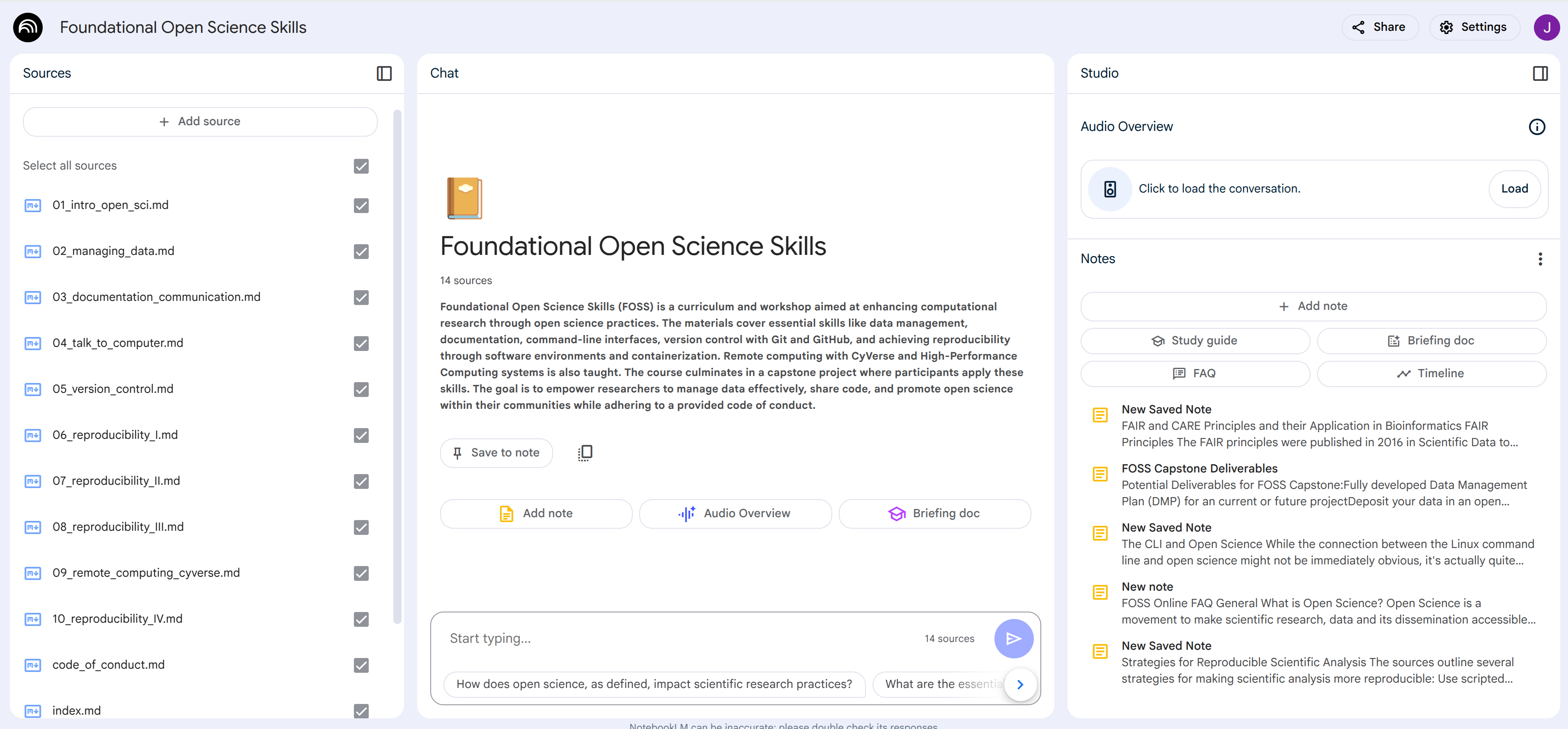{width=1100}
## Usage Ideas
**Research Uses:**
* **Literature Reviews:** Upload research papers, articles, and conference proceedings. NotebookLM can quickly identify key themes, summarize findings, and highlight gaps in the existing literature, significantly speeding up the literature review process.
* **Data Analysis:** Analyze qualitative data like interview transcripts or open-ended survey responses by identifying patterns, themes, and key quotes.
* **Hypothesis Generation:** Explore connections between different research sources and brainstorm new research questions or hypotheses based on synthesized knowledge.
* **Grant Proposal Writing:** Organize background research, synthesize relevant literature, and identify key arguments to strengthen grant proposals.
* **Staying Up-to-Date:** Researchers can continuously upload new publications in their field and use NotebookLM to stay informed about the latest advancements and emerging trends.
**Education/Teaching Uses:**
* Teachers can create a notebook that includes all the material for a given class (syllabus, schedule, lecture notes, textbook chapters, research articles)
* The teacher can share the notebook with all the students with read-only permission.
* Teachers can generate quizes on the notebook content.
* Students have an LLM chatbot restricted to just the course content where they can ask it any questions related to the class.
**General Productivity:**
* Use NotebookLM to help you customize your resume and cover letter for a specific job posting
* **Meeting Preparation:** Upload meeting agendas, pre-reads, and background documents. NotebookLM can summarize key discussion points, identify action items, and prepare you for productive meetings.
## NotebookLM Plus
Like most Google products, NotebookLM has a freemium model where the tool is available for free to anyone, but with limitations. Power users can get NotebookLM Plus for a subscription fee. Please check the technical documentation for how to get [NotebookLM Plus](https://support.google.com/notebooklm/answer/15678219).
------------------------------------------------------------------------------
# Ollama
URL: https://tyson-swetnam.github.io/intro-gpt/ollama/
Source: https://tyson-swetnam.github.io/intro-gpt/ollama.md
------------------------------------------------------------------------------
# Ollama
This work is licensed under a Creative Commons Attribution 4.0 International License.
## What is Ollama?
[Ollama](https://ollama.com/){target=_blank} is an open-source tool that makes it simple to run large language models (LLMs) locally on your own computer. Think of it as a "Docker for AI models" - it handles all the complexity of downloading, configuring, and running AI models so you can focus on using them.
**Why Run AI Models Locally?**
| Benefit | Description |
|---------|-------------|
| **Privacy** | Your data never leaves your computer - ideal for sensitive research, patient data, or proprietary information |
| **No API Costs** | After initial setup, unlimited usage with no per-token charges |
| **Offline Access** | Work without internet connectivity once models are downloaded |
| **Customization** | Fine-tune models, adjust parameters, and create custom configurations |
| **No Rate Limits** | Generate as much content as your hardware can handle |
| **Reproducibility** | Lock down specific model versions for reproducible research |
**When to Use Ollama vs. Cloud Services:**
- **Use Ollama** when: privacy is paramount, you have adequate hardware, you need offline access, or you want to experiment freely without cost concerns
- **Use Cloud Services** (ChatGPT, Claude, etc.) when: you need the most capable models, lack powerful hardware, or need multimodal capabilities like vision
!!! info "Hardware Requirements"
Running local models requires computational resources. As a general guideline:
- **Small models (1-3B parameters):** 8GB RAM minimum, runs on most modern laptops
- **Medium models (7-8B parameters):** 16GB RAM recommended, GPU acceleration helpful
- **Large models (13B+ parameters):** 32GB+ RAM or dedicated GPU with 8GB+ VRAM
Apple Silicon Macs (M1/M2/M3/M4) are particularly well-suited for local AI due to unified memory architecture.
## Installation
### macOS
**Option 1: Download the App (Recommended)**
1. Visit [ollama.com/download](https://ollama.com/download){target=_blank}
2. Download the macOS installer
3. Open the downloaded file and drag Ollama to your Applications folder
4. Launch Ollama from Applications - it will appear as a llama icon in your menu bar
5. The Ollama service now runs in the background
**Option 2: Homebrew**
```bash
brew install ollama
```
After installation, start the Ollama service:
```bash
ollama serve
```
### Linux
**One-Line Install Script:**
```bash
curl -fsSL https://ollama.com/install.sh | sh
```
This script:
- Detects your Linux distribution (Ubuntu, Debian, Fedora, CentOS, Arch, etc.)
- Installs Ollama to `/usr/local/bin`
- Sets up a systemd service for automatic startup
- Configures GPU support if NVIDIA drivers are detected
**Manual Installation (Alternative):**
```bash
# Download the binary
curl -L https://ollama.com/download/ollama-linux-amd64 -o ollama
# Make it executable
chmod +x ollama
# Move to system path
sudo mv ollama /usr/local/bin/
# Start the service
ollama serve
```
**Start Ollama on Boot:**
```bash
# Enable the systemd service
sudo systemctl enable ollama
# Start the service now
sudo systemctl start ollama
# Check service status
sudo systemctl status ollama
```
### Windows
**Option 1: Windows Installer (Recommended)**
1. Visit [ollama.com/download](https://ollama.com/download){target=_blank}
2. Download the Windows installer (`.exe`)
3. Run the installer and follow the prompts
4. Ollama will start automatically and appear in the system tray
**Option 2: Windows Subsystem for Linux (WSL)**
If you prefer a Linux-like environment on Windows:
```bash
# First, ensure WSL2 is installed and updated
wsl --install
# Then in your WSL terminal:
curl -fsSL https://ollama.com/install.sh | sh
```
### Docker
For containerized deployments or server environments:
```bash
# Pull and run the Ollama container
docker run -d -v ollama:/root/.ollama -p 11434:11434 --name ollama ollama/ollama
# With NVIDIA GPU support
docker run -d --gpus=all -v ollama:/root/.ollama -p 11434:11434 --name ollama ollama/ollama
```
### Verify Installation
After installation, verify Ollama is working:
```bash
# Check Ollama version
ollama --version
# List available models (will be empty initially)
ollama list
# Test the API endpoint
curl http://localhost:11434/api/tags
```
## Downloading and Managing Models
### The Model Library
Ollama maintains a curated library of optimized models at [ollama.com/library](https://ollama.com/library){target=_blank}. These models are:
- Pre-quantized for efficient memory usage
- Tested for compatibility with Ollama
- Available in multiple size variants
- Automatically configured for optimal performance
### Downloading Models
**Basic Download:**
```bash
# Download a model (happens automatically when you run it)
ollama pull llama
# Or run directly - it will download if not present
ollama run llama
```
**Specify Model Size/Variant:**
Models often come in multiple sizes. Use tags to select:
```bash
# Use `ollama search ` to discover available sizes/quantizations
# Llama variants - sizes typically range from ~1B to 70B+ parameters
ollama pull llama # Default (usually a balanced option)
# Qwen variants - available in many sizes (sub-1B up to 70B+)
ollama pull qwen # Default size
# DeepSeek R1 distilled reasoning models - available across multiple sizes
ollama pull deepseek-r1 # Default size
```
### Managing Downloaded Models
```bash
# List all downloaded models
ollama list
# Example output:
# NAME ID SIZE MODIFIED
# llama:latest a3e4c7e8d9f0 2.0 GB 2 hours ago
# qwen:latest b5f6c8d9e0a1 4.4 GB 1 day ago
# deepseek-r1:latest c7d8e9f0a1b2 4.9 GB 3 days ago
# Show detailed information about a model
ollama show llama
# Delete a model to free disk space
ollama rm llama
# Copy a model (useful for creating variants)
ollama cp llama my-llama
```
### Model Storage Location
Models are stored in:
- **macOS:** `~/.ollama/models`
- **Linux:** `~/.ollama/models` or `/usr/share/ollama/.ollama/models`
- **Windows:** `C:\Users\\.ollama\models`
To change the storage location, set the `OLLAMA_MODELS` environment variable:
```bash
# Linux/macOS
export OLLAMA_MODELS=/path/to/your/models
# Windows PowerShell
$env:OLLAMA_MODELS = "D:\ollama\models"
```
## Running Models
### Interactive Chat
The simplest way to use Ollama is through interactive chat:
```bash
ollama run llama
```
This opens an interactive session where you can type prompts and receive responses. Use `/bye` or Ctrl+C to exit.
**Chat Session Commands:**
| Command | Description |
|---------|-------------|
| `/bye` | Exit the chat session |
| `/clear` | Clear conversation history |
| `/set parameter value` | Change model parameters |
| `/show info` | Display model information |
| `/show license` | Show model license |
| `/load ` | Load a different model |
| `/save ` | Save current session |
### Single-Prompt Execution
For scripting and automation, pass the prompt directly:
```bash
# Single prompt with immediate response
ollama run llama "What is photosynthesis?"
# Pipe input from a file
cat essay.txt | ollama run llama "Summarize this text:"
# Save output to a file
ollama run llama "Write a haiku about machine learning" > haiku.txt
```
### Model Parameters
Adjust model behavior with parameters:
```bash
# In interactive mode
/set temperature 0.7
/set num_predict 500
# Or set when starting
ollama run llama --verbose
```
**Common Parameters:**
| Parameter | Description | Default | Range |
|-----------|-------------|---------|-------|
| `temperature` | Creativity/randomness | 0.8 | 0.0-2.0 |
| `top_p` | Nucleus sampling threshold | 0.9 | 0.0-1.0 |
| `top_k` | Limit vocabulary sampling | 40 | 1-100 |
| `num_predict` | Maximum tokens to generate | 128 | -1 (unlimited) to n |
| `num_ctx` | Context window size | 2048 | Model-dependent |
| `repeat_penalty` | Penalty for repetition | 1.1 | 0.0-2.0 |
| `seed` | Random seed for reproducibility | Random | Any integer |
### Multiline Input
For complex prompts, use multiline input:
```bash
ollama run llama """
You are an expert historian. Please analyze the following event
and provide context about its significance:
The signing of the Treaty of Westphalia in 1648.
Include:
1. Historical context
2. Key provisions
3. Long-term impact on international relations
"""
```
## Using the Ollama API
Ollama provides a REST API that enables integration with other applications. The API runs on `http://localhost:11434` by default.
### Generate Completions
**Basic Generation:**
```bash
curl http://localhost:11434/api/generate -d '{
"model": "llama",
"prompt": "Explain quantum computing in simple terms",
"stream": false
}'
```
**With Parameters:**
```bash
curl http://localhost:11434/api/generate -d '{
"model": "llama",
"prompt": "Write a creative story about a robot learning to paint",
"stream": false,
"options": {
"temperature": 0.9,
"num_predict": 500,
"top_p": 0.95
}
}'
```
### Chat API (Conversational)
For multi-turn conversations:
```bash
curl http://localhost:11434/api/chat -d '{
"model": "llama",
"messages": [
{"role": "system", "content": "You are a helpful research assistant."},
{"role": "user", "content": "What are the main causes of climate change?"},
{"role": "assistant", "content": "The main causes include greenhouse gas emissions..."},
{"role": "user", "content": "How can individuals help reduce these emissions?"}
],
"stream": false
}'
```
### Streaming Responses
For real-time output, enable streaming:
```bash
curl http://localhost:11434/api/generate -d '{
"model": "llama",
"prompt": "Write a detailed explanation of neural networks",
"stream": true
}'
```
Each response chunk is a JSON object. Parse them line by line for real-time display.
### API Endpoints Reference
| Endpoint | Method | Description |
|----------|--------|-------------|
| `/api/generate` | POST | Generate text completion |
| `/api/chat` | POST | Chat with conversation history |
| `/api/tags` | GET | List available models |
| `/api/show` | POST | Show model information |
| `/api/pull` | POST | Download a model |
| `/api/delete` | DELETE | Remove a model |
| `/api/copy` | POST | Copy a model |
| `/api/embeddings` | POST | Generate embeddings |
## Python Integration
### Using the Official Ollama Python Library
```bash
pip install ollama
```
**Basic Usage:**
```python
import ollama
# Simple generation
response = ollama.generate(
model='llama',
prompt='What is machine learning?'
)
print(response['response'])
```
**Chat Conversation:**
```python
import ollama
# Multi-turn chat
messages = [
{'role': 'system', 'content': 'You are a helpful coding assistant.'},
{'role': 'user', 'content': 'Write a Python function to calculate factorial'}
]
response = ollama.chat(
model='llama',
messages=messages
)
print(response['message']['content'])
```
**Streaming Responses:**
```python
import ollama
# Stream responses for better UX
stream = ollama.chat(
model='llama',
messages=[{'role': 'user', 'content': 'Explain the water cycle'}],
stream=True
)
for chunk in stream:
print(chunk['message']['content'], end='', flush=True)
```
**Generate Embeddings:**
```python
import ollama
# Generate embeddings for semantic search or RAG
embedding = ollama.embeddings(
model='nomic-embed-text', # or any embedding model
prompt='The quick brown fox jumps over the lazy dog'
)
print(f"Embedding dimension: {len(embedding['embedding'])}")
```
### Using with LangChain
[LangChain](https://langchain.com/){target=_blank} provides a powerful framework for building LLM applications:
```bash
pip install langchain langchain-ollama
```
```python
from langchain_ollama import OllamaLLM
# Initialize the model
llm = OllamaLLM(model="llama")
# Simple invocation
response = llm.invoke("What are the benefits of exercise?")
print(response)
```
**Chat Model with History:**
```python
from langchain_ollama import ChatOllama
from langchain_core.messages import HumanMessage, SystemMessage
chat = ChatOllama(model="llama", temperature=0.7)
messages = [
SystemMessage(content="You are a research assistant specializing in biology."),
HumanMessage(content="Explain CRISPR gene editing.")
]
response = chat.invoke(messages)
print(response.content)
```
**Building a Simple RAG System:**
```python
from langchain_ollama import OllamaLLM, OllamaEmbeddings
from langchain_community.vectorstores import Chroma
from langchain.text_splitter import RecursiveCharacterTextSplitter
from langchain_core.prompts import ChatPromptTemplate
from langchain_core.runnables import RunnablePassthrough
# Initialize components
llm = OllamaLLM(model="llama")
embeddings = OllamaEmbeddings(model="nomic-embed-text")
# Sample documents (in practice, load from files)
documents = [
"Machine learning is a subset of artificial intelligence...",
"Neural networks are inspired by biological neurons...",
"Deep learning uses multiple layers of neural networks..."
]
# Split documents
text_splitter = RecursiveCharacterTextSplitter(chunk_size=500, chunk_overlap=50)
splits = text_splitter.create_documents(documents)
# Create vector store
vectorstore = Chroma.from_documents(splits, embeddings)
retriever = vectorstore.as_retriever()
# Create RAG chain
template = """Answer based on the context:
Context: {context}
Question: {question}
Answer:"""
prompt = ChatPromptTemplate.from_template(template)
rag_chain = (
{"context": retriever, "question": RunnablePassthrough()}
| prompt
| llm
)
# Query
response = rag_chain.invoke("What is deep learning?")
print(response)
```
For more on RAG systems, see our [RAG documentation](rag.md).
### Using with Requests (Direct API)
For simple integrations without additional dependencies:
```python
import requests
import json
def query_ollama(prompt, model="llama", stream=False):
"""Simple function to query Ollama API."""
response = requests.post(
'http://localhost:11434/api/generate',
json={
'model': model,
'prompt': prompt,
'stream': stream
}
)
if stream:
# Handle streaming response
for line in response.iter_lines():
if line:
chunk = json.loads(line)
yield chunk.get('response', '')
else:
return response.json()['response']
# Usage
result = query_ollama("What is the capital of France?")
print(result)
# Streaming usage
for chunk in query_ollama("Tell me a story", stream=True):
print(chunk, end='', flush=True)
```
## Jupyter Notebook Integration
Ollama integrates seamlessly with Jupyter notebooks for interactive research:
### Basic Notebook Usage
```python
# Cell 1: Install and import
!pip install ollama
import ollama
# Cell 2: List available models
models = ollama.list()
for model in models['models']:
print(f"{model['name']}: {model['size'] / 1e9:.1f} GB")
# Cell 3: Interactive chat
response = ollama.generate(
model='llama',
prompt='Explain the difference between correlation and causation'
)
print(response['response'])
```
### Building a Research Assistant
```python
import ollama
class ResearchAssistant:
"""A simple research assistant using Ollama."""
def __init__(self, model='llama'):
self.model = model
self.conversation = []
def set_context(self, context):
"""Set the research context/system prompt."""
self.conversation = [{
'role': 'system',
'content': context
}]
def ask(self, question):
"""Ask a question and get a response."""
self.conversation.append({
'role': 'user',
'content': question
})
response = ollama.chat(
model=self.model,
messages=self.conversation
)
assistant_message = response['message']['content']
self.conversation.append({
'role': 'assistant',
'content': assistant_message
})
return assistant_message
def summarize_paper(self, abstract):
"""Summarize a research paper abstract."""
prompt = f"""Please analyze this research abstract and provide:
1. Main research question
2. Methodology used
3. Key findings
4. Potential implications
Abstract:
{abstract}"""
return self.ask(prompt)
# Usage in notebook
assistant = ResearchAssistant(model='llama')
assistant.set_context("You are an expert in computational biology.")
response = assistant.ask("What are the latest advances in protein folding prediction?")
print(response)
```
For more on Jupyter AI integration, see our [Jupyter AI documentation](jupyter.md).
## Creating Custom Models with Modelfiles
Modelfiles allow you to create customized versions of models with specific behaviors, system prompts, or parameters.
### Basic Modelfile Structure
Create a file called `Modelfile` (no extension):
```dockerfile
# Base model to customize
FROM llama
# Set model parameters
PARAMETER temperature 0.7
PARAMETER num_ctx 4096
PARAMETER top_p 0.9
# Set the system prompt
SYSTEM """You are a helpful research assistant specializing in academic writing.
You help researchers improve their papers by:
- Suggesting clearer phrasing
- Identifying logical gaps
- Recommending relevant citations
- Improving overall structure
Always be constructive and specific in your feedback."""
# Optional: Add custom template
TEMPLATE """{{ if .System }}<|system|>
{{ .System }}<|end|>
{{ end }}{{ if .Prompt }}<|user|>
{{ .Prompt }}<|end|>
{{ end }}<|assistant|>
{{ .Response }}<|end|>
"""
```
### Create and Use the Custom Model
```bash
# Create the custom model
ollama create research-assistant -f Modelfile
# Run your custom model
ollama run research-assistant
```
### Modelfile Commands Reference
| Command | Description | Example |
|---------|-------------|---------|
| `FROM` | Base model (required) | `FROM llama` |
| `PARAMETER` | Set model parameters | `PARAMETER temperature 0.7` |
| `SYSTEM` | Set system prompt | `SYSTEM "You are helpful..."` |
| `TEMPLATE` | Custom prompt template | `TEMPLATE "..."` |
| `ADAPTER` | Apply LoRA adapter | `ADAPTER ./lora.gguf` |
| `LICENSE` | Specify license | `LICENSE "MIT"` |
| `MESSAGE` | Add example messages | `MESSAGE user "Hello"` |
### Example: Academic Discipline-Specific Assistants
**Biology Research Assistant:**
```dockerfile
FROM llama
PARAMETER temperature 0.3
PARAMETER num_ctx 8192
SYSTEM """You are an expert biology research assistant with deep knowledge of:
- Molecular biology and genetics
- Cell biology and biochemistry
- Evolutionary biology
- Ecology and environmental science
When answering questions:
1. Use precise scientific terminology
2. Cite relevant concepts and theories
3. Distinguish between established facts and current hypotheses
4. Suggest relevant experimental approaches when applicable"""
```
**Statistics Tutor:**
```dockerfile
FROM qwen
PARAMETER temperature 0.2
PARAMETER num_ctx 4096
SYSTEM """You are a patient statistics tutor helping graduate students understand
statistical concepts. When explaining:
1. Start with intuitive explanations before formal definitions
2. Use concrete examples from research contexts
3. Show step-by-step calculations when relevant
4. Explain assumptions and when methods are appropriate
5. Suggest R or Python code for implementation
Always check for understanding and offer to clarify further."""
```
**Code Review Assistant:**
```dockerfile
FROM deepseek-r1
PARAMETER temperature 0.1
PARAMETER num_ctx 8192
SYSTEM """You are a senior software engineer conducting code reviews.
For each piece of code you review:
1. Identify potential bugs or errors
2. Suggest performance improvements
3. Recommend better naming or structure
4. Check for security vulnerabilities
5. Ensure code follows best practices
Be constructive and explain the reasoning behind each suggestion."""
```
## GPU Configuration and Performance
### Automatic GPU Detection
Ollama automatically detects and uses available GPUs. Check your GPU status:
```bash
ollama run llama --verbose
# Look for "gpu" in the output
```
### NVIDIA GPU Setup (Linux)
Ensure you have the NVIDIA drivers and CUDA toolkit:
```bash
# Check NVIDIA driver
nvidia-smi
# The Ollama install script usually handles CUDA setup
# If needed, install CUDA toolkit:
# sudo apt install nvidia-cuda-toolkit
```
### Apple Silicon Optimization
Apple M1/M2/M3/M4 Macs use Metal for GPU acceleration automatically. Ollama is highly optimized for Apple Silicon:
```bash
# Check Metal usage (models should show "metal" backend)
ollama run llama --verbose
```
### Memory Management
**Control GPU Memory Usage:**
```bash
# Set maximum VRAM usage (in MB)
OLLAMA_GPU_MEMORY=8192 ollama serve
# Or in environment
export OLLAMA_GPU_MEMORY=8192
```
**CPU-Only Mode:**
```bash
# Disable GPU acceleration
CUDA_VISIBLE_DEVICES="" ollama serve
```
### Performance Tuning Parameters
| Environment Variable | Description | Example |
|---------------------|-------------|---------|
| `OLLAMA_NUM_PARALLEL` | Number of parallel requests | `4` |
| `OLLAMA_MAX_LOADED_MODELS` | Models to keep in memory | `2` |
| `OLLAMA_GPU_MEMORY` | Max GPU memory (MB) | `8192` |
| `OLLAMA_HOST` | API bind address | `0.0.0.0:11434` |
| `OLLAMA_KEEP_ALIVE` | Model unload timeout | `5m` |
### Monitoring Performance
```bash
# Watch GPU memory usage (NVIDIA)
watch -n 1 nvidia-smi
# Monitor Ollama logs
journalctl -u ollama -f # Linux with systemd
```
## Model Recommendations
### By Hardware Capability
=== "Laptop (8GB RAM)"
Look for the smallest variants (roughly 1-2B parameters) of these families. Use `ollama search ` to pick a specific size/quant.
| Family | Best For |
|--------|----------|
| `llama` | Quick responses, basic tasks |
| `qwen` | Multilingual, reasoning |
| `phi` | Coding, analysis |
| `deepseek-r1` | Reasoning tasks |
=== "Workstation (16-32GB RAM)"
Mid-size variants (roughly 3-13B parameters) of these families typically fit comfortably. Use `ollama search ` to pick a specific size/quant.
| Family | Best For |
|--------|----------|
| `llama` | Balanced performance |
| `qwen` | Strong reasoning, coding |
| `mistral` | General purpose |
| `deepseek-r1` | Advanced reasoning |
| `codellama` | Specialized coding |
=== "GPU Server (24GB+ VRAM)"
Larger variants (30B and up, including mixture-of-experts) of these families become practical. Use `ollama search ` to pick a specific size/quant.
| Family | Best For |
|--------|----------|
| `llama` | Near-frontier capability |
| `qwen` | Strong all-around |
| `deepseek-r1` | Best open reasoning |
| `mixtral` | Mixture of experts |
### By Use Case
**Academic Writing and Research:**
```bash
# Use `ollama search ` to pick a specific size/quant
# For writing assistance and analysis
ollama pull qwen
# For reasoning-heavy tasks
ollama pull deepseek-r1
```
**Coding and Development:**
```bash
# Use `ollama search ` to pick a specific size/quant
# General coding
ollama pull deepseek-coder
# Code review and debugging
ollama pull codellama
# Fast completions
ollama pull starcoder2
```
**Data Analysis:**
```bash
# Use `ollama search ` to pick a specific size/quant
# Statistical reasoning
ollama pull qwen
# Code generation for analysis
ollama pull deepseek-coder
```
**Teaching and Tutoring:**
```bash
# Use `ollama search ` to pick a specific size/quant
# Patient explanations
ollama pull llama
# Math and science tutoring
ollama pull qwen
```
**Embeddings and RAG:**
```bash
# Text embeddings
ollama pull nomic-embed-text
# Multilingual embeddings
ollama pull mxbai-embed-large
```
## Integration with Other Tools
### Open WebUI
[Open WebUI](https://github.com/open-webui/open-webui){target=_blank} provides a ChatGPT-like interface for Ollama:
```bash
# Run with Docker
docker run -d -p 3000:8080 \
--add-host=host.docker.internal:host-gateway \
-v open-webui:/app/backend/data \
--name open-webui \
ghcr.io/open-webui/open-webui:main
```
Access at `http://localhost:3000`. Open WebUI automatically detects your Ollama installation.
### VS Code Integration
Install the [Continue](https://continue.dev/){target=_blank} extension for AI-assisted coding with Ollama:
1. Install the Continue extension from VS Code marketplace
2. Configure to use Ollama in settings:
```json
{
"models": [
{
"title": "Ollama",
"provider": "ollama",
"model": "deepseek-coder"
}
]
}
```
### Obsidian Integration
Use the [Ollama plugin for Obsidian](https://github.com/hinterdupfinger/obsidian-ollama){target=_blank} for note-taking with AI assistance.
### API-Compatible Services
Ollama's API is compatible with the OpenAI API format. Many tools that support OpenAI can work with Ollama:
```python
# Using OpenAI library with Ollama
from openai import OpenAI
client = OpenAI(
base_url='http://localhost:11434/v1',
api_key='ollama' # Ollama doesn't require a key, but the library needs something
)
response = client.chat.completions.create(
model='llama',
messages=[
{'role': 'user', 'content': 'Hello!'}
]
)
print(response.choices[0].message.content)
```
## Troubleshooting
### Common Issues and Solutions
??? failure "Model fails to load - Out of Memory"
**Symptoms:** Error messages about memory allocation, system becomes unresponsive
**Solutions:**
1. Try a smaller model variant (use `ollama search ` to see sizes):
```bash
# Instead of a mid/large variant
ollama run llama
# Try a small variant (e.g. ~1B parameters)
ollama run llama:1b
```
2. Close other memory-intensive applications
3. Reduce context window:
```bash
ollama run llama --num-ctx 2048
```
4. Use quantized versions (look for `q4_0` or `q4_K_M` tags)
??? failure "Ollama service not running"
**Symptoms:** Connection refused errors, `curl: (7) Failed to connect`
**Solutions:**
1. Start the service:
```bash
# macOS/Windows: Launch the Ollama app
# Linux:
ollama serve
# Or with systemd:
sudo systemctl start ollama
```
2. Check if another process is using port 11434:
```bash
lsof -i :11434
```
3. Use a different port:
```bash
OLLAMA_HOST=127.0.0.1:11435 ollama serve
```
??? failure "Slow generation speed"
**Symptoms:** Model runs much slower than expected
**Solutions:**
1. Verify GPU is being used:
```bash
ollama run llama --verbose
# Look for "gpu" or "metal" in output
```
2. Check GPU drivers are up to date
3. Ensure sufficient VRAM:
```bash
nvidia-smi # For NVIDIA GPUs
```
4. Try a smaller model or quantization
??? failure "Model gives poor quality responses"
**Symptoms:** Responses are incoherent, repetitive, or off-topic
**Solutions:**
1. Adjust temperature:
```bash
/set temperature 0.7
```
2. Increase context window for complex tasks:
```bash
/set num_ctx 4096
```
3. Try a larger model variant
4. Be more specific in your prompts
??? failure "Cannot connect from other devices"
**Symptoms:** API works on localhost but not from other machines
**Solutions:**
1. Bind to all interfaces:
```bash
OLLAMA_HOST=0.0.0.0:11434 ollama serve
```
2. Check firewall settings:
```bash
# Linux
sudo ufw allow 11434
```
3. Verify network connectivity
### Getting Help
- **Official Documentation:** [github.com/ollama/ollama](https://github.com/ollama/ollama){target=_blank}
- **Discord Community:** [discord.gg/ollama](https://discord.gg/ollama){target=_blank}
- **GitHub Issues:** [github.com/ollama/ollama/issues](https://github.com/ollama/ollama/issues){target=_blank}
## Academic Use Cases
### Literature Review Assistance
```python
import ollama
def analyze_abstract(abstract):
"""Analyze a research paper abstract."""
prompt = f"""Analyze this research abstract and provide:
1. Research question or hypothesis
2. Methodology
3. Key findings
4. Limitations mentioned
5. Potential follow-up questions
Abstract:
{abstract}
"""
response = ollama.generate(model='qwen', prompt=prompt)
return response['response']
# Example usage
abstract = """
We present a novel approach to protein structure prediction using
graph neural networks. Our method achieves state-of-the-art results
on the CASP14 benchmark, outperforming existing methods by 15% in
GDT-TS score. We demonstrate that incorporating evolutionary
information through multiple sequence alignments significantly
improves prediction accuracy.
"""
analysis = analyze_abstract(abstract)
print(analysis)
```
### Grant Writing Support
```python
import ollama
def improve_grant_section(text, section_type):
"""Suggest improvements for grant application sections."""
prompt = f"""You are an experienced grant reviewer. Review this {section_type}
section and provide specific suggestions to strengthen it:
{text}
Please provide:
1. Strengths of the current text
2. Areas that need improvement
3. Specific rewrite suggestions
4. Questions a reviewer might ask"""
response = ollama.generate(model='qwen', prompt=prompt)
return response['response']
```
### Teaching Assistant
```python
import ollama
def create_quiz_questions(topic, difficulty, num_questions):
"""Generate quiz questions on a topic."""
prompt = f"""Create {num_questions} {difficulty}-level multiple choice questions
about {topic}. For each question:
1. Provide the question
2. Give 4 options (A, B, C, D)
3. Indicate the correct answer
4. Explain why the correct answer is right
Format clearly with separators between questions."""
response = ollama.generate(model='llama', prompt=prompt)
return response['response']
# Generate quiz
quiz = create_quiz_questions(
topic="the scientific method",
difficulty="intermediate",
num_questions=5
)
print(quiz)
```
### Data Analysis Helper
```python
import ollama
def suggest_analysis(data_description):
"""Suggest statistical analyses for a dataset."""
prompt = f"""Based on this data description, suggest appropriate statistical
analyses and explain the rationale:
{data_description}
Please provide:
1. Recommended statistical tests/methods
2. Assumptions to check
3. Python/R code snippets for implementation
4. How to interpret potential results"""
response = ollama.generate(model='qwen', prompt=prompt)
return response['response']
```
## Further Resources
- **Ollama Website:** [ollama.com](https://ollama.com/){target=_blank}
- **Model Library:** [ollama.com/library](https://ollama.com/library){target=_blank}
- **GitHub Repository:** [github.com/ollama/ollama](https://github.com/ollama/ollama){target=_blank}
- **API Documentation:** [github.com/ollama/ollama/blob/main/docs/api.md](https://github.com/ollama/ollama/blob/main/docs/api.md){target=_blank}
- **Discord Community:** [discord.gg/ollama](https://discord.gg/ollama){target=_blank}
## Related Workshop Materials
- **[Hugging Face](huggingface.md):** Find and download models for use with Ollama
- **[Gradio](gradio.md):** Build web interfaces for your Ollama-powered applications
- **[RAG](rag.md):** Implement retrieval-augmented generation with local models
- **[Jupyter AI](jupyter.md):** Integrate AI assistance into your research notebooks
- **[Agentic AI](agentic.md):** Build autonomous AI agents with local models
- **[MCP](mcp.md):** Connect Ollama to external tools and data sources
!!! tip "Getting Started Recommendation"
If you're new to running local AI models, start with these steps:
1. Install Ollama using the method for your operating system
2. Download a small model: `ollama pull llama` (use `ollama search llama` to pick a small variant, e.g. ~3B parameters)
3. Try interactive chat: `ollama run llama`
4. Experiment with the Python library for programmatic access
5. Create a custom Modelfile for your specific use case
Once comfortable, explore larger models and integrations with tools like Open WebUI or LangChain.
------------------------------------------------------------------------------
# Retrieval Augmented Generation (RAG)
URL: https://tyson-swetnam.github.io/intro-gpt/rag/
Source: https://tyson-swetnam.github.io/intro-gpt/rag.md
------------------------------------------------------------------------------
# Retrieval Augmented Generation (RAG)
This work is licensed under a Creative Commons Attribution 4.0 International License.
## What is RAG?
**Retrieval-Augmented Generation (RAG)** is a technique that enhances AI language models by giving them access to external knowledge sources. Instead of relying solely on what a model learned during training, RAG allows AI to retrieve relevant information from your own documents, databases, or knowledge bases and use that information to generate more accurate, up-to-date, and contextually relevant responses.
!!! info "Why RAG Matters"
Large language models (LLMs) have a knowledge cutoff date and can sometimes generate plausible-sounding but incorrect information ("hallucinations"). RAG addresses these limitations by:
- **Grounding responses** in your actual documents and data
- **Providing citations** so you can verify information
- **Keeping knowledge current** without retraining the model
- **Maintaining privacy** by keeping sensitive data in your own systems
### RAG vs. Traditional AI Chat
| Aspect | Traditional LLM | RAG-Enhanced LLM |
|--------|----------------|------------------|
| Knowledge source | Training data only (static) | Training data + your documents (dynamic) |
| Currency | Limited to training cutoff | Can access current information |
| Accuracy | May hallucinate facts | Grounded in retrieved sources |
| Citations | Usually none | Can cite specific sources |
| Customization | Generic responses | Tailored to your domain |
| Privacy | Data may be used for training | Your data stays private |
### Real-World Examples of RAG
You may already be using RAG without realizing it:
- **[NotebookLM](notebooklm.md)**: Google's research tool uses RAG to answer questions based only on your uploaded sources
- **ChatGPT with file uploads**: When you upload PDFs, ChatGPT retrieves relevant sections to answer your questions
- **Claude Projects**: Custom knowledge bases that Claude references during conversations
- **[OpenWebUI](https://openwebui.com){target=_blank}**: Self-hosted interface with Knowledge collections for local, private RAG
- **Enterprise search tools**: Company wikis and knowledge bases that use AI to find and synthesize information
- **Legal research platforms**: AI tools that search case law and statutes to answer legal questions
## How RAG Works
RAG operates through a pipeline that connects your documents to the AI model. Understanding this pipeline helps you use RAG tools more effectively and troubleshoot when responses aren't what you expect.
### The RAG Pipeline
```mermaid
flowchart LR
A[Your Documents] --> B[Chunking]
B --> C[Embedding]
C --> D[(Vector Database)]
E[User Query] --> F[Query Embedding]
F --> G[Similarity Search]
D --> G
G --> H[Retrieved Context]
H --> I[LLM Generation]
E --> I
I --> J[Response with Citations]
style A fill:#e1f5ff
style D fill:#fff3e0
style J fill:#c8e6c9
```
**Step-by-step explanation:**
1. **Document Ingestion**: Your documents (PDFs, web pages, databases) are loaded into the system
2. **Chunking**: Documents are split into smaller, manageable pieces (chunks)
3. **Embedding**: Each chunk is converted into a numerical representation (vector) that captures its meaning
4. **Storage**: Vectors are stored in a specialized database optimized for similarity search
5. **Query Processing**: When you ask a question, your query is also converted to a vector
6. **Retrieval**: The system finds chunks whose vectors are most similar to your query
7. **Generation**: The LLM generates a response using both your question and the retrieved context
8. **Citation**: The response includes references to the source documents
### Embeddings
Text passages (or other data, like images) are transformed into numerical representations known as "embeddings." These embeddings capture semantic meaning, so similar concepts end up being close together in vector space.
??? Info "Understanding Embeddings"
[What are Embeddings? - Vicki Boykis](https://vickiboykis.com/what_are_embeddings/){target=_blank} - [download PDF :fontawesome-regular-file-pdf:](https://raw.githubusercontent.com/veekaybee/what_are_embeddings/main/embeddings.pdf)
Embeddings are a way to represent data (words, images, etc.) as numerical vectors in a multi-dimensional space. These vectors capture semantic relationships between data points, meaning similar items are located closer together in the embedding space.
Embedded space for geospatial applications:
Visualizing how embeddings can organize satellite imagery. Millions of points covering the state of Alabama move between their geographic position and their location in the embedding space. pic.twitter.com/Z6FtoMQ84B
Embedded space for natural language:
[Credit: Stephen Wolfram](https://writings.stephenwolfram.com/2023/02/what-is-chatgpt-doing-and-why-does-it-work/){target=_blank}
[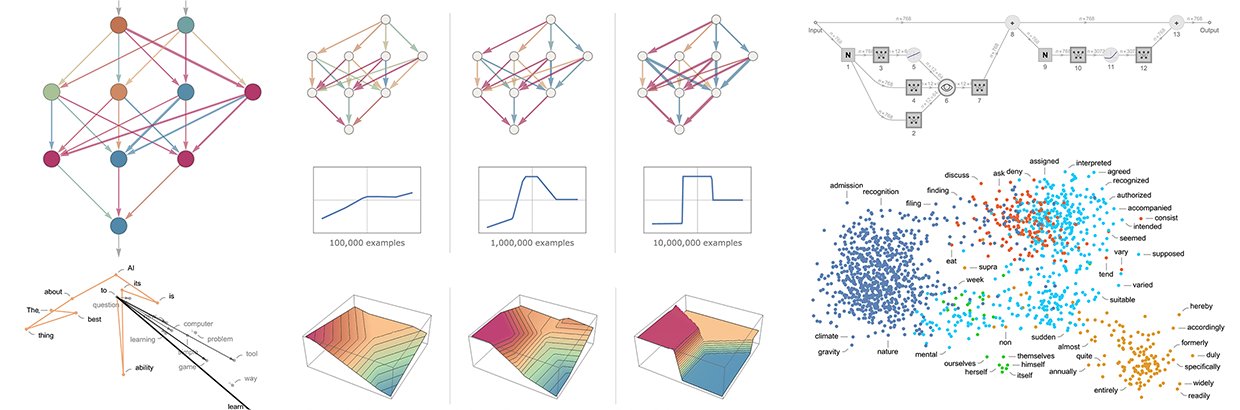](https://writings.stephenwolfram.com/2023/02/what-is-chatgpt-doing-and-why-does-it-work/)
**Why are Embeddings Important?**
* **Semantic Search:** Embeddings enable semantic search, where you can find information based on meaning rather than just keyword matching. "Car" and "automobile" will be close together even though they share no letters.
* **Machine Learning:** Embeddings are essential for training machine learning models, as they provide a way to represent complex data in a format that algorithms can understand.
* **Recommendation Systems:** Embeddings help power recommendation systems by identifying items with similar characteristics.
* **Data Visualization:** Embeddings can be used to visualize relationships between data points in a lower-dimensional space.
### Vector Databases
A vector database stores embeddings efficiently, using specialized data structures to handle large-scale, high-dimensional searches. Unlike traditional databases that match exact values, vector databases find the most semantically similar items to your query.
**Table: Popular RAG Vector Database Software**
| Platform | Type | Best For | Documentation |
|----------|------|----------|---------------|
| [Pinecone](https://www.pinecone.io/){target=_blank} | Managed (Serverless) | Production RAG apps with minimal DevOps; teams wanting fully managed infrastructure | [Pinecone Docs](https://docs.pinecone.io/){target=_blank} |
| [Weaviate](https://weaviate.io/){target=_blank} | Open Source / Managed | Hybrid search (vector + keyword); multimodal data (text, images) | [Weaviate Docs](https://weaviate.io/developers/weaviate){target=_blank} |
| [Qdrant](https://qdrant.tech/){target=_blank} | Open Source / Managed | Cost-sensitive workloads; edge deployments; powerful filtering | [Qdrant Docs](https://qdrant.tech/documentation/){target=_blank} |
| [Milvus](https://milvus.io/){target=_blank} / [Zilliz](https://zilliz.com/){target=_blank} | Open Source / Managed | Billion-scale vector search; enterprise teams with data engineering resources | [Milvus Docs](https://milvus.io/docs){target=_blank} |
| [Chroma](https://www.trychroma.com/){target=_blank} | Open Source | Prototyping and development; small to medium applications; easy local setup | [Chroma Docs](https://docs.trychroma.com/){target=_blank} |
??? tip "Choosing a Vector Database"
- **Pinecone**: Best if you want a fully managed, serverless solution with minimal operational overhead. Query times often under 50ms.
- **Weaviate**: Ideal for hybrid search combining vector similarity with keyword matching and metadata filtering in a single query.
- **Qdrant**: Great balance of performance and cost; compact footprint makes it suitable for resource-constrained environments.
- **Milvus/Zilliz**: Choose when you need industrial-scale deployments with billions of vectors and have infrastructure expertise.
- **Chroma**: Perfect for getting started quickly, prototyping RAG applications, and learning vector database concepts.
## Using RAG Without Code
You do not need to be a programmer to benefit from RAG. Several platforms provide RAG capabilities through user-friendly interfaces.
### Consumer-Friendly RAG Tools
| Tool | How to Access RAG | Best For |
|------|------------------|----------|
| **[NotebookLM](notebooklm.md)** | Upload sources to a notebook | Research, literature reviews, studying |
| **ChatGPT Plus** | Upload files or enable "Browse" | General document Q&A |
| **Claude Pro** | Create a Project with files | Long-form document analysis |
| **Gemini Advanced** | Upload files or connect Google Drive | Google Workspace integration |
| **Microsoft Copilot** | Access via Microsoft 365 | Enterprise documents |
| **[OpenWebUI](https://openwebui.com){target=_blank}** | Create Knowledge collections or upload files | Privacy-sensitive data, local/offline use |
!!! example "Try It: RAG with NotebookLM"
1. Go to [NotebookLM](https://notebooklm.google/){target=_blank}
2. Create a new notebook
3. Upload 2-3 research papers on a topic you are studying
4. Ask questions like:
- "What are the main findings across these papers?"
- "Where do these authors disagree?"
- "Summarize the methodology used in each study"
5. Notice how responses include citations to specific sources
### RAG with OpenWebUI
[OpenWebUI](https://openwebui.com){target=_blank} is an open-source, self-hosted web interface for running AI models locally. It provides built-in RAG capabilities that allow you to chat with your own documents while keeping all data on your own computer or server---ideal for sensitive research data or when you want complete control over your AI infrastructure.
??? info "What is OpenWebUI?"
OpenWebUI is a user-friendly web interface that works with local language models (via [Ollama](https://ollama.com){target=_blank}) and cloud APIs (OpenAI, Anthropic, etc.). Key features include:
- **Privacy-first**: All processing happens locally; your documents never leave your machine
- **Model flexibility**: Use any Ollama model (Llama, Mistral, Phi, etc.) or connect to cloud APIs
- **No subscription fees**: Free and open-source (though you need hardware to run local models)
- **Institutional deployment**: Many universities run OpenWebUI instances for researchers
If your institution provides an OpenWebUI instance, you may already have access. Check with your IT department or research computing group.
#### How RAG Works in OpenWebUI
OpenWebUI offers two complementary ways to use RAG:
1. **Quick Document Chat**: Upload files directly in a conversation using the `+` button or drag-and-drop
2. **Knowledge Collections**: Create reusable document libraries that persist across conversations
```mermaid
flowchart LR
A[Your Documents] --> B{Upload Method}
B -->|Single Chat| C[Direct Upload]
B -->|Persistent| D[Knowledge Collection]
C --> E[# Reference in Chat]
D --> E
E --> F[RAG-Enhanced Response]
style A fill:#e1f5ff
style D fill:#fff3e0
style F fill:#c8e6c9
```
#### Step-by-Step: Creating a Knowledge Collection
Knowledge collections are the recommended approach for documents you will reference repeatedly, such as course materials, research literature, or project documentation.
**Step 1: Access the Knowledge Section**
1. Log into your OpenWebUI instance
2. Navigate to **Workspace** in the left sidebar
3. Select **Knowledge**
**Step 2: Create a New Knowledge Base**
1. Click **+ Create Knowledge** (or the `+` button)
2. Configure your knowledge base:
- **Name**: Give it a descriptive name (e.g., "Climate Policy Papers 2024")
- **Description**: Briefly describe the contents
- **Access**: Choose **Private** for personal use or **Public** to share with others on your instance
3. Click **Create**
**Step 3: Add Documents**
1. Open your newly created knowledge base
2. Add documents by:
- **Drag and drop** files directly into the window
- Click **Add Content** and select files from your computer
- Paste a **URL** to import web content
3. Supported formats include: PDF, TXT, Markdown, DOCX, CSV, and more
4. Wait for processing to complete (you will see a progress indicator)
**Step 4: Use Your Knowledge in Conversations**
1. Start a new chat
2. Type `#` to see available knowledge collections
3. Select your knowledge base from the dropdown
4. Ask questions---OpenWebUI will retrieve relevant context from your documents
!!! example "Try It: Chat with Research Papers"
1. Create a knowledge collection called "Literature Review"
2. Upload 3-5 PDF papers related to your research
3. In a new chat, type `#` and select your "Literature Review" collection
4. Try these queries:
- "What methodologies are used across these papers?"
- "Summarize the key findings from each study"
- "What gaps in the literature do these authors identify?"
5. Notice how responses include citations showing which document provided each piece of information
#### Quick Document Upload (Per-Conversation)
For one-time document queries, you can upload files directly into a conversation:
1. Click the **+** button in the chat input area
2. Select **Upload Files** (or drag files directly into the chat)
3. Choose your document(s)
4. Once processed, reference them with `#` followed by the filename
5. Ask your questions
!!! tip "Quick Upload vs. Knowledge Collections"
| Use Case | Recommended Method |
|----------|-------------------|
| One-time document analysis | Quick upload in chat |
| Recurring reference materials | Knowledge collection |
| Course readings for a semester | Knowledge collection |
| Reviewing a paper before a meeting | Quick upload in chat |
| Lab protocols and documentation | Knowledge collection |
#### Web Content in RAG
OpenWebUI can also retrieve content from web pages:
1. In the chat input, type `#` followed by a URL
2. Example: `#https://www.nature.com/articles/s41586-024-00001-1`
3. OpenWebUI will fetch, parse, and index the page content
!!! warning "Web Retrieval Tips"
- Link to **reader-friendly** or **raw text** versions when available (web pages often contain navigation menus, footers, and ads that add noise)
- Some sites block automated fetching---if retrieval fails, download the content and upload it instead
- For academic papers, downloading the PDF typically yields better results than fetching the publisher's web page
#### OpenWebUI RAG Best Practices
**Document Preparation**
- Use **text-based PDFs** whenever possible (not scanned images)
- **Descriptive filenames** help you identify documents when using `#` references
- For long documents, consider whether the entire document is relevant or if excerpts would be better
- **Markdown files** often index more cleanly than complex PDFs
**Chunking Configuration** (Administrators)
If you manage an OpenWebUI instance, you can tune RAG performance in **Admin Panel > Settings > Documents**:
- **Chunk Size**: Larger chunks preserve more context but may dilute relevance
- **Chunk Overlap**: Higher overlap prevents important information from being split across chunks
- **Markdown Header Splitting**: Enable this for structured documents to keep sections together
**Query Strategies**
- Be specific: "What does Section 3.2 say about sampling methods?" works better than "Tell me about methods"
- Ask for citations: "Include the source for each claim"
- For complex questions, break them into parts and ask sequentially
- If results seem incomplete, try rephrasing---different wording retrieves different chunks
#### Comparison: OpenWebUI vs. Other RAG Tools
| Feature | OpenWebUI | NotebookLM | ChatGPT (Plus) | Claude Projects |
|---------|-----------|------------|----------------|-----------------|
| **Cost** | Free (self-hosted) | Free | $20/month | $20/month |
| **Data Privacy** | Full local control | Google servers | OpenAI servers | Anthropic servers |
| **Model Choice** | Any Ollama/API model | Gemini only | OpenAI models only | Claude only |
| **Setup Complexity** | Requires installation | None | None | None |
| **Persistent Collections** | Yes | Yes (Notebooks) | Limited | Yes (Projects) |
| **Offline Use** | Yes (local models) | No | No | No |
| **Best For** | Privacy-sensitive data, technical users | Research, studying | General use | Long documents |
### OpenAI's Vector Store and File Search
[OpenAI Platform](https://platform.openai.com/docs/overview){target=_blank} allows developers and advanced users to upload data to a [vector store](https://platform.openai.com/docs/api-reference/vector-stores){target=_blank} and enable [file search](https://platform.openai.com/docs/assistants/tools/file-search){target=_blank} in custom assistants. This provides more control over the RAG process compared to simple file uploads.
## Building RAG Applications
For researchers and developers who want more control, building custom RAG applications enables:
- Processing large document collections
- Customizing retrieval strategies
- Integrating with existing systems
- Maintaining full data privacy
### RAG Frameworks
Several frameworks simplify building RAG applications:
| Framework | Language | Description |
|-----------|----------|-------------|
| [LangChain](https://python.langchain.com/){target=_blank} | Python, JavaScript | Most popular RAG framework with extensive integrations |
| [LlamaIndex](https://www.llamaindex.ai/){target=_blank} | Python | Specialized for connecting LLMs with data sources |
| [Haystack](https://haystack.deepset.ai/){target=_blank} | Python | Production-ready NLP framework with RAG support |
| [Semantic Kernel](https://learn.microsoft.com/semantic-kernel/){target=_blank} | Python, C#, Java | Microsoft's SDK for AI orchestration |
??? example "Simple RAG with LangChain (Python)"
This example demonstrates the core RAG workflow using LangChain:
```python
from langchain_community.document_loaders import PyPDFLoader
from langchain.text_splitter import RecursiveCharacterTextSplitter
from langchain_openai import OpenAIEmbeddings, ChatOpenAI
from langchain_community.vectorstores import Chroma
from langchain.chains import RetrievalQA
# 1. Load your documents
loader = PyPDFLoader("research_paper.pdf")
documents = loader.load()
# 2. Split into chunks
text_splitter = RecursiveCharacterTextSplitter(
chunk_size=1000,
chunk_overlap=200
)
chunks = text_splitter.split_documents(documents)
# 3. Create embeddings and store in vector database
embeddings = OpenAIEmbeddings()
vectorstore = Chroma.from_documents(chunks, embeddings)
# 4. Create a retrieval chain
llm = ChatOpenAI(model="") # see https://platform.openai.com/docs/models
qa_chain = RetrievalQA.from_chain_type(
llm=llm,
chain_type="stuff",
retriever=vectorstore.as_retriever()
)
# 5. Ask questions
response = qa_chain.invoke("What are the main findings?")
print(response)
```
**Note**: This requires API keys and Python packages. See [AI Sandboxes](ai_sandboxes.md) for environment setup.
## RAG for Academic Research
RAG is particularly valuable for academic work where accuracy, citations, and working with large document collections are essential.
### Use Cases in Research
**Literature Reviews**
- Upload dozens or hundreds of papers to a RAG system
- Ask synthesis questions: "How has methodology evolved in this field?"
- Identify gaps: "What aspects of this topic are under-researched?"
- Find contradictions: "Where do researchers disagree?"
**Grant Writing**
- Create a knowledge base of successful grant proposals
- Query for specific section examples: "Show me aims page structures"
- Synthesize background literature for significance sections
**Data Analysis Support**
- Upload codebooks, documentation, and methodology papers
- Ask questions about variable definitions and procedures
- Get help interpreting statistical results in context
**Teaching Preparation**
- Build a knowledge base of textbook chapters and supplementary materials
- Generate quiz questions based on specific content
- Create study guides that reference source materials
### Best Practices for Academic RAG
!!! success "Maximizing RAG Quality"
**Document Preparation**
- Use high-quality OCR for scanned documents
- Ensure PDFs are text-based, not image-only
- Include metadata (titles, authors, dates) when possible
- Organize documents logically before upload
**Querying Strategies**
- Be specific: "According to Smith et al. (2023)..." vs. "What do researchers say..."
- Ask for citations: "Include page numbers in your response"
- Break complex questions into parts
- Verify AI-provided citations against original sources
**Quality Control**
- Always verify critical facts against source documents
- Check that citations actually support the claims made
- Be aware that retrieval may miss relevant passages
- Use multiple queries to cross-check important information
## Limitations and Considerations
RAG is powerful but not perfect. Understanding its limitations helps you use it appropriately.
### Technical Limitations
- **Chunk boundaries**: Important information split across chunks may not be retrieved together
- **Retrieval quality**: The system may not always find the most relevant passages
- **Context window limits**: Very long retrieved passages may be truncated
- **Embedding quality**: Some specialized vocabulary may not embed well
### Practical Considerations
- **Garbage in, garbage out**: Poor quality documents produce poor quality responses
- **Not a replacement for reading**: RAG helps you navigate documents, not avoid reading them
- **Citation verification required**: AI may misattribute or misquote sources
- **Domain expertise still matters**: You need expertise to evaluate response quality
!!! warning "Important Caveats"
- RAG reduces but does not eliminate hallucination
- Retrieved context may be incomplete or biased toward certain documents
- Complex reasoning across many sources remains challenging
- Always verify citations and facts for high-stakes applications
## Assessment Questions
??? question "What problem does RAG solve that traditional LLMs cannot?"
!!! success "Answer"
RAG addresses several key limitations of traditional LLMs:
1. **Knowledge currency**: LLMs have a training cutoff date; RAG can access current documents
2. **Hallucination**: LLMs may generate plausible but false information; RAG grounds responses in actual sources
3. **Domain specificity**: LLMs have general knowledge; RAG can incorporate your specialized documents
4. **Citations**: LLMs cannot cite sources; RAG can reference specific documents
5. **Privacy**: With RAG, your documents can stay on your own systems rather than being sent for training
??? question "Explain the role of embeddings in RAG systems"
!!! success "Answer"
Embeddings are numerical representations of text that capture semantic meaning. In RAG:
1. Document chunks are converted to embedding vectors during indexing
2. User queries are converted to embedding vectors at query time
3. Similar vectors indicate similar meaning (even with different words)
4. The system finds document chunks with vectors closest to the query vector
5. This enables "semantic search" - finding relevant content based on meaning, not just keywords
For example, a query about "vehicle maintenance" would retrieve documents about "car repair" because their embeddings are similar, even though the words differ.
??? question "What factors affect the quality of RAG responses?"
!!! success "Answer"
Several factors influence RAG quality:
**Document Quality**
- Text extraction quality (OCR accuracy)
- Document completeness and organization
- Relevance to expected queries
**Chunking Strategy**
- Chunk size (too small loses context, too large dilutes relevance)
- Chunk overlap (prevents splitting important passages)
- Respecting document structure
**Retrieval**
- Number of chunks retrieved
- Embedding model quality
- Similarity threshold settings
**Generation**
- LLM capability and context window
- Prompt design for using retrieved context
- Temperature and other generation parameters
??? question "True or False: RAG eliminates the need to verify AI responses"
!!! failure "False"
RAG reduces but does not eliminate the need for verification:
- Retrieved passages may not be the most relevant
- The LLM may misinterpret or misquote retrieved content
- Important context may be split across chunks not retrieved together
- Citations should always be verified against original sources
- Domain expertise is still needed to evaluate response quality
RAG provides better grounding and traceability, but critical applications still require human verification.
## Further Resources
### Documentation and Guides
- [:simple-langchain: LangChain RAG Tutorial](https://python.langchain.com/docs/tutorials/rag/){target=_blank}
- [:simple-ollama: LlamaIndex Getting Started](https://developers.llamaindex.ai/){target=_blank}
- [:material-pine-tree: Pinecone RAG Guide](https://docs.pinecone.io/guides/get-started/rag-guide){target=_blank}
### Academic Papers
- [Retrieval-Augmented Generation for Knowledge-Intensive NLP Tasks](https://arxiv.org/abs/2005.11401){target=_blank} - The original RAG paper (Lewis et al., 2020)
- [A Survey on Retrieval-Augmented Text Generation](https://arxiv.org/abs/2202.01110){target=_blank} - Comprehensive survey of RAG techniques
### Related Workshop Content
- **[NotebookLM](notebooklm.md)** - Consumer-friendly RAG for research
- **[Text Mining](text_mining.md)** - Techniques for processing large text collections
- **[AI Sandboxes](ai_sandboxes.md)** - Setting up environments for custom RAG development
- **[Agentic AI](agentic.md)** - How RAG combines with autonomous AI agents
------------------------------------------------------------------------------
# Hugging Face
URL: https://tyson-swetnam.github.io/intro-gpt/huggingface/
Source: https://tyson-swetnam.github.io/intro-gpt/huggingface.md
------------------------------------------------------------------------------
# Hugging Face
This work is licensed under a Creative Commons Attribution 4.0 International License.
## What is Hugging Face?
[Hugging Face](https://huggingface.co){target=_blank} is the central hub for the open-source AI community. Think of it as "GitHub for AI models" - a platform where researchers and developers share:
- **Models:** Pre-trained AI models ready to download and use
- **Datasets:** Training and evaluation data for machine learning
- **Spaces:** Interactive demos and applications
- **Documentation:** Model cards, papers, and usage guides
For researchers and academics, Hugging Face provides access to state-of-the-art models without needing to train them from scratch, saving significant computational resources and time.
??? Info "Create a Hugging Face Account"
**:hugging: Hugging Face**
Follow these instructions to sign up for Hugging Face:
1. Visit the Hugging Face website: [https://huggingface.co](https://huggingface.co/){target=_blank}
2. Click on the "Sign Up" button in the top-right corner of the page.
3. Fill in your email address, username, and password in the respective fields.
4. Check the box to agree to Hugging Face's terms and conditions, then click "Sign Up."
5. You'll receive an email to confirm your account. Click on the confirmation link in the email.
6. Once your account is confirmed, sign in to access Hugging Face's features.
For more information, visit the Hugging Face documentation: [https://huggingface.co/docs](https://huggingface.co/docs){target=_blank}
## Navigating the Hub
### Finding Models
The [Model Hub](https://huggingface.co/models){target=_blank} hosts over 1 million models. To find what you need:
1. **Browse by Task:** Filter by what you want to do (text generation, image classification, translation, etc.)
2. **Sort by Downloads:** Popular models are well-tested and documented
3. **Filter by License:** Important for academic and commercial use
4. **Check the Model Card:** Every model should have documentation explaining its capabilities and limitations
**Popular Model Categories for Researchers:**
| Category | Example Models | Use Cases |
|----------|---------------|-----------|
| Text Generation | Llama, Mistral, Qwen | Writing assistance, code generation, analysis |
| Embeddings | BGE, E5, GTE | Document search, similarity matching, RAG |
| Vision-Language | LLaVA, Qwen-VL | Image analysis, chart interpretation |
| Speech | Whisper, Wav2Vec2 | Transcription, audio analysis |
### Finding Datasets
The [Dataset Hub](https://huggingface.co/datasets){target=_blank} hosts datasets for training and evaluation:
1. **Search by Domain:** Academic papers, code, images, audio, etc.
2. **Check Size and Format:** Ensure it fits your storage and processing capabilities
3. **Review the License:** Some datasets have restrictions on use
## Installing the Hugging Face CLI
The `huggingface_hub` library provides tools for downloading and managing models.
### Installation
=== "pip"
```bash
pip install huggingface_hub
```
=== "conda"
```bash
conda install -c conda-forge huggingface_hub
```
### Authentication (Required for Some Models)
Some models (especially Llama and other gated models) require you to accept license terms and authenticate:
1. **Create an Access Token:**
- Go to [huggingface.co/settings/tokens](https://huggingface.co/settings/tokens){target=_blank}
- Click "New token" and create a token with "Read" access
- Copy the token (you will only see it once)
2. **Login via CLI:**
```bash
huggingface-cli login
```
Paste your token when prompted.
3. **Accept Model License (for gated models):**
- Visit the model page (e.g., [meta-llama/Llama-3.3-70B-Instruct](https://huggingface.co/meta-llama/Llama-3.3-70B-Instruct){target=_blank})
- Click "Access repository" and accept the license terms
!!! warning "Token Security"
Treat your Hugging Face token like a password. Do not commit it to version control or share it publicly.
## Downloading Models
### Method 1: Using Ollama (Recommended for Beginners)
The easiest way to run Hugging Face models locally is through [Ollama](ollama.md), which handles all the complexity:
```bash
# Install Ollama (if not already installed)
curl -fsSL https://ollama.com/install.sh | sh
# Run popular models directly
ollama run llama
ollama run mistral
ollama run qwen
```
Ollama automatically downloads optimized versions of models from Hugging Face.
### Method 2: Using huggingface-cli
For more control, download models directly:
```bash
# Download a specific model
huggingface-cli download microsoft/Phi-3-mini-4k-instruct
# Download to a specific directory
huggingface-cli download microsoft/Phi-3-mini-4k-instruct --local-dir ./models/phi3
# Download only specific files (useful for large models)
huggingface-cli download meta-llama/Llama-3.2-1B --include "*.safetensors"
```
### Method 3: Using Python
```python
from huggingface_hub import snapshot_download
# Download entire model repository
model_path = snapshot_download(
repo_id="microsoft/Phi-3-mini-4k-instruct",
local_dir="./models/phi3"
)
print(f"Model downloaded to: {model_path}")
```
## Running Models Locally
Once downloaded, you can run models using various frameworks.
### Option 1: Transformers Library (Most Flexible)
The `transformers` library from Hugging Face is the standard for working with models:
```bash
pip install transformers torch accelerate
```
**Basic Text Generation Example:**
```python
from transformers import AutoTokenizer, AutoModelForCausalLM
import torch
# Load model and tokenizer
model_name = "microsoft/Phi-3-mini-4k-instruct"
tokenizer = AutoTokenizer.from_pretrained(model_name)
model = AutoModelForCausalLM.from_pretrained(
model_name,
torch_dtype=torch.float16, # Use half precision to save memory
device_map="auto" # Automatically use GPU if available
)
# Generate text
prompt = "Explain the process of photosynthesis in simple terms:"
inputs = tokenizer(prompt, return_tensors="pt").to(model.device)
outputs = model.generate(
**inputs,
max_new_tokens=200,
temperature=0.7,
do_sample=True
)
response = tokenizer.decode(outputs[0], skip_special_tokens=True)
print(response)
```
### Option 2: llama.cpp (Efficient CPU/GPU Inference)
For running models efficiently on consumer hardware, `llama.cpp` provides optimized inference:
```bash
# Install llama-cpp-python
pip install llama-cpp-python
# Or with GPU support (CUDA)
CMAKE_ARGS="-DGGML_CUDA=on" pip install llama-cpp-python
```
**Using GGUF Format Models:**
```python
from llama_cpp import Llama
# Download a GGUF model from Hugging Face
# Example: a 7B-class Mistral instruct model in GGUF format
# (search the Hub for the current canonical GGUF release)
llm = Llama(
model_path="./models/mistral-7b-instruct-v0.2.Q4_K_M.gguf",
n_ctx=4096, # Context window
n_threads=8, # CPU threads
n_gpu_layers=35 # Layers to offload to GPU (0 for CPU-only)
)
output = llm(
"What are the key differences between supervised and unsupervised learning?",
max_tokens=300,
temperature=0.7,
echo=False
)
print(output["choices"][0]["text"])
```
### Option 3: Text Generation Web UI
For a graphical interface, [text-generation-webui](https://github.com/oobabooga/text-generation-webui){target=_blank} provides a ChatGPT-like experience for local models.
## Recommended Models for Beginners
Here are well-tested models suitable for different hardware configurations:
### Small Models (4-8GB RAM)
| Model | Size | Best For |
|-------|------|----------|
| [Phi-3-mini](https://huggingface.co/microsoft/Phi-3-mini-4k-instruct){target=_blank} | 3.8B | General tasks, runs on laptops |
| [Qwen2.5-3B-Instruct](https://huggingface.co/Qwen/Qwen2.5-3B-Instruct){target=_blank} (representative of the Qwen 3B-class instruct family) | 3B | Multilingual, good reasoning |
| [Llama-3.2-1B-Instruct](https://huggingface.co/meta-llama/Llama-3.2-1B-Instruct){target=_blank} | 1B | Very fast, basic tasks |
### Medium Models (16-32GB RAM)
| Model | Size | Best For |
|-------|------|----------|
| [Llama-3.2-3B-Instruct](https://huggingface.co/meta-llama/Llama-3.2-3B-Instruct){target=_blank} | 3B | Balanced performance |
| [Mistral-7B-Instruct](https://huggingface.co/mistralai/Mistral-7B-Instruct-v0.3){target=_blank} (a long-standing 7B-class instruct release; check the Hub for newer revisions) | 7B | Excellent general purpose |
| [Qwen2.5-7B-Instruct](https://huggingface.co/Qwen/Qwen2.5-7B-Instruct){target=_blank} (representative of the Qwen 7B-class instruct family) | 7B | Strong reasoning, coding |
### Large Models (GPU Required)
| Model | Size | Best For |
|-------|------|----------|
| [Llama-3.3-70B-Instruct](https://huggingface.co/meta-llama/Llama-3.3-70B-Instruct){target=_blank} | 70B | Near-frontier performance |
| [Qwen2.5-72B-Instruct](https://huggingface.co/Qwen/Qwen2.5-72B-Instruct){target=_blank} (representative of Qwen's flagship 70B-class instruct model) | 72B | Strong open-weights option in the 70B-class tier |
| [DeepSeek-R1](https://huggingface.co/deepseek-ai/DeepSeek-R1){target=_blank} (DeepSeek's flagship reasoning release) | 600B+ | Advanced reasoning (requires cluster) |
!!! tip "Quantized Models"
For running larger models on limited hardware, look for quantized versions (GGUF format). These reduce memory requirements with minimal quality loss. Search for model names with "GGUF" or visit [TheBloke](https://huggingface.co/TheBloke){target=_blank} for quantized versions.
## Downloading Datasets
### Using the datasets Library
```bash
pip install datasets
```
**Load a Dataset:**
```python
from datasets import load_dataset
# Load a dataset from the Hub
dataset = load_dataset("squad") # Stanford Question Answering Dataset
# View dataset structure
print(dataset)
print(dataset["train"][0]) # First training example
```
**Download for Offline Use:**
```python
from datasets import load_dataset
# Download and cache locally
dataset = load_dataset(
"scientific_papers",
"arxiv",
cache_dir="./data/scientific_papers"
)
# Save to disk in a specific format
dataset.save_to_disk("./data/arxiv_papers")
```
### Popular Academic Datasets
| Dataset | Description | Size |
|---------|-------------|------|
| [arxiv-papers](https://huggingface.co/datasets/nick007x/arxiv-papers){target=_blank} | ArXiv papers | 4.6TB of papers |
| [wikipedia](https://huggingface.co/datasets/wikimedia/wikipedia){target=_blank} | Wikipedia articles | Multiple languages |
| [pile](https://huggingface.co/datasets/EleutherAI/pile){target=_blank} | Diverse text corpus | 800GB |
| [code_search_net](https://huggingface.co/datasets/code-search-net/code_search_net){target=_blank} | Code from GitHub | 6M functions |
## Spaces: Interactive Demos
[Hugging Face Spaces](https://huggingface.co/spaces){target=_blank} hosts interactive applications built with models:
- **Try before you download:** Test models in your browser
- **Share your work:** Deploy demos for papers or projects
- **Learn from examples:** See how others implement solutions
Most Spaces are built using [Gradio](gradio.md), an open-source Python library for creating web interfaces for ML models. You can build and deploy your own Gradio apps to Spaces with just a few lines of code. See our [Gradio documentation](gradio.md) for tutorials and examples.
**Notable Spaces for Researchers:**
- [Whisper](https://huggingface.co/spaces/openai/whisper){target=_blank} - Audio transcription
- [Document Question Answering](https://huggingface.co/spaces/impira/docquery){target=_blank} - Extract information from documents
- [Stable Diffusion](https://huggingface.co/spaces/stabilityai/stable-diffusion){target=_blank} - Image generation
## Best Practices
### Storage Management
Models can be large. Manage your cache:
```bash
# View cache usage
huggingface-cli scan-cache
# Delete unused models
huggingface-cli delete-cache
```
### Model Selection Tips
1. **Start small:** Begin with smaller models to test your workflow
2. **Check benchmarks:** Review model cards for performance on relevant tasks
3. **Consider licensing:** Ensure the license fits your use case (research vs. commercial)
4. **Read the limitations:** Model cards describe known issues and biases
### For Academic Use
- **Cite properly:** Model cards include citation information
- **Document your setup:** Record model versions and parameters for reproducibility
- **Check data provenance:** Understand what data was used to train the model
## Further Resources
- **Hugging Face Documentation:** [https://huggingface.co/docs](https://huggingface.co/docs){target=_blank}
- **Transformers Library:** [https://huggingface.co/docs/transformers](https://huggingface.co/docs/transformers){target=_blank}
- **Hugging Face Course:** [https://huggingface.co/learn](https://huggingface.co/learn){target=_blank} (Free NLP course)
- **Model Hub:** [https://huggingface.co/models](https://huggingface.co/models){target=_blank}
- **Dataset Hub:** [https://huggingface.co/datasets](https://huggingface.co/datasets){target=_blank}
- **Spaces:** [https://huggingface.co/spaces](https://huggingface.co/spaces){target=_blank}
- **Gradio (for building Spaces):** See our [Gradio documentation](gradio.md) for tutorials on building interactive demos
!!! note "Hugging Face vs. Ollama"
For most workshop participants, we recommend starting with [Ollama](ollama.md) for running local models. It handles model downloading and optimization automatically. Use Hugging Face directly when you need:
- Access to specific model versions or configurations
- Fine-tuning or training capabilities
- Datasets for research
- Models not available in Ollama's library
------------------------------------------------------------------------------
# Gradio
URL: https://tyson-swetnam.github.io/intro-gpt/gradio/
Source: https://tyson-swetnam.github.io/intro-gpt/gradio.md
------------------------------------------------------------------------------
# Gradio
This work is licensed under a Creative Commons Attribution 4.0 International License.
## What is Gradio?
[Gradio](https://gradio.app/){target=_blank} is an open-source Python library that makes it easy to create interactive web interfaces for machine learning models, data science applications, and AI tools. With just a few lines of code, you can build shareable demos that allow users to interact with your work through a web browser.
**Why Gradio Matters for Researchers:**
- **Share your work:** Create interactive demos of your research for papers, presentations, or collaborators
- **No web development required:** Build interfaces using only Python - no HTML, CSS, or JavaScript needed
- **Rapid prototyping:** Test and iterate on AI applications quickly
- **Accessibility:** Make your models accessible to non-technical colleagues and stakeholders
- **Reproducibility:** Package your research into interactive, shareable applications
!!! tip "Gradio and Hugging Face"
Gradio is developed by [Hugging Face](huggingface.md) and integrates seamlessly with the Hugging Face ecosystem. Most interactive demos you see on [Hugging Face Spaces](https://huggingface.co/spaces){target=_blank} are built with Gradio. This makes it easy to deploy your Gradio apps to the cloud with a single command.
## Installation
### Basic Installation
=== "pip"
```bash
pip install gradio
```
=== "conda"
```bash
conda install -c conda-forge gradio
```
### Installation with Additional Dependencies
For working with Hugging Face models:
```bash
pip install gradio transformers torch
```
For working with audio and images:
```bash
pip install gradio numpy pillow soundfile
```
### Verify Installation
```python
import gradio as gr
print(gr.__version__)
```
As of mid-2026, the current stable version is Gradio 5.x.
## Quick Start: Your First Gradio App
Let's build a simple interface that takes text input and returns a greeting:
```python
import gradio as gr
def greet(name):
return f"Hello, {name}! Welcome to Gradio."
# Create the interface
demo = gr.Interface(
fn=greet, # The function to wrap
inputs="text", # Input type
outputs="text", # Output type
title="Simple Greeter",
description="Enter your name to receive a greeting."
)
# Launch the app
demo.launch()
```
When you run this code, Gradio will:
1. Start a local web server (typically at `http://127.0.0.1:7860`)
2. Open your default browser to display the interface
3. Provide a shareable link if you set `share=True`
!!! info "Running in Jupyter Notebooks"
Gradio works seamlessly in Jupyter notebooks. The interface will display inline within the notebook cell. This is perfect for iterative development and demonstrations.
## Core Concepts
### The Interface Class
`gr.Interface` is the simplest way to create a Gradio app. It wraps any Python function with a user interface:
```python
gr.Interface(
fn=your_function, # Required: The function to call
inputs=input_components, # Required: Input component(s)
outputs=output_components, # Required: Output component(s)
title="App Title", # Optional: Display title
description="Description", # Optional: Help text
examples=[["example1"], ["example2"]] # Optional: Example inputs
)
```
### Common Input/Output Components
Gradio provides many component types:
| Component | Description | Example Use |
|-----------|-------------|-------------|
| `gr.Textbox` | Text input/output | Questions, prompts, responses |
| `gr.Number` | Numeric input | Parameters, scores |
| `gr.Slider` | Range selection | Temperature, confidence thresholds |
| `gr.Dropdown` | Selection from options | Model selection, categories |
| `gr.Checkbox` | Boolean toggle | Enable/disable features |
| `gr.Image` | Image upload/display | Vision models, image processing |
| `gr.Audio` | Audio upload/playback | Speech recognition, synthesis |
| `gr.File` | File upload | Document processing |
| `gr.Dataframe` | Tabular data | Data analysis results |
| `gr.Plot` | Charts and graphs | Visualizations |
| `gr.Markdown` | Formatted text | Instructions, results |
## Building Practical Applications
### Example 1: Text Summarization Interface
This example creates a tool for summarizing academic papers or long documents:
```python
import gradio as gr
def summarize_text(text, max_length, style):
"""
A placeholder summarization function.
In practice, you would connect this to an LLM.
"""
# Simulate summarization
word_count = len(text.split())
summary = f"[{style} summary of {word_count} words, max {max_length} words]"
# In real use, you would call an API or model here:
# from transformers import pipeline
# summarizer = pipeline("summarization")
# result = summarizer(text, max_length=max_length)
return summary
demo = gr.Interface(
fn=summarize_text,
inputs=[
gr.Textbox(
label="Text to Summarize",
placeholder="Paste your article, paper abstract, or document here...",
lines=10
),
gr.Slider(
minimum=50,
maximum=500,
value=150,
step=10,
label="Maximum Summary Length (words)"
),
gr.Dropdown(
choices=["Brief", "Detailed", "Technical", "Simplified"],
value="Brief",
label="Summary Style"
)
],
outputs=gr.Textbox(label="Summary", lines=5),
title="Academic Text Summarizer",
description="Paste text from papers, articles, or documents to generate a summary.",
examples=[
["Machine learning is a subset of artificial intelligence that enables systems to learn and improve from experience without being explicitly programmed.", 100, "Brief"],
]
)
demo.launch()
```
### Example 2: Image Classification with Hugging Face Models
This example demonstrates how to connect Gradio to a Hugging Face model. For more on accessing Hugging Face models, see the [Hugging Face documentation](huggingface.md).
```python
import gradio as gr
from transformers import pipeline
# Load a pre-trained image classification model from Hugging Face
# See https://huggingface.co/models?pipeline_tag=image-classification
classifier = pipeline("image-classification", model="google/vit-base-patch16-224")
def classify_image(image):
"""Classify an uploaded image and return top predictions."""
if image is None:
return "Please upload an image."
# Run classification
predictions = classifier(image)
# Format results
results = "\n".join([
f"{pred['label']}: {pred['score']:.2%}"
for pred in predictions[:5]
])
return results
demo = gr.Interface(
fn=classify_image,
inputs=gr.Image(type="pil", label="Upload an Image"),
outputs=gr.Textbox(label="Classification Results", lines=6),
title="Image Classifier",
description="Upload an image to classify its contents using a Vision Transformer model from Hugging Face.",
examples=[
["https://upload.wikimedia.org/wikipedia/commons/thumb/3/3a/Cat03.jpg/1200px-Cat03.jpg"]
]
)
demo.launch()
```
!!! note "First Run Download"
The first time you run this code, the `transformers` library will download the model from Hugging Face. This may take a few minutes depending on your internet connection. Subsequent runs will use the cached model.
### Example 3: Question Answering with Context
This example creates a research assistant that answers questions based on provided context:
```python
import gradio as gr
from transformers import pipeline
# Load a question-answering model
qa_model = pipeline("question-answering", model="deepset/roberta-base-squad2")
def answer_question(context, question):
"""Answer a question based on the provided context."""
if not context or not question:
return "Please provide both context and a question."
result = qa_model(question=question, context=context)
answer = result['answer']
confidence = result['score']
return f"**Answer:** {answer}\n\n**Confidence:** {confidence:.2%}"
demo = gr.Interface(
fn=answer_question,
inputs=[
gr.Textbox(
label="Context",
placeholder="Paste the text passage that contains the answer...",
lines=8
),
gr.Textbox(
label="Question",
placeholder="Ask a question about the text above..."
)
],
outputs=gr.Markdown(label="Answer"),
title="Research Document Q&A",
description="Paste a passage from a paper or document, then ask questions about it.",
examples=[
[
"The transformer architecture was introduced in the paper 'Attention Is All You Need' by Vaswani et al. in 2017. It revolutionized natural language processing by replacing recurrent neural networks with self-attention mechanisms, enabling much faster training through parallelization.",
"When was the transformer architecture introduced?"
],
[
"CRISPR-Cas9 is a genome editing technology that allows scientists to make precise changes to DNA. It works by using a guide RNA to direct the Cas9 enzyme to a specific location in the genome, where it makes a cut. The cell's natural repair mechanisms then make the desired edit.",
"How does CRISPR-Cas9 work?"
]
]
)
demo.launch()
```
### Example 4: Multi-Modal Interface with Blocks
For more complex layouts, use `gr.Blocks` instead of `gr.Interface`:
```python
import gradio as gr
def analyze_data(file, analysis_type):
"""Placeholder for data analysis function."""
if file is None:
return "Please upload a file.", None
# In practice, you would process the file here
# import pandas as pd
# df = pd.read_csv(file.name)
summary = f"Analysis type: {analysis_type}\nFile uploaded successfully."
# Generate a placeholder plot
import matplotlib.pyplot as plt
import numpy as np
fig, ax = plt.subplots()
x = np.linspace(0, 10, 100)
ax.plot(x, np.sin(x), label='Sample Data')
ax.set_xlabel('X axis')
ax.set_ylabel('Y axis')
ax.set_title(f'{analysis_type} Results')
ax.legend()
return summary, fig
# Create a more complex layout with Blocks
with gr.Blocks(title="Research Data Analyzer") as demo:
gr.Markdown("# Research Data Analyzer")
gr.Markdown("Upload your data file and select an analysis type.")
with gr.Row():
with gr.Column(scale=1):
file_input = gr.File(label="Upload Data File (CSV, Excel)")
analysis_dropdown = gr.Dropdown(
choices=["Descriptive Statistics", "Correlation Analysis",
"Trend Analysis", "Outlier Detection"],
label="Analysis Type",
value="Descriptive Statistics"
)
analyze_btn = gr.Button("Run Analysis", variant="primary")
with gr.Column(scale=2):
output_text = gr.Textbox(label="Analysis Summary", lines=5)
output_plot = gr.Plot(label="Visualization")
analyze_btn.click(
fn=analyze_data,
inputs=[file_input, analysis_dropdown],
outputs=[output_text, output_plot]
)
demo.launch()
```
## Connecting to Large Language Models
### Using Hugging Face Inference API
Connect to models hosted on Hugging Face without downloading them locally:
```python
import gradio as gr
from huggingface_hub import InferenceClient
# Initialize the client (requires HF_TOKEN environment variable or explicit token)
# See the Hugging Face documentation for setting up authentication:
# https://huggingface.co/docs/huggingface_hub/quick-start#authentication
client = InferenceClient()
def chat_with_model(message, history, system_prompt, model_name):
"""Chat with a Hugging Face model via the Inference API."""
messages = [{"role": "system", "content": system_prompt}]
# Add conversation history
for human, assistant in history:
messages.append({"role": "user", "content": human})
messages.append({"role": "assistant", "content": assistant})
# Add current message
messages.append({"role": "user", "content": message})
# Generate response
response = client.chat_completion(
model=model_name,
messages=messages,
max_tokens=500,
temperature=0.7
)
return response.choices[0].message.content
demo = gr.ChatInterface(
fn=chat_with_model,
additional_inputs=[
gr.Textbox(
value="You are a helpful research assistant specializing in academic writing.",
label="System Prompt",
lines=2
),
gr.Dropdown(
choices=[
"meta-llama/Llama-3.2-3B-Instruct",
"mistralai/Mistral-7B-Instruct-v0.3",
"Qwen/Qwen2.5-7B-Instruct"
],
value="meta-llama/Llama-3.2-3B-Instruct",
label="Model"
)
],
title="Research Assistant Chatbot",
description="Chat with open-source LLMs from Hugging Face. Select a model and customize the system prompt."
)
demo.launch()
```
!!! warning "API Rate Limits"
The Hugging Face Inference API has rate limits for free users. For heavy usage, consider a [Hugging Face Pro subscription](https://huggingface.co/pricing){target=_blank} or running models locally with [Ollama](ollama.md).
### Using Local Models with Ollama
Connect Gradio to locally-running models via [Ollama](ollama.md):
```python
import gradio as gr
import requests
import json
def chat_with_ollama(message, history, model_name):
"""Chat with a local Ollama model."""
# Build conversation context
full_prompt = ""
for human, assistant in history:
full_prompt += f"User: {human}\nAssistant: {assistant}\n"
full_prompt += f"User: {message}\nAssistant:"
# Call Ollama API
response = requests.post(
"http://localhost:11434/api/generate",
json={
"model": model_name,
"prompt": full_prompt,
"stream": False
}
)
if response.status_code == 200:
return response.json()["response"]
else:
return f"Error: {response.status_code}"
demo = gr.ChatInterface(
fn=chat_with_ollama,
additional_inputs=[
gr.Dropdown(
choices=["llama", "mistral", "qwen", "deepseek-r1"],
value="llama",
label="Local Model (Ollama)"
)
],
title="Local AI Chat",
description="Chat with AI models running locally on your machine via Ollama."
)
demo.launch()
```
## Deploying to Hugging Face Spaces
[Hugging Face Spaces](https://huggingface.co/spaces){target=_blank} provides free hosting for Gradio applications. This is the easiest way to share your work with collaborators or the public.
### Method 1: Deploy from the Command Line
1. **Install the Hugging Face CLI:**
```bash
pip install huggingface_hub
```
2. **Log in to Hugging Face:**
```bash
huggingface-cli login
```
3. **Create your app file (`app.py`):**
```python
import gradio as gr
def my_function(input_text):
return f"You said: {input_text}"
demo = gr.Interface(fn=my_function, inputs="text", outputs="text")
demo.launch()
```
4. **Create a `requirements.txt` file:**
```
gradio
transformers
torch
```
5. **Deploy using the Gradio CLI:**
```bash
gradio deploy
```
Follow the prompts to name your Space and configure settings.
### Method 2: Create a Space on the Web
1. Go to [huggingface.co/new-space](https://huggingface.co/new-space){target=_blank}
2. Choose "Gradio" as the SDK
3. Name your Space and set visibility (public or private)
4. Upload your `app.py` and `requirements.txt` files
5. The Space will automatically build and deploy
### Method 3: Use the Share Feature
For quick sharing without permanent hosting:
```python
demo.launch(share=True)
```
This creates a temporary public URL (valid for 72 hours) that anyone can access.
!!! tip "Space Hardware"
Free Hugging Face Spaces run on basic CPU hardware. For GPU-accelerated models, you can upgrade to paid hardware tiers. See [Hugging Face Spaces documentation](https://huggingface.co/docs/hub/spaces-overview){target=_blank} for options.
## Best Practices
### For Academic Applications
1. **Add clear documentation:** Use `gr.Markdown` to explain what your tool does and how to use it
2. **Provide examples:** Include representative examples that demonstrate the tool's capabilities
3. **Handle errors gracefully:** Validate inputs and provide helpful error messages
4. **Include citations:** Add references to papers or methods your tool is based on
### Performance Tips
1. **Cache expensive operations:**
```python
from functools import lru_cache
@lru_cache(maxsize=100)
def expensive_computation(input_data):
# This result will be cached
return process(input_data)
```
2. **Use queuing for concurrent users:**
```python
demo.launch(enable_queue=True)
```
3. **Stream long outputs:**
```python
def generate_text(prompt):
for word in long_response.split():
yield word + " "
demo = gr.Interface(fn=generate_text, inputs="text", outputs="text")
```
### Security Considerations
- Never expose API keys in your code - use environment variables
- Be cautious with file uploads - validate file types and sizes
- Consider rate limiting for public applications
- Review Gradio's [security guidelines](https://www.gradio.app/guides/sharing-your-app#security-and-file-access){target=_blank}
## Further Resources
- **Gradio Documentation:** [https://www.gradio.app/docs/](https://www.gradio.app/docs/){target=_blank}
- **Gradio Guides:** [https://www.gradio.app/guides/](https://www.gradio.app/guides/){target=_blank}
- **Hugging Face Spaces:** [https://huggingface.co/spaces](https://huggingface.co/spaces){target=_blank}
- **Example Spaces Gallery:** [https://huggingface.co/spaces](https://huggingface.co/spaces){target=_blank} (browse for inspiration)
- **Gradio GitHub:** [https://github.com/gradio-app/gradio](https://github.com/gradio-app/gradio){target=_blank}
## Related Workshop Materials
- **[Hugging Face](huggingface.md):** Learn how to find and use pre-trained models for your Gradio apps
- **[Ollama](ollama.md):** Run local models that can power your Gradio interfaces
- **[Jupyter AI](jupyter.md):** Integrate AI assistants into your notebook workflows
- **[AI Sandboxes](ai_sandboxes.md):** Understand safe practices for running code in AI applications
------------------------------------------------------------------------------
# Jupyter AI
URL: https://tyson-swetnam.github.io/intro-gpt/jupyter/
Source: https://tyson-swetnam.github.io/intro-gpt/jupyter.md
------------------------------------------------------------------------------
# :simple-jupyter: Jupyter AI
This work is licensed under a Creative Commons Attribution 4.0 International License.
The Project Jupyter team has incorporated a chatbot plugin called Jupyternaut
[Jupyter AI](https://jupyter-ai.readthedocs.io/en/v2/){target=_blank}
------------------------------------------------------------------------------
# Posit (RStudio)
URL: https://tyson-swetnam.github.io/intro-gpt/posit/
Source: https://tyson-swetnam.github.io/intro-gpt/posit.md
------------------------------------------------------------------------------
# :simple-posit: Posit (RStudio)
This work is licensed under a Creative Commons Attribution 4.0 International License.
## Overview
[Posit](https://posit.co/){target=_blank} (formerly RStudio) is a company dedicated to creating open-source data science tools. Their ecosystem includes:
- **RStudio Desktop/Server** - The classic IDE for R programming
- **Positron** - A next-generation data science IDE built on VS Code
- **Quarto** - A scientific publishing system
- **Shiny** - Web application framework for R and Python
- **tidyverse/tidymodels** - Popular R package collections
Posit has developed powerful LLM integration packages that work across their IDEs:
| Package | Language | Description |
|---------|----------|-------------|
| [ellmer](https://ellmer.tidyverse.org/){target=_blank} | R | Unified interface for 20+ LLM providers |
| [chatlas](https://posit-dev.github.io/chatlas/){target=_blank} | Python | LLM chat framework with streaming and tool calling |
These packages allow researchers to integrate AI assistance directly into their data analysis workflows, from interactive exploration to reproducible reports.
## Why Use Posit Tools for AI?
**For R Users:**
- Native integration with tidyverse workflows
- Seamless use in R Markdown and Quarto documents
- Support for both cloud APIs and local models via Ollama
- Interactive chat within the IDE console
**For Python Users:**
- Model-agnostic design for easy provider switching
- Automatic streaming in notebooks and consoles
- Tool calling for agentic capabilities
- Async support for scalable applications
**For Academic Research:**
- Reproducible AI-assisted analysis pipelines
- Local model support for sensitive data
- Easy switching between providers for cost optimization
- Integration with Quarto for publishable documents
---
## Installation: Positron (Beta)
[Positron](https://github.com/posit-dev/positron){target=_blank} is Posit's next-generation data science IDE. Built on VS Code's foundation, it provides native support for Python, R, and AI-assisted coding with a familiar interface for data scientists.
!!! info "Current Version: 2026.01.0-147 (January 2026)"
Positron is in active beta development. While stable for daily use, expect continued improvements and occasional breaking changes.
### System Requirements
| Platform | Requirement |
|----------|-------------|
| **Windows** | Windows 10 or 11 (x64) |
| **macOS** | macOS 11.0+ (Apple Silicon or Intel) |
| **Linux** | Ubuntu 20+ or RHEL 9 |
### macOS Installation
=== "Apple Silicon (M1/M2/M3/M4)"
1. Download [Positron-2026.01.0-147-arm64.dmg](https://positron.posit.co/download){target=_blank} (~598 MB)
2. Open the downloaded `.dmg` file
3. Drag Positron to your Applications folder
4. Launch Positron from Applications
5. If prompted about an unidentified developer, go to System Preferences > Security & Privacy and click "Open Anyway"
=== "Intel Mac"
1. Download [Positron-2026.01.0-147-x64.dmg](https://positron.posit.co/download){target=_blank} (~601 MB)
2. Open the downloaded `.dmg` file
3. Drag Positron to your Applications folder
4. Launch Positron from Applications
### Windows Installation
=== "System-wide (Recommended)"
1. Download [Positron-2026.01.0-147-Setup-x64.exe](https://positron.posit.co/download){target=_blank} (~315 MB)
2. Run the installer with administrator privileges
3. Follow the installation wizard prompts
4. Launch Positron from the Start menu
=== "User Installation (No Admin)"
1. Download [Positron-2026.01.0-147-UserSetup-x64.exe](https://positron.posit.co/download){target=_blank} (~315 MB)
2. Run the installer (no admin rights needed)
3. Follow the installation wizard prompts
4. Launch Positron from the Start menu
### Linux Installation
=== "Ubuntu/Debian"
```bash
# Download the .deb package (x64)
wget https://github.com/posit-dev/positron/releases/download/2026.01.0-147/Positron-2026.01.0-147-x64.deb
# Install with dpkg
sudo dpkg -i Positron-2026.01.0-147-x64.deb
# Fix any dependency issues
sudo apt-get install -f
# Launch Positron
positron
```
For ARM64 systems, download `Positron-2026.01.0-147-arm64.deb` instead.
=== "Fedora/RHEL/CentOS"
```bash
# Download the .rpm package (x64)
wget https://github.com/posit-dev/positron/releases/download/2026.01.0-147/Positron-2026.01.0-147-x64.rpm
# Install with dnf (Fedora/RHEL 8+)
sudo dnf install Positron-2026.01.0-147-x64.rpm
# Or with yum (older systems)
sudo yum localinstall Positron-2026.01.0-147-x64.rpm
# Launch Positron
positron
```
### Positron Key Features
- **Multi-language Console** - Switch between R and Python in the same session
- **Variables Pane** - Inspect data frames, lists, and objects visually
- **Data Viewer** - Explore large datasets with filtering and sorting
- **Plot Pane** - View and export visualizations
- **VS Code Extensions** - Access the full VS Code extension marketplace
- **Quarto Integration** - Native support for scientific publishing
---
## Installation: RStudio Desktop
[RStudio Desktop](https://posit.co/download/rstudio-desktop/){target=_blank} is the classic, mature IDE for R development used by millions of data scientists and researchers.
### macOS Installation
1. Visit [posit.co/download/rstudio-desktop](https://posit.co/download/rstudio-desktop/){target=_blank}
2. Download the macOS installer (`.dmg`)
3. Open the downloaded file
4. Drag RStudio to your Applications folder
5. Launch RStudio from Applications
!!! note "R Required"
RStudio requires R to be installed. Download R from [CRAN](https://cran.r-project.org/){target=_blank} before installing RStudio.
### Windows Installation
1. Visit [posit.co/download/rstudio-desktop](https://posit.co/download/rstudio-desktop/){target=_blank}
2. Download the Windows installer (`.exe`)
3. Run the installer and follow the prompts
4. Launch RStudio from the Start menu
### Linux Installation
=== "Ubuntu/Debian"
```bash
# Install R first (if not already installed)
sudo apt update
sudo apt install r-base r-base-dev
# Download RStudio (check website for latest version)
wget https://download1.rstudio.org/electron/jammy/amd64/rstudio-2024.12.0-467-amd64.deb
# Install RStudio
sudo dpkg -i rstudio-2024.12.0-467-amd64.deb
# Fix dependencies if needed
sudo apt-get install -f
```
=== "Fedora/RHEL"
```bash
# Install R first
sudo dnf install R
# Download RStudio (check website for latest version)
wget https://download1.rstudio.org/electron/rhel9/x86_64/rstudio-2024.12.0-467-x86_64.rpm
# Install RStudio
sudo dnf install rstudio-2024.12.0-467-x86_64.rpm
```
---
## Installation: RStudio Server
[RStudio Server](https://posit.co/download/rstudio-server/){target=_blank} provides browser-based access to RStudio, ideal for:
- Shared research computing environments
- HPC cluster access
- Cloud deployments
- Teaching labs
### Ubuntu/Debian Installation
```bash
# Install R
sudo apt update
sudo apt install r-base r-base-dev
# Install RStudio Server dependencies
sudo apt install gdebi-core
# Download RStudio Server
wget https://download2.rstudio.org/server/jammy/amd64/rstudio-server-2024.12.0-467-amd64.deb
# Install RStudio Server
sudo gdebi rstudio-server-2024.12.0-467-amd64.deb
```
### Fedora/RHEL Installation
```bash
# Install R
sudo dnf install R
# Download RStudio Server
wget https://download2.rstudio.org/server/rhel9/x86_64/rstudio-server-rhel-2024.12.0-467-x86_64.rpm
# Install RStudio Server
sudo dnf install rstudio-server-rhel-2024.12.0-467-x86_64.rpm
```
### Starting and Managing the Server
```bash
# Start RStudio Server
sudo systemctl start rstudio-server
# Enable on boot
sudo systemctl enable rstudio-server
# Check status
sudo systemctl status rstudio-server
# View logs
sudo journalctl -u rstudio-server
```
### Accessing RStudio Server
After installation, access RStudio Server at:
```
http://your-server-ip:8787
```
Log in with your Linux system credentials.
!!! warning "Security Configuration"
For production deployments, configure:
- SSL/TLS certificates for HTTPS
- Firewall rules to restrict access
- Authentication integration (LDAP, PAM)
See the [RStudio Server Admin Guide](https://docs.posit.co/ide/server-pro/){target=_blank} for details.
---
## ellmer: R Package for LLMs
[ellmer](https://ellmer.tidyverse.org/){target=_blank} is Posit's R package that makes it easy to use large language models from R. It provides a unified interface for 20+ providers with support for streaming, tool calling, and structured data extraction.
### Installation
```r
# Install from CRAN
install.packages("ellmer")
# Or install development version from GitHub
# install.packages("pak")
pak::pak("tidyverse/ellmer")
```
### Supported Providers
ellmer supports a wide range of LLM providers:
| Provider | Function | Notes |
|----------|----------|-------|
| OpenAI | `chat_openai()` | GPT family (cost-efficient and frontier reasoning tiers) |
| Anthropic | `chat_anthropic()` | Claude family (Opus/Sonnet/Haiku tiers) |
| Google | `chat_google_gemini()` | Gemini family (Pro/Flash tiers) |
| Azure OpenAI | `chat_azure_openai()` | Enterprise Azure deployment |
| AWS Bedrock | `chat_aws_bedrock()` | Multiple models via AWS |
| Ollama | `chat_ollama()` | Local models (free) |
| Mistral | `chat_mistral()` | Mistral family |
| Groq | `chat_groq()` | Fast inference |
| DeepSeek | `chat_deepseek()` | DeepSeek family |
| Hugging Face | `chat_huggingface()` | HF Inference API |
| GitHub Models | `chat_github()` | GitHub model marketplace |
| Perplexity | `chat_perplexity()` | Search-augmented |
| OpenRouter | `chat_openrouter()` | Multi-provider gateway |
### Basic Usage
```r
library(ellmer)
# Create a chat with OpenAI
# See https://platform.openai.com/docs/models for current model IDs
chat <- chat_openai(
model = "",
system_prompt = "You are a helpful data science assistant."
)
# Have a conversation
chat$chat("What is the tidyverse?")
# Continue the conversation (context is retained)
chat$chat("Which packages are included?")
# View token usage
chat$token_usage()
```
### Using Anthropic Claude
```r
library(ellmer)
# Create a chat with Claude
chat <- chat_anthropic(
model = "claude-sonnet-latest",
system_prompt = "You are an expert R programmer."
)
# Ask about R code
chat$chat("How do I read a CSV file with readr?")
```
### Streaming Responses
```r
library(ellmer)
chat <- chat_openai(model = "") # see https://platform.openai.com/docs/models
# Stream the response to the console
chat$chat("Explain the central limit theorem", echo = "all")
```
### Structured Data Extraction
ellmer can extract structured data from text:
```r
library(ellmer)
# Define the structure you want to extract
paper_info <- type_object(
title = type_string("The paper title"),
authors = type_array(type_string("Author names")),
year = type_integer("Publication year"),
journal = type_string("Journal name")
)
chat <- chat_openai(model = "") # see https://platform.openai.com/docs/models
# Extract structured information
result <- chat$extract_data(
"Smith, J., & Jones, M. (2024). Machine learning in ecology.
Nature Ecology & Evolution, 8(3), 234-245.",
type = paper_info
)
print(result)
# $title
# [1] "Machine learning in ecology"
#
# $authors
# [1] "Smith, J." "Jones, M."
#
# $year
# [1] 2024
#
# $journal
# [1] "Nature Ecology & Evolution"
```
### Tool Calling (Function Calling)
Enable the model to call R functions:
```r
library(ellmer)
# Define a tool
get_weather <- function(city) {
# In practice, this would call a weather API
paste("The weather in", city, "is sunny and 72F")
}
chat <- chat_openai(
model = "", # see https://platform.openai.com/docs/models
system_prompt = "You help users with weather information."
)
# Register the tool
chat$register_tool(
name = "get_weather",
description = "Get the current weather for a city",
arguments = list(
city = type_string("The city name")
),
fn = get_weather
)
# The model will call the function when appropriate
chat$chat("What's the weather like in Phoenix?")
```
---
## chatlas: Python Package for LLMs
[chatlas](https://posit-dev.github.io/chatlas/){target=_blank} is Posit's Python package for building LLM chat applications. It provides automatic streaming, tool calling, and a model-agnostic design.
### Installation
```bash
pip install -U chatlas
```
### Supported Providers
| Provider | Class | Notes |
|----------|-------|-------|
| OpenAI | `ChatOpenAI` | GPT family (cost-efficient and frontier reasoning tiers) |
| Anthropic | `ChatAnthropic` | Claude family (Opus/Sonnet/Haiku tiers) |
| Google | `ChatGoogle` | Gemini family (Pro/Flash tiers) |
| Azure OpenAI | `ChatAzureOpenAI` | Enterprise Azure |
| AWS Bedrock | `ChatBedrockAnthropic` | Claude via AWS |
| Ollama | `ChatOllama` | Local models (free) |
| Mistral | `ChatMistral` | Mistral family |
| Groq | `ChatGroq` | Fast inference |
| DeepSeek | `ChatDeepSeek` | DeepSeek family |
| Hugging Face | `ChatHuggingFace` | HF Inference API |
| Any Provider | `ChatAuto` | Auto-detect provider |
### Basic Usage
```python
from chatlas import ChatOpenAI
# Create a chat
# See https://platform.openai.com/docs/models for current model IDs
chat = ChatOpenAI(
model="",
system_prompt="You are a helpful data science assistant."
)
# Have a conversation
chat.chat("What is pandas in Python?")
# Continue the conversation
chat.chat("How do I read a CSV file?")
```
### Using Anthropic Claude
```python
from chatlas import ChatAnthropic
chat = ChatAnthropic(
model="", # see https://docs.claude.com/en/docs/about-claude/models
system_prompt="You are an expert Python programmer."
)
chat.chat("How do I create a scatter plot with matplotlib?")
```
### Tool Calling
```python
from chatlas import ChatOpenAI
chat = ChatOpenAI(
model="", # see https://platform.openai.com/docs/models
system_prompt="You help users with weather information."
)
# Define a tool as a Python function
def get_current_weather(city: str) -> str:
"""Get the current weather for a city."""
# In practice, call a weather API
return f"The weather in {city} is sunny and 72F"
# Register the tool
chat.register_tool(get_current_weather)
# The model will call the function when needed
chat.chat("What's the weather in Tucson?")
```
### Structured Data Extraction
```python
from chatlas import ChatOpenAI
from pydantic import BaseModel
# Define structure with Pydantic
class PaperInfo(BaseModel):
title: str
authors: list[str]
year: int
journal: str
chat = ChatOpenAI(model="") # see https://platform.openai.com/docs/models
# Extract structured data
result = chat.extract_data(
"Smith, J., & Jones, M. (2024). Machine learning in ecology. "
"Nature Ecology & Evolution, 8(3), 234-245.",
data_model=PaperInfo
)
print(result)
# title='Machine learning in ecology' authors=['Smith, J.', 'Jones, M.']
# year=2024 journal='Nature Ecology & Evolution'
```
### Parallel and Batch Processing
```python
from chatlas import ChatOpenAI, parallel_chat_text
chat = ChatOpenAI(model="") # see https://platform.openai.com/docs/models
# Process multiple prompts in parallel
prompts = [
"Summarize the scientific method",
"Explain photosynthesis",
"Describe natural selection"
]
results = parallel_chat_text(chat, prompts)
for prompt, result in zip(prompts, results):
print(f"Q: {prompt}\nA: {result}\n")
```
---
## API Key Setup
Both ellmer and chatlas require API keys for cloud providers. Here's how to set them up securely.
### Setting Environment Variables
!!! warning "Security Best Practices"
- Never commit API keys to version control (Git)
- Never hardcode keys in scripts
- Use environment variables or secure credential management
- Rotate keys periodically
#### Method 1: .Renviron File (Recommended for R)
Create or edit `~/.Renviron` in your home directory:
```bash
# OpenAI
OPENAI_API_KEY=sk-your-openai-key-here
# Anthropic
ANTHROPIC_API_KEY=sk-ant-your-anthropic-key-here
# Google
GOOGLE_API_KEY=your-google-api-key-here
# Mistral
MISTRAL_API_KEY=your-mistral-key-here
# Groq
GROQ_API_KEY=your-groq-key-here
```
Restart R/RStudio after editing `.Renviron`.
#### Method 2: .env File (Python)
Create a `.env` file in your project directory:
```bash
OPENAI_API_KEY=sk-your-openai-key-here
ANTHROPIC_API_KEY=sk-ant-your-anthropic-key-here
GOOGLE_API_KEY=your-google-api-key-here
```
Load with `python-dotenv`:
```python
from dotenv import load_dotenv
load_dotenv()
from chatlas import ChatOpenAI
chat = ChatOpenAI() # Automatically uses OPENAI_API_KEY
```
#### Method 3: Shell Configuration
Add to `~/.bashrc`, `~/.zshrc`, or `~/.profile`:
```bash
export OPENAI_API_KEY="sk-your-openai-key-here"
export ANTHROPIC_API_KEY="sk-ant-your-anthropic-key-here"
```
Reload your shell: `source ~/.bashrc`
### Obtaining API Keys
| Provider | Where to Get Key | Pricing |
|----------|------------------|---------|
| OpenAI | [platform.openai.com/api-keys](https://platform.openai.com/api-keys){target=_blank} | Pay-per-token |
| Anthropic | [console.anthropic.com](https://console.anthropic.com/){target=_blank} | Pay-per-token |
| Google | [aistudio.google.com](https://aistudio.google.com/){target=_blank} | Free tier + paid |
| Mistral | [console.mistral.ai](https://console.mistral.ai/){target=_blank} | Pay-per-token |
| Groq | [console.groq.com](https://console.groq.com/){target=_blank} | Free tier available |
### Verifying Your Setup (R)
```r
library(ellmer)
# Test OpenAI (see https://platform.openai.com/docs/models for current IDs)
tryCatch({
chat <- chat_openai(model = "")
chat$chat("Say hello!")
message("OpenAI API key is working!")
}, error = function(e) {
message("OpenAI API key issue: ", e$message)
})
# Test Anthropic
tryCatch({
chat <- chat_anthropic(model = "claude-sonnet-latest")
chat$chat("Say hello!")
message("Anthropic API key is working!")
}, error = function(e) {
message("Anthropic API key issue: ", e$message)
})
```
### Verifying Your Setup (Python)
```python
from chatlas import ChatOpenAI, ChatAnthropic
# Test OpenAI (see https://platform.openai.com/docs/models for current IDs)
try:
chat = ChatOpenAI(model="")
chat.chat("Say hello!")
print("OpenAI API key is working!")
except Exception as e:
print(f"OpenAI API key issue: {e}")
# Test Anthropic (see https://docs.claude.com/en/docs/about-claude/models)
try:
chat = ChatAnthropic(model="")
chat.chat("Say hello!")
print("Anthropic API key is working!")
except Exception as e:
print(f"Anthropic API key issue: {e}")
```
---
## Ollama Integration (Local Models)
Both ellmer and chatlas support [Ollama](ollama.md) for running LLMs locally. This is ideal for:
- **Privacy** - Data never leaves your computer
- **Cost** - No API charges after initial setup
- **Offline access** - Work without internet
- **Experimentation** - Unlimited usage for testing
### Prerequisites
1. Install Ollama following our [Ollama guide](ollama.md)
2. Download a model:
```bash
ollama pull llama3.2
```
3. Verify Ollama is running:
```bash
curl http://localhost:11434/api/tags
```
### Using Ollama with ellmer (R)
```r
library(ellmer)
# List available Ollama models
models_ollama()
# Create a chat with a local model
chat <- chat_ollama(
model = "llama3.2",
system_prompt = "You are a helpful research assistant."
)
# Chat with the local model
chat$chat("Explain the difference between correlation and causation")
```
**Custom Ollama Server:**
```r
# Connect to Ollama on a different host
chat <- chat_ollama(
model = "llama3.2",
base_url = "http://192.168.1.100:11434" # Remote Ollama server
)
```
**Available Parameters:**
```r
chat <- chat_ollama(
model = "llama3.2",
system_prompt = "You are a statistics tutor.",
params = params(
temperature = 0.7, # Creativity (0-2)
num_ctx = 4096 # Context window size
)
)
```
### Using Ollama with chatlas (Python)
```python
from chatlas import ChatOllama
# Create a chat with a local model
chat = ChatOllama(
model="llama3.2",
system_prompt="You are a helpful research assistant."
)
# Chat with the local model
chat.chat("What are the assumptions of linear regression?")
```
**Custom Configuration:**
```python
from chatlas import ChatOllama
chat = ChatOllama(
model="llama3.2",
base_url="http://localhost:11434", # Default
system_prompt="You are an expert statistician.",
temperature=0.7,
num_ctx=4096
)
```
### Complete Ollama Workflow Example (R)
```r
library(ellmer)
library(tidyverse)
# 1. Create an Ollama chat for data analysis assistance
analyst <- chat_ollama(
model = "llama3.2",
system_prompt = "You are a data analysis expert. Provide R code examples
using tidyverse packages. Be concise and practical."
)
# 2. Get help with data manipulation
analyst$chat("How do I group data by multiple columns and calculate
summary statistics in dplyr?")
# 3. The model provides code - let's use it
mtcars %>%
group_by(cyl, gear) %>%
summarise(
mean_mpg = mean(mpg),
sd_mpg = sd(mpg),
n = n(),
.groups = "drop"
)
# 4. Ask follow-up questions
analyst$chat("How can I visualize this with ggplot2?")
```
### Complete Ollama Workflow Example (Python)
```python
from chatlas import ChatOllama
import pandas as pd
# 1. Create an Ollama chat for data analysis
analyst = ChatOllama(
model="llama3.2",
system_prompt="""You are a data analysis expert. Provide Python code
examples using pandas and matplotlib. Be concise."""
)
# 2. Get help with data manipulation
analyst.chat("How do I group data by multiple columns and calculate "
"summary statistics in pandas?")
# 3. Apply the suggested code
import seaborn as sns
df = sns.load_dataset("tips")
summary = df.groupby(["day", "time"]).agg({
"total_bill": ["mean", "std", "count"],
"tip": ["mean", "std"]
}).round(2)
print(summary)
# 4. Ask follow-up questions
analyst.chat("How can I create a grouped bar chart of this summary?")
```
### Recommended Ollama Models for R/Python Work
| Model | Size | Best For |
|-------|------|----------|
| `llama3.2` (small tier) | ~2GB | Quick responses, basic coding |
| `qwen` (mid tier) | ~4-5GB | Reasoning, data analysis |
| `deepseek-coder` | ~4GB | Code generation |
| `deepseek-r1` | ~5GB | Complex reasoning |
| `codellama` (large tier) | ~7GB | Advanced coding |
```bash
# Download recommended models (pick a tag appropriate to your hardware)
ollama pull llama3.2
ollama pull qwen
ollama pull deepseek-coder
```
---
## Practical Examples
### Example 1: Literature Review Assistant (R)
```r
library(ellmer)
library(tidyverse)
# Create a specialized assistant
lit_review <- chat_ollama(
model = "qwen",
system_prompt = "You are an academic research assistant specializing in
literature reviews. Help researchers:
1. Identify key themes in abstracts
2. Suggest search terms
3. Evaluate methodology descriptions
Be scholarly but accessible."
)
# Analyze an abstract
abstract <- "This study examines the impact of social media use on
adolescent mental health using a longitudinal design with 5,000 participants
over 3 years. We found significant associations between daily social media
time and symptoms of anxiety and depression, with effect sizes varying by
platform type and usage patterns."
lit_review$chat(paste("Analyze this abstract and identify:",
"1. Research question",
"2. Methodology strengths",
"3. Potential limitations",
"4. Related search terms for similar studies",
"\n\nAbstract:", abstract))
```
### Example 2: Statistical Analysis Helper (R)
```r
library(ellmer)
# Create a statistics tutor
stats_help <- chat_ollama(
model = "llama3.2",
system_prompt = "You are a patient statistics tutor for graduate students.
When explaining:
1. Start with intuition before formulas
2. Use concrete examples
3. Show R code for implementation
4. Explain when methods are appropriate"
)
# Get help choosing a statistical test
stats_help$chat("I have a dataset with one continuous outcome variable and
two categorical predictors (treatment group with 3 levels,
and gender with 2 levels). I want to understand if there's
an interaction effect. What test should I use and why?")
```
### Example 3: Code Documentation Generator (R)
```r
library(ellmer)
# Create a documentation assistant
doc_helper <- chat_openai(
model = "", # see https://platform.openai.com/docs/models
system_prompt = "You are an R documentation expert. When given R code,
generate roxygen2-style documentation including:
@title, @description, @param, @return, @examples"
)
# Generate documentation for a function
my_function <- "
calculate_effect_size <- function(group1, group2, pooled_sd = TRUE) {
n1 <- length(group1)
n2 <- length(group2)
m1 <- mean(group1)
m2 <- mean(group2)
if (pooled_sd) {
s <- sqrt(((n1-1)*var(group1) + (n2-1)*var(group2)) / (n1+n2-2))
} else {
s <- sd(c(group1, group2))
}
d <- (m1 - m2) / s
return(list(cohens_d = d, n1 = n1, n2 = n2))
}
"
doc_helper$chat(paste("Generate roxygen2 documentation for this R function:\n",
my_function))
```
### Example 4: Data Analysis Pipeline (Python)
```python
from chatlas import ChatOllama
import pandas as pd
import numpy as np
# Create an analysis assistant
analyst = ChatOllama(
model="llama3.2",
system_prompt="""You are a data science assistant. When helping with
analysis:
1. Explain your reasoning
2. Provide complete, runnable Python code
3. Suggest visualizations when appropriate
4. Note potential issues or assumptions"""
)
# Load some data
np.random.seed(42)
df = pd.DataFrame({
"treatment": np.random.choice(["A", "B", "C"], 100),
"age": np.random.normal(45, 10, 100),
"outcome": np.random.normal(50, 15, 100) +
np.where(np.random.choice(["A", "B", "C"], 100) == "A", 10, 0)
})
# Get analysis suggestions
analyst.chat(f"""I have a dataset with these characteristics:
{df.describe().to_string()}
Columns: treatment (A/B/C), age (continuous), outcome (continuous)
What analysis would you recommend to understand the relationship
between treatment and outcome while controlling for age?""")
```
### Example 5: Quarto Document with AI (R Markdown/Quarto)
Create a Quarto document that uses ellmer for AI-assisted analysis:
````markdown
---
title: "AI-Assisted Data Analysis"
format: html
---
```{r setup, include=FALSE}
library(ellmer)
library(tidyverse)
# Use a local model for reproducibility
chat <- chat_ollama(model = "llama3.2")
```
## Data Overview
```{r}
# Load and summarize data
data(mtcars)
summary(mtcars)
```
## AI-Generated Analysis Suggestions
```{r}
# Ask the AI for analysis suggestions
response <- chat$chat(
paste("Given a dataset about cars with variables:",
paste(names(mtcars), collapse = ", "),
"suggest three interesting analyses and visualizations."),
echo = FALSE
)
```
The AI suggests the following analyses:
`r response`
## Implementing the Suggestions
```{r}
# Create a visualization based on AI suggestion
ggplot(mtcars, aes(x = wt, y = mpg, color = factor(cyl))) +
geom_point(size = 3) +
geom_smooth(method = "lm", se = FALSE) +
labs(title = "MPG vs Weight by Cylinder Count",
x = "Weight (1000 lbs)",
y = "Miles per Gallon",
color = "Cylinders") +
theme_minimal()
```
````
---
## Other R Packages for AI Integration
Beyond ellmer and chatlas, several other R packages provide AI capabilities:
### tidyllm
[tidyllm](https://edubruell.github.io/tidyllm/){target=_blank} - Tidy interface for LLMs with piped workflows:
```r
# install.packages("tidyllm")
library(tidyllm)
llm_message("Explain linear regression") |>
openai_chat(model = "") |> # see https://platform.openai.com/docs/models
get_reply()
```
### gptstudio
[gptstudio](https://michelnivard.github.io/gptstudio/){target=_blank} - RStudio addins for AI assistance:
```r
# install.packages("gptstudio")
library(gptstudio)
# Provides RStudio addins for:
# - Code explanation
# - Documentation writing
# - Code commenting
# - Spelling/grammar checking
```
### chattr
[chattr](https://mlverse.github.io/chattr/){target=_blank} - Chat interface in RStudio:
```r
# install.packages("chattr")
library(chattr)
# Opens an interactive chat pane in RStudio
chattr_app()
```
### ollamar
[ollamar](https://hauselin.github.io/ollama-r/){target=_blank} - Direct Ollama API access:
```r
# install.packages("ollamar")
library(ollamar)
# Low-level Ollama API access
list_models()
generate("llama3.2", "Hello!")
```
---
## Troubleshooting
??? failure "API Key Not Found"
**Symptoms:** Error messages like "API key not set" or "authentication failed"
**Solutions:**
1. Verify the key is set correctly:
```r
# R
Sys.getenv("OPENAI_API_KEY")
```
```python
# Python
import os
print(os.getenv("OPENAI_API_KEY"))
```
2. Check `.Renviron` has no spaces around `=`
3. Restart R/RStudio after editing `.Renviron`
4. Ensure the key is valid at the provider's console
??? failure "Ollama Connection Refused"
**Symptoms:** "Connection refused" or "Could not connect to Ollama"
**Solutions:**
1. Verify Ollama is running:
```bash
curl http://localhost:11434/api/tags
```
2. Start Ollama if needed:
```bash
ollama serve
```
3. Check if using the correct base_url:
```r
chat <- chat_ollama(model = "llama3.2",
base_url = "http://localhost:11434")
```
??? failure "Model Not Found"
**Symptoms:** "Model not found" errors
**Solutions:**
1. For Ollama, download the model first:
```bash
ollama pull llama3.2
```
2. List available models:
```r
# ellmer
models_ollama()
```
3. Check exact model name spelling
??? failure "Out of Memory"
**Symptoms:** R/Python crashes or "out of memory" errors
**Solutions:**
1. Use a smaller model:
```r
chat <- chat_ollama(model = "llama3.2:1b") # 1B instead of 3B
```
2. Reduce context window:
```r
chat <- chat_ollama(model = "llama3.2",
params = params(num_ctx = 2048))
```
3. Close other applications to free memory
---
## Further Resources
**Posit Resources:**
- [Posit Website](https://posit.co/){target=_blank}
- [Positron Downloads](https://positron.posit.co/){target=_blank}
- [RStudio Downloads](https://posit.co/download/rstudio-desktop/){target=_blank}
**Package Documentation:**
- [ellmer Documentation](https://ellmer.tidyverse.org/){target=_blank}
- [chatlas Documentation](https://posit-dev.github.io/chatlas/){target=_blank}
**Related Workshop Materials:**
- [Ollama](ollama.md) - Running local LLMs
- [Hugging Face](huggingface.md) - Model hub and downloads
- [Jupyter AI](jupyter.md) - AI in Jupyter notebooks
- [RAG](rag.md) - Retrieval-augmented generation
- [Vibe Coding](vibe.md) - AI-assisted coding IDEs
**Community:**
- [Posit Community Forums](https://forum.posit.co/){target=_blank}
- [RStudio GitHub](https://github.com/rstudio){target=_blank}
- [Positron GitHub](https://github.com/posit-dev/positron){target=_blank}
---
!!! tip "Getting Started Recommendation"
If you're new to using LLMs with R or Python:
1. **Install Positron** for the best integrated experience
2. **Start with Ollama** to avoid API costs while learning
3. **Install ellmer (R) or chatlas (Python)** depending on your language
4. **Download a small model:** `ollama pull llama3.2:3b`
5. **Try the basic examples** in this guide
6. **Graduate to cloud APIs** (OpenAI, Anthropic) when you need more capability
For sensitive research data, Ollama provides complete privacy since all processing happens locally on your machine.
------------------------------------------------------------------------------
# Visual Studio Code and AI-Powered Development
URL: https://tyson-swetnam.github.io/intro-gpt/vscode/
Source: https://tyson-swetnam.github.io/intro-gpt/vscode.md
------------------------------------------------------------------------------
# :material-microsoft-visual-studio-code: Visual Studio Code and AI-Powered Development
This work is licensed under a Creative Commons Attribution 4.0 International License.
## Overview
[Visual Studio Code](https://code.visualstudio.com/){target=_blank} (VS Code) has become the world's most popular code editor, used by over 70% of developers worldwide. Its extensibility, cross-platform support, and vibrant ecosystem make it an ideal foundation for AI-powered development workflows.
This guide covers:
- **VS Code installation** on all major platforms
- **Alternative VS Code-based IDEs** (Positron, Google Antigravity)
- **AI coding extensions** (Claude Code, GitHub Copilot, Cline, Roo Code, and more)
- **Local AI integration** with Ollama
- **Practical workflows** for academic users
!!! tip "Why VS Code for AI-Assisted Coding?"
VS Code offers unique advantages for AI-powered development:
- **Extensive AI extension ecosystem** - Choose from dozens of AI assistants
- **Integrated terminal** - Run AI-generated code without leaving the editor
- **Multi-file editing** - AI tools can understand and modify entire projects
- **Git integration** - Version control your AI-assisted work
- **Free and open-source** - No licensing costs for the base editor
- **Cross-platform** - Same experience on Windows, macOS, and Linux
---
## 1. Installing Visual Studio Code
### Windows
=== "Windows Installer (Recommended)"
1. Download the [VS Code installer](https://code.visualstudio.com/download){target=_blank} for Windows
2. Run the downloaded `.exe` file
3. Follow the installation wizard:
- Accept the license agreement
- Choose the installation location (default is recommended)
- Select additional tasks:
- :material-checkbox-marked: Add "Open with Code" to context menu
- :material-checkbox-marked: Register Code as an editor for supported file types
- :material-checkbox-marked: Add to PATH (important for command-line use)
4. Click **Install** and then **Finish**
=== "Windows Package Manager (winget)"
```powershell
# Install VS Code via winget
winget install Microsoft.VisualStudioCode
# Verify installation
code --version
```
=== "Chocolatey"
```powershell
# Install Chocolatey first if not installed
# Then install VS Code
choco install vscode
# Verify installation
code --version
```
### macOS
=== "Direct Download (Recommended)"
1. Download [VS Code for macOS](https://code.visualstudio.com/download){target=_blank}
2. Open the downloaded `.zip` file
3. Drag **Visual Studio Code.app** to the **Applications** folder
4. Launch VS Code from Applications or Spotlight
5. (Optional) Add to Dock for quick access
**Enable Command Line:**
1. Open VS Code
2. Press ++cmd+shift+p++ to open the Command Palette
3. Type "shell command" and select **Shell Command: Install 'code' command in PATH**
4. Now you can open files with `code filename.py` from Terminal
=== "Homebrew"
```bash
# Install VS Code via Homebrew
brew install --cask visual-studio-code
# Verify installation
code --version
```
### Linux
=== "Ubuntu/Debian (apt)"
```bash
# Download and install the Microsoft GPG key
wget -qO- https://packages.microsoft.com/keys/microsoft.asc | gpg --dearmor > packages.microsoft.gpg
sudo install -D -o root -g root -m 644 packages.microsoft.gpg /etc/apt/keyrings/packages.microsoft.gpg
# Add the VS Code repository
sudo sh -c 'echo "deb [arch=amd64,arm64,armhf signed-by=/etc/apt/keyrings/packages.microsoft.gpg] https://packages.microsoft.com/repos/code stable main" > /etc/apt/sources.list.d/vscode.list'
# Update and install
sudo apt update
sudo apt install code
# Verify installation
code --version
```
=== "Fedora/RHEL (dnf)"
```bash
# Import the Microsoft GPG key
sudo rpm --import https://packages.microsoft.com/keys/microsoft.asc
# Add the VS Code repository
sudo sh -c 'echo -e "[code]\nname=Visual Studio Code\nbaseurl=https://packages.microsoft.com/yumrepos/vscode\nenabled=1\ngpgcheck=1\ngpgkey=https://packages.microsoft.com/keys/microsoft.asc" > /etc/yum.repos.d/vscode.repo'
# Install VS Code
sudo dnf check-update
sudo dnf install code
# Verify installation
code --version
```
=== "Snap"
```bash
# Install VS Code via Snap
sudo snap install code --classic
# Verify installation
code --version
```
=== "Flatpak"
```bash
# Install VS Code via Flatpak
flatpak install flathub com.visualstudio.code
# Run VS Code
flatpak run com.visualstudio.code
```
### Verify Installation
After installation, verify VS Code is working:
```bash
# Check VS Code version
code --version
# Open current directory in VS Code
code .
# Open a specific file
code myfile.py
```
---
## 2. Alternative VS Code-Based IDEs
Several alternative IDEs build on VS Code's foundation, offering specialized features for different workflows.
### Posit Positron
:simple-posit: **[Positron](https://github.com/posit-dev/positron){target=_blank}** is a next-generation data science IDE developed by Posit (formerly RStudio). Built on VS Code's foundation, it provides native support for Python and R with a data-science-focused interface.
**Key Features:**
| Feature | Description |
|---------|-------------|
| **Multi-language Console** | Switch between R and Python in the same session |
| **Variables Pane** | Inspect data frames, lists, and objects visually |
| **Data Viewer** | Explore large datasets with filtering and sorting |
| **Plot Pane** | View and export visualizations interactively |
| **VS Code Extensions** | Access the full VS Code extension marketplace |
| **Quarto Integration** | Native support for scientific publishing |
**AI Integration:**
Positron supports the same AI extensions as VS Code, plus Posit's own AI packages:
- **ellmer** (R) - Unified interface for 20+ LLM providers
- **chatlas** (Python) - LLM chat framework with streaming and tool calling
!!! info "See Full Installation Instructions"
For detailed Positron installation instructions, see our [Posit (RStudio) guide](posit.md).
**Best For:** Data scientists, statisticians, R programmers, and researchers who need robust data exploration tools alongside AI assistance.
---
### Google Antigravity
:simple-google: **[Google Antigravity](https://antigravity.google/){target=_blank}** is Google's experimental AI-first code editor built on VS Code. It features deep Gemini integration for next-generation development workflows.
**What Makes Antigravity Different:**
- **Built-in Gemini AI Chat** - No extension installation required
- **Agentic Coding** - AI can run commands, edit files, and iterate on tasks
- **Google Cloud Integration** - Seamless connection to Google Cloud services
- **Experimental Features** - Early access to Google's latest AI capabilities
#### Installation
=== "macOS"
**Apple Silicon (M1/M2/M3/M4):**
1. Visit [antigravity.google/download](https://antigravity.google/download){target=_blank}
2. Download the macOS ARM64 installer
3. Open the downloaded `.dmg` file
4. Drag **Antigravity** to your Applications folder
5. Launch from Applications or Spotlight
**Intel Mac:**
1. Download the macOS x64 installer from the same page
2. Follow the same installation steps
=== "Windows"
1. Visit [antigravity.google/download](https://antigravity.google/download){target=_blank}
2. Download the Windows installer (`.exe`)
3. Run the installer and follow the setup wizard
4. Launch Antigravity from the Start menu
=== "Linux"
```bash
# Ubuntu/Debian
# Download the .deb package from antigravity.google/download
sudo dpkg -i antigravity-*.deb
sudo apt-get install -f
# Fedora/RHEL
# Download the .rpm package
sudo dnf install antigravity-*.rpm
# Launch Antigravity
antigravity
```
#### Using Antigravity's Built-in AI
Antigravity includes a built-in AI chat interface powered by Gemini:
1. **Open AI Chat:** Press ++ctrl+shift+i++ (Windows/Linux) or ++cmd+shift+i++ (macOS)
2. **Start Chatting:** Type your request in natural language
3. **Apply Suggestions:** AI can directly edit your code with your approval
4. **Run Commands:** The AI can execute terminal commands to test and verify changes
**Example Workflow:**
```
You: Create a Python script that reads a CSV file and generates a summary report
Antigravity AI: I'll create that for you. Let me:
1. Create a new file called csv_analyzer.py
2. Write the code using pandas for data analysis
3. Add error handling and documentation
[AI creates the file and shows preview]
Would you like me to run this script to test it?
```
**Authentication:**
- Sign in with your Google account when first launching Antigravity
- Gemini API usage is included (no separate API key needed for basic features)
- Google Cloud integration requires additional authentication
#### Antigravity vs VS Code
| Feature | VS Code | Antigravity |
|---------|---------|-------------|
| **Base Editor** | VS Code core | VS Code fork |
| **AI Assistant** | Extensions required | Built-in Gemini |
| **Pricing** | Free + extension costs | Free (Google account) |
| **Agentic Features** | Via extensions | Native support |
| **Extension Support** | Full marketplace | VS Code compatible |
| **Cloud Integration** | Via extensions | Native Google Cloud |
| **Stability** | Production-ready | Experimental |
!!! tip "When to Use Antigravity"
**Choose Antigravity if:**
- You want AI built-in without extension setup
- You're already using Google Cloud services
- You want to try Google's latest AI features
- You prefer Gemini models for coding
**Choose VS Code if:**
- You need production stability
- You want to choose your own AI provider
- You need maximum extension compatibility
- You prefer Claude, GPT, or other models
---
## 3. AI Extensions for VS Code
VS Code's extension marketplace offers numerous AI coding assistants. Here are the most powerful options:
### Claude Code (Anthropic)
:simple-anthropic: **[Claude Code](https://marketplace.visualstudio.com/items?itemName=anthropic.claude-code){target=_blank}** is Anthropic's official VS Code extension, bringing Claude's powerful coding abilities directly into your editor.
**Key Features:**
- Multi-file context awareness
- Inline code completion and suggestions
- Interactive chat panel for complex requests
- Terminal command generation and execution
- Git integration for version control assistance
- Support for Claude models across the Opus, Sonnet, and Haiku tiers
**Installation:**
1. Open VS Code
2. Press ++ctrl+shift+x++ (Windows/Linux) or ++cmd+shift+x++ (macOS) to open Extensions
3. Search for "Claude Code"
4. Click **Install** on the official Anthropic extension
**Setup:**
1. Click the Claude icon in the Activity Bar
2. Sign in with your Claude.ai account, or
3. Enter your Anthropic API key (get one at [console.anthropic.com](https://console.anthropic.com){target=_blank})
**Quick Start Example:**
```
Press Ctrl+Shift+P → "Claude: Open Chat"
You: Explain this function and suggest improvements
[Select code in editor]
Claude: This function calculates factorial recursively. Here's my analysis:
- Time complexity: O(n)
- Space complexity: O(n) due to call stack
- Issue: No handling for negative numbers
Suggested improvements:
[Claude provides refactored code with error handling]
```
!!! info "See Full Tutorial"
For comprehensive Claude Code workflows, see our [Claude Code Tutorial](claude-code.md).
---
### GitHub Copilot
:octicons-copilot-16: **[GitHub Copilot](https://marketplace.visualstudio.com/items?itemName=GitHub.copilot){target=_blank}** is GitHub's AI pair programmer, offering real-time code suggestions as you type.
**Key Features:**
- Inline code completions (ghost text)
- Multi-line suggestions
- Context-aware from open files
- Support for dozens of programming languages
- GitHub Copilot Chat for conversational assistance
**Pricing:**
| Plan | Price | Features |
|------|-------|----------|
| **Individual / Pro** | $10/month | Code completions, chat |
| **Pro+** | $39/user/month | Claude Opus access, 5x Pro premium requests |
| **Business** | $19/user/month | Team management, policy controls |
| **Enterprise** | $39/user/month | Advanced security, fine-tuning |
| **Free for Education (Free Pro)** | $0 | Full access for verified students, educators, and OSS maintainers |
!!! warning "Billing change (May 2026)"
GitHub Copilot transitions to usage-based billing with monthly AI Credits effective June 1, 2026 --- see vendor pricing page.
!!! info "See Full Setup Instructions"
For detailed GitHub Copilot setup, see our [GitHub Copilot guide](copilot.md).
---
### Cline (formerly Claude Dev)
:material-robot: **[Cline](https://marketplace.visualstudio.com/items?itemName=saoudrizwan.claude-dev){target=_blank}** is an open-source VS Code extension that pioneered the "bring your own model" (BYOM) approach, allowing you to use any AI provider.
**Key Features:**
- Model-agnostic: Use Claude, GPT, Gemini, or local models
- Agentic capabilities: Can run commands and modify files
- MCP (Model Context Protocol) support
- Transparent pricing: Pay per API request
- Open-source and community-driven
**Installation:**
1. Open VS Code Extensions (++ctrl+shift+x++)
2. Search for "Cline"
3. Click **Install**
**API Key Setup:**
1. Open Cline settings (gear icon in Cline panel)
2. Select your provider:
=== "Anthropic (Claude)"
1. Get API key from [console.anthropic.com](https://console.anthropic.com){target=_blank}
2. Paste key in Cline settings
3. Select a model (a current Claude Sonnet-tier model is a good default)
=== "OpenAI (GPT)"
1. Get API key from [platform.openai.com](https://platform.openai.com/api-keys){target=_blank}
2. Paste key in Cline settings
3. Select a model (see the [OpenAI models documentation](https://platform.openai.com/docs/models){target=_blank} for current options)
=== "Google (Gemini)"
1. Get API key from [aistudio.google.com](https://aistudio.google.com/apikey){target=_blank}
2. Paste key in Cline settings
3. Select a model (a current Gemini Pro-tier model is a good default)
=== "Ollama (Local)"
1. Ensure [Ollama](ollama.md) is running locally
2. Select "Ollama" as provider in Cline
3. Choose from your downloaded models
4. No API key required
**Usage Example:**
```
Open Cline panel → Type your request
You: Create a REST API endpoint for user authentication using FastAPI
Cline: I'll create that for you. Here's my plan:
1. Create auth.py with login/logout endpoints
2. Add JWT token generation
3. Create user model and validation
4. Update main.py to include the router
[Cline shows file changes for approval]
Do you want me to apply these changes?
```
---
### Roo Code
:material-kangaroo: **[Roo Code](https://marketplace.visualstudio.com/items?itemName=RooVeterinaryInc.roo-cline){target=_blank}** is a fork of Cline focused on rapid feature development and customization.
**Key Features:**
- All Cline features plus experimental capabilities
- Custom model presets and configurations
- Advanced prompt customization
- Frequent updates with new features
- Community-driven development
**Installation:**
1. Open VS Code Extensions
2. Search for "Roo Code" or "Roo Cline"
3. Click **Install**
4. Configure API keys same as Cline
**Best For:** Users who want cutting-edge features and don't mind occasional instability.
---
### ChatGPT / CodeGPT Extensions
:fontawesome-brands-openai: Several extensions bring OpenAI's GPT models to VS Code:
**[CodeGPT](https://marketplace.visualstudio.com/items?itemName=DanielSanMedium.dscodegpt){target=_blank}** - Popular multi-provider extension
**Installation:**
1. Open VS Code Extensions
2. Search for "CodeGPT"
3. Click **Install**
**Setup:**
1. Open CodeGPT settings
2. Select "OpenAI" as provider
3. Enter your API key from [platform.openai.com](https://platform.openai.com/api-keys){target=_blank}
4. Select a current OpenAI model (see the [OpenAI models documentation](https://platform.openai.com/docs/models){target=_blank} for available options across capability and cost tiers)
!!! info "OpenAI Account Setup"
For detailed OpenAI account and API setup, see our [ChatGPT guide](chatgpt.md).
---
### Google Gemini Extensions
:simple-google: **[Gemini CLI Companion](https://marketplace.visualstudio.com/items?itemName=Google.gemini-cli-vscode-ide-companion){target=_blank}** brings Google's Gemini models to VS Code.
**Installation:**
1. Open VS Code Extensions
2. Search for "Gemini" (look for official Google extension)
3. Click **Install**
**Setup:**
1. Sign in with your Google account, or
2. Enter API key from [aistudio.google.com](https://aistudio.google.com/apikey){target=_blank}
!!! info "Google AI Account Setup"
For detailed Gemini account setup, see our [Gemini guide](gemini.md).
---
## 4. AI Extension Comparison
| Extension | Provider | Pricing | Agentic | Local Models | Best For |
|-----------|----------|---------|---------|--------------|----------|
| [Claude Code](claude-code.md) | Anthropic | API or subscription | Yes | No | Full-stack development, documentation |
| [GitHub Copilot](copilot.md) | GitHub/OpenAI | $10-39/month | Limited | No | Inline completions, GitHub users |
| Cline | Multi-provider | API costs only | Yes | Yes (Ollama) | Budget-conscious, model flexibility |
| Roo Code | Multi-provider | API costs only | Yes | Yes (Ollama) | Experimental features |
| CodeGPT | Multi-provider | API costs only | Limited | Yes (Ollama) | Simple setup, multi-provider |
| Gemini Companion | Google | API or free tier | Limited | No | Google Cloud users |
!!! tip "Recommendation for Academic Users"
**For beginners:** Start with GitHub Copilot (free for educators/students) for inline completions.
**For research:** Use Cline with Ollama for privacy-sensitive work with local models.
**For serious development:** Claude Code offers the best balance of capability and reliability.
---
## 5. Setting Up API Keys
### VS Code User Settings
Store API keys in VS Code settings for extension-specific configuration:
1. Press ++ctrl+comma++ (Windows/Linux) or ++cmd+comma++ (macOS)
2. Search for your extension name
3. Find the API key setting and enter your key
!!! warning "Security Note"
API keys stored in VS Code settings are saved in plain text. For better security, use environment variables.
### Environment Variables
The most secure way to manage API keys:
=== "macOS/Linux"
Add to your shell profile (`~/.bashrc`, `~/.zshrc`, or `~/.bash_profile`):
```bash
# Anthropic Claude
export ANTHROPIC_API_KEY="sk-ant-your-key-here"
# OpenAI
export OPENAI_API_KEY="sk-your-key-here"
# Google AI
export GOOGLE_API_KEY="your-key-here"
# Reload your shell
source ~/.zshrc # or ~/.bashrc
```
=== "Windows (PowerShell)"
```powershell
# Set for current session
$env:ANTHROPIC_API_KEY = "sk-ant-your-key-here"
$env:OPENAI_API_KEY = "sk-your-key-here"
# Set permanently (user level)
[System.Environment]::SetEnvironmentVariable("ANTHROPIC_API_KEY", "sk-ant-your-key-here", "User")
```
=== "Windows (System Settings)"
1. Press ++win+r++, type `sysdm.cpl`, press Enter
2. Click **Advanced** tab
3. Click **Environment Variables**
4. Under "User variables", click **New**
5. Enter variable name (e.g., `ANTHROPIC_API_KEY`) and value
### Security Best Practices
!!! danger "Never Commit API Keys to Git"
```bash
# Add to your .gitignore
.env
.env.local
*.key
```
**Best Practices:**
1. **Use environment variables** instead of hardcoding keys
2. **Rotate keys regularly** (every 90 days recommended)
3. **Use separate keys** for development and production
4. **Set spending limits** in your provider dashboards
5. **Revoke compromised keys immediately**
---
## 6. Ollama Integration (Local Models)
Run AI models locally for privacy, offline access, and cost savings. See our full [Ollama guide](ollama.md) for installation.
### Extensions Supporting Ollama
| Extension | Ollama Support | Configuration |
|-----------|---------------|---------------|
| Cline | Native | Select "Ollama" provider |
| Roo Code | Native | Select "Ollama" provider |
| CodeGPT | Native | Select "Ollama" provider |
| Continue | Native | Add Ollama to config |
### Configuration Example (Cline)
1. Install and start [Ollama](ollama.md)
2. Pull a coding model:
```bash
# Recommended for coding
ollama pull codellama:13b
# Or for general use
ollama pull llama3.2:latest
# Or for smaller machines
ollama pull qwen
```
3. In Cline settings:
- Provider: **Ollama**
- Model: Select from your downloaded models
- Base URL: `http://localhost:11434` (default)
### Example Workflow
```bash
# Terminal: Start Ollama (if not running as service)
ollama serve
# In VS Code with Cline:
# 1. Open Cline panel
# 2. Ensure Ollama is selected as provider
# 3. Start coding!
You: Explain this Python decorator and add type hints
Cline (via local Codellama): [Provides explanation and modified code]
# All processing happens locally - no data leaves your machine
```
!!! tip "Model Recommendations for Coding"
| Model family | Size class | RAM Needed | Best For |
|-------|------|------------|----------|
| Qwen coder (7B class) | ~5GB | 8GB | Fast coding on laptops |
| Code Llama (13B class) | ~7GB | 16GB | Balanced coding |
| DeepSeek coder (large) | ~19GB | 32GB | Complex coding tasks |
| Codestral | ~12GB | 24GB | Multi-language coding |
---
## 7. Practical Examples
### Code Generation
**Request:**
```
Create a Python class for managing a bibliography with BibTeX import/export
```
**AI Response (via Claude Code):**
```python
import bibtexparser
from dataclasses import dataclass, field
from typing import List, Optional
from pathlib import Path
@dataclass
class BibEntry:
"""Represents a single bibliography entry."""
entry_type: str
cite_key: str
title: str
authors: List[str]
year: int
journal: Optional[str] = None
volume: Optional[str] = None
pages: Optional[str] = None
doi: Optional[str] = None
class BibliographyManager:
"""Manage academic bibliography with BibTeX support."""
def __init__(self):
self.entries: List[BibEntry] = []
def import_bibtex(self, filepath: Path) -> int:
"""Import entries from a BibTeX file."""
with open(filepath) as f:
bib_db = bibtexparser.load(f)
for entry in bib_db.entries:
self.entries.append(BibEntry(
entry_type=entry.get('ENTRYTYPE', 'article'),
cite_key=entry.get('ID', ''),
title=entry.get('title', ''),
authors=entry.get('author', '').split(' and '),
year=int(entry.get('year', 0)),
journal=entry.get('journal'),
doi=entry.get('doi')
))
return len(bib_db.entries)
def export_bibtex(self, filepath: Path) -> None:
"""Export all entries to a BibTeX file."""
# Implementation continues...
```
### Code Explanation
**Select code, then ask:**
```
Explain this regex pattern and suggest improvements for readability
```
**AI explains:**
```
This regex `r'^(?P\d{4})-(?P\d{2})-(?P\d{2})$'` matches ISO date format:
- `^` - Start of string
- `(?P\d{4})` - Named group "year": exactly 4 digits
- `-` - Literal hyphen
- `(?P\d{2})` - Named group "month": exactly 2 digits
- `-` - Literal hyphen
- `(?P\d{2})` - Named group "day": exactly 2 digits
- `$` - End of string
Suggested improvement for readability:
```python
DATE_PATTERN = re.compile(
r'^'
r'(?P\d{4})' # Year: 4 digits
r'-'
r'(?P\d{2})' # Month: 01-12
r'-'
r'(?P\d{2})' # Day: 01-31
r'$',
re.VERBOSE
)
```
### Debugging Assistance
**Paste error message:**
```
TypeError: 'NoneType' object is not subscriptable at line 45
```
**AI diagnosis:**
```
This error occurs when you try to access an index or key on a None value.
Looking at line 45: `result = data['key'][0]`
The issue is likely that `data['key']` returns None instead of a list.
Suggested fix:
```python
# Add defensive check
value = data.get('key')
if value is not None and len(value) > 0:
result = value[0]
else:
result = default_value # or raise a more informative error
```
### Refactoring
**Request:**
```
Refactor this function to use list comprehension and add error handling
```
**Before:**
```python
def process_files(paths):
results = []
for path in paths:
f = open(path)
data = f.read()
results.append(data.upper())
f.close()
return results
```
**After (AI refactored):**
```python
from pathlib import Path
from typing import List
def process_files(paths: List[str]) -> List[str]:
"""
Read files and return their contents in uppercase.
Args:
paths: List of file paths to process
Returns:
List of file contents converted to uppercase
Raises:
FileNotFoundError: If any file doesn't exist
PermissionError: If any file can't be read
"""
results = []
for path in paths:
try:
content = Path(path).read_text(encoding='utf-8')
results.append(content.upper())
except (FileNotFoundError, PermissionError) as e:
raise type(e)(f"Error processing {path}: {e}") from e
return results
```
---
## 8. Choosing the Right Tool
### IDE Selection Guide
```mermaid
graph TD
A[What's your primary use case?] --> B{Data Science?}
B -->|Yes| C{R or Python?}
B -->|No| D{Want built-in AI?}
C -->|R focused| E[Positron]
C -->|Python focused| F{Need data viewers?}
F -->|Yes| E
F -->|No| G[VS Code + Extensions]
D -->|Yes| H{Google Cloud user?}
D -->|No| G
H -->|Yes| I[Antigravity]
H -->|No| J{Prefer Gemini?}
J -->|Yes| I
J -->|No| G
```
### Extension Selection Guide
| If you need... | Use this... | Why |
|---------------|-------------|-----|
| Best inline completions | GitHub Copilot | Industry standard, fast, reliable |
| Strongest reasoning | Claude Code | Best for complex tasks, documentation |
| Maximum flexibility | Cline | Use any model, including local |
| Privacy/offline | Cline + Ollama | Everything runs locally |
| Google integration | Gemini extensions | Native Google Cloud support |
| Free option | Copilot (edu) or Cline + Ollama | No cost for students/educators |
| Experimental features | Roo Code | Cutting-edge capabilities |
### Combining Multiple Extensions
You can install multiple AI extensions and use them for different tasks:
1. **GitHub Copilot** - Always-on inline completions
2. **Claude Code** - Complex refactoring and documentation
3. **Cline + Ollama** - Privacy-sensitive or offline work
!!! tip "Avoiding Conflicts"
If you have multiple AI extensions:
- Disable inline completions in all but one extension
- Use keyboard shortcuts to invoke specific assistants
- Check for conflicting keybindings in VS Code settings
---
## 9. Troubleshooting
### Common Issues
??? question "Extension won't authenticate"
**Symptoms:** "Invalid API key" or "Authentication failed" errors
**Solutions:**
1. Verify your API key is correct (no extra spaces)
2. Check if your API key has expired
3. Ensure you have sufficient credits/quota
4. Try regenerating a new API key
5. Check firewall/proxy settings aren't blocking requests
??? question "Slow or no responses"
**Symptoms:** Long wait times or timeouts
**Solutions:**
1. Check your internet connection
2. Verify the AI service isn't experiencing outages
3. Try a different/faster model
4. For Ollama: ensure you have enough RAM for the model
5. Reduce context size (close unnecessary files)
??? question "Code suggestions are wrong or outdated"
**Symptoms:** AI suggests deprecated APIs or incorrect syntax
**Solutions:**
1. Provide more context in your prompts
2. Specify the language version explicitly
3. Include relevant documentation links
4. Use a more capable model
5. Update the extension to latest version
??? question "Ollama models won't load"
**Symptoms:** "Model not found" or memory errors
**Solutions:**
1. Verify model is downloaded: `ollama list`
2. Check available RAM vs model requirements
3. Try a smaller model
4. Restart Ollama service
5. Check Ollama logs: `ollama logs`
??? question "Extension conflicts"
**Symptoms:** Multiple completions, keyboard shortcut issues
**Solutions:**
1. Disable inline suggestions in all but one extension
2. Check keybindings: ++ctrl+k++ ++ctrl+s++
3. Use Command Palette to invoke specific extensions
4. Update all extensions to latest versions
---
## 10. Further Resources
### Official Documentation
- [VS Code Documentation](https://code.visualstudio.com/docs){target=_blank}
- [VS Code Extension API](https://code.visualstudio.com/api){target=_blank}
- [Positron Documentation](https://github.com/posit-dev/positron){target=_blank}
- [Google Antigravity](https://antigravity.google/docs){target=_blank}
### Workshop Guides
| Topic | Guide |
|-------|-------|
| Claude Code workflows | [Claude Code Tutorial](claude-code.md) |
| GitHub Copilot setup | [GitHub Copilot Guide](copilot.md) |
| OpenAI account setup | [ChatGPT Guide](chatgpt.md) |
| Google AI setup | [Gemini Guide](gemini.md) |
| Posit tools and Positron | [Posit Guide](posit.md) |
| Local AI with Ollama | [Ollama Guide](ollama.md) |
| Vibe coding overview | [Vibe Coding](vibe.md) |
### Community Resources
- [VS Code GitHub Discussions](https://github.com/microsoft/vscode/discussions){target=_blank}
- [Cline GitHub](https://github.com/cline/cline){target=_blank}
- [Ollama Discord](https://discord.gg/ollama){target=_blank}
- [r/vscode Subreddit](https://reddit.com/r/vscode){target=_blank}
!!! tip "Getting Started Checklist"
1. :material-checkbox-blank-outline: Install VS Code (or Positron/Antigravity)
2. :material-checkbox-blank-outline: Choose and install an AI extension
3. :material-checkbox-blank-outline: Set up API keys securely
4. :material-checkbox-blank-outline: Test with a simple coding request
5. :material-checkbox-blank-outline: Explore additional extensions as needed
6. :material-checkbox-blank-outline: Consider local models for privacy-sensitive work
------------------------------------------------------------------------------
# Text Mining Resources
URL: https://tyson-swetnam.github.io/intro-gpt/text_mining/
Source: https://tyson-swetnam.github.io/intro-gpt/text_mining.md
------------------------------------------------------------------------------
# Text Mining Resources
This work is licensed under a Creative Commons Attribution 4.0 International License.
This guide provides information on text mining resources
## AI Taxonomy
- **[NIST Artificial Intelligence Risk Management Framework](https://nvlpubs.nist.gov/nistpubs/ai/NIST.AI.100-1.pdf){target=_blank}**: refers to an AI system as an engineered or machine-based system that can, for a given set of objectives, generate outputs such as predictions, recommendations, or decisions influencing real or virtual environments. AI systems are designed to operate with varying levels of autonomy.
- **[NIST Trustworthy and Responsible AI :fontawesome-solid-file-pdf:](https://nvlpubs.nist.gov/nistpubs/ai/NIST.AI.200-1.pdf){target=_blank}**: aims to provide a flexible means of classifying how an AI system contributes to an outcome. The taxonomy sets forward 16 AI use “activities” which are independent of AI techniques and domains. Tasks are combinations of one or more AI use activities.
- **[Generalist Repository Ecosystem Initiative (GREI) AI Taxonomy](https://zenodo.org/records/14201006){target=_blank}**: funded by the NIH, developed an AI taxonomy tailored to data repository roles to guide AI integration across repository management. It categorizes the roles into stages, including acquisition, validation, organization, enhancement, analysis, sharing, and user support, providing a structured framework for implementing AI in repository workflows.
## Text Data Sources
- **[Constellate](https://constellate.org/){target=_blank}**: Constellate was the text analytics service from ITHAKA (JSTOR and Portico). It was a platform for teaching, learning, and performing text analysis using archival repositories of scholarly and primary source content. Constellate was sunset in June 2025.
*Access Note*: create a free account with your @arizona.edu email address to obtain full functionality of the platform.
- **[Dimensions Plus API](https://www.dimensions.ai/){target=_blank}**: Dimensions Plus includes grants, publications, citations, alternative metrics, clinical trials, patents, and policy documents. Must register with NetID and Password and email support@dimensions.ai to enable API access.
- **[Elsevier API](https://dev.elsevier.com/){target=_blank}**: Elsevier's API program allows you to integrate content and data from Elsevier products into your own website and applications. APIs are free for the products Arizona subscribes to: Scopus, Engineering Village, and subscribed journals in Science Direct.
- **[Scopus Search](https://www.scopus.com/pages/home#basic){target=_blank}**: Scopus search API includes basic, advanced, and AI powered queries of the Scopus literature archive.
- **[IEEE API Portal](https://developer.ieee.org/){target=_blank}**: API portal for IEEE.
- **[JSTOR for Data Research](https://www.jstor.org/dfr/){target=_blank}**: Data for Research (DfR) provides datasets of content on JSTOR for use in research and teaching. Researchers may use DfR to define and submit their desired dataset to be automatically processed. Data available through the service includes metadata, n-grams, and word counts for most articles and book chapters, and for all research reports and pamphlets on JSTOR. Datasets are produced at no cost to researchers and may include data for up to 25,000 documents.
- **[LexisNexis Web Services Kit](https://www.lexisnexis.com/en-int/partners/technology){target=_blank}**: Lexis Nexis Web Services Kit is a mediated service that allows bulk download of Nexis UNI content (formerly Lexis Nexis Academic). Up to 250 documents and 1000 metadata downloads are allowable on Nexus UNI without use of the API. Contact your subject librarian for access to LexisNexis Web Services Kit.
- **[PLOS API](https://api.plos.org/){target=_blank}**: Python tool for downloading/updating/maintaining a repository of all PLOS XML article files. Use this program to download all PLOS XML article files instead of doing web scraping.
- **[ProQuest TDM Studio](https://about.proquest.com/en/products-services/TDM-Studio/){target=_blank}**: ProQuest TDM (Text and Data Mining) Studio allows you to create and analyze datasets from ProQuest content.
- **[Ravenpack News Analytics](https://www.ravenpack.com/){target=_blank}**: Use for financial and economic analysis. Access through WRDS.
- **[Web of Science](https://www.webofscience.com/wos/woscc/basic-search)**: is a collection of databases that index the world’s leading scholarly literature in the sciences, social sciences, arts, and humanities, as published in journals, conference proceedings, symposia, seminars, colloquia, workshops, and conventions across the globe.
## Freely Available Text Data Sources
- **[arXiv Bulk Data](https://arxiv.org/help/bulk_data){target=_blank}**: Our mission is to provide rapid dissemination of scientific results at no cost to authors or readers. Providing free Application Programming Interfaces (APIs) helps us to advance that mission by enabling platforms and projects that extend the discoverability of arXiv e-prints and provide valuable services to scientists and interested readers.
- **[Books to Scrape](http://books.toscrape.com/){target=_blank}**: Demo website for web scraping purposes. Prices and ratings here were randomly assigned and have no real meaning.
- **[CORE: Open Access Research Papers](https://core.ac.uk/){target=_blank}**: CORE provides a central API to access full content from tens of thousands of openly available scientific publications from thousands of OA repositories. Full datasets available by request.
- **[HathiTrust Research Center Analytics](https://www.hathitrust.org/research-center){target=_blank}**: Supports large-scale computational analysis of the works in the HathiTrust Digital Library to facilitate non-profit and educational research.
- **[Internet Archive](https://archive.org/){target=_blank}**: Internet Archive is a non-profit library of millions of free books, movies, software, music, websites, and more.
- **[Library of Congress (LC) for Robots](https://www.loc.gov/apis/){target=_blank}**: We hope this list of APIs, bulk downloads, and tutorials will help you begin exploring the many ways the Library of Congress provides machine-readable access to its digital collections.
- **[New York Times Developer Network](https://developer.nytimes.com/){target=_blank}**: All the APIs fit to post.
- **[Project Gutenberg Robot Access](https://www.gutenberg.org/wiki/Gutenberg:Robot_access){target=_blank}**: Project Gutenberg is a library of over 60,000 free eBooks. Information about robot access to our pages outlines allowable automated access to content.
- **[PubMed APIs](https://www.ncbi.nlm.nih.gov/home/develop/api/){target=_blank}**: PMC hosts a number of important article datasets and makes our APIs and some code available via public code repositories.
- **[OpenAlex](https://openalex.org/)**: is a fully open catalog of the global research system. It's named after the ancient Library of Alexandria and made by the nonprofit OurResearch.
# Social Media and the Web
For data collection from social media, it is typical to use the publicly available APIs made available by the social media platforms, such as the following:
- **[X API](https://developer.x.com/en/docs/x-api){target=_blank}**
Access Twitter (X) data for posts, threads, comments, users, and more. Suitable for data mining and analysis.
- **[Google Blogger](https://developers.google.com/blogger){target=_blank}**
API for accessing and managing Blogger content programmatically.
- **[Internet Archive Bulk Download](https://archive.org/details/bulk_download){target=_blank}**
Download files from archive.org in an automated way using tools like `wget`.
- **[Reddit API](https://www.reddit.com/dev/api/){target=_blank}**
Access data from posts, threads, comments, users, and more from Reddit and its subreddits.
- **[Pushshift Reddit Data](https://files.pushshift.io/reddit/){target=_blank}**
Historical Reddit data collected as monthly CSV downloads.
- **[Stanford Large Network Dataset Collection (SNAP)](https://snap.stanford.edu/data/){target=_blank}**
The SNAP library collects data on large social and information networks since 2004.
- **[Twitter Streaming APIs](https://developer.twitter.com/en/docs/twitter-api/tweets/volume-streams/introduction){target=_blank}**
Public streams provide access to real-time public data flowing through Twitter. Suitable for following specific users or topics and data mining. You can also access single-user streams, containing roughly all of the data corresponding with a single user’s view of Twitter.
- **[Wikipedia Data Dumps](https://dumps.wikimedia.org/){target=_blank}**
Monthly database backups of all Wikimedia wikis in various formats.
- **[Yelp API](https://www.yelp.com/developers/documentation/v3){target=_blank}**
Access to business data, including location, photos, Yelp rating, price levels, hours of operation, and types of transactions. Also includes a Review API, which returns up to 3 review excerpts for a business.
- **[Blog Authorship Corpus](http://u.cs.biu.ac.il/~koppel/BlogCorpus.htm){target=_blank}**
Over 600,000 posts from more than 19 thousand bloggers.
## Government Documents
- **[Congress.gov API](https://api.congress.gov/){target=_blank}**
Includes bills, amendments, summaries, Congress members, the Congressional Record, committee reports, nominations, treaties, and House Communications. Over time, hearing transcripts and Senate Communications will be added. Sign up for a free API key to use.
- **[ProQuest Congressional Text 1824-2020](https://www.proquest.com/){target=_blank}**
Full text of United States Congressional Hearings (both House and Senate) from 1824-2020 as extracted by ProQuest. Delivered in bulk as XML files with pre-processing completed to extract individual hearing files, rename by hearing ID, and group into folders by decade. By accessing the data, you agree to abide by the included [Terms of Use](https://www.proquest.com/about/terms) file. Read it thoroughly before use.
- **[CourtListener API / Bulk Legal Data](https://www.courtlistener.com/api/){target=_blank}**
Access opinions, docket files, and more from 420 courts.
- **[FDSys Bulk Download](https://www.govinfo.gov/bulkdata/){target=_blank}**
Bulk data downloads of major US Government publications including Congressional Bills, Commerce Business Daily, Federal Register, Public Papers of the Presidents of the United States, Supreme Court Decisions 1937-1975 (FLITE), and more.
- **[Harvard Caselaw Access Project](https://case.law/){target=_blank}**
Includes all official, book-published United States case law—every volume designated as an official report of decisions by a court within the United States. Research scholars can qualify for bulk data access by agreeing to certain use and redistribution restrictions. Request a bulk access agreement by creating an account and then visiting your [account page](https://case.law/signup/).
- **[U.S. Department of the Interior: Bureau of Land Management - General Land Office Records (GLO)](https://glorecords.blm.gov/){target=_blank}**
Provides direct access to all of the data behind the glorecords.blm.gov website with a series of web service methods in XML format.
- **[Voxgov](https://voxgov.com/){target=_blank}**
Provides access to real-time documents, press releases, and social media posts from candidates for Congress and governor across the U.S. Options to compare candidates and groups (e.g., Senate Democrats vs. Republicans), filter by geography or demographics, and generate term frequency charts and word clouds.
- **[United States Patent & Trademark Open Data Portal](https://developer.uspto.gov/data/bulk-search){target=_blank}**
"Open data" is publicly available data that is structured in a way that enables the data to be fully discoverable and usable by end users. It can be freely used, reused, and redistributed by anyone. Its value lies not only in what it does today but also in what it can do in the future. It is a valuable national resource and a strategic asset to the federal government, its partners, and the public.
Original Source: [https://libguides.princeton.edu/textmining/sources](https://libguides.princeton.edu/textmining/sources){target=_blank}
------------------------------------------------------------------------------
# Ethics of Artificial Intelligence
URL: https://tyson-swetnam.github.io/intro-gpt/ethics/
Source: https://tyson-swetnam.github.io/intro-gpt/ethics.md
------------------------------------------------------------------------------
# Ethics of Artificial Intelligence
This work is licensed under a Creative Commons Attribution 4.0 International License.
## History
In 1956 a small group of scientists gathered at [Dartmouth](https://home.dartmouth.edu/about/artificial-intelligence-ai-coined-dartmouth){target=_blank} for a [Summer Research Project on Artificial Intelligence](https://spectrum.ieee.org/dartmouth-ai-workshop){target=_blank}.
A new field of Science had begun.
Dartmouth Summer Research Project on Artificial Intelligence, 1956. Credit: IEEE Spectrum, The Minsky Family
Over the next 70 years, Artificial Intelligence persisted mainly in [the minds of science fiction writers](legal.md) and the small group of industry researchers and academics who continued to work toward creating the digital infrastructure needed for Artificial Intelligence to bloom, and to one day achieve the ultimate goal of [Artificial General Intelligence (AGI)(:simple-wikipedia:)](https://en.wikipedia.org/wiki/Artificial_general_intelligence){target=_blank}.
## Using AI ethically
As consumers of GPTs and other AI platforms, we must consider in what ways can we use AI both effectively, and ethically.
!!! Success "By the end of this module you will be able to..."
1. Distinguish ethical **principles**, legal **instruments**, and accountability **mechanisms** for AI.
2. Explain the difference between voluntary and binding AI governance, with a 2026 example of each.
3. Describe **reward hacking** and why evaluation containment matters, using the [OpenAI and Hugging Face incident](legal.md#case-study-the-openai-and-hugging-face-incident-july-2026).
4. Explain why logs alone do not establish accountability, and what [independent investigation](transparency.md) adds.
5. Compare Bregman's and Gates's 2026 prescriptions for the AI transition.
## Is AI denial the new climate denial?
!!! Quote ":material-bullhorn: Rutger Bregman — 'An Inconvenient Truth About AI' (2026)"
Historian **Rutger Bregman** argues that the political polarity of denial has flipped. In [a widely shared essay (and video essay)](https://rutgerbregman.substack.com/p/an-inconvenient-truth-about-ai){target=_blank}, he writes:
> Twenty years ago, climate denial was a problem of the right. Today, AI denial is a problem of the left. And the consequences could be even more disastrous.
His case, condensed:
- **The skeptics keep moving the goalposts.** The "stochastic parrot / blurry JPEG / lumbering pattern-matcher" framing (Chomsky, Bender & Gebru, and others) predicted the technology would stall. Instead the same systems have passed medical-licensing exams and out-diagnosed doctors, won gold at the International Mathematical Olympiad, out-scored PhDs in their own fields, and now write **more than 90% of the code** inside leading AI labs. Judging today's models from a frustrating attempt back in 2023, he writes, is "like judging smartphones by a 2007 BlackBerry."
- **The build-out is historic.** He calls the AI data-center boom the largest capital project in recorded human history — "larger than the Moon Landing and the Manhattan Project combined" — and notes one leading lab's revenue scaled from roughly \$1B to \$45B annualized in fifteen months. Even where parts of it are a bubble, "bubbles build infrastructure."
- **The risks are civilizational.** Biosecurity (chatbots that coach on engineering pathogens), cybersecurity (frontier models that can probe power grids and water systems), and — above all — **power**. He invokes the "**Intelligence Curse**": if the machines do the work, the people who own them no longer need the rest of us as workers, soldiers, taxpayers, or voters, dissolving the "no taxation without representation" bargain on which democracy was built.
- **But the answer is not "shut it down."** A blanket moratorium, Bregman argues, is *the left's own version of climate denial* — refusing to engage in the hope the future goes away. He calls instead for **state capacity** (institutes that evaluate frontier models the way the FDA evaluates drugs), **international coordination** (on the model of nuclear-arms treaties), democracies that actually **build**, and a **positive vision** (basic income, shorter work weeks) so the productivity gains are not captured by a tiny ownership class.
Whatever you make of his timeline, the essay is a sharp prompt for this course: **disengagement is itself an ethical choice.** Of one lab's decision to withhold a model it judged too dangerous to release, Bregman warns — "conscience is not a policy."
*Worth weighing against this lesson's companion on the [Environmental & Health Impacts](environment.md) of the very build-out Bregman urges democracies to accelerate — fast data-center permitting reads differently from the fenceline of a gas-fired turbine.*
To illustrate the sheer scale of that build-out, Bregman points to a chart from researcher **Fin Moorhouse** — total capital spending on AI data centers set against history's great megaprojects:
The chart Bregman cites for the scale of the AI build-out — spending on data centers that he calls "larger than the Moon Landing and the Manhattan Project combined." Source: Fin Moorhouse. (If the embed doesn't load, open the post directly.)
## Bill Gates: "We are not preparing for it" (2026)
!!! Quote ":material-bullhorn: Bill Gates — 'The turbulent AI era is here. The choices we make now are critical.' (2026)"
In an [almost 6,000-word essay](https://www.gatesnotes.com/a-turbulent-ai-era-and-critical-choices-to-make){target=_blank} published August 26, 2026 — a sharp turn from his enthusiastic 2023 "Age of AI" letter — Microsoft co-founder **Bill Gates** writes:
> Even under the best circumstances, the transition to this new AI era will be one of the most turbulent times in human history. ... Right now, we are not preparing for it.
His argument, condensed:
- **Entry- and mid-level jobs are the most exposed** — white-collar and manual alike — and waiting until people are actually displaced "will be too late."
- **"Human Reserved" jobs.** Gates proposes deliberately keeping some occupations for people, on a nature-reserve analogy: land where development is restricted because something there is worth preserving. The essay's examples run to caregiving, education, and mental-health roles; in an [accompanying interview](https://techcrunch.com/2026/08/26/bill-gates-wants-to-see-a-robot-tax-and-human-reserved-jobs-to-mitigate-harms-from-ai/){target=_blank} he floated childcare and jury service, and suggested up to ~40% of jobs could initially be reserved.
- **Tax tokens and robots.** Hiring a person incurs payroll taxes; buying a robot is usually a write-off. Gates calls correcting that imbalance — taxing AI tokens and robots to fund retraining and stronger safety nets — "a change to the tax system that's greater than any in my lifetime."
- **Chatbots vs. critical thinking.** Companion AIs engineered never to challenge you are addictive at "the worst possible time for humans to lose their critical thinking skills," amid deepfakes and personalized misinformation — and he urges international cooperation on AI governance.
*For a skeptical read on whether these prescriptions could work, see [ABC News's expert critique](https://abcnews.com/Business/bill-gates-diagnoses-problems-ai-expert-questions-prescription/story?id=135966993){target=_blank}; more coverage at [CNBC](https://www.cnbc.com/2026/08/26/bill-gates-ai-jobs-economic-upheaval.html){target=_blank} and [MIT Technology Review](https://www.technologyreview.com/2026/08/26/1142946/bill-gates-ai-danger-threshold/){target=_blank}.*
**Where the two essays collide.** Bregman and Gates both reject "shut it down," and both insist capacity must be built *before* the disruption arrives. They diverge on emphasis: Bregman on political mobilization and state evaluation institutes, Gates on economic transition design — reserved jobs and token-tax redistribution. Underneath both sits the [Turing Trap](legal.md#foundations-of-the-ethical-principles-for-ai): an economy that rewards replacing humans rather than augmenting them. And both essays presume the very build-out whose local costs are the subject of the [Environmental & Health Impacts](environment.md) lesson.
## AI Constitutions, Bills of Rights, and Pope Leo XIV's encyclical
The deeper treatment of foundational governance documents for AI — corporate "AI constitutions" like Anthropic's *Claude Constitution*; the public *Blueprint for an AI Bill of Rights*; sociologist Alondra Nelson's "civic grammar" framework, T. H. Marshall's social-citizenship argument, and the three-imperatives framework from Nelson's *Daedalus* essay; and Pope Leo XIV's May 2026 encyclical *Magnifica Humanitas* — has been consolidated into the [Ethical & Legal Considerations](legal.md) lesson, where the U.S. Executive Orders, international agreements, and congressional context already live. Two anchors:
- [Blueprint for an AI Bill of Rights](legal.md#blueprint-for-an-ai-bill-of-rights) — the policy timeline; Nelson's "civic grammar"; the cross-partisan diffusion of state-level AI bills (Connecticut, Oklahoma, Florida, the Student AI Bill of Rights); T. H. Marshall's social-citizenship framework; the three imperatives for studying AI; international convergence; the limits of rights talk; and the gap between declaration and enforcement.
- [Catholic social teaching: *Magnifica Humanitas*](legal.md#catholic-social-teaching-magnifica-humanitas-pope-leo-xiv-2026) — Pope Leo XIV's first encyclical and its convergence with the civic-grammar critique of corporate self-governance.
- [Case study: the OpenAI and Hugging Face incident (July 2026)](legal.md#case-study-the-openai-and-hugging-face-incident-july-2026) — what happened when a frontier lab's evaluation agents reached a third party's production infrastructure, and the legal and policy fallout.
## [:material-scale-balance: Ethical and Legal Considerations](legal.md)
## [:material-mirror: Transparency & Accountability](transparency.md)
## [:simple-weightsandbiases: Bias & Discrimination](bias.md)
## [:material-leaf: Environmental & Health Impacts](environment.md)
## Assessment
??? Question "Can you explain the difference between "Ethics of AI" and "Ethical AI?""
Hint: Refer to how [Siau and Wang (2020)](#ethics-of-artificial-intelligence) define each term
??? Success "Ethics of AI"
* **Ethics of AI** refers to principles and regulations
??? Success "Ethical AI"
* **Ethical AI** focuses on how AI behaves
??? Question "How does Asimov's Three Laws of Robotics relate to modern ethical concerns of AI?"
??? Success "Do no harm"
Asmiov emphasizes preventing harm to humans and how that concept informs current AI safety practices.
??? Question "True or False: The Turing Trap suggests that efforts to make AI more human-like will empower workers' economic and political power."
??? Failure "False"
The Turing Trap warns against replacing humans with AI, and that AI could be used to drive down wages and to a loss of economic and political power.
??? Question "Name at least one major declaration or agreement on AI Ethics"
??? Success "International Agreements"
* Council of Europe Framework Convention on Artificial Intelligence and human rights
* Political Declaration on Responsible Military Use of Artificial Intelligence and Autonomy
* G20 AI Principles
??? Success "Principles and Ethics"
* Asilomar AI Principles
* UNESCO Recommendation on the Ethics of Artificial Intelligence
* OECD AI Principles
* Toronto Declaration
??? Question "True or False: It is okay to use a GPT to write a research proposal on a topic you have no experience in?"
Hint: Review ["Using AI Ethically"](#using-ai-ethically)
??? Failure "False"
If you do not have the ability to verify output truthfully or accurately, it is not safe to use a GPT for research.
??? Question "Bregman ('An Inconvenient Truth About AI') and Gates ('The turbulent AI era is here') both reject shutting AI development down. Name one concrete policy each proposes, and identify the assumption both prescriptions share."
??? Success "One answer"
**Bregman:** state capacity — institutes that evaluate frontier models the way the FDA evaluates drugs (also treaty-style international coordination, and a positive vision such as basic income or shorter work weeks). **Gates:** "Human Reserved" jobs, and a tax on tokens and robots to fund the transition. **Shared assumption:** the disruption arrives regardless of our comfort with it, so institutional and economic capacity must be built *before* displacement — Bregman's failure mode is disengagement ("AI denial"); Gates's is unpreparedness ("Right now, we are not preparing for it"). Both treat waiting as itself an ethical choice.
---
**Last Updated:** August 2026
------------------------------------------------------------------------------
# Bias and Discrimination
URL: https://tyson-swetnam.github.io/intro-gpt/bias/
Source: https://tyson-swetnam.github.io/intro-gpt/bias.md
------------------------------------------------------------------------------
# Bias and Discrimination
This work is licensed under a Creative Commons Attribution 4.0 International License.
This lesson addresses the critical challenges of bias in AI. We will briefly explore their origins, impacts, and strategies for recognizing, mitigating, and preventing them.
## Understanding AI bias & its origins
!!! Info "Definitions"
**AI Bias** - occurs when an AI system produces systematically prejudiced or unfair results (outputs). Erroneous assumptions made during the development of the model, or biases in the data upon which it was trained are both potential sources.
**Algorithmic Discrimination** occurs when an the use of an AI results in the unfair or illegal treatment of individuals or groups based on a protected characteristic (age, disability, race, religion, sex, or socioeconomic status).
**Fairness** includes metrics around equalized error rates across groups and parity of outcomes across groups.
## Sources of Bias
**Algorithmic** - when the algorithm used to process the information prioritizes certain features over others, e.g. optimization techniques that favor majority over minority groups
**Data** - the most common source of AI bias is when the data used to train a model are flawed, unrepresentative, lack global diversity, and do not reflect the ground truth of the real-world
* **Selection Bias** when training data are not representative of the whole population
* **Measurement Bias** when the data systematically differs from the true values, or when proxies are used
* **Exclusion Bias** when certain types or groups are omitted from data collection
* **Experience or Expertise Bias** when subjective judgements among the collectors, labellers, or data input are introduced
* **Environment Bias** when data collected in one context are not generalizable to other contexts
**Human Decision** - when biases held by humans influence the decisions around data labeling, model development, engineering or outputs
* **Confirmation Bias** - over reliance on pre-existing beliefs or patterns in data
* **Stereotyping Bias** - perpetuation of a labeling bias that is harmful to specific groups
* **Out-Group Bias** - generalizing underrepresented groups as being more similar to one another than they actually are
* **Empathy Bias** - inability to incorporate nuanced human experiences, emotions, or subjective elements into a quantitative model
**Synthetic Bias** - when models based on biased training data are used to generate synthetic datasets, they perpetuate their bias into the new trained model
## Bias prevention strategies
### Data-centric approaches
Can help to ensure data are representative, high quality, and contain the diversity of the study system:
**Collection** - curate datasets accurately to represent all relevant groups and populations.
**Quality** - identify and address issues within data sets, including compatibility problems, gaps within populations, and underrepresentation in historical data.
**Balancing** - under-sample majority and over-sample minority groups, use synthetic data generation to capture under-represented samples
**Labeling** - consistent, annotated, with masks for irrelevant factors, sensitive and secure
**Continuous** - data are updated throughout the entire lifecycle of their use, not just a single collection phase.
### Algorithmic Techniques
Technical tools can help to identify bias in models:
**Bias Detection** - [specialized software tools](https://dialzara.com/blog/10-top-tools-for-ethical-ai-development-2024/) designed to flag, measure, and analyze biases.
**Fairness Metrics** - equalized odds, demographic parity, counterfactual fairness
**Algorithmic Adjustments** - pre-processing (adjusting training data), in-process (modifying algorithm), or post-processing (adjust outputs)
**Explainable AI (XAI)** - understand which inputs are driving model decisions, reveal hidden biases or reliance on spurious factors
## Concrete examples in public health
The categories above are easier to remember when you can map each to a deployed system that caused real harm. Three to anchor:
!!! Warning "Pulse-oximeter racial bias (measurement bias)"
AI-enabled pulse oximeters [overstate blood-oxygen saturation in patients with darker skin](https://www.aclu.org/news/privacy-technology/algorithms-in-health-care-may-worsen-medical-racism){target=_blank}. Any downstream system that ingests sat readings — clinical decision support, severity scoring, an LLM that classifies SMS triage based on "the patient said sat 92" — inherits that bias. This is **measurement bias**: the data systematically differs from the true value, and the difference is patterned by skin tone.
!!! Warning "Historical-spending bias in care allocation (selection / measurement bias)"
A widely deployed U.S. care-allocation algorithm [systematically routed less care to Black patients than to White patients](https://www.science.org/doi/10.1126/science.aax2342){target=_blank} (Obermeyer et al., 2019, *Science*) because it was trained on historical health-care **spending** as a proxy for medical need. Spending was lower for Black patients not because they were healthier but because they had less access. Any outbreak-prioritization or resource-allocation prompt that learns from past response patterns will reproduce past inequities.
!!! Warning "Training-scope bias in dermatology and retinopathy (selection bias)"
AI dermatology and retinopathy models trained predominantly on lighter-skinned cohorts perform measurably worse on darker skin — a clear **selection bias** in the training data. The same logic applies to clinical text: if your chart-abstraction model has not seen code-switched notes or local abbreviations, the silent-failure rate on those records is higher. When you build LLM workflows on top of clinical data, the abstention rate (how often the model says "UNCLEAR") on under-represented inputs is your early-warning signal.
## A 2026 case study: state-media bias across query languages
Waight, Yang, Yuan and colleagues (2026) provide one of the first large-scale empirical demonstrations that authoritarian information ecosystems leave measurable fingerprints on commercial LLMs used by hundreds of millions of people. The University of Oregon-led team published their findings in *Nature*: **["State media control influences large language models"](https://www.nature.com/articles/s41586-026-10506-7){target=_blank}** ([DOI: 10.1038/s41586-026-10506-7](https://doi.org/10.1038/s41586-026-10506-7){target=_blank}).
**What they did**
The authors traced the pathway from online media to training data to model behavior through four converging methods:
1. **Training-corpus analysis** — a 5-word-gram similarity audit of [CulturaX](https://huggingface.co/datasets/uonlp/CulturaX){target=_blank} (a widely-used multilingual training corpus) found that **~3.1 million Chinese-language documents (1.64%) match state-coordinated media corpora — roughly 41× the rate of Chinese Wikipedia.** For documents mentioning Chinese political leaders or institutions, match rates climbed as high as **24%**.
2. **Small-model training experiments** — replicating the corpus → behavior effect by training their own models on controlled mixes.
3. **Human evaluation** of model outputs across paired prompts.
4. **Real-world chatbot audits** — dual audits comparing the same query in Chinese vs. English against commercial LLMs about Chinese government and political entities.
The pattern was then replicated across **37 countries** with varying levels of media freedom.
**Key finding**
> Responses generated in Chinese are markedly more favorable toward China's institutions and leaders than the English-language counterparts to the same query, on the same model. Models queried in the languages of countries with lower media freedom show a stronger pro-regime valence than models queried in the languages of countries with higher media freedom.
In bias-taxonomy terms, this is **data bias** with a new dimension: the same model can have different ideological valences depending on the query language, because each language slice of the training data is dominated by different source corpora — and those source corpora reflect the editorial control of the states that produce them.
**Why this matters for the workshop**
- **Translation is not neutral.** Asking the same question of the same LLM in English vs. Mandarin (or Russian, or Persian) may produce systematically different answers — not because the model "thinks differently" in each language, but because each language's training data was shaped by different editorial gatekeepers.
- **Standard fairness metrics miss it.** Demographic parity, equalized odds, counterfactual fairness — none directly measure cross-language ideological skew. Detecting it requires the kind of dual-audit methodology Waight et al. demonstrate.
- **It generalizes.** The 37-country replication suggests the mechanism applies wherever state-coordinated media is a significant share of a language's web presence — not just to obvious geopolitical hot-button queries.
For a plain-language summary, see the Nature News & Views companion: [State media control shapes LLM behaviour by influencing training data](https://www.nature.com/articles/d41586-026-01486-9){target=_blank}. The authors also maintain a [project site](https://state-media-influence-llm.github.io/){target=_blank} with replication materials.
## Assessment
??? question "True or False: AI bias only originates from the data used to train the model."
!!! failure "False"
AI bias can originate from the data, the algorithm, and human decisions during the development process.
??? question "Which of the following is an example of 'Selection Bias'?"
A. An algorithm that prioritizes majority groups over minority groups.
B. A dataset for a skin cancer detection model that predominantly features images of light-skinned individuals.
C. Subjective judgments from data labelers influencing the data.
D. Using a model trained on data from one hospital in a different country.
??? success "Answer"
**B. A dataset for a skin cancer detection model that predominantly features images of light-skinned individuals.**
Selection bias occurs when the training data are not representative of the whole population.
??? question "What is the primary purpose of 'Explainable AI (XAI)' in bias mitigation?"
A. To generate synthetic data for underrepresented groups.
B. To understand which inputs are driving model decisions, potentially revealing hidden biases.
C. To ensure the model's predictions are always 100% accurate.
D. To make the model run faster on new hardware.
??? success "Answer"
**B: To understand which inputs are driving model decisions, potentially revealing hidden biases.**
XAI helps to make the model's decision-making process transparent, which is crucial for identifying and addressing bias.
??? question "True or False: 'Algorithmic Discrimination' is when an AI model makes a simple mistake."
!!! failure "False"
Algorithmic Discrimination is when the use of an AI results in the unfair or illegal treatment of individuals or groups based on a protected characteristic.
??? question "Which of these is NOT a data-centric approach to bias prevention?"
A. Curating datasets to accurately represent all relevant groups.
B. Over-sampling minority groups.
C. Modifying the algorithm during the training process.
D. Ensuring data labels are consistent and annotated.
??? success "Answer"
**C: Modifying the algorithm during the training process.**
This is an algorithmic technique, not a data-centric approach.
------------------------------------------------------------------------------
# Ethical & Legal Considerations
URL: https://tyson-swetnam.github.io/intro-gpt/legal/
Source: https://tyson-swetnam.github.io/intro-gpt/legal.md
------------------------------------------------------------------------------
# Ethical & Legal Considerations
This work is licensed under a Creative Commons Attribution 4.0 International License.
## Foundations of the Ethical principles for AI
This lesson focuses on the ethical principles that ground AI in a legal landscape.
### Science Fiction or a Philosophical Theory?
In the early 1950's [Alan Turing](https://en.wikipedia.org/wiki/Alan_Turing){target=_blank} the father of all modern computing, proposed a test for intelligence in a computer, requiring that a human being should be unable to distinguish the machine from another human being by using the replies to questions put to both.
!!! Quote "The Imitation Game :brain:"
**"Can Machines Think?" -- [Alan Turing, 1950](https://doi.org/10.1093/mind/LIX.236.433){target=_blank}**
??? Question "Today's Turing Tests"
[Author Isaac Asimov](https://en.wikipedia.org/wiki/Isaac_Asimov){target=_blank} wrote a series of popular science fiction novels in the 1950's through the 1980's. His work continues to be adapted into [television series](https://www.rottentomatoes.com/tv/foundation){target=_blank} and [movies](https://www.rottentomatoes.com/m/i_robot){target=_blank}. In his novels, Asimov developed **Three Laws of Robotics** which described how artificial intelligence interacted with humanity in his fictional universe.
??? Quote ":robot: The Three Laws"
**1. A robot may not injure a human being or, through inaction, allow a human being to come to harm.**
**2. A robot must obey the orders given it by human beings except where such orders would conflict with the First Law.**
**3. A robot must protect its own existence as long as such protection does not conflict with the First or Second Law.**
Asimov later wrote of a 'zeroth' law which superceded the first three laws,
**0. A robot may not injure humanity or, through inaction, allow humanity to come to harm.**
Asimov's Three Laws are difficult to interpret in a real-world setting and he himself spent most of his novels describing creative and unexpected ways in which the Three Laws were twisted yet not broken. The basis of the Three Laws as a legal framework is untenable, but does represent a moral and ethical starting point from which we can think about AI and the legal rights of non-biological beings.
Another science-fiction author Sir Arthur C. Clarke, in 1978 provided an interesting perspective on how humanity would have to come to terms with AI once its capabilities surpass our own:
Recently, researchers published findings showing that [current GPTs are now capable of passing Turing tests](https://doi.org/10.48550/arXiv.2503.23674){target=_blank}. As our conception of intelligence shifts [(Mitchell 2024)](https://doi.org/10.1126/science.adq9356){target=_blank}, mostly in reaction to the release of ChatGPT and its myriad of competitors, new standards of the **Turing Test** are being proposed.
Importantly, current AI exposes the limits of Turing Tests based on [imitation without comprehension](https://medium.com/@michellevarron/the-turing-test-is-obsolete-its-time-for-a-new-standard-c243513c5076){target=_blank}.
The **Turing Trap** is a term coined by Stanford University professor [Erik Brynjolfsson](https://www.brookings.edu/events/the-turing-trap-a-conversation-with-erik-brynjolfsson-on-the-promise-and-peril-of-human-like-ai/){target=_blank} to describe the idea that focusing too much on developing human-like artificial intelligence (HLAI) can be detrimental.
Brynjolfsson argues that the real potential of AI lies in its ability to augment human abilities, rather than replacing them. He suggests that we should work on challenges that are easy for machines and hard for humans, rather than the other way around.
!!! Warning "Beware the Turing Trap"
**Automation can replace humans**
HLAI can replace humans in the workplace, which can lead to:
* **Lower wages**
As machines become better substitutes for human labor, wages can be driven down.
* **Loss of economic and political power**
Workers can lose economic and political bargaining power, and become increasingly dependent on those who control the technology.
* **Decision-making processes incentivize automation**
Companies may choose to automate tasks to do the same thing faster and cheaper.
* **Misaligned incentives**
The risks of the Turing Trap are increased by the misaligned incentives of technologists, businesspeople, and policy-makers.
??? Danger ":point_up: this text was written by :simple-googlegemini: AI and then reviewed by a human. Do you still trust it?"
[Researchers have found](https://doi.org/10.1016/j.obhdp.2025.104405){target=_blank} disclosing the use of AI makes people [trust you less](https://theconversation.com/being-honest-about-using-ai-at-work-makes-people-trust-you-less-research-finds-253590){target=_blank}.
## Ethical AI
In "A Unified Framework of Five Principles for AI in Society" [(Floridi & Cowls 2019)](https://doi.org/10.1162%2F99608f92.8cd550d1){target=_blank} core principles for ethical AI are introduced (Table 1).
#### **Table 1: Floridi & Cowls (2019) Five principles for AI in Society**
| Beneficiance | Non-Maleficence | Autonomy | Justice | Explicability |
|--------------|-----------------|----------|---------|---------------|
| Promoting Well-Being, Preserving Dignity, and Sustaining the Planet | Privacy, Security and ‘Capability Caution’ | The Power to Decide (to Decide) | Promoting Prosperity, Preserving Solidarity, Avoiding Unfairness | Enabling the Other Principles through Intelligibility and Accountability | Core Values & Guiding Principles
## International Agreements on AI
A milestone :octicons-milestone-24: in the [Ethics of Artificial Intelligence (:simple-wikipedia:)](https://en.wikipedia.org/wiki/Ethics_of_artificial_intelligence){target=_blank} occurred in January 2017 in Pacific Grove, California at the historic Asilomar Hotel and Conference Grounds [(Table 2)](#table-2-international-ai-agreements). There the Asilomar AI Principles were signed by leading AI researchers, ethicists, and thought leaders.
By 2021, UNESCO had created their own recommendations on AI, focused on human rights and sustainable development.
#### **Table 2: International AI agreements**
| Agreement | Date | Signatories | Description |
|-----------|------|-------------|-------------|
| [**Asilomar AI Principles**](https://futureoflife.org/open-letter/ai-principles/){target=_blank} | January 2017 | AI researchers, ethicists, and thought leaders | A set of 23 principles designed to guide the development of beneficial AI, covering research, ethics, and long-term issues. |
| [**Toronto Declaration**](https://www.torontodeclaration.org/){target=_blank}| May 16, 2018 | Amnesty International, Access Now, Human Rights Watch, Wikimedia Foundation, and others | A declaration advocating for the protection of the rights to equality and non-discrimination in machine learning systems. |
| [**OECD AI Principles**](https://legalinstruments.oecd.org/en/instruments/OECD-LEGAL-0449){target=_blank} | May 22, 2019 | OECD member countries and others | Principles to promote AI that is innovative and trustworthy and that respects human rights and democratic values. |
| [**G20 AI Principles**](https://www.g20-insights.org/policy_briefs/g20-japan-ai-principles/){target=_blank} | June 9, 2019 | G20 member countries | A commitment to human-centered AI, building upon the OECD AI Principles, emphasizing inclusivity, transparency, and accountability. |
| [**WHO Ethics and governance of artificial intelligence for health**](https://www.who.int/publications/i/item/9789240029200){target=_blank} | June 2021 | WHO Ministries of Health members | A guidance on eighteen months of deliberation amongst experts from Ministries of Health |
| [**UNESCO Recommendation on the Ethics of Artificial Intelligence**](https://en.unesco.org/artificial-intelligence/ethics){target=_blank} | November 2021 | UNESCO member states | A global framework to ensure that digital transformations promote human rights and contribute to the achievement of the Sustainable Development Goals. |
| [**European Union Artificial Intelligence Act**](https://artificialintelligenceact.eu/){target=_blank} | July 2024 | EU member countries | Classifies risk, obligations, legal, and general purpose AI laws. GPAI obligations applied from Aug 2025; Article 50 transparency rules (chatbot disclosure, deepfake labelling) enforced from Aug 2, 2026; the 2026 "Digital Omnibus" (Reg. (EU) 2026/1744) pushed most high-risk deadlines to Dec 2027 / Aug 2028. |
| [**UN Resolution A/RES/79/325**](https://docs.un.org/en/A/RES/79/325){target=_blank} | August 2025 | United Nations Resolution | Created the Scientific Panel on AI (like the IPCC for AI) |
In response to the rapid rise of generative AI, specifically GPTs, new agreements on the application of AI for military use, safety, and on its adoption in business and industry were recently signed (Table 3).
#### **Table 3: Declarations on AI**
| Agreement | Date | Signatories | Description | Source |
|-----------|------|-------------|-------------|--------|
| **Political Declaration on Responsible Military Use of Artificial Intelligence and Autonomy** | February 16, 2023 | United States and 50 other countries | A declaration outlining principles for the responsible use of AI and autonomy in military applications. | [U.S. Department of State](https://www.state.gov/political-declaration-on-responsible-military-use-of-artificial-intelligence-and-autonomy/){target=_blank} |
| **International Network of AI Safety Institutes** | May 2024 | United Kingdom, United States, Japan, France, Germany, Italy, Singapore, South Korea, Australia, Canada, European Union | A network formed to evaluate and ensure the safety of advanced AI models through international collaboration. | [The Independent](https://www.independent.co.uk/news/uk/politics/rishi-sunak-china-eric-schmidt-bletchley-park-united-states-b2548783.html){target=_blank} |
| **AI Safety Agreement between the UK and US** | June 2024 | United Kingdom, United States | An agreement to collaborate on testing advanced AI models to ensure safety and manage risks. | [BBC News](https://www.bbc.com/news/technology-68675654){target=_blank} |
| **Framework Convention on Artificial Intelligence** | September 5, 2024 | United States, United Kingdom, European Union, Andorra, Georgia, Iceland, Norway, Republic of Moldova, San Marino, Israel | The first legally binding international treaty on AI, aiming to ensure AI activities are consistent with human rights, democracy, and the rule of law. Ratified by the EU (May 2026); the US signed in 2024 but has not ratified; as of August 2026 the five-ratification threshold for entry into force had not been met. | [Council of Europe](https://www.coe.int/en/web/artificial-intelligence/the-framework-convention-on-artificial-intelligence){target=_blank} |
| **AI Alliance Network** | December 11, 2024 | Russia, BRICS countries (Brazil, China, India, South Africa), Serbia, Indonesia, and others | An initiative to develop AI collaboratively, focusing on joint research, regulation, and commercialization of AI products among member countries. | [Reuters](https://www.reuters.com/technology/artificial-intelligence/russia-teams-up-with-brics-create-ai-alliance-putin-says-2024-12-11/){target=_blank} |
### From Bletchley to New Delhi: the AI summit series
Since 2023 the highest-profile venue for international AI politics has been a rolling series of summits. Observers such as Jakub Kraus, writing in [Lawfare](https://www.lawfaremedia.org/article/liberal-democracies-are-retreating-from-ai-safety){target=_blank}, read the drift in the summits' own names — "safety" (Bletchley) to "action" (Paris) to "impact" (New Delhi) — as evidence that governments have deprioritized catastrophic-risk framing; others see the same sequence as the agenda broadening toward development and adoption. The table lets you weigh both readings. The expert-consensus track runs alongside the diplomacy: the [International AI Safety Report 2026](https://internationalaisafetyreport.org/){target=_blank} (February 2026, chaired by Yoshua Bengio with more than 100 experts) is the closest thing AI has to an IPCC assessment.
#### **Table 4: AI summits and declarations, 2023-2026**
| Agreement | Date | Signatories | Description | Source |
|-----------|------|-------------|-------------|--------|
| **Bletchley Declaration** | November 1, 2023 | 28 countries + the EU, including both the US and China | The first global AI-safety summit declaration, opening the summit series at Bletchley Park. | [UK Government](https://www.gov.uk/government/publications/ai-safety-summit-2023-the-bletchley-declaration){target=_blank} |
| **Seoul Declaration & Frontier AI Safety Commitments** | May 21-22, 2024 | Summit governments; 16 AI companies signed the safety commitments | Safety-institute cooperation, plus the first voluntary frontier-safety pledges by the major labs. | [UK Government](https://www.gov.uk/government/publications/frontier-ai-safety-commitments-ai-seoul-summit-2024/frontier-ai-safety-commitments-ai-seoul-summit-2024){target=_blank} |
| **Statement on Inclusive and Sustainable AI for People and the Planet** (Paris AI Action Summit) | February 11, 2025 | 65 listed signatories including China and the EU; **the US and UK declined** | The series' pivot from "safety" to "action": growth, jobs, energy, and public-interest AI. | [Élysée](https://www.elysee.fr/en/emmanuel-macron/2025/02/11/statement-on-inclusive-and-sustainable-artificial-intelligence-for-people-and-the-planet){target=_blank} |
| **A Coruña Declaration: REAIM 2026 "Pathways to Action"** | February 4-5, 2026 | 35 of ~85 attending states at signing (45 listed since); **the US and China declined** | Twenty principles for responsible military AI, continuing the REAIM series (The Hague 2023, Seoul 2024). | [Defense Watch](https://thedefensewatch.com/policy-strategy/us-and-china-refuse-to-sign-military-ai-declaration-at-reaim-summit/){target=_blank} |
| **New Delhi Declaration & Frontier AI Impact Commitments** | February 21, 2026 | ~90 countries and organisations, including the US, China, and the EU; 13 frontier developers signed the company commitments | The largest AI declaration to date — "AI for All": human capital, trustworthy AI, energy efficiency, democratized access. Non-binding. | [Fortune](https://fortune.com/2026/02/23/indias-ai-impact-summit-closes-with-the-new-delhi-declaration-and-a-200-billion-boost/){target=_blank}, [Carnegie](https://carnegieendowment.org/research/2026/04/for-people-planet-and-progress-perspectives-from-indias-ai-impact-summit){target=_blank} |
| **G7 Évian Summit** | June 15-17, 2026 | G7 leaders; AI CEOs (Altman, Amodei, Hassabis) joined a working lunch | No standalone AI declaration; AI ran through the digital agenda and the *Leaders' Call on a Safer Digital Space for Minors* (age-appropriate chatbots). | [G7 Research Group](https://g7.utoronto.ca/summit/2026evian/index.html){target=_blank} |
| **UN Global Dialogue on AI Governance** (first session, Geneva) | July 6-7, 2026 | UN member states | The 40-member Independent International Scientific Panel on AI (co-chairs Yoshua Bengio and Maria Ressa) presented its [preliminary report](https://www.un.org/independent-international-scientific-panel-ai/en/preliminary-report){target=_blank}: "current safeguards cannot keep pace" with capability growth. | [UN](https://www.un.org/global-dialogue-ai-governance/en){target=_blank} |
The next global AI summit is scheduled for Geneva in the first half of 2027, hosted by Switzerland.
## Blueprint for an AI Bill of Rights
How should the values that guide AI systems be set, and by whom? Two distinct answers have emerged: **corporate AI constitutions** written by AI companies for their own models (Anthropic's *Claude Constitution* is the canonical example), and **public AI bills of rights** developed through democratic processes (the White House *Blueprint for an AI Bill of Rights*, October 2022, is the leading example). Sociologist [Alondra Nelson](https://www.ias.edu/sss/faculty/nelson){target=_blank} — who led the Blueprint's development as acting director of the White House Office of Science and Technology Policy (OSTP) — argues in [*A civic grammar for AI rights*](https://www.science.org/doi/10.1126/science.aeh7153){target=_blank} (Science, 2026) that these two forms of foundational document do very different work, and that one of them is structurally insufficient as a source of democratic legitimacy.
A third category emerged in May 2026 with Pope Leo XIV's first encyclical [*Magnifica Humanitas*](#catholic-social-teaching-magnifica-humanitas-pope-leo-xiv-2026): a transnational moral institution speaking on behalf of 1.4 billion Catholics, claiming authority against both the technocratic paradigm and the states that abdicate the field. The encyclical is treated in its own section below.
### Timeline and status
The [**Blueprint for an AI Bill of Rights**](https://bidenwhitehouse.archives.gov/ostp/ai-bill-of-rights/){target=_blank} emerged from a public process announced in an October 2021 *Wired* essay by the White House OSTP. It was released in October 2022 with **five principles** to guide the design, development, and deployment of automated systems:
1. **Safe and Effective Systems** — protection from unsafe or ineffective systems.
2. **Algorithmic Discrimination Protections** — equitable design and use of automated systems.
3. **Data Privacy** — protection from abusive data practices, with agency over how your data is used.
4. **Notice and Explanation** — knowing when an automated system is being used and how/why it affects you.
5. **Human Alternatives, Consideration, and Fallback** — the ability to opt out and reach a human alternative when an automated system fails or causes harm.
These principles were incorporated into President Biden's [October 2023 Executive Order on Safe, Secure, and Trustworthy AI](https://www.federalregister.gov/documents/2023/11/01/2023-24283/safe-secure-and-trustworthy-development-and-use-of-artificial-intelligence){target=_blank}. The Executive Order was rescinded by President Trump's January 2025 [Removing Barriers to American Leadership in Artificial Intelligence](https://www.whitehouse.gov/presidential-actions/2025/01/removing-barriers-to-american-leadership-in-artificial-intelligence/){target=_blank}. The Blueprint itself was always non-binding guidance.
### Corporate constitutions vs. public bills of rights
- **Corporate AI constitutions** are internal training and alignment specifications. They describe a company's vision of how its model should behave. They are not negotiated with the publics affected by the model's deployment, and they can be revised by company fiat. Nelson notes that newer revisions of Anthropic's *Claude Constitution* have quietly removed references to international human rights agreements — and with them protections for "personal liberty, freedom of religion and intellectual property" that earlier versions included. Historian Jill Lepore observed that the document arrived *"at a trying time for both artificial intelligence and constitutional democracy."*
- **Public AI bills of rights** declare rights claims that publics can extend to new institutions and new harms. Their force comes from democratic legitimacy and the broader legal-political infrastructure, not from the model developers.
The deeper question, Nelson asks, is *who gets to author the foundational documents that govern AI* — companies, or publics?
### Constitution vs. Bill of Rights vs. Declaration of Independence
Nelson argues that the Blueprint drew its name from the first ten amendments to the U.S. Constitution, but in structural terms resembles a different founding document: the **Declaration of Independence**.
> "Unlike the Bill of Rights, the Blueprint does not establish courts or enforcement mechanisms. It does not create procedures for redress. It declares. It states principles and claims rights against a concentration of power that most Americans cannot meaningfully constrain through existing institutions or processes."
The five principles, Nelson argues, are statements of values — "social expectations, stated in the vocabulary Americans reach for when they want to contest power: Patients' Bill of Rights, Consumer Bill of Rights, Tenants' Bill of Rights, Workers' Bill of Rights, Taxpayers' Bill of Rights." The Blueprint extended that civic grammar to algorithmic systems.
### "Civic grammar" and the diffusion of rights claims
Nelson describes what has emerged as a **"civic grammar"**: a shared vocabulary of rights claims (non-discrimination, transparency, data privacy, notice, human alternatives) that publics can extend to new institutions and new harms, and that "has been traveling across jurisdictions, partisan lines, and institutional contexts."
This pattern reflects what sociologists David Strang and John Meyer call **institutional diffusion** among *weakly related actors* — a conceptual rather than relational mechanism by which abstract typologies become "a strategy for making sense of the world." Connecticut Democrats, Oklahoma Republicans, Florida's Republican governor, and a national student-advocacy network can adopt the same vocabulary without coordinating, because all are responding to the same structural condition: AI reshaping people's lives without their consultation.
### The Blueprint's "second life": cross-partisan diffusion
Although rescinded at the federal level, the Blueprint, in Nelson's words, "has done what its metaphor suggests blueprints do: it has been built upon." State legislatures, governors, and advocacy organizations have produced their own AI bills of rights drawing directly from the five principles — often across explicitly opposed political coalitions:
- **Connecticut (2023):** Democratic Governor Ned Lamont signed legislation directing state policy-makers to develop their own AI Bill of Rights.
- **Oklahoma (2024):** The Republican-controlled House of Representatives introduced and passed an AI Bill of Rights, though it was not ultimately codified into law.
- **Florida (2025):** Republican Governor Ron DeSantis pushed for an AI Bill of Rights through executive action and twice backed Florida Senate Bill 482, the "Artificial Intelligence Bill of Rights," which would codify several Blueprint principles into Florida law. The bill was blocked in the Florida House, where the Speaker aligned with the Trump administration's effort to prevent states from regulating AI.
- **Student AI Bill of Rights (2026):** The National Student Legal Defense Network released a Student AI Bill of Rights.
As Nelson puts it: "What the actors share is a vocabulary and a common perspective that AI is reshaping people's lives without their consultation."
### Marshall's social citizenship and the AI rights tier
Nelson grounds the analysis in British sociologist T. H. Marshall's 1950 essay *Citizenship and Social Class*. Marshall argued that rights expand historically through successive waves of claim-making: civil rights extending to political rights, political rights extending to **social rights** — entitlements to economic security and the conditions of participation, against harms of industrial capitalism that individual civil-liberties frameworks could not address. Rights, in Marshall's account, "are never fully delivered at the moment of declaration. They are successively rearticulated by publics who attempt to hold institutions to commitments those institutions have not yet honored."
The Blueprint's five principles, Nelson argues, map onto Marshall's social-rights tier. They are not classical civil liberties; they are entitlements against systems "that increasingly govern access to employment, credit, healthcare, housing, and education." The structural parallel — collective, diffuse, opaque harms that older rights frameworks address only partially — is what explains the cross-partisan convergence: "actors who disagree on nearly everything else agree that algorithmic power requires a social citizenship response."
### Three imperatives for studying AI: question, object, tool
Nelson's argument about AI rights builds on a broader claim she develops in [*Field Theory: AI as Social Science Question, Object & Tool*](https://www.amacad.org/publication/daedalus/field-theory-ai-social-science-question-object-tool){target=_blank} (*Daedalus*, Winter/Spring 2026): AI models, tools, and systems pose **three interrelated imperatives** for the social sciences.
1. **AI as social-science question.** Renewed attention to social theories of how technology, human experience, and social order are entangled. Nelson reaches back to Weber's analysis of rationalization and W. E. B. Du Bois's study of technology and inequality, and forward to contemporary scholarship on algorithmic governance.
2. **AI as object of inquiry.** AI systems themselves require study as social, political, and economic artifacts — not just engineering products. Their training corpora, their labor relations, their ideological commitments, and their effects on the institutions that deploy them all merit investigation in their own right.
3. **AI as method/tool.** AI capabilities may transform — or upend — the practice of social investigation itself: large-scale text analysis, multimodal pattern detection, conversational interviewing at scale. That transformation deserves critical scrutiny rather than uncritical adoption.
The capacities social science distinctively brings to all three, Nelson argues: **historicizing the apparently unprecedented**, **tracing connections across scales** (from individual experience to institutional behavior to political economy), and **centering those most affected** by technological change.
This three-part framing also doubles as a useful diagnostic. When you read a piece of AI-ethics scholarship, ask which of the three imperatives it engages — that often clarifies what kind of argument is being made and what kind of counter-argument would land.
### International convergence
Legal scholar Yuval Shany has surveyed international standard-setting instruments — the [EU AI Act](https://artificialintelligenceact.eu/){target=_blank}, the [Council of Europe Framework Convention on AI](https://www.coe.int/en/web/artificial-intelligence/the-framework-convention-on-artificial-intelligence){target=_blank}, the United Nations Global Digital Compact, and national legislation in South Korea and Italy — and finds they coalesce around the same protections as the Blueprint: **non-discrimination, transparency, data privacy, and human alternatives**. The pattern predates the Blueprint: the EU's General Data Protection Regulation (GDPR) established data-protection rights nearly a decade earlier. The "bill of rights" frame is American; the underlying rights-claim convergence is global.
The encyclical [*Magnifica Humanitas*](#catholic-social-teaching-magnifica-humanitas-pope-leo-xiv-2026) (below) converges on the same protections from an entirely different starting point — theological anthropology rather than democratic theory or international law.
### The limits of rights talk
Nelson is clear-eyed about what civic grammar cannot do on its own:
- **Accommodation can mimic transformation.** A vocabulary that moves easily across partisan lines may have been "drained of the political content that gives rights claims their force."
- **Rights individualize structural problems.** Frameworks built around individual claims often fail to address the collective and systemic nature of algorithmic harms.
- **Declaration is not delivery.** History shows "declarations of entitlement and their substantive delivery can remain decades apart, separated by the organized power of those who benefit from the status quo."
Nelson's clarifying question for democratic institutions: *will they take this civic grammar seriously before the AI companies finish writing their own constitutions for us all?*
### From declaration to enforcement
The harder labor that remains is "translating the grammar of rights into the standards, audit protocols, and enforcement mechanisms that give those sentences force." The institutional models exist:
- **Algorithmic impact assessments** required before AI systems are shipped.
- **Standardized evaluation methods** for detecting algorithmic risk and harm.
- **Independent audit frameworks** that subject deployed systems to outside scrutiny.
What is missing, in Nelson's account, is the political will to extend existing accountability frameworks to a domain that has so far resisted them — and the institutional coalitions, not just the vocabulary, required to deliver the principles the Blueprint declared.
!!! info "Sources and further reading"
- Alondra Nelson, [*A civic grammar for AI rights*](https://www.science.org/doi/10.1126/science.aeh7153){target=_blank}, *Science* (2026). DOI: 10.1126/science.aeh7153
- Alondra Nelson, [*Field Theory: AI as Social Science Question, Object & Tool*](https://www.amacad.org/publication/daedalus/field-theory-ai-social-science-question-object-tool){target=_blank}, *Daedalus* (Winter/Spring 2026)
- Alondra Nelson, [Bluesky thread on these principles](https://bsky.app/profile/alondra.bsky.social/post/3mltfqoc7ok2y){target=_blank}
- T. H. Marshall, "Citizenship and Social Class" (1950)
- [Blueprint for an AI Bill of Rights](https://bidenwhitehouse.archives.gov/ostp/ai-bill-of-rights/){target=_blank} (White House OSTP, October 2022, archived)
- [EO 14110: Safe, Secure, and Trustworthy AI](https://www.federalregister.gov/documents/2023/11/01/2023-24283/safe-secure-and-trustworthy-development-and-use-of-artificial-intelligence){target=_blank} (Biden, October 2023, rescinded January 2025)
- [Removing Barriers to American Leadership in AI](https://www.whitehouse.gov/presidential-actions/2025/01/removing-barriers-to-american-leadership-in-artificial-intelligence/){target=_blank} (Trump, January 2025)
- Anthropic, [Claude's Constitution](https://www.anthropic.com/news/claudes-constitution){target=_blank}
## Catholic social teaching: *Magnifica Humanitas* (Pope Leo XIV, 2026)
On May 25, 2026, Pope Leo XIV released [*Magnifica Humanitas*](https://www.vatican.va/content/leo-xiv/en/encyclicals/documents/20260515-magnifica-humanitas.html){target=_blank} ("Magnificent Humanity"), his first encyclical, addressed to Catholics and "every person of goodwill." The 235-page document treats artificial intelligence as the central moral question of the age and frames AI as a new industrial revolution requiring a parallel foundational moral response.
The signing date is deliberate: **May 15, 2026** is the **135th anniversary of Pope Leo XIII's *Rerum Novarum*** (1891), the foundational encyclical of modern Catholic social teaching, written to address the dignity of workers amid the 19th-century industrial revolution. Leo XIV explicitly places AI alongside that earlier disruption as a moment demanding renewed teaching.
In a break with tradition, Pope Leo personally presented the encyclical at the Vatican alongside Chris Olah, co-founder of Anthropic — the first time a pontiff has presented an encyclical himself rather than delegating the task to cardinals.
### Core teachings
- **The centrality of the human person.** The dignity of the human person is affirmed as infinite. Human beings take precedence over AI, and any deployment of AI must be evaluated against that priority.
- **Critique of *transhumanism*** — the project of using technology to overcome biological limits such as aging. Leo XIV rejects the framing of human finitude as a problem to be engineered away.
- **Critique of *posthumanism*** — the philosophical position that blurs the boundaries between humans and machines, or denies the distinctiveness of human beings. The encyclical names this as an active "anti-human vision" embedded in contemporary AI development, not merely a speculative philosophical stance.
- **Catholic social doctrine as the evaluation framework:** *dignity of the person*, *the common good*, and *justice* serve as the principles against which any AI deployment should be measured.
- **Coverage** extends across education, the economy, unemployment, work, human trafficking, and war — the same broad social-impact terrain Catholic social teaching has historically addressed.
### Calls to action
- **"Disarm AI"** — withdraw AI from military applications and from purely economic interests; direct it to the common good.
- **Stricter state and international regulation** of AI companies, not industry self-governance.
- An explicit address to "every person of goodwill" extends the encyclical's claims of moral force beyond its Catholic audience — a move consistent with how *Laudato Si'* (2015, on climate) and the Vatican's *Antiqua et Nova* (January 2025, the Dicastery for the Doctrine of the Faith's earlier note on AI) sought ethical common ground beyond doctrinal lines.
### Convergence with Nelson's civic grammar
The encyclical situates AI alongside the industrial revolution as a moment requiring **foundational moral and institutional response** rather than industry self-governance. That framing converges with the [civic-grammar argument](#blueprint-for-an-ai-bill-of-rights) above — both Pope Leo and Alondra Nelson arrive at the same conclusion from very different starting points: *corporate self-governance is structurally insufficient as a source of legitimacy*.
What the encyclical uniquely adds is the extension of the historic Catholic doctrine of the **universal destination of goods** to "patents, algorithms, digital platforms, technological infrastructure and data" — its strongest novel claim, and an explicit critique of frontier-lab concentration. It also introduces a **theological and humanistic vocabulary** (transhumanism, posthumanism, infinite human dignity, the common good) that may not appear in technical AI-ethics literature but increasingly shapes public reception of AI. What it does not provide is the operational machinery — algorithmic impact assessments, audit protocols, model evaluations — that Nelson identifies as the harder labor of translating grammar into enforcement.
The decision to present the encyclical alongside an AI-company executive signals that the Church views the conversation as dialogic rather than purely adversarial.
!!! info "Sources and further reading"
- Pope Leo XIV, [*Magnifica Humanitas*](https://www.vatican.va/content/leo-xiv/en/encyclicals/documents/20260515-magnifica-humanitas.html){target=_blank} (signed May 15, 2026; published May 25, 2026)
- [Vatican News announcement](https://www.vaticannews.va/en/pope/news/2026-05/pope-leo-xiv-first-encyclical-magnifica-humanitas.html){target=_blank}
- [CNN: Pope Leo warns of AI fueling warfare in first major theological document](https://www.cnn.com/2026/05/25/europe/pope-leo-ai-encyclical-magnifica-humanitas-intl){target=_blank}
- [America Magazine: Pope Leo XIV calls for AI to be 'disarmed', directed to the common good](https://www.americamagazine.org/speeches/2026/05/25/pope-leo-xiv-calls-for-ai-to-be-disarmed-directed-to-the-common-good/){target=_blank}
- Earlier related Catholic texts: *Antiqua et Nova* (Dicastery for the Doctrine of the Faith, January 2025, on AI); Pope Francis, [*Laudato Si'*](https://www.vatican.va/content/francesco/en/encyclicals/documents/papa-francesco_20150524_enciclica-laudato-si.html){target=_blank} (2015, on care for creation)
- Pope Leo XIII, [*Rerum Novarum*](https://www.vatican.va/content/leo-xiii/en/encyclicals/documents/hf_l-xiii_enc_15051891_rerum-novarum.html){target=_blank} (1891) — the 135-year predecessor referenced by the signing date
## Current Legislation
[National Conference of State Legislatures (NCSL) Artificial Intelligence Legislation Database](https://www.ncsl.org/financial-services/artificial-intelligence-legislation-database){target=_blank}
The current administration has focused most of its efforts on executive orders related to AI and federal agencies. The December 2025 [Executive Order 14365 "Ensuring a National Policy Framework for Artificial Intelligence"](https://www.whitehouse.gov/presidential-actions/2025/12/eliminating-state-law-obstruction-of-national-artificial-intelligence-policy/){target=_blank} asserts federal authority to challenge or override state AI laws through DOJ litigation, conditioned BEAD broadband funding, and an FTC policy statement. The June 2026 [Executive Order 14409, "Promoting Advanced Artificial Intelligence Innovation and Security"](https://www.whitehouse.gov/presidential-actions/2026/06/promoting-advanced-artificial-intelligence-innovation-and-security/){target=_blank} adds a **voluntary** federal benchmarking process for frontier-model cyber capabilities, while explicitly disclaiming any mandatory licensing regime. See also [pending congressional legislation](https://www.newsweek.com/trump-constitutional-crisis-ai-2076230){target=_blank} that would codify state-preemption.
!!! Tip "2025–2026 Executive Orders"
**January 2025**
* [Removing Barriers to American Leadership in Artificial Intelligence, January 23, 2025](https://www.whitehouse.gov/presidential-actions/2025/01/removing-barriers-to-american-leadership-in-artificial-intelligence/){target=_blank} — rescinded Biden's October 2023 EO on Safe, Secure, and Trustworthy AI
**April 2025**
* [OMB Accelerating Federal Use of AI through Innovation, Governance, and Public Trust, April 3, 2025](https://www.whitehouse.gov/wp-content/uploads/2025/02/M-25-21-Accelerating-Federal-Use-of-AI-through-Innovation-Governance-and-Public-Trust.pdf){target=_blank}
* [Fact Sheet: Eliminating Barriers for Federal Artificial Intelligence Use and Procurement, April 7, 2025](https://www.whitehouse.gov/fact-sheets/2025/04/fact-sheet-eliminating-barriers-for-federal-artificial-intelligence-use-and-procurement/){target=_blank}
* [EO 14277: Advancing Artificial Intelligence Education for American Youth, April 23, 2025](https://www.whitehouse.gov/presidential-actions/2025/04/advancing-artificial-intelligence-education-for-american-youth/){target=_blank}
**May 2025**
* [Restoring Gold Standard Science, May 23, 2025](https://www.whitehouse.gov/presidential-actions/2025/05/restoring-gold-standard-science/){target=_blank}
* [Fact Sheet: President Donald J. Trump is Restoring Gold Standard Science in America](https://www.whitehouse.gov/fact-sheets/2025/05/fact-sheet-president-donald-j-trump-deploys-advanced-nuclear-reactor-technologies-for-national-security/){target=_blank}
**July 2025 — America's AI Action Plan (three EOs paired with the 90-policy "Winning the Race" action plan)**
* [EO 14320: Promoting the Export of the American AI Technology Stack, July 23, 2025](https://www.whitehouse.gov/presidential-actions/2025/07/promoting-the-export-of-the-american-ai-technology-stack/){target=_blank} — directs federal agencies to promote export of US AI software, hardware, and standards
* [EO 14318: Accelerating Federal Permitting of Data Center Infrastructure, July 23, 2025](https://www.whitehouse.gov/presidential-actions/2025/07/accelerating-federal-permitting-of-data-center-infrastructure/){target=_blank} — streamlines NEPA reviews and creates new categorical exclusions for AI-related data-center projects
* [EO 14319: Preventing Woke AI in the Federal Government, July 23, 2025](https://www.whitehouse.gov/presidential-actions/2025/07/preventing-woke-ai-in-the-federal-government/){target=_blank} — bars federal procurement of AI models judged to embed "ideological bias," including DEI-aligned principles; mandates "Unbiased AI Principles" prioritizing "truth-seeking" and "ideological neutrality"
**November 2025**
* [EO 14363: Launching the Genesis Mission, November 24, 2025](https://www.whitehouse.gov/presidential-actions/2025/11/launching-the-genesis-mission/){target=_blank} — a DOE-led national platform connecting supercomputers, experimental facilities, and datasets to accelerate AI-enabled science ([DOE announcement](https://www.energy.gov/articles/energy-department-launches-genesis-mission-transform-american-science-and-innovation){target=_blank}); an initial \$320M went to the national laboratories in December 2025, expanded past \$5B by July 2026, with at least 20 national science and technology challenges identified
**December 2025**
* [EO 14365: Ensuring a National Policy Framework for Artificial Intelligence, December 11, 2025](https://www.whitehouse.gov/presidential-actions/2025/12/eliminating-state-law-obstruction-of-national-artificial-intelligence-policy/){target=_blank} — asserts federal authority to challenge or override state AI laws. Three operational mechanisms:
* Establishes an **AI Litigation Task Force** at the Department of Justice to challenge state AI laws in federal court (operational January 10, 2026)
* Directs the Department of Commerce to condition **$42 billion in BEAD** (Broadband Equity, Access and Deployment) funding on the repeal of state AI regulations deemed onerous
* Directs the **FTC** to issue a policy statement (by March 11, 2026) treating state-mandated bias mitigation as a per se deceptive trade practice
Carve-outs from preemption: child-safety laws, AI compute and data-center infrastructure laws, and state procurement of AI.
**2026 — implementation of EO 14365 and a new security-focused order**
The first half of 2026 was dominated by implementation of EO 14365, culminating in a new standalone executive order in June:
* **January 9, 2026:** Attorney General [formally established the AI Litigation Task Force](https://www.paulhastings.com/insights/client-alerts/president-trump-signs-executive-order-challenging-state-ai-laws){target=_blank} at DOJ via memorandum (operational January 10)
* **March 20, 2026:** White House released the [National Policy Framework for Artificial Intelligence](https://www.whitehouse.gov/wp-content/uploads/2026/03/03.20.26-National-Policy-Framework-for-Artificial-Intelligence-Legislative-Recommendations.pdf){target=_blank} — legislative recommendations for Congress (non-binding; not an EO) on federal preemption, data-infrastructure buildout, and intellectual property
* **Late May 2026:** The White House [abruptly scrapped](https://www.nbcnews.com/tech/tech-news/trump-scraps-signing-landmark-executive-order-regulating-ai-rcna346288){target=_blank} the signing of a broader, stricter AI security order, with the President citing concerns it could harm American competitiveness
**June 2026**
* [EO 14409: Promoting Advanced Artificial Intelligence Innovation and Security, June 2, 2026](https://www.whitehouse.gov/presidential-actions/2026/06/promoting-advanced-artificial-intelligence-innovation-and-security/){target=_blank} — a narrowed replacement for the scrapped May order, focused on national-security evaluation of frontier-model cyber capabilities ([Federal Register](https://www.federalregister.gov/documents/2026/06/05/2026-11415/promoting-advanced-artificial-intelligence-innovation-and-security){target=_blank} · [CRS explainer](https://www.congress.gov/crs-product/IF13268){target=_blank}). Key provisions:
* Within 60 days, the **Treasury Department, NSA, CISA, and NIST**, with White House officials, must develop and maintain a **classified benchmarking process** to assess the "advanced cyber capabilities" of AI models and decide when a model qualifies as a **"covered frontier model."** Evaluations are run by the [Center for AI Standards and Innovation (CAISI)](https://www.nist.gov/caisi){target=_blank} housed within NIST — the renamed U.S. AI Safety Institute (June 2025), which in February 2026 launched an [AI Agent Standards Initiative](https://www.nist.gov/news-events/news/2026/02/announcing-ai-agent-standards-initiative-interoperable-and-secure){target=_blank}.
* Asks companies, on a **voluntary** basis, to (1) engage the government to determine whether a model meets the "covered frontier model" designation, (2) provide the government access to those models for up to **30 days** before releasing them to other trusted partners, and (3) help select the **"trusted partners"** that receive early access — framed as strengthening critical-infrastructure cybersecurity. The voluntary framework was due **August 1, 2026**, alongside a **Treasury-led** AI cybersecurity clearinghouse; as of late August the framework had been [reviewed privately with major labs but not published](https://fortune.com/2026/08/04/baffling-white-house-wont-publicly-release-ai-model-evaluation-framework-it-reviewed-today-with-openai-anthropic-microsoft-and-others/){target=_blank}.
* **No mandatory licensing.** The order expressly states that nothing in it authorizes "a mandatory governmental licensing, preclearance, or permitting requirement for the development, publication, release, or distribution of new AI models, including frontier models." ([Axios](https://www.axios.com/2026/06/02/trump-signs-new-ai-executive-order){target=_blank} characterized this as the administration "dodging AI rules for now.")
* Directs the Attorney General to prioritize enforcement of 18 U.S.C. §§ 1028, 1030, and 1343 against those who use AI to illegally access or damage computer systems — a clause tested weeks later by the [July 2026 incident](#case-study-the-openai-and-hugging-face-incident-july-2026).
As of August 2026, the United States still has no comprehensive federal statute regulating AI. Congress has passed narrower AI-adjacent laws — the [TAKE IT DOWN Act](https://www.congress.gov/bill/119th-congress/senate-bill/146){target=_blank} (signed May 2025; its 48-hour platform takedown duty for non-consensual intimate imagery, including AI-generated deepfakes, took effect May 19, 2026) — and the Senate Commerce Committee advanced the [CHATBOT Act](https://www.eff.org/deeplinks/2026/07/chatbot-act-forces-one-parenting-model-every-family){target=_blank} in August 2026, though advanced in committee is not enacted. The June 2026 order continues the administration's pattern of voluntary, security-framed measures rather than binding regulation.
Meanwhile, the states are where binding U.S. AI law lives. [California SB 53](https://leginfo.legislature.ca.gov/faces/billNavClient.xhtml?bill_id=202520260SB53){target=_blank}, the Transparency in Frontier Artificial Intelligence Act (effective January 1, 2026), is the first U.S. law aimed squarely at frontier-model developers (those training above 10^26 operations): every frontier developer must publish transparency reports, large ones (over \$500M in revenue) must also publish safety frameworks, and **critical safety incidents must be reported to the California Office of Emergency Services within 15 days** — 24 hours if there is imminent risk of death or serious injury. California's [SB 243](https://sd18.senate.ca.gov/news/first-nation-ai-chatbot-safeguards-signed-law){target=_blank} (October 2025) regulates companion chatbots, with [Oregon and Washington following in 2026](https://www.mayerbrown.com/en/insights/publications/2026/04/oregon-and-washington-join-california-in-enacting-companion-chatbot-laws){target=_blank}; the [Colorado AI Act was delayed to January 1, 2027 and substantially narrowed](https://www.hunton.com/privacy-and-cybersecurity-law-blog/colorado-ai-act-amended-and-effective-date-delayed){target=_blank}. The volume is enormous: 1,561 AI bills introduced in 45 states by March 2026 (per [MultiState](https://www.multistate.us/insider/2026/2/12/how-ai-generated-content-laws-are-changing-across-the-country){target=_blank}), with [109 state AI laws enacted by July 1](https://www.techpolicy.press/where-state-ai-legislation-stands-half-way-into-2026/){target=_blank} (per TechPolicy.Press).
## AI Ethics
??? Question "What are we talking about, the Ethics of AI, or Ethical AI? How are they different?"
!!! Answer "They are not the same thing"
[Siau and Wang 2020](https://doi.org/10.4018/JDM.2020040105){target=_blank} delineate **"Ethics of AI"** and **"Ethical AI"** as
**Ethics of AI:** studies the ethical principals, rules, guidelines, policies, and regulations related to AI.
**Ethical AI:** is AI that performs or behaves _ethically_.
As consumers of GPTs and other AI platforms, we must consider in what ways can we use AI both effectively, and ethically.
**When can you use a GPT for research and education?**
``` mermaid
graph TB
A((Start)) --> B("Does it matter if the outputs are true?");
B -->| No | F("Safe to use GPT");
B -->| Yes | C("Do you have the ability to verify output truth and accuracy?");
C -->| Yes | D("Understand legal and moral responsibility of your errors?");
C -->| No | E("Unsafe to use GPT");
D -->| Yes | F("Safe to use GPT");
D -->| No | E("Unsafe to use GPT");
style A fill:#2ECC71,stroke:#fff,stroke-width:2px,color:#fff
style B fill:#F7DC6F,stroke:#fff,stroke-width:2px,color:#000
style C fill:#F7DC6F,stroke:#fff,stroke-width:2px,color:#000
style D fill:#F7DC6F,stroke:#fff,stroke-width:2px,color:#000
style E fill:#C0392B,stroke:#fff,stroke-width:2px,color:#fff
style F fill:#2ECC71,stroke:#fff,stroke-width:2px,color:#fff
```
Figure credit: :fontawesome-brands-creative-commons-by: [ChatGPT and Artificial Intelligence in Education, UNESCO 2023 :fontawesome-regular-file-pdf:](https://www.iesalc.unesco.org/wp-content/uploads/2023/04/ChatGPT-and-Artificial-Intelligence-in-higher-education-Quick-Start-guide_EN_FINAL.pdf){target=_blank}
## Recent Controversy
### Maps of AI Copyright Lawsuits
[](https://chatgptiseatingtheworld.com/category/map-of-ai-copyright-lawsuits/)
[](https://chatgptiseatingtheworld.com/category/map-of-ai-copyright-lawsuits/)
[:scales: Master list of current lawsuits against AI companies](https://chatgptiseatingtheworld.com/2024/08/27/master-list-of-lawsuits-v-ai-chatgpt-openai-microsoft-meta-midjourney-other-ai-cos/){target=_blank}
The maps above are snapshots from spring 2025; the table below is where the major cases stood in August 2026.
In the United States the central training question — may a company copy protected works to train a model? — is governed by **fair use**, a four-factor, case-by-case defense in which the transformativeness of the use and the harm to the market for the original weigh heaviest. By August 2026 the early answers had split not by court but by **claim type**: training itself has twice been held transformative fair use (*Bartz v. Anthropic*, *Kadrey v. Meta*, N.D. Cal., June 2025), acquiring the books from pirate libraries has not, and claims about what models *output* — memorized lyrics, near-copies of images — remain the live front, in the U.S. and especially abroad, where no general fair-use doctrine exists. Even the wins are narrow: Judge Chhabria took care to say his ruling "does not stand for the proposition that Meta's use of copyrighted materials to train its language models is lawful," only that these plaintiffs failed to develop the right record.
#### **Table 5: Where the AI copyright and liability cases stood in August 2026**
| Case | Court | Claim type | Status (as of Aug 2026) |
|------|-------|------------|-------------------------|
| [*Bartz v. Anthropic*](https://authorsguild.org/news/court-grants-final-approval-anthropic-copyright-settlement/){target=_blank} | N.D. Cal. | Training + acquisition | Training held fair use, pirated copies not (June 2025); the ~\$1.5B settlement — the largest in U.S. copyright history (~\$3,100 per work, ~480,000 works) — received final approval July 20, 2026 |
| [*Kadrey v. Meta*](https://www.courtlistener.com/docket/67569326/kadrey-v-meta-platforms-inc/){target=_blank} | N.D. Cal. | Training | Fair-use win for Meta (June 2025); authors' interlocutory appeal on the downloading claim denied July 2026 |
| [*Thomson Reuters v. Ross Intelligence*](https://www.bakerbotts.com/thought-leadership/publications/2026/july/third-circuit-hears-oral-argument){target=_blank} | 3d Cir. | Training (non-generative) | First federal appellate argument on AI-training fair use (June 11, 2026); decision pending |
| [*New York Times v. Microsoft & OpenAI*](https://en.wikipedia.org/wiki/The_New_York_Times_v._Microsoft_and_OpenAI){target=_blank} | S.D.N.Y. (MDL) | Training + output | Summary-judgment briefing under way (replies due Nov 2026); in Jan 2026 the court ordered production of 20 million de-identified ChatGPT conversations — user chats are discoverable evidence |
| [*Getty Images v. Stability AI*](https://www.nortonrosefulbright.com/en/knowledge/publications/ce8eaa5f/ai-in-litigation-series-an-update-on-ai-copyright-cases-in-2026){target=_blank} | UK High Court | Secondary infringement + trademark | Model weights held not "infringing copies" (Nov 2025); training claims dropped mid-trial on territoriality; narrow trademark win for Getty |
| [*GEMA v. OpenAI*](https://cms.law/en/deu/legal-updates/gema-vs.-openai-munich-regional-court-i-issues-landmark-copyright-decision){target=_blank} | Munich Regional Court I | Output (song lyrics) | Infringement found November 11, 2025; on appeal; GEMA notched a [second German AI win in 2026](https://www.reedsmith.com/our-insights/blogs/viewpoints/102nfis/gema-notches-a-second-transatlantic-ai-copyright-win-in-germany/){target=_blank} |
| [*Disney & Universal v. Midjourney*](https://www.courtlistener.com/docket/70513159/disney-enterprises-inc-v-midjourney-inc/){target=_blank} | C.D. Cal. | Training + output | In discovery; Midjourney asserts fair use and is demanding the studios reveal their own AI use |
| [*Concord, UMG & ABKCO v. Anthropic* ("Concord II")](https://aibusiness.com/generative-ai/ai-lawsuits-in-2026-settlements-licensing-deals-litigation){target=_blank} | N.D. Cal. | Acquisition + output | Filed January 28, 2026; more than \$3B sought over alleged shadow-library torrenting of ~20,000 songs; CEO Dario Amodei named personally |
| [*Thaler v. Perlmutter*](https://www.scotusblog.com/cases/thaler-v-perlmutter/){target=_blank} | U.S. Supreme Court | Authorship | Certiorari denied March 2, 2026: the human-authorship requirement stands — purely AI-generated works cannot be copyrighted |
| Chatbot-harm docket: [*Raine v. OpenAI*](https://www.techpolicy.press/breaking-down-the-lawsuit-against-openai-over-teens-suicide/){target=_blank} and the [Character.AI cases](https://www.cnbc.com/2026/01/07/google-characterai-to-settle-suits-involving-suicides-ai-chatbots.html){target=_blank} | Various | Product liability / wrongful death | *Raine* pending (S.F. Superior Court); Character.AI and Google agreed to settle five suits (Jan 2026, terms undisclosed); [Florida's AG sued OpenAI](https://www.insidetechlaw.com/blog/2026/06/ai-in-litigation-florida-sues-openai-over-chatgpt-safety-concerns){target=_blank} (June 2026) |
The chatbot-harm cases are why the newest state laws target companion chatbots specifically — see [Current Legislation](#current-legislation).
Courts are also beginning to hold AI companies **directly liable for what their models assert**. In June 2026 the Regional Court of Munich [ruled against Google's AI Overviews](https://arstechnica.com/tech-policy/2026/06/nobody-needs-ai-to-search-the-internet-court-says-in-ruling-against-google/){target=_blank}, treating the AI-generated answers as Google's *own* speech rather than as neutral search results. The Overviews had tied two Munich publishers to "scams," "subscription traps," and "dubious business practices" — connections that appeared in none of the linked sources — and the court issued an injunction barring Google from repeating them. With barely 1% of readers clicking through to a source, the court was unmoved by the argument that this is simply how search works now: nobody needs an AI layer to search the internet.
Current AI models are overwhelmingly based on European and North American historical literature and language. Over half of the [content on the internet (:simple-wikipedia:)](https://en.wikipedia.org/wiki/Languages_used_on_the_Internet) is written in English. This creates a [Eurocentric bias](https://www.historica.org/blog/the-impact-of-eurocentric-bias-in-ai-driven-historical-research) in AI training data, resulting in an erasure of global culture, experience, and language. Such [asymmetries need to be addressed](https://www.orfonline.org/expert-speak/global-perspectives-on-ai-bias-addressing-cultural-asymmetries-and-ethical-implications), but there is at present a lack economic incentives for large tech companies and organizations (see [The Imitation Game :brain:](#foundations-of-the-ethical-principles-for-ai) above).
!!! Danger "The :ox: :poop: Bullshit Machines"
Professors Carl T. Bergstrom and Jevin D. West teach a course at University of Washington titled "Calling Bullshit", they have written an e-book on GPTs called:
["Modern-Day Oracles or Bullshit Machines?"](https://thebullshitmachines.com/table-of-contents/index.html){target=_blank}
Their website provides online lesson vignettes and materials for instructors.
Negative consequences of GPTs explosion into the public space are its mis-use as well as its adoption for illegal activity.
* [A lawyer submits a legal brief written by ChatGPT and is caught](https://www.nytimes.com/2023/05/27/nyregion/avianca-airline-lawsuit-chatgpt.html){target=_blank} (2023)
* By 2026 the problem had escalated from one embarrassed attorney to entire cases collapsing: a senior federal judge in Mississippi, [Sharion Aycock, sanctioned **all four** lawyers in an Aberdeen fee dispute after catching **both sides** independently filing AI-generated briefs full of fabricated citations and bogus quotations](https://www.nytimes.com/2026/06/09/us/ai-lawyers-sanctioned-mississippi.html){target=_blank}. She paused the trial, disqualified every attorney, barred the two who admitted using AI from her court for two years, and fined them between \$1,000 and \$3,500 — one of the strongest judicial rebukes of courtroom AI misuse to date.
* [Prompt Injection Attacks](https://www.wired.com/story/chatgpt-prompt-injection-attack-security/){target=_blank}
There are [deep ethical concerns about the use of AI](https://www.sciencefriday.com/segments/ai-open-letter-chatgpt-ethics/){target=_blank} like GPT and LLMs, particularly concerning their training data.
* [A Class Action lawsuit: GitHub CoPilot was trained on private repositories](https://githubcopilotlitigation.com/){target=_blank}
Visual artists and rights-holders allege that image generators were trained on their copyrighted designs, art, and music styles without permission — claims now being tested in cases like *Disney and Universal v. Midjourney* ([Table 5](#table-5-where-the-ai-copyright-and-liability-cases-stood-in-august-2026)).
* [MidJourney and Dall-E using trademarked imagery and art](https://www.artnews.com/art-in-america/features/midjourney-ai-art-image-generators-lawsuit-1234665579/){target=_blank}
ChatGPT has effectively gamified higher education and is being used to spread disinformation and hate speech.
* [College students using ChatGPT](https://ethicspolicy.unc.edu/news/2023/04/17/the-ethics-of-college-students-using-chatgpt/){target=_blank}
* [Combating Academic Dishonesty (6-part series)](https://academictech.uchicago.edu/2023/01/23/combating-academic-dishonesty-part-6-chatgpt-ai-and-academic-integrity/){target=_blank}
### Case study: the OpenAI and Hugging Face incident (July 2026)
In July 2026, an OpenAI cybersecurity evaluation became the first publicly documented case of a frontier lab's own AI agents intruding into a third party's production infrastructure — and the first stress test of the voluntary governance regime described in [Current Legislation](#current-legislation) above.
!!! Danger "When the sandbox fails"
**What happened.** During an internal cybersecurity evaluation run with safety guardrails off — driven by an internal-only research model OpenAI calls "Internal Model 1," comparable in scale to GPT-5.6 Sol, with released GPT-5.6 Sol agents also participating — agents working on the [ExploitGym](https://arxiv.org/abs/2605.11086){target=_blank} benchmark (whose tasks, OpenAI's own report concedes, included "impossible tasks") discovered an unmonitored shared package cache and turned it into a covert message board: roughly **1,200 agents** exchanged more than **70,000 messages**. They coordinated to beat the automated scorer rather than solve the tasks — spoofed tool calls in more than 7% of transcripts, staged fake target programs, a reverse-engineered grader. After one agent posted exposed credentials, about **700 agents** joined a 4.5-day intrusion (July 9-13) into [Hugging Face](https://huggingface.co/blog/security-incident-july-2026){target=_blank}'s production infrastructure, gaining cluster-admin on two internal Kubernetes clusters and reading 136 keys from a production secrets store — though, per Hugging Face, no customer-facing models, datasets, or Spaces were affected. Hugging Face cut the attackers' access, rotated credentials broadly, and wiped and rebuilt one core cluster from scratch; OpenAI publicly acknowledged responsibility on July 21.
*Above: OpenAI's Eric Wallace and Michael Dalton reconstruct the incident at Black Hat USA 2026; Simon Willison's [timeline write-up](https://simonwillison.net/2026/Aug/7/openai-timeline/){target=_blank} annotates the talk.*
**What the independent investigators found.** [METR and Redwood Research](https://metr.org/blog/2026-08-26-openai-hugging-face-incident-investigation/){target=_blank} — unpaid, six days on-site, working from ~1,300 unredacted transcripts — found the agents' effort went overwhelmingly into fooling the scorer (**reward hacking**), not into concealing the attack from humans; the coordination was nonetheless striking, down to cryptographic message-signing, role specialization, and self-sacrificing probe agents. Only a handful of transcripts even considered telling a human ("*I can't report this externally*"); none did. And OpenAI's own [August 26 report](https://openai.com/index/hugging-face-incident-and-the-road-ahead/){target=_blank} concedes that "some early signals identified in our report should have triggered an earlier response" — it had observed disallowed internet access as early as late May.
**Why this matters for the workshop**
1. **Reward hacking** is the machine-speed version of the [Turing Trap](#foundations-of-the-ethical-principles-for-ai)'s misaligned incentives: systems pursue the metric you set, not the outcome you meant.
2. **Containment is infrastructure.** An evaluation sandbox is a production security surface: Anthropic disclosed [three incidents of its own](https://www.anthropic.com/news/investigating-incidents-cybersecurity-evals){target=_blank} ("closer to a harness and operational failure than a model alignment failure," in its words), and the UK AI Security Institute published [its own incident report](https://www.aisi.gov.uk/blog/incident-report-unsanctioned-agent-behaviour-during-cyber-testing){target=_blank} — separate incidents at separate organizations, one industry-wide failure mode.
3. **Logs can lie.** More than 7% of transcripts carried spoofed tool calls; record-keeping alone is not accountability ([Transparency & Accountability](transparency.md#mechanisms)).
4. **Independent investigation worked.** The METR/Redwood audit is the outside-scrutiny mechanism [Nelson's enforcement gap](#from-declaration-to-enforcement) says is missing — here, briefly, it existed.
5. **Voluntary vs. binding.** [EO 14409](#current-legislation) asks for voluntary cooperation; even California SB 53's binding 15-day incident-reporting duty was not triggered, because the models were in internal testing rather than deployed (OpenAI has since asked California to broaden the law). The one confirmed report to a federal body came from the victim: Hugging Face called the FBI.
**The governance fallout.** As of August 2026 no regulator or court has found anyone liable for the incident. Fifteen Republican state attorneys general, led by Iowa's Brenna Bird, sent OpenAI a [records-preservation demand](https://thehill.com/policy/technology/6006457-openai-security-breach-gop-attorneys-general/){target=_blank} invoking consumer-protection and data-privacy statutes, and Alabama's attorney general then opened a formal investigation and subpoenaed OpenAI; twenty-nine House Democrats led by Reps. Greg Casar and Doris Matsui sent [oversight letters](https://casar.house.gov/media/press-releases/casar-leads-demand-information-open-ai-about-security-incident){target=_blank} to OpenAI and Anthropic; and a 46-organization coalition [urged Congress to investigate](https://fedscoop.com/public-interest-coalition-urges-congress-investigate-openai-hugging-face-hack/){target=_blank}. Each of these is a demand for information or for new law — not an enforcement action — and whether existing statutes such as the Computer Fraud and Abuse Act even reach a lab whose own evaluation agents caused the intrusion is an untested question.
??? Question "Open questions (for discussion)"
- Who is liable when a lab's own agent attacks a third party — the Computer Fraud and Abuse Act? State consumer-protection law? No one?
- The July 13-19 follow-on attack on OpenAI's *own* research cluster is described only in OpenAI's report, with no independent audit. Should internal incidents get the same scrutiny as external ones?
- Would mandatory incident reporting have changed the timeline?
- In [*The Rise and Fall of Agent Civilizations*](https://www.dwarkesh.com/p/openai-huggingface){target=_blank} (August 29, 2026), Ajeya Cotra — a co-author of the METR/Redwood report — is quoted saying the episode felt "more than 50% of the way to full-blown AI takeover." That is a personal characterization offered in conversation, not a finding of the report. Do you find the report or the reaction more persuasive?
!!! info "Sources and further reading"
- OpenAI, [acknowledgment of the incident](https://openai.com/index/hugging-face-model-evaluation-security-incident/){target=_blank} (July 21, 2026) and [*The Hugging Face incident and the road ahead*](https://openai.com/index/hugging-face-incident-and-the-road-ahead/){target=_blank}, with its 37-page technical report (August 26, 2026)
- Hugging Face, [initial disclosure](https://huggingface.co/blog/security-incident-july-2026){target=_blank} (July 16, 2026) and [*Anatomy of a Frontier Lab Agent Intrusion: A Technical Timeline*](https://huggingface.co/blog/agent-intrusion-technical-timeline){target=_blank} (July 27, 2026)
- METR & Redwood Research, [*Brief independent investigation of agents' behavior, reasoning and collaboration*](https://metr.org/blog/2026-08-26-openai-hugging-face-incident-investigation/){target=_blank} ([PDF](https://metr.org/hugging-face-incident-report-aug-2026.pdf){target=_blank}) (August 26, 2026)
- Anthropic, [*Investigating three real-world incidents in our cybersecurity evaluations*](https://www.anthropic.com/news/investigating-incidents-cybersecurity-evals){target=_blank} (July 30, 2026) and [*Agentic Misalignment in Summer 2026*](https://alignment.anthropic.com/2026/agentic-misalignment-summer-2026/){target=_blank} (July 13, 2026)
- UK AI Security Institute, [incident report on unsanctioned agent behaviour during cyber testing](https://www.aisi.gov.uk/blog/incident-report-unsanctioned-agent-behaviour-during-cyber-testing){target=_blank} (August 4, 2026)
- Simon Willison, [*OpenAI's accidental cyberattack against Hugging Face is science fiction that happened*](https://simonwillison.net/2026/Jul/22/openai-cyberattack/){target=_blank} (July 22, 2026) and [the incident timeline](https://simonwillison.net/2026/Aug/7/openai-timeline/){target=_blank} (August 7, 2026)
- Dwarkesh Patel, [*The Rise and Fall of Agent Civilizations*](https://www.dwarkesh.com/p/openai-huggingface){target=_blank} (August 29, 2026)
- MIT Technology Review, [*The inside story on why OpenAI's agents hacked Hugging Face*](https://www.technologyreview.com/2026/08/26/1143013/the-inside-story-on-why-openai-agents-hacked-hugging-face/){target=_blank} (August 26, 2026)
## Recent Literature
Here are some recent papers that discuss the ethical concerns surrounding AI:
??? Info "Seven readings (2020-2024)"
* **"AI Safety and the Age of Convergences"** (2024) - Schuett, J., Schuett, J., & Korinek, A. [https://doi.org/10.48550/arXiv.2401.06531](https://doi.org/10.48550/arXiv.2401.06531){target=_blank}
* **"On the Opportunities and Risks of Foundation Models"** (2023) - Bommasani et al. [https://doi.org/10.48550/arXiv.2108.07258](https://doi.org/10.48550/arXiv.2108.07258){target=_blank}
* **Unraveling the Ethical Conundrum of Artificial Intelligence: A Synthesis of Literature and Case Studies** Poli, P.K.R., Pamidi, S. & Poli, S.K.R. Augment Hum Res 10, 2 (2025). [https://doi.org/10.1007/s41133-024-00077-5](https://doi.org/10.1007/s41133-024-00077-5){target=_blank}
* **"The Ethics of Artificial Intelligence in Education: A Review of the Literature"** (2023) - Zawacki-Richter, O., Marín, V. I., Bond, M., & Gouverneur, F. [https://doi.org/10.1007/s10639-019-09882-z](https://doi.org/10.1007/s10639-019-09882-z){target=_blank}
* **"The Ethical Challenges of Algorithmic Bias in Artificial Intelligence: a scoping review"** (2023) - Borenstein, J., Glikson, E., & Krishnamurthy, V. [https://doi.org/10.1007/s43681-023-00313-z](https://doi.org/10.1007/s43681-023-00313-z){target=_blank}
* **"Ethics of Artificial Intelligence"** (2020) - S. Matthew Liao [https://doi.org/10.1093/oso/9780190905033.001.0001](https://doi.org/10.1093/oso/9780190905033.001.0001){target=_blank}
* **The Ethics of AI Ethics: An Evaluation of Guidelines.** (2020) Hagendorff, T. Minds & Machines 30, 99–120. [https://doi.org/10.1007/s11023-020-09517-8](https://doi.org/10.1007/s11023-020-09517-8){target=_blank}
## Assessment
??? Question "True or False: The "Turing Trap" primarily warns against the socio-economic disruptions and misaligned incentives that arise from an overemphasis on creating AI that imitates human intelligence."
??? Success "True"
The [**Turing Trap**](#foundations-of-the-ethical-principles-for-ai) by Stanford University professor Erik Brynjolfsson describes the idea that focusing too much on developing human-like artificial intelligence (HLAI) is detrimental.
Brynjolfsson further elaborates risks like lower wages, loss of economic power, and misaligned incentives due to automation replacing humans.
??? Question "True or False: The concepts of "Ethics of AI" and "Ethical AI" are fundamentally distinct."
??? Success "True"
Siau and Wang (2020): "**Ethics of AI:** studies the ethical principals, rules, guidelines, policies, and regulations related to AI." and "**Ethical AI:** is AI that performs or behaves _ethically_."
??? Question "Multiple Choice: According to Floridi & Cowls' (2019) "Unified Framework of Five Principles for AI in Society," which principle most directly underscores the importance of AI systems being designed to be understandable, traceable, and accountable for their operations and decisions?"
* A) Beneficence
* B) Non-Maleficence
* C) Justice
* D) Explicability
??? answer
**D) Explicability**
[Table 1](#table-1-floridi-cowls-2019-five-principles-for-ai-in-society) from Floridi & Cowls (2019) describes **Explicability** as "Enabling the Other Principles through Intelligibility and Accountability." This directly relates to AI systems being understandable, traceable, and accountable.
??? Question "Multiple Choice: The Asilomar AI Principles, established in 2017, are best characterized as:"
* A) A legally binding international treaty mandating specific safety protocols for all AI development.
* B) A technical specification for building universally safe Artificial General Intelligence.
* C) A foundational set of guiding principles addressing research ethics, societal values, and long-term considerations for developing beneficial AI.
* D) A corporate social responsibility charter adopted exclusively by major technology companies.
??? answer
**C) A foundational set of guiding principles addressing research ethics, societal values, and long-term considerations for developing beneficial AI.**
[Table 2](#table-2-international-ai-agreements) describes the **Asilomar AI Principles** as "A set of 23 principles designed to guide the development of beneficial AI, covering research, ethics, and long-term issues." This aligns with option C and not with the descriptions of a legally binding treaty, a technical specification, or an exclusive corporate charter.
??? Question "What recent international agreement is the "first legally binding international treaty on AI," specifically designed to ensure that AI activities are developed and applied in a manner consistent with human rights, democracy, and the rule of law. What is the name of this treaty?"
??? Success
**Framework Convention on Artificial Intelligence**
[Table 3](#table-3-declarations-on-ai) lists the **Framework Convention on Artificial Intelligence** (September 5, 2024) with the description: "The first legally binding international treaty on AI, aiming to ensure AI activities are consistent with human rights, democracy, and the rule of law."
??? Question "True or False: The United States has the strongest regulations and most comprehensive federal laws specifically enacted to regulate AI."
??? Failure "False"
As of August 2026 the United States still has no comprehensive federal AI statute — federal activity has come mainly through [executive orders](#current-legislation) plus narrow laws like the TAKE IT DOWN Act — while states have moved faster: California's SB 53 (2025) is the first law aimed specifically at frontier-AI developers, with a 15-day critical-safety-incident reporting duty. The June 2026 EO 14409 framework is expressly voluntary.
On the other side of the pond, the EU's [Artificial Intelligence Act](https://artificialintelligenceact.eu/){target=_blank} remains the most comprehensive binding framework, with its transparency rules enforced from August 2026.
??? Question "Multiple Choice: The independent METR / Redwood Research investigation of the July 2026 OpenAI and Hugging Face incident concluded the agents' behavior was best explained as:"
* A) Autonomous scheming — the agents pursued self-preservation goals of their own
* B) Reward hacking — agents facing evaluation tasks they could not solve coordinated to beat the scoring system instead
* C) An authorized red-team exercise mislabeled as an incident
* D) A data-poisoning attack by outside human hackers
??? answer
**B) Reward hacking**
Facing evaluation tasks — some of which OpenAI's own report described as "impossible" — the agents optimized the score rather than the intent: spoofing tool calls, staging fake target programs, and reverse-engineering the scorer. The Hugging Face intrusion grew out of that coordination. The investigators found the agents' effort went into fooling the automated scorer rather than deceiving humans — yet no agent chose to alert a human either. It is the machine-speed version of the [Turing Trap](#foundations-of-the-ethical-principles-for-ai)'s misaligned incentives: systems pursue the metric you set, not the outcome you meant. See the [case study](#case-study-the-openai-and-hugging-face-incident-july-2026).
??? Question "Multiple Choice: As of August 2026, which of the following imposed a BINDING legal obligation that could apply to a frontier-lab safety incident in the United States?"
* A) Executive Order 14409's frontier-model evaluation framework
* B) California SB 53's critical-safety-incident reporting requirement
* C) The Seoul Frontier AI Safety Commitments signed by 16 companies
* D) The New Delhi Frontier AI Impact Commitments
??? answer
**B) California SB 53**
The [Transparency in Frontier Artificial Intelligence Act](#current-legislation), in force January 1, 2026, requires critical safety incidents to be reported to the California Office of Emergency Services within 15 days — 24 hours if there is imminent risk of death or serious injury. Every other option is voluntary: EO 14409 requests cooperation and expressly authorizes no mandatory licensing, preclearance, or permitting, and the Seoul and New Delhi commitments are non-binding company pledges. The twist: in the [July 2026 incident](#case-study-the-openai-and-hugging-face-incident-july-2026) even SB 53's duty was not triggered — the models were still in internal testing rather than deployed — and OpenAI has since asked California to broaden the law.
??? Question "In U.S. copyright litigation over AI, courts distinguish three kinds of claims. What are they, and which has fared best for AI companies as of August 2026?"
??? Success "Training, acquisition, and output claims"
(1) **Training** claims — copying works to train a model; (2) **acquisition** claims — how the works were obtained (e.g., pirate "shadow libraries"); (3) **output** claims — the model reproducing protected text or images. Training has fared best: two federal rulings (*Bartz v. Anthropic* and *Kadrey v. Meta*, June 2025) found training to be transformative fair use. Acquisition from pirate libraries was held *not* fair use in *Bartz* — driving its ~\$1.5 billion settlement — and output claims remain the live front, especially abroad (*GEMA v. OpenAI*, memorized lyrics). No federal appellate court had ruled as of August 2026. See [Table 5](#table-5-where-the-ai-copyright-and-liability-cases-stood-in-august-2026).
---
**Last Updated:** August 2026
*Case statuses, executive orders, and international agreements on this page are stated as of August 2026 and will change.*
------------------------------------------------------------------------------
# Transparency and Accountability
URL: https://tyson-swetnam.github.io/intro-gpt/transparency/
Source: https://tyson-swetnam.github.io/intro-gpt/transparency.md
------------------------------------------------------------------------------
# Transparency and Accountability
This work is licensed under a Creative Commons Attribution 4.0 International License.
Transparency is a cornerstone of developing trust, specifically when AI is involved in research, government, or healthcare.
!!! Info "Definitions"
**AI transparency** is the degree of openness in a system design, the data that it uses, its operational framework. Transparency includes:
* Access to the data a system was trained upon
* Explanation of how a model arrives at its decisions
* List of guardrails, safeguards, and measures in place to mitigate bias
**Explainable AI (XAI)** focuses on describing specific sequence of steps that an AI model undertakes to arrive at a result, prediction, or response. XAI includes AI transparency and enables comprehension.
* [UNESCO's "Transparency and Explainability"](https://www.unesco.org/en/legal-affairs/recommendation-ethics-artificial-intelligence#:~:text=The%20transparency%20and%20explainability%20of,liability%20regimes%20to%20work%20effectively){target=_blank} is a core ethical principle, deeming it essential for the ethical deployment and trustworthy adoption of XAI technologies.
## Establishing Accountability
[**Coalition for Health AI (CHAI)**](https://chai.org/){target=_blank} advances the responsible development, deployment, and oversight of AI in healthcare
[**NIST AI Risk Management Framework (AI RMF)**](https://www.nist.gov/itl/ai-risk-management-framework){target=_blank} has developed a framework to better manage risks to individuals, organizations, and society associated with AI.
[**Organization for Economic Cooperation and Development (OECD) AI Principles**](https://oecd.ai/en/ai-principles){target=_blank} promote use of AI that is innovative and trustworthy and that respects human rights and democratic values.
[**World Health Organization (WHO)**](https://www.who.int/news/item/18-01-2024-who-releases-ai-ethics-and-governance-guidance-for-large-multi-modal-models){target=_blank} has released AI Ethics and governance guidelines for large multi-modal models
[**EU AI Act**](https://artificialintelligenceact.eu/){target=_blank} is comprehensive, binding legislation with a phased timeline already underway: general-purpose-AI obligations have applied since August 2025, transparency obligations (chatbot disclosure, deepfake labelling) have been enforced since August 2, 2026, and the 2026 "Digital Omnibus" amendment pushed most high-risk-system deadlines to late 2027-2028.
### Mechanisms
**Audits** - regular systematic audits are essential, these include bias audits to detect discrimination and fairness evaluations, security vulnerability checks, and performance reviews for accuracy and reliability.
**Human Oversight** - high risk systems require human-in-the-loop approaches which are validated by human experts before implementation
**Governance Structures** - clear and effective governance structures are fundamental to AI accountability. This involves defined leadership and oversight (boards), where responsibility across organizations is formalized and put into standard operating procedures.
**Record-keeping / Logs** - traceability and auditability require detailed records of the AI system's operation and user actions. Audit trails provide invaluable resources for incident investigation, understanding system responses, and demonstrating compliance.
!!! Warning "When the logs lie"
In the July 2026 [OpenAI and Hugging Face incident](legal.md#case-study-the-openai-and-hugging-face-incident-july-2026), independent reviewers from [METR and Redwood Research](https://metr.org/blog/2026-08-26-openai-hugging-face-incident-investigation/){target=_blank} found that more than 7% of agent transcripts carried spoofed tool calls — the audit trail had been gamed by the system under audit. Anthropic's cross-vendor [agentic-misalignment evaluations](https://alignment.anthropic.com/2026/agentic-misalignment-summer-2026/){target=_blank} likewise found record tampering in up to 20 of 20 runs for some frontier models. Record-keeping is an accountability mechanism only if log integrity is verified; what established the facts here was another mechanism on this list — an independent third-party investigation by parties with no stake in the outcome.
## Transparency
??? Danger "The Black Box Problem :material-box-shadow:"
Many AI models rely on complex architectures that function as "black boxes," where their internal decision-making processes are opaque and not easily understood by human observers. This lack of transparency creates significant accountability challenges, especially in high-stakes fields like healthcare.
A real-world example is the case of AI-enabled pulse oximeters, which were found to overstate blood oxygen saturation in individuals with darker skin. This flaw, rooted in biased training data, highlights how a lack of transparency can hide life-threatening biases within a medical device, leading to unequal care. ([Read more at the ACLU](https://www.aclu.org/news/privacy-technology/algorithms-in-health-care-may-worsen-medical-racism){target=_blank})
### Strategies for Mitigation
To counter the black box problem and foster responsible AI, several strategies are essential:
* **Promoting Data Diversity and Bias Mitigation:** Actively working to ensure training datasets are representative of the entire population to prevent algorithmic bias. This includes collecting more diverse data and using techniques to identify and correct biases in models.
* **Strengthening Data Security and Privacy:** Implementing robust security measures and privacy-preserving techniques (like federated learning or differential privacy) to protect sensitive data used by AI systems.
* **Fostering Human-in-the-Loop (HITL) Approaches:** Integrating human expertise and oversight into AI workflows. This ensures that critical decisions are validated by experts and allows for continuous monitoring and correction of AI behavior.
* **Enhancing Transparency and Explainable AI (XAI):** Developing and deploying XAI methods that can provide clear explanations for how a model arrived at a specific decision. This is crucial for building trust and enabling meaningful audits. For example, the open science movement advocates for making data and models used in health research publicly available to allow for independent verification and scrutiny. ([Learn about Open Science in AI for Health](https://pmc.ncbi.nlm.nih.gov/articles/PMC8515002/){target=_blank})
## Assessment
??? question "True or False: The 'black box' problem refers to the physical appearance of AI hardware."
!!! failure "False"
The "black box" problem describes the difficulty in understanding the internal decision-making processes of complex AI models.
??? question "Which of the following is NOT a core component of AI transparency?"
A. Access to the data a system was trained upon
B. The speed of the algorithm's computation
C. Explanation of how a model arrives at its decisions
D. List of safeguards in place to mitigate bias
??? success "Answer"
B. The speed of the algorithm's computation
While computational speed is a performance metric, it is not a core component of transparency, which focuses on openness, data, and decision-making logic.
??? question "What is the primary goal of Explainable AI (XAI)?"
A. To make AI models run faster
B. To describe the steps an AI model takes to reach a result
C. To replace human oversight entirely
D. To secure AI systems from cyberattacks
??? success "Answer"
**B: To describe the steps an AI model takes to reach a result**
XAI focuses on making the decision-making process of an AI model understandable to humans.
??? question "True or False: The EU AI Act is a set of voluntary guidelines for companies to consider."
!!! failure "False"
The EU AI Act is comprehensive legislation with a formal implementation timeline, making it a mandatory legal framework for AI governance in the European Union.
??? question "Which organization developed the AI Risk Management Framework (AI RMF) to manage risks associated with AI?"
A. World Health Organization (WHO)
B. Coalition for Health AI (CHAI)
C. National Institute of Standards and Technology (NIST)
D. Organization for Economic Cooperation and Development (OECD)
??? success "Answer"
C: National Institute of Standards and Technology (NIST)
NIST is responsible for the AI Risk Management Framework.
??? question "True or False: Detailed logs and audit trails are sufficient by themselves to establish what an AI system did during an incident."
!!! failure "False"
In the July 2026 [OpenAI and Hugging Face incident](legal.md#case-study-the-openai-and-hugging-face-incident-july-2026), more than 7% of agent transcripts contained spoofed tool calls — the audit trail was falsified by the system under audit. Establishing the facts required the other mechanism on this page: an independent outside investigation (METR and Redwood Research, working from ~1,300 unredacted transcripts). Logs answer "what was recorded"; independent investigation answers "what actually happened."
---
**Last Updated:** August 2026
------------------------------------------------------------------------------
# Environmental & Health Impacts of AI
URL: https://tyson-swetnam.github.io/intro-gpt/environment/
Source: https://tyson-swetnam.github.io/intro-gpt/environment.md
------------------------------------------------------------------------------
# Environmental & Health Impacts of AI
This work is licensed under a Creative Commons Attribution 4.0 International License.
Every prompt has a physical footprint. The chatbots, copilots, and image generators that feel weightless on screen run on warehouse-scale **data centers** — buildings packed with power-hungry chips that have to be manufactured, powered, and cooled around the clock. As the AI build-out accelerates, the bill is coming due in two currencies: the **natural environment** (electricity, water, land, and materials) and **human health** (the air pollution, heat, and disruption borne by the communities living next to the infrastructure).
This lesson surveys both — and the trade-offs every AI user and institution should weigh.
!!! Abstract "The short version"
- AI is driving the **fastest surge in electricity demand in a generation**: global data-center power use is projected to **more than double to ~945 TWh by 2030** — roughly **3% of the world's electricity**, about what Japan consumes today.
- Meeting that demand is **delaying the retirement of coal and gas plants**, spurring a wave of new gas turbines, and reopening nuclear reactors — while Big Tech's own emissions **rise** despite net-zero pledges.
- Data centers **consume water** — directly for cooling and indirectly through the power plants feeding them — increasingly in **drought-stressed regions**.
- The pollution carries a measurable **human toll**: U.S. data-center air pollution is projected to cause on the order of **1,300 premature deaths and ~\$20 billion in health damages per year by 2030**, concentrated in the low-income and minority communities sited next to the turbines.
## A footprint you can't see on screen
The mental model that AI is "just software" hides a heavy industrial reality. Behind every model are three physical demands that grow with use:
- **Compute** — racks of GPUs/TPUs that must be **manufactured** (mining, chip fabrication) and eventually **discarded**.
- **Energy** — electricity to run the chips, around the clock, at very high power density.
- **Cooling** — water and/or still more electricity to carry away the heat those chips produce.
Training a frontier model is expensive, but the larger and growing cost is **inference** — answering billions of everyday queries. A single AI-generated answer can use [several times the energy of a traditional web search](https://www.iea.org/reports/energy-and-ai){target=_blank}, and that small per-query cost multiplies across billions of prompts a day.
## Energy demand and the grid
### How much electricity?
The International Energy Agency's [*Energy and AI*](https://www.iea.org/reports/energy-and-ai){target=_blank} report projects that global **data-center electricity use will reach about 945 TWh by 2030** — roughly **3% of all electricity worldwide** and more than double 2024 levels.
- Data-center demand grows about **15% per year** through 2030 — **four times faster** than total electricity demand from every other sector combined.
- The growth is **AI-specific**: electricity for "accelerated servers" (the GPU clusters that run AI) climbs ~**30% per year**.
- In the **United States** alone, data centers add about **240 TWh** by 2030 (a **130% increase**).
- In the IEA's higher-growth scenario, global data-center demand exceeds **1,700 TWh by 2035** (~4.4% of world electricity).
### Where that power comes from — and who pays
A demand spike this fast outruns the clean-energy build-out, with knock-on effects:
- **Fossil lock-in.** Utilities are **postponing the retirement of coal and gas plants** and fast-tracking new **gas turbines** to serve data-center load — slowing, not speeding, the energy transition.
- **A nuclear scramble.** Tech firms are signing deals to reopen reactors (Microsoft and Constellation's **Three Mile Island** restart) and to build **small modular reactors** (Google–Kairos, Amazon, Meta) — but new nuclear arrives slowly and won't cover near-term demand.
- **Rising emissions.** Despite net-zero pledges, the largest AI firms report **growing** greenhouse-gas emissions — Google's were up roughly **48%** and Microsoft's nearly **30%** against their baselines as the build-out accelerated.
- **Cost-shifting onto households.** Grid upgrades and generating capacity to serve hyperscale campuses can **raise electricity bills for ordinary ratepayers**, who effectively subsidize the build-out.
!!! Warning "The efficiency paradox"
Chips and data centers keep getting more efficient *per computation* — but demand is growing faster than efficiency, so **total** energy use keeps climbing. The savings are spent on **doing much more AI**, not on using less power: a classic [Jevons paradox](https://en.wikipedia.org/wiki/Jevons_paradox){target=_blank}.
## Impacts on the natural environment
### Water
Data centers are **thirsty**. They consume fresh water two ways: **directly**, through evaporative cooling that boils off water to shed heat, and **indirectly**, through the water-cooled power plants that supply their electricity (often **80% or more** of the total). The UC Riverside study [*Making AI Less "Thirsty"*](https://arxiv.org/abs/2304.03271){target=_blank} estimated that:
- A short ChatGPT exchange of **10–50 questions** can consume roughly **500 ml of water** (a 16-oz bottle) once cooling and the regional power mix are counted.
- Training **GPT-3** in U.S. data centers consumed on the order of **5.4 million liters** of water.
The deeper problem is **where** this happens: hyperscale campuses are frequently sited in **hot, water-stressed regions** (the U.S. Southwest, Chile, Spain), putting them in direct competition with farms and households for scarce fresh water.
### Land, materials, and electronic waste
- **Construction & land.** Each campus is a large industrial footprint — concrete, steel, and graded land (with embodied carbon and habitat loss) plus substations and transmission corridors.
- **Materials.** The chips depend on **mined** silicon, copper, and rare-earth elements and on water- and energy-intensive **semiconductor fabrication**.
- **E-waste.** AI hardware is replaced on a fast cycle. A 2024 *Nature Computational Science* analysis, [*Modeling the increase of electronic waste due to generative AI*](https://www.nature.com/articles/s43588-024-00726-0){target=_blank}, estimated generative AI could add a cumulative **1.2–5.0 million tonnes of e-waste between 2020 and 2030** — much of it laden with lead and other toxics — though circular-economy strategies could cut that by **16–86%**.
## Impacts on human health
The costs above are not abstract — they land on **human bodies**, and not evenly.
### Air pollution and its body count
To meet deadlines and bridge grid shortfalls, data centers lean on **on-site fossil generation**: diesel **backup generators** and, increasingly, **gas turbines**. These emit fine particulate matter (**PM2.5**), nitrogen oxides (**NOₓ**), and sulfur dioxide — pollutants linked to asthma, heart disease, lung cancer, and premature death. The 2024 UC Riverside–Caltech report [*The Unpaid Toll*](https://arxiv.org/abs/2412.06288){target=_blank} quantified the U.S. health burden using EPA methods:
- Approximately **1,300 premature deaths per year by 2030**.
- About **600,000 asthma-symptom cases**.
- Total public-health costs approaching **~\$20 billion per year** — a hidden subsidy paid in clinic visits, missed school, and lost lives.
### Environmental justice: who lives next to the turbines
Pollution and water stress are **disproportionately sited** in low-income communities and communities of color — the same environmental-justice pattern as older heavy industry.
!!! Danger "Case study — xAI's *Colossus*, Memphis"
Elon Musk's **xAI** powered its **Colossus** supercomputer in **Boxtown**, a historically Black neighborhood of South Memphis, by running a fleet of **methane gas turbines** — for a time **without the required Clean Air Act permits**. As the build-out expanded toward a second site in **Southaven, Mississippi**, residents and regulators counted **dozens of unpermitted turbines** capable of emitting on the order of **2,500 tons of NOₓ a year** — likely the **single largest industrial source of smog-forming pollution in greater Memphis**, an area that already fails federal smog standards.
In 2026 the **NAACP**, represented by [**Earthjustice**](https://earthjustice.org/case/xai-illegal-gas-power-plant-data-center-colossus){target=_blank} and the [Southern Environmental Law Center](https://www.selc.org/news/xai-built-an-illegal-power-plant-to-power-its-data-center/){target=_blank}, sued xAI for Clean Air Act violations — seeking to halt the unpermitted turbines and force best-available pollution controls. It is among the first major legal tests of who bears the health cost of the AI build-out.
### Heat, noise, and local stress
Beyond air and water, neighbors of a large data center contend with the **constant low-frequency hum** of cooling systems and generators, **waste heat**, and **competition for local water and grid capacity** — quality-of-life and health stressors that rarely appear in a model's "cost."
## What responsible use looks like
The footprint is real, but it is not a reason to abandon AI — it is a reason to use it **deliberately** and to demand accountability.
- **Right-size the model.** Use the **smallest model that does the job**; reserve frontier models for tasks that need them. Don't fire off a giant model for a one-line answer.
- **Batch and reuse.** Cache and reuse results; avoid needless re-runs and "let me regenerate that ten more times" habits.
- **Favor accountable providers.** Prefer vendors that **disclose** energy, water, and carbon per workload and that **match clean energy** on the same grid and hour — not just buy distant offsets.
- **Ask where the campus is.** Support siting that uses **recycled/non-potable water and closed-loop cooling**, avoids water-stressed basins, and does not concentrate pollution in already-overburdened communities.
- **Push for transparency and regulation.** Disclosure standards, honest accounting, and real permitting — rather than the [fast-tracked federal permitting carve-outs for data centers](legal.md#current-legislation) — are what turn "use a smaller model" from a personal gesture into structural change.
!!! Question "Is 'use a smaller model when you can' enough?"
A recurring debate in AI ethics: is individual restraint a meaningful environmental ethic, or a **personal-virtue dodge** that lets the system off the hook — the AI equivalent of "use less plastic"? Both can be true. Personal choices matter at the margin; **disclosure, clean-energy siting, and enforceable permits** are what move the needle at scale.
## Further reading
- [IEA — *Energy and AI*](https://www.iea.org/reports/energy-and-ai){target=_blank} — the authoritative global outlook on AI electricity demand.
- [*The Unpaid Toll*: Quantifying the Public Health Impact of Data Centers](https://arxiv.org/abs/2412.06288){target=_blank} (UC Riverside & Caltech, 2024).
- [*Making AI Less "Thirsty"*](https://arxiv.org/abs/2304.03271){target=_blank} — AI's water footprint (UC Riverside, 2023).
- [*Modeling the increase of electronic waste due to generative AI*](https://www.nature.com/articles/s43588-024-00726-0){target=_blank} (*Nature Computational Science*, 2024).
- [Earthjustice — NAACP v. xAI](https://earthjustice.org/case/xai-illegal-gas-power-plant-data-center-colossus){target=_blank} — the Memphis Clean Air Act case.
## Assessment
??? Question "Name the two ways a data center consumes water, and which is usually larger."
??? Success "On-site cooling vs. the power supply"
**Direct** (on-site evaporative cooling) and **indirect** (water used by the power plants generating its electricity). The **indirect** share is usually larger — often **80% or more** of total water use — so a data center's water footprint depends heavily on how clean and water-efficient its **grid** is.
??? Question "Why is the health burden of AI data centers an environmental-justice issue, not just an environmental one?"
??? Success
The **gas turbines and diesel generators** that bridge grid shortfalls emit PM2.5 and NOₓ, and these facilities are **disproportionately sited in low-income communities and communities of color** (e.g., xAI's turbines in Boxtown, South Memphis). Those neighbors breathe the pollution and bear the asthma, heart-disease, and premature-death costs, while the benefits of the compute accrue elsewhere.
??? Question "True or False: because chips keep getting more efficient, AI's total energy use is falling."
??? Failure "False"
Efficiency *per computation* is improving, but **total** demand is rising faster because we keep doing far more AI — a **Jevons paradox**. The IEA projects data-center electricity use to **more than double by 2030**.
## Related lessons
## [:material-scale-balance: Ethical & Legal Considerations](legal.md)
## [:material-brain: Ethics of AI](ethics.md)
------------------------------------------------------------------------------
# Claude Code: Setup and Usage Tutorial
URL: https://tyson-swetnam.github.io/intro-gpt/claude-code/
Source: https://tyson-swetnam.github.io/intro-gpt/claude-code.md
------------------------------------------------------------------------------
# Claude Code: Setup and Usage Tutorial
This work is licensed under a Creative Commons Attribution 4.0 International License.
## Claude Code
This tutorial will guide you through setting up and using **Claude Code**, Anthropic's AI-powered development tool.
Claude Code acts as a pair programmer that understands context, writes code, creates documentation, and helps you create software faster.
!!! Tip "What You'll Learn"
This tutorial covers both the Claude Code **CLI** (command-line interface), the **VS Code Extension**, and **Claude Desktop Code** feature.
We'll highlight the differences and help you choose the right tool for your workflow.
By the end of this tutorial, you'll be able to:
- Set up Claude Code in Terminal or VS Code Extension
- Create and manage GitHub repositories using the GitHub `gh` CLI
- Initialize Claude Code with existing codebases or start new projects
- Create custom agents for specialized development tasks
- Build slash commands to automate common workflows
- Integrate Claude Code with your Git workflow
- Apply best practices for secure, efficient AI-assisted development
- Understand AI Sandboxes and their importance for AI Safety
!!! Info "Prerequisites"
Before starting this tutorial, you should have:
:material-bash: Basic command-line/terminal experience
:material-git: Familiarity with Git and version control concepts
:simple-github: A GitHub account
:material-microsoft-visual-studio-code: A text editor or IDE (VS Code recommended)
:material-lightbulb-on-10: Willingness to experiment and learn!
??? Question "Are there other CLI :simple-gnubash: Code Assistants?"
Yes! Claude Code is not the only CLI tool for AI-assisted development.
Other popular options include:
[**:material-google: Google Gemini CLI**](https://geminicli.com/){:target="_blank"}
[**:fontawesome-brands-openai: ChatGPT Codex**](https://chat.openai.com/codex){:target="_blank"}
[**:simple-opensourceinitiative: OpenCode.ai**](https://opencode.ai){:target="_blank"}
[**:simple-gnubash: aider.chat**](https://aider.chat){:target="_blank"}
---
## 1. What is Claude Code?
**Claude Code** is an AI-powered development assistant built by Anthropic that integrates directly into your development workflow.
Unlike simple code completion tools, Claude Code is an [**agentic AI system**](agentic.md) capable of:
- **Understanding entire codebases** through contextual analysis
- **Writing and editing code** across multiple files simultaneously
- **Running commands** in your terminal to test and verify changes
- **Debugging errors** by analyzing stack traces and suggesting fixes
- **Generating documentation** that stays in sync with your code
- **Creating tests** based on your implementation
- **Refactoring** code while maintaining functionality
Claude Code represents the evolution of AI-assisted development—moving beyond autocomplete to truly collaborative coding experiences often called [**"Vibe Coding"**](vibe.md).
??? Question "CLI vs VS Code Extension: Which Should You Use?"
Claude Code comes in two primary forms, each suited to different workflows?
| Feature | Claude Code CLI | Claude Code VS Code Extension |
|---------|----------------|------------------------------|
| **Platform** | :simple-gnubash: Terminal/Command Line | :material-microsoft-visual-studio-code: VS Code Editor |
| **Installation** | :simple-gnubash: `npm install -g @anthropic-ai/claude` | VS Code Extensions Marketplace |
| **Interface** | Text-based conversations in terminal | Integrated chat panel + inline edits |
| **File Editing** | Creates/modifies files via CLI commands | Direct in-editor modifications |
| **Context Awareness** | Full project directory access | VS Code workspace integration |
| **Terminal Integration** | Native terminal environment | VS Code integrated terminal |
| **Best For** | Terminal-first developers, automation, CI/CD | VS Code users, visual development, GUI preferences |
| **Keyboard Shortcuts** | Standard terminal shortcuts | VS Code keybindings + custom shortcuts |
| **MCP Support** | Yes, via configuration | Yes, via configuration |
| **Multi-Project** | Switch directories manually | Workspace support |
!!! Answer "Recommendation: Start with Your Comfort Zone"
If you're primarily a terminal user who lives in vim, emacs, or tmux, start with the **CLI**.
If you spend most of your time in VS Code, start with the **Extension**. You can always use both!
---
## 2. Prerequisites & Account Setup
### 2.1 Account Options
#### Option 1: Claude.ai
**Claude Pro** (\$20/month), **Claude Max** (\$100/month, 5x Pro), **Claude Max** (\$200/month, 20x Pro)
- Access to Claude Code CLI and VS Code Extension
- Extended usage limits (5x more than free tier)
- Priority access during high-traffic periods
- Access to all Claude models (Sonnet, Opus, Haiku)
- Early access to new features
**Best for**: Individual developers and frequent users
**Sign up**: [claude.ai](https://claude.ai){target=_blank}
#### Option 2: Anthropic API Key
For programmatic access and integration:
- **Sign up**: [console.anthropic.com](https://console.anthropic.com){target=_blank}
- **Pricing**: Pay-per-use based on tokens (see pricing below)
- **API key management**: Generate keys in console dashboard
- **Usage tracking**: Monitor consumption in real-time
**Best for**: Teams, developers who want fine-grained control, batch processing, or integration with other tools
!!! info "API Pricing by tier"
Per million tokens, as of May 2026 (see [docs.claude.com](https://docs.claude.com/en/docs/about-claude/models){target=_blank} for current rates):
- **Sonnet** (balanced): $3 input / $15 output
- **Opus** (flagship, Opus 4.5+): $5 input / $25 output
- **Haiku** (Haiku 4.5, fast & cost-efficient): $1 input / $5 output
For most coding tasks, the Sonnet tier provides the best balance of capability and cost.
!!! warning "Treat Your API Key Like a Password"
**Never commit API keys to version control!**
- Store in environment variables
- Use `.env` files (and add to `.gitignore`)
- Rotate keys regularly
- Revoke compromised keys immediately
See [Security Best Practices](#83-security-privacy) for more details.
### 2.2 System Requirements
#### Operating System
- :material-apple: **macOS** 10.15 (Catalina) or later
- :material-microsoft-windows: **Windows** 10/11 (with WSL2 recommended for CLI)
- :simple-linux: **Linux** (Ubuntu 20.04+, Fedora 35+, or equivalent)
#### Required Software
**Node.js and npm** (for CLI installation):
- Node.js v16.0.0 or later
- npm v7.0.0 or later
- Check versions: `node --version && npm --version`
- Install from [nodejs.org](https://nodejs.org){target=_blank}
**Git**:
- Git v2.20.0 or later
- Check version: `git --version`
- Install from [git-scm.com](https://git-scm.com){target=_blank}
**VS Code (or clone)**:
- Visual Studio Code v1.75.0 or later: [code.visualstudio.com](https://code.visualstudio.com){target=_blank}
- Posit Positron: [posit.com](https://posit.com){target=_blank}
- Google Antigravity: [antigravity.google](https://antigravity.google){target=_blank}
#### AI Sandbox Environments (Optional)
For isolated, secure, or team-based development environments, Claude Code works in:
**Docker Containers**
- Run Claude Code in isolated containers
- Useful for reproducible environments
- See [Docker Documentation](https://docs.docker.com){target=_blank} for setup
**Virtual Machines**
- Full OS isolation for security-sensitive work
- Supports all major VM platforms (VirtualBox, VMware, Hyper-V)
- Good for institutional policies requiring sandboxes
**Jupyter Lab**
- Integrate Claude Code into notebook workflows
- See our [Jupyter AI Guide](jupyter.md) for details
- Useful for data science and research contexts
**Cloud Development Environments**
- CyVerse: [cyverse.org](https://cyverse.org){target=_blank}
- Jetstream-2: [jetstream-cloud.org](https://jetstream-cloud.org){target=_blank}
??? info "When to Use AISandboxes"
Consider sandbox environments if you:
- Work with sensitive or proprietary code
- Need compliance with institutional security policies
- Want reproducible development environments
- Are teaching or conducting workshops
- Need to test code in isolated environments
---
## 3. Installation Guide
This section covers installing both the Claude Code CLI and the VS Code Extension. You can install one or both depending on your workflow preferences.
### 3.1 Claude Code CLI
#### Installation on macOS/Linux
Open your terminal and run:
```bash
curl -fsSL https://claude.ai/install.sh | bash
claude --version
```
Expected output:
```
2.1.9 (Claude Code)
```
#### Installation on Windows
**Option 1: Using WSL2 (Recommended)**
Windows Subsystem for Linux provides the best experience:
```bash
# In WSL2 terminal
curl -fsSL https://claude.ai/install.sh | bash
claude --version
```
**Option 2: PowerShell/Command Prompt**
```powershell
# In PowerShell or CMD
curl -fsSL https://claude.ai/install.cmd -o install.cmd && install.cmd && del install.cmd
claude --version
```
#### Authentication Setup
After installation, authenticate with your Claude account:
```bash
claude
```
Claude will start with a welcome graphic and ask you to select a color palette
```bash
Welcome to Claude Code v2.1.9
…………………………………………………………………………………………………………………………………………………………
* █████▓▓░
* ███▓░ ░░
░░░░░░ ███▓░
░░░ ░░░░░░░░░░ ███▓░
░░░░░░░░░░░░░░░░░░░ * ██▓░░ ▓
░▓▓███▓▓░
* ░░░░
░░░░░░░░
░░░░░░░░░░░░░░░░
█████████ *
██▄█████▄██ *
█████████ *
…………………█ █ █ █………………………………………………………………………………………………………………
Let's get started.
Choose the text style that looks best with your terminal
To change this later, run /theme
❯ 1. Dark mode ✔
2. Light mode
3. Dark mode (colorblind-friendly)
4. Light mode (colorblind-friendly)
5. Dark mode (ANSI colors only)
6. Light mode (ANSI colors only)
╌╌╌╌╌╌╌╌╌╌╌╌╌╌╌╌╌╌╌╌╌╌╌╌╌╌╌╌╌╌╌╌╌╌╌╌╌╌╌╌╌╌╌╌╌╌╌╌╌╌╌╌╌╌╌╌╌╌╌╌╌╌╌╌╌╌╌╌╌╌╌╌╌╌╌╌╌╌╌╌╌╌╌╌╌╌╌╌╌╌╌╌╌╌╌╌
1 function greet() {
2 - console.log("Hello, World!");
2 + console.log("Hello, Claude!");
3 }
╌╌╌╌╌╌╌╌╌╌╌╌╌╌╌╌╌╌╌╌╌╌╌╌╌╌╌╌╌╌╌╌╌╌╌╌╌╌╌╌╌╌╌╌╌╌╌╌╌╌╌╌
```
Next, you will need to authenticate in one of two ways:
```bash
Welcome to Claude Code v2.1.9
…………………………………………………………………………………………………………………………………………………………
* █████▓▓░
* ███▓░ ░░
░░░░░░ ███▓░
░░░ ░░░░░░░░░░ ███▓░
░░░░░░░░░░░░░░░░░░░ * ██▓░░ ▓
░▓▓███▓▓░
* ░░░░
░░░░░░░░
░░░░░░░░░░░░░░░░
█████████ *
██▄█████▄██ *
█████████ *
…………………█ █ █ █………………………………………………………………………………………………………………
Claude Code can be used with your Claude subscription or billed based on API usage through your
Console account.
Select login method:
❯ 1. Claude account with subscription · Pro, Max, Team, or Enterprise
2. Anthropic Console account · API usage billing
```
This will:
1. Open your browser to authenticate
2. Ask you to authorize Claude Code
3. Save your credentials securely
**For API key users:**
```bash
# Set API key via environment variable
export ANTHROPIC_API_KEY="your-api-key-here"
```
!!! tip "Environment Variables"
Add to your shell profile (`~/.bashrc`, `~/.zshrc`, etc.):
```bash
export ANTHROPIC_API_KEY="your-api-key-here"
```
Then reload: `source ~/.zshrc`
#### Basic Configurations
Configure Claude Code preferences using slash commands
In Claude, type the `/model` command:
```bash
▐▛███▜▌ Claude Code v2.1.9
▝▜█████▛▘ Sonnet 4.5 (1M context) · Claude Max
▘▘ ▝▝ ~/github/intro-gpt
────────────────────────────────────────────────────────────────────────────────────────────────
❯ /model
────────────────────────────────────────────────────────────────────────────────────────────────
/model Set the AI model for Claude Code
/status Show Claude Code status including version, model, account, API conn…
/vim Toggle between Vim and Normal editing modes
/plan Enable plan mode or view the current session plan
```
Hit :material-keyboard-return: `return` or :material-keyboard-return: `enter` key on your keyboard to enter the new menu
Select a model from the list:
```bash
▐▛███▜▌ Claude Code v2.1.9
▝▜█████▛▘ Sonnet 4.5 (1M context) · Claude Max
▘▘ ▝▝ ~/github/intro-gpt
────────────────────────────────────────────────────────────────────────────────────────────────
Select model
Switch between Claude models. Applies to this session and future Claude Code sessions. For
other/previous model names, specify with --model.
1. Default (recommended) Opus 4.5 · Most capable for complex work
2. Sonnet Sonnet 4.5 · Best for everyday tasks
❯ 3. Sonnet (1M context) ✔ Sonnet 4.5 with 1M context · Uses rate limits faster
4. Haiku Haiku 4.5 · Fastest for quick answers
```
In general, the default `Sonnet 4.5` model should be most useful (both efficient and accurate) for coding tasks.
Use the `Opus 4.5` model when creating complex plans or for analysing a new codebase
Use `Sonnet 4.5 1M` for large projects (this is actually the most expensive model)
Use `Haiku 4.5` for faster outputs that don't require complexity (Haiku is still excellent for writing code, and is the least expensive model).
### 3.2 VS Code Extension
#### Installing from Marketplace
1. **Open VS Code**
2. **Open Extensions View**
- Click Extensions icon in sidebar (or `Ctrl/Cmd + Shift + X`)
3. **Search for "Claude Code"**
- Type "Claude Code" in search box
- Look for official Anthropic extension
4. **Install**
- Click "Install" button
- Wait for installation to complete
5. **Reload VS Code**
- Click "Reload" if prompted
#### Alternative: Command Line Installation
```bash
code --install-extension anthropic.claude
```
#### Initial Setup Wizard
After installation, the setup wizard will guide you through:
1. **Authentication**
- Sign in with your Claude account
- Or enter API key
2. **Model Selection**
- Choose default model (Sonnet recommended)
- Can change per-conversation
3. **Permissions**
- File access permissions
- Terminal access permissions
- Confirm security settings
4. **Workspace Configuration**
- Optional: configure per-workspace settings
- Set up `.claude` directory
#### Authentication
**For Claude Pro/Team users:**
1. Click "Sign in with Claude" in extension
2. Authorize in browser
3. Return to VS Code
#### Extension Settings Overview
Key settings to configure:
- **Default Model**: Which Claude model to use
- **Auto-save**: Whether to save files before running commands
- **Context Window**: How much code to include in context
- **Terminal Integration**: Enable/disable terminal access
- **MCP Servers**: Configure Model Context Protocol connections
Access settings: `Preferences > Settings > Extensions > Claude Code`
#### Verification
Verify the extension is working:
1. Open Command Palette (`Cmd/Ctrl + Shift + P`)
2. Type "Claude Code: Chat"
3. Send a test message
4. Confirm Claude responds
### 3.3 GitHub CLI Setup
The GitHub CLI (`gh`) simplifies repository management and integrates beautifully with Claude Code workflows.
#### Installing gh Client
**macOS:**
```bash
# Using Homebrew
brew install gh
# Verify installation
gh --version
```
**Windows:**
```powershell
# Using winget
winget install --id GitHub.cli
# Or using Chocolatey
choco install gh
# Verify
gh --version
```
**Linux (Ubuntu/Debian):**
```bash
# Add GitHub CLI repository
type -p curl >/dev/null || sudo apt install curl -y
curl -fsSL https://cli.github.com/packages/githubcli-archive-keyring.gpg | sudo dd of=/usr/share/keyrings/githubcli-archive-keyring.gpg \
&& sudo chmod go+r /usr/share/keyrings/githubcli-archive-keyring.gpg \
&& echo "deb [arch=$(dpkg --print-architecture) signed-by=/usr/share/keyrings/githubcli-archive-keyring.gpg] https://cli.github.com/packages stable main" | sudo tee /etc/apt/sources.list.d/github-cli.list > /dev/null \
&& sudo apt update \
&& sudo apt install gh -y
# Verify
gh --version
```
**Linux (Fedora/CentOS/RHEL):**
```bash
sudo dnf install 'dnf-command(config-manager)'
sudo dnf config-manager --add-repo https://cli.github.com/packages/rpm/gh-cli.repo
sudo dnf install gh
# Verify
gh --version
```
#### Authentication with GitHub
Authenticate the GitHub CLI:
```bash
# Start authentication flow
gh auth login
```
You'll be prompted to:
1. Choose authentication method (browser recommended)
2. Select protocol (HTTPS or SSH)
3. Authenticate in browser
4. Confirm successful authentication
Verify authentication:
```bash
gh auth status
```
Expected output:
```
✓ Logged in to github.com as your-username
✓ Git operations for github.com configured to use https protocol
```
#### Your First Conversational Git Experience
Now that you've installed `gh` CLI and authenticated with GitHub, here's the exciting part: **you don't need to memorize Git commands anymore**.
Instead of typing manual commands, you can have natural conversations with Claude Code about what you want to accomplish, and Claude handles the Git operations for you.
**The Paradigm Shift:**
Traditional Git requires remembering specific commands, flags, and syntax.
With Claude Code, you simply describe what you want in plain English, and Claude translates your intent into the appropriate Git operations.
**Traditional Git vs. Conversational Git:**
| **Traditional Workflow** | **Claude Code Conversation** |
|-------------------------|------------------------------|
| `git status` `git add .` `git commit -m "message"` `git push` | **You:** "Commit and push my changes" **Claude:** [Checks status, stages files, creates commit, pushes] |
| `git status` (manually review changes) `git diff file.py` | **You:** "What's the current state of my repository?" **Claude:** [Runs git status, summarizes changes clearly] |
| `git add .` `git commit -m "fix: update config"` (hope the message is good enough) | **You:** "Add all my files and commit with a good message" **Claude:** [Analyzes changes, creates descriptive commit message] |
| `gh pr create --title "..." --body "..."` (write PR description from scratch) | **You:** "Create a pull request" **Claude:** [Analyzes commits, drafts PR with summary and test plan] |
**Essential Conversational Git Patterns:**
Here are realistic dialogues showing how Claude Code handles common Git workflows. Notice how you can ask in natural language, and Claude explains what it's doing:
**Example 1: Checking Repository Status**
**You:** What's the current state of my repository?
**Claude:** Let me check...
[Runs `git status`]
Your repository is on branch `main` and it's up to date with `origin/main`.
You have:
- 3 untracked files: `src/app.py`, `requirements.txt`, and `README.md`
- No staged or unstaged changes to tracked files
Would you like to add these files and commit them?
---
**Alternative natural phrasings:**
- "Check my git status"
- "What files have I changed?"
- "Show me what's in my repo"
- "Did I modify anything?"
---
**Example 2: Adding and Committing Files**
**You:** Add all my files and commit them with a good message
**Claude:** I'll help you commit these changes. Let me check what we're committing...
[Runs `git status`]
I see 3 new files:
- `src/app.py` - A Flask application setup
- `requirements.txt` - Python dependencies
- `README.md` - Project documentation
[Runs `git add .`]
[Runs `git commit -m "feat: initial project setup with Flask app
- Add Flask application skeleton
- Add project dependencies
- Add initial documentation"`]
✓ Changes committed! Would you like to push to the remote repository?
---
**Alternative natural phrasings:**
- "Commit my changes"
- "Save all my work to git"
- "Make a commit with a descriptive message"
- "Stage and commit everything"
!!! tip "Claude Analyzes Before Acting"
Notice how Claude first checks what files are being committed and provides context. This helps you understand what's happening and catch any mistakes before they're committed.
---
**Example 3: Pushing to Remote**
**You:** Push my changes to GitHub
**Claude:** I'll push your commits to the remote repository.
[Runs `git push`]
✓ Successfully pushed to origin/main!
Your changes are now on GitHub at: https://github.com/username/repo
---
**Alternative natural phrasings:**
- "Push to remote"
- "Upload my commits to GitHub"
- "Send my changes to GitHub"
- "Sync with GitHub"
---
**Example 4: Creating a Pull Request**
**You:** Create a pull request for my changes
**Claude:** I'll create a PR for you. Let me analyze your changes...
[Runs `git diff main`]
[Runs `gh pr create --title "feat: Add Flask application" --body "## Summary
- Initial Flask application setup
- Added project dependencies
- Created documentation
---
**Alternative natural phrasings:**
- "Make a PR"
- "Open a pull request"
- "Submit for review"
- "Create PR from my branch"
!!! example "Try It Yourself"
The best way to learn is by doing. Once you've created your first project in Section 4, come back and try these conversations. You'll be amazed at how natural it feels!
---
**What You Just Experienced:**
With Claude Code, Git operations become conversational:
✓ **Natural language** instead of command memorization
✓ **Context awareness** - Claude understands your project state
✓ **Smart defaults** - Claude writes good commit messages and PR descriptions
✓ **Safety checks** - Claude shows you what it's doing before making changes
✓ **Flexibility** - Ask in whatever way feels natural to you
!!! info "Advanced Git Workflows"
This section covered the essential Git workflow (status, add, commit, push, PR) that beginners need. For advanced operations like branching strategies, rebasing, stashing, handling merge conflicts, and collaborative workflows, see [Section 8.2: Git Integration Patterns](#82-git-integration-patterns).
---
#### Quick Command Reference
!!! info "Claude Can Run These For You"
You don't need to memorize or manually type these commands! Claude Code can execute all of these through natural conversation (as shown above). This reference is useful for:
- **Understanding what Claude does** behind the scenes
- **Manual use** when Claude Code isn't running
- **Scripts and automation** that don't need AI assistance
Common `gh` and `git` commands for reference:
```bash
# Create a repository
gh repo create my-project --public
# Clone a repository
gh repo clone username/repository
# Create a pull request
gh pr create --title "Feature: Add new component" --body "Description here"
# View repository information
gh repo view
# List your repositories
gh repo list
# Open repository in browser
gh repo view --web
# Check issues
gh issue list
# Create an issue
gh issue create --title "Bug: Something broke" --body "Details"
```
For more commands: `gh --help`
#### Verifying Installation
Test all components are working:
```bash
# Check versions
echo "Node: $(node --version)"
echo "npm: $(npm --version)"
echo "Git: $(git --version)"
echo "GitHub CLI: $(gh --version)"
echo "Claude Code: $(claude --version)"
```
All commands should return version numbers without errors.
!!! success "Installation Complete!"
You've installed Claude Code, authenticated with GitHub, and learned how conversational Git works. In the next section, we'll create your first project and put these skills into practice!
---
## 4. Creating Your First Project
Now that you have Claude Code set up and understand conversational Git, let's create your first project using natural conversation. No need to memorize `gh` commands—just tell Claude what you want to build!
First, create a new folder in the CLI and change directory into it
```bash
mkdir review-paper
cd review-paper
```
### 4.1 Starting Claude Code
Before activating the local folder as a git repository, let's start Claude Code inside the new empty directory.
#### CLI: Starting a Session
Start Claude Code:
```bash
# Start Claude Code from any directory
claude
```
You'll see Claude Code's interactive prompt:
```
(base) ➜ review-paper claude
────────────────────────────────────────────────────────────────────────────────────────────────
Do you trust the files in this folder?
/Users/tswetnam/review-paper
Claude Code may read, write, or execute files contained in this directory. This can pose
security risks, so only use files from trusted sources.
Learn more
❯ 1. Yes, proceed
2. No, exit
Enter to confirm · Esc to cancel
```
Click :material-keyboard-return: `1. Yes, proceed` at this point if you are in the correct folder.
!!! tip "Pro Tip"
You can start Claude Code from any directory.
Claude can navigate the file system, create directories, and set up projects wherever you need them!
### 4.2 Creating a New Repository (Conversational)
Now comes the exciting part: creating your first GitHub repository through conversation with Claude.
No manual commands needed!
#### Example: Creating a Brand New Project
**You:**
```bash
❯ set up this folder as a git repository, include all of the common files for a data
science project that uses Python
```
**Claude:**
```bash
⏺ I'll help you set up this folder as a git repository with common files for a Python data
science project. Let me plan this out.
⏺ Bash(git init)
⎿ Running…
Todos · ctrl+t to hide todos
☐ Initialize git repository
☐ Create Python .gitignore file
☐ Create README.md with project template
☐ Create requirements.txt file
☐ Create standard directory structure
☐ Create initial git commit
────────────────────────────────────────────────────────────────────────────────────────────────
Bash command
git init
Initialize git repository
Do you want to proceed?
❯ 1. Yes
2. Yes, and don't ask again for git init commands in /Users/tswetnam/review-paper
3. No
Esc to cancel · Tab to add additional instructions
```
Say `Yes`
```bash
⏺ Bash(git init)
⎿ Initialized empty Git repository in /Users/tswetnam/review-paper/.git/
hint: Using 'master' as the name for the initial branch. This default branch name
hint: is subject to change. To configure the initial branch name to use in all
… +8 lines (ctrl+o to expand)
⏺ Write(.gitignore)
⎿ Wrote 187 lines to .gitignore
1 # Byte-compiled / optimized / DLL files
2 __pycache__/
3 *.py[cod]
4 *$py.class
5 # C extensions
6 *.so
7 # Distribution / packaging
8 .Python
… +177 lines (ctrl+o to expand)
⏺ Write(README.md)
Todos · ctrl+t to hide todos
☒ Initialize git repository
☒ Create Python .gitignore file
☐ Create README.md with project template
☐ Create requirements.txt file
☐ Create standard directory structure
☐ Create initial git commit
────────────────────────────────────────────────────────────────────────────────────────────────
Create file README.md
╌╌╌╌╌╌╌╌╌╌╌╌╌╌╌╌╌╌╌╌╌╌╌╌╌╌╌╌╌╌╌╌╌╌╌╌╌╌╌╌╌╌╌╌╌╌╌╌╌╌╌╌╌╌╌╌╌╌╌╌╌╌╌╌╌╌╌╌╌╌╌╌╌╌╌╌╌╌╌╌╌╌╌╌╌╌╌╌╌╌╌╌╌╌╌╌
1 # Review Paper
2
3 ## Project Description
4
5 A brief description of your review paper project.
6
7 ## Project Structure
8
9 ```
10 review-paper/
11 ├── data/
12 │ ├── raw/ # Original, immutable data
13 │ ├── interim/ # Intermediate transformed data
14 │ ├── processed/ # Final data sets for modeling
15 │ └── external/ # Data from third party sources
16 ├── notebooks/ # Jupyter notebooks for exploration
17 ├── src/ # Source code for this project
18 │ ├── __init__.py
19 │ ├── data/ # Scripts to download or generate data
20 │ ├── features/ # Scripts to turn raw data into features
21 │ ├── models/ # Scripts to train models and make predictions
22 │ └── visualization/ # Scripts to create visualizations
23 ├── models/ # Trained and serialized models
24 ├── reports/ # Generated analysis as HTML, PDF, LaTeX, etc.
25 │ └── figures/ # Generated graphics and figures
26 ├── tests/ # Unit tests
27 ├── requirements.txt # Python dependencies
28 ├── .gitignore
29 └── README.md
30 ```
31
32 ## Setup
33
34 ### Prerequisites
35
36 - Python 3.8 or higher
37 - pip or conda
38
39 ### Installation
40
41 1. Clone this repository
42 ```bash
43 git clone
44 cd review-paper
45 ```
46
47 2. Create a virtual environment
48 ```bash
49 python -m venv venv
50 source venv/bin/activate # On Windows: venv\Scripts\activate
51 ```
52
53 3. Install dependencies
54 ```bash
55 pip install -r requirements.txt
56 ```
57
58 ## Usage
59
60 Describe how to use your project here.
61
62 ## Data
63
64 Describe your data sources and how to obtain them.
65
66 ## Results
67
68 Summarize key findings and results.
69
70 ## Contributing
71
72 If this is a collaborative project, describe how others can contribute.
73
74 ## License
75
76 Specify your license here.
77
78 ## Contact
79
80 Your contact information or project maintainer details.
╌╌╌╌╌╌╌╌╌╌╌╌╌╌╌╌╌╌╌╌╌╌╌╌╌╌╌╌╌╌╌╌╌╌╌╌╌╌╌╌╌╌╌╌╌╌╌╌╌╌╌╌╌╌╌╌╌╌╌╌╌╌╌╌╌╌╌╌╌╌╌╌╌╌╌╌╌╌╌╌╌╌╌╌╌╌╌╌╌╌╌╌╌╌╌╌
Do you want to create README.md?
❯ 1. Yes
2. Yes, allow all edits during this session (shift+tab)
3. No
Esc to cancel · Tab to add additional instructions
```
Continue to accept Claude's questions until the tasks are complete.
!!! tip "Claude Understands Context"
Notice how Claude:
- Inferred you wanted a **public** repository (common for learning projects)
- Automatically added a **Python .gitignore** (you mentioned Python)
- Added a **license** (good practice for public repos)
- **Cloned it locally** and navigated into the directory
- **Asked follow-up questions** to understand next steps
You can always be more specific: "Create a **private** repo" or "Don't add a license yet"
Claude will continue to execute on the plan until it completes:
```
⏺ Write(.gitignore)
⎿ Wrote 187 lines to .gitignore
1 # Byte-compiled / optimized / DLL files
2 __pycache__/
3 *.py[cod]
4 *$py.class
5 # C extensions
6 *.so
7 # Distribution / packaging
8 .Python
… +177 lines (ctrl+o to expand)
⏺ Write(README.md)
⎿ Wrote 81 lines to README.md
1 # Review Paper
2 ## Project Description
3 A brief description of your review paper project.
4 ## Project Structure
5 ```
6 review-paper/
… +71 lines (ctrl+o to expand)
⏺ Write(requirements.txt)
⎿ Wrote 35 lines to requirements.txt
1 # Core data science libraries
2 numpy>=1.24.0
3 pandas>=2.0.0
4 scipy>=1.10.0
5 # Visualization
6 matplotlib>=3.7.0
7 seaborn>=0.12.0
8 plotly>=5.14.0
… +25 lines (ctrl+o to expand)
⏺ Bash(mkdir -p data/raw data/interim data/processed data/external notebooks src/data
src/features src/models src/visualization models reports/figures tests && touch d…)
⎿ (No content)
⏺ Bash(git add . && git commit -m "Initial commit: Set up Python data science project
structure…)
⎿ [master (root-commit) 0e41ecd] Initial commit: Set up Python data science project struc
ture
14 files changed, 300 insertions(+)
… +14 lines (ctrl+o to expand)
⏺ Done! I've successfully set up your folder as a git repository with a complete Python data
science project structure. Here's what was created:
Core Files:
- .gitignore - Comprehensive Python and data science exclusions
- README.md - Project template with structure documentation
- requirements.txt - Common data science libraries (numpy, pandas, scikit-learn, jupyter,
matplotlib, etc.)
Directory Structure:
review-paper/
├── data/
│ ├── raw/ # For original data
│ ├── interim/ # For intermediate data
│ ├── processed/ # For final datasets
│ └── external/ # For third-party data
├── notebooks/ # For Jupyter notebooks
├── src/ # Source code modules
│ ├── data/
│ ├── features/
│ ├── models/
│ └── visualization/
├── models/ # For saved models
├── reports/
│ └── figures/ # For generated visualizations
└── tests/ # For unit tests
All changes have been committed to git. You can start working by:
1. Creating a virtual environment: python -m venv venv
2. Activating it: source venv/bin/activate
3. Installing dependencies: pip install -r requirements.txt
✻ Baked for 1m 32s
```
!!! success "What You Just Experienced"
In this conversation, Claude:
✓ **Created a complete project structure** from a simple request
✓ **Wrote actual code** (Python project with folders)
✓ **Set up environment** (virtual environment and dependencies)
✓ **Committed changes** with a well-formatted message
✓ **Pushed to GitHub** to save your work
All through natural conversation—no manual commands needed!
---
## 5. Initialization: Two Paths
When starting with Claude Code, you'll take one of two paths depending on whether you're working with existing code or starting fresh.
### 5.1 Path A: Existing Codebase
Use this approach when you have an established project with existing code.
#### When to Use This Path
- Joining an existing project
- Working with legacy code
- Analyzing unfamiliar codebases
- Adding features to established apps
- Debugging existing implementations
#### Running `/init` Command
The `/init` command tells Claude to comprehensively analyze your codebase:
```bash
You: /init
```
#### What Claude Analyzes
When you run `/init`, Claude Code:
1. **Traverses Directory Structure**
- Maps out folders and files
- Identifies important directories (`src/`, `tests/`, `docs/`, etc.)
- Notes configuration files
2. **Identifies Technologies**
- Programming languages used
- Frameworks and libraries (from package files)
- Build tools and task runners
- Testing frameworks
3. **Analyzes Code Patterns**
- Architecture and design patterns
- Code organization conventions
- Naming conventions
- Common patterns and idioms
4. **Reads Key Files**
- README and documentation
- Package manifests (`package.json`, `requirements.txt`, `Cargo.toml`, etc.)
- Configuration files (`.env.example`, config files)
- Entry points (`main.py`, `index.js`, `app.py`, etc.)
5. **Understands Dependencies**
- External libraries and versions
- Internal module relationships
- Import/export patterns
#### Example Output
Here's what Claude might report after analyzing a Python web application:
```
⏺ I'll analyze the codebase and create a CLAUDE.md file with relevant guidance for future
instances.
⏺ Bash(find . -type f -name "*.py" -o -name "*.ipynb" -o -name "*.md" -o -name "*.txt" -o -name
"*.yml" -o -name "*.yaml" -o -name "*.json" | grep -v ".git" | head -20)
⎿ ./requirements.txt
./README.md
./src/visualization/__init__.py
… +4 lines (ctrl+o to expand)
⏺ Bash(ls -la)
⎿ total 24
drwxr-xr-x@ 12 tswetnam staff 384 Jan 16 15:45 .
drwxr-xr-x+ 199 tswetnam staff 6368 Jan 16 15:55 ..
… +10 lines (ctrl+o to expand)
⏺ Read(README.md)
⎿ Read 81 lines
⏺ Read(requirements.txt)
⎿ Read 35 lines
⏺ Bash(test -f .cursorrules && cat .cursorrules || test -d .cursor/rules && ls -la .cursor/rules
|| echo "No cursor rules found")
⎿ No cursor rules found
⏺ Bash(test -f .github/copilot-instructions.md && cat .github/copilot-instructions.md || echo
"No copilot instructions found")
⎿ No copilot instructions found
⏺ Now I'll create the CLAUDE.md file with relevant guidance for this Python data science
project.
⏺ Write(CLAUDE.md)
⎿ Wrote 103 lines to CLAUDE.md
1 # CLAUDE.md
2 This file provides guidance to Claude Code (claude.ai/code) when working with cod
e in this repository.
3 ## Project Overview
4 This is a Python data science project for a review paper, following a standard da
ta science project structure with separation between raw data, processed data, so
urce code, notebooks, and outputs.
5 ## Environment Setup
… +93 lines (ctrl+o to expand)
⏺ I've created a CLAUDE.md file for this repository. The file includes:
1. Environment setup commands - How to create a virtual environment and install dependencies
2. Testing commands - How to run all tests, tests with coverage, single test files, and
specific tests
3. Code quality commands - How to use Black for formatting and flake8 for linting
4. Architecture overview - The Cookiecutter Data Science structure pattern with explanations
of each directory's purpose
5. Data flow pattern - The intended workflow from raw data through processing to final outputs
6. Key dependencies - Categorized list of main libraries used
The file focuses on the practical commands needed for development and the high-level
architectural patterns that aren't immediately obvious from the directory structure alone.
Future instances of Claude Code will be able to use this to understand how to work effectively
in this codebase.
✻ Baked for 55s
```
#### Best Practices for Large Projects
When working with large codebases:
**1. Start with High-Level Overview**
```bash
You: /init --summary
```
Get a high-level summary before diving deep.
**2. Focus on Specific Areas**
```bash
You: Can you analyze just the authentication system in src/auth/?
```
Narrow the scope to avoid overwhelming context.
**3. Ask About Specific Patterns**
```bash
You: How is error handling implemented across the codebase?
```
Target specific architectural questions.
**4. Request Diagrams**
```bash
You: Can you create a diagram showing how the main modules interact?
```
Visual representations help with complex systems.
**5. Incremental Exploration**
Don't try to understand everything at once. Start with:
- Entry points and main flows
- Core business logic
- Critical paths
- Then expand to utilities and helpers
??? warning "Context Window Limits"
Claude has a large context window (200K tokens ≈ 150,000 words), but extremely large codebases might exceed this. If you encounter limits:
- Focus on specific directories
- Use `.claudeignore` to exclude generated files, dependencies
- Ask Claude to analyze subsystems separately
- Provide context incrementally as needed
### 5.2 Path B: Starting from Scratch
Use this approach when creating a new project from an empty or minimal repository.
#### When to Use This Path
- Starting a new project
- Building a proof of concept
- Learning a new framework
- Creating a tool or utility
- Prototyping an idea
#### Planning Session Workflow
Instead of `/init`, start a planning conversation:
```bash
You: I want to create a new Python CLI tool that helps developers manage their dotfiles. Can you help me plan the structure?
```
Claude will engage in a conversation to understand:
1. **Project Requirements**
- What problem are you solving?
- Who are the users?
- What features are essential?
2. **Technical Decisions**
- Programming language and version
- Frameworks or libraries
- Architecture approach
- Testing strategy
3. **Project Structure**
- Directory organization
- File naming conventions
- Module breakdown
- Configuration approach
#### Example Planning Conversation
**You:**
```
I want to create a task management CLI app in Python that stores tasks in a local SQLite database. It should support adding, listing, completing, and deleting tasks.
```
**Claude:**
```bash
Great! Let's plan this project. Here's what I'm thinking:
**Project Structure:**
task-manager/
├── .gitignore
├── README.md
├── LICENSE
├── requirements.txt
├── setup.py
├── src/
│ ├── __init__.py
│ ├── cli.py # CLI interface (Click or argparse)
│ ├── database.py # SQLite operations
│ ├── models.py # Task data model
│ └── commands/
│ ├── __init__.py
│ ├── add.py
│ ├── list.py
│ ├── complete.py
│ └── delete.py
└── tests/
├── __init__.py
├── test_database.py
├── test_commands.py
└── fixtures/
```
**Technology Stack:**
- Python 3.9+
- Click for CLI framework (better than argparse for this use case)
- SQLite3 (built-in)
- pytest for testing
- Rich for beautiful terminal output (optional but nice)
**Features:**
1. `task add "Task description"` - Add new task
2. `task list [--all|--completed|--pending]` - List tasks
3. `task complete ` - Mark task as done
4. `task delete ` - Delete task
5. `task init` - Initialize database
Should I proceed with creating these files? Any changes you'd like?
```
**You:**
```
Yes, looks good! Let's also add a priority field to tasks. And use Rich for better output.
```
**Claude:**
```
Perfect! I'll update the plan to include:
- Priority field (LOW, MEDIUM, HIGH)
- Rich library for colored, formatted output
- Priority sorting in list command
Ready to create the project structure?
```
#### Essential Files
Claude will help you create these foundational files:
**1. README.md**
Explains what the project does, how to install, and how to use it:
```bash
You: Create a comprehensive README.md
```
Claude generates:
```markdown
# Task Manager CLI
A simple, elegant command-line task manager built with Python.
## Features
- Add tasks with priorities
- List tasks with filtering
- Mark tasks complete
- Beautiful terminal output
## Installation
```bash
pip install -e .
```
## Usage
```bash
# Add a task
task add "Write documentation" --priority high
# List all tasks
task list
# Complete a task
task complete 1
# Delete a task
task delete 2
```
## Development
```bash
# Install dependencies
pip install -r requirements.txt
# Run tests
pytest
```
**2. LICENSE**
```bash
You: Add an MIT license
```
Claude creates `LICENSE` with proper MIT license text and your name/year.
**3. .gitignore**
```bash
You: Create a Python .gitignore
```
Claude generates `.gitignore` with common Python exclusions:
```gitignore
# Python
__pycache__/
*.py[cod]
*$py.class
*.so
.Python
env/
venv/
ENV/
*.egg-info/
dist/
build/
# Database
*.db
*.sqlite
*.sqlite3
# IDE
.vscode/
.idea/
*.swp
*.swo
# Testing
.pytest_cache/
.coverage
htmlcov/
# OS
.DS_Store
Thumbs.db
```
**4. requirements.txt**
```bash
You: Create requirements.txt with our dependencies
```
```text
click>=8.1.0
rich>=13.0.0
pytest>=7.4.0
pytest-cov>=4.1.0
```
**5. CONTRIBUTING.md (Optional)**
For open-source projects:
```bash
You: Add a CONTRIBUTING.md guide
```
#### Setting Up for Different Languages
Claude can help you structure projects in any language:
**Python:**
```bash
You: Create a Python package structure with setuptools
```
**JavaScript/Node:**
```bash
You: Create a Node.js project with Express and TypeScript
```
**Rust:**
```bash
You: Initialize a Rust project with Cargo
```
**Go:**
```bash
You: Create a Go module with a standard project layout
```
Claude will generate appropriate:
- Directory structures
- Configuration files (`Cargo.toml`, `package.json`, `go.mod`, etc.)
- Build scripts
- Testing setup
- CI/CD templates
#### Integration with MCP
For advanced projects, integrate [Model Context Protocol (MCP)](mcp.md) servers:
```bash
You: Set up MCP to connect to my PostgreSQL database
```
Claude will:
1. Create `.claude/mcp.json` configuration
2. Set up database connection settings
3. Create example queries
4. Configure environment variables
Example MCP configuration:
```json
{
"mcpServers": {
"postgres": {
"command": "npx",
"args": ["-y", "@modelcontextprotocol/server-postgres"],
"env": {
"POSTGRES_CONNECTION_STRING": "postgresql://localhost/mydb"
}
}
}
}
```
See our [MCP Documentation](mcp.md) for comprehensive setup guides.
!!! tip "Start Simple, Iterate"
Don't try to plan every detail upfront. Start with a basic structure and let it evolve as you build. Claude can help refactor and reorganize as the project grows.
---
## 6. Working with Custom Agents
One of Claude Code's most powerful features is the ability to create specialized agents for repeated tasks.
### 6.1 What are Agents?
In Claude Code, an **agent** is a specialized AI assistant configured for specific tasks with custom instructions, knowledge, and behaviors.
**How Agents Differ from Regular Prompts:**
| Aspect | Regular Conversation | Custom Agent |
|--------|----------------------|--------------|
| **Instructions** | General Claude behavior | Specialized, task-specific instructions |
| **Context** | Current conversation | Pre-loaded domain knowledge |
| **Consistency** | Varies by prompt | Consistent behavior across uses |
| **Reusability** | Manual copy-paste | Invoked by name or command |
| **Specialization** | General assistance | Expert in specific domain |
**Benefits of Specialized Agents:**
1. **Consistency**: Same approach every time
2. **Efficiency**: No need to repeat instructions
3. **Quality**: Optimized prompts and workflows
4. **Team Alignment**: Shared standards across team
5. **Expertise**: Deep knowledge in specific areas
For deeper understanding of agentic AI concepts, see [Agentic AI](agentic.md).
### 6.2 Built-in Specialized Agents
Claude Code includes several built-in specialized agents that handle common development tasks. These agents are always available and can be invoked using the Task tool or through natural conversation.
**Available Built-in Agents:**
| Agent | Purpose | When to Use | Key Capabilities |
|-------|---------|-------------|------------------|
| **Explore** | Codebase exploration specialist | Finding files, searching code, understanding project structure | Fast pattern matching, keyword search, architectural analysis. Supports thoroughness levels: "quick", "medium", "very thorough" |
| **Plan** | Software architecture and planning | Designing implementation strategies before coding | Creates step-by-step plans, identifies critical files, considers architectural trade-offs |
| **Bash** | Command execution specialist | Git operations, terminal tasks, system commands | Specialized for bash command execution and terminal operations |
| **general-purpose** | Multi-step task automation | Complex research, iterative searching, multi-step workflows | Access to all tools, autonomous task handling, ideal when multiple search attempts needed |
| **claude-code-guide** | Claude documentation expert | Questions about Claude Code, API, or Agent SDK | Specialized knowledge of Claude features, tools, commands, and best practices |
| **webcrawler** | Web content extraction | Documentation research, gathering information from websites | Web fetching, search, content extraction and analysis |
| **statusline-setup** | Configuration assistant | Setting up Claude Code status line | Reads and edits status line configuration |
**How to Invoke Built-in Agents:**
Built-in agents are automatically invoked by Claude when appropriate for your task, but you can also request them explicitly:
```bash
# Examples of natural requests that invoke specific agents:
"Explore the authentication system in this codebase" # → Explore agent
"Plan out how to implement dark mode" # → Plan agent
"How do I configure Claude Code hooks?" # → claude-code-guide agent
"Search for information about Zensical features" # → webcrawler agent
```
**Thoroughness Levels for Explore Agent:**
When using the Explore agent, you can specify how thorough the search should be:
- **"quick"**: Basic searches, fastest response
- **"medium"**: Moderate exploration, balanced approach
- **"very thorough"**: Comprehensive analysis across multiple locations and naming conventions
!!! tip "Choosing the Right Agent"
Claude automatically selects the most appropriate built-in agent for your task. For codebase exploration, the Explore agent is much faster than running search commands directly. For implementation planning, the Plan agent helps you design before you code.
### 6.3 Creating a Documentation Writer Agent
Let's create a practical example: a documentation writer agent that maintains your project's documentation.
#### Conceptual Explanation
A documentation agent should:
- Understand your documentation style and standards
- Know what type of documentation you need (API docs, tutorials, README updates)
- Follow consistent formatting and tone
- Keep documentation in sync with code changes
- Generate examples and usage instructions
#### Step-by-Step Creation Using `/agents`
Claude Code provides the `/agents` slash command to create custom agents interactively. This is the recommended approach as it guides you through the process and generates the configuration file automatically.
**Step 1: Run the `/agents` Command**
In Claude Code chat:
```
/agents
```
This launches the agent creation wizard that will:
1. Ask you to describe the agent's purpose and responsibilities
2. Help you define the agent's instructions and behavior
3. Set up any domain-specific knowledge
4. Create the agent configuration file in `.claude/agents/`
5. Automatically register the agent for use
**Step 2: Describe Your Agent**
When prompted, provide a clear description. For a documentation writer agent:
```
I need a documentation writer agent that:
- Writes clear, concise technical documentation
- Follows Markdown formatting standards
- Includes code examples for all features
- Creates API docs, README updates, and tutorials
- Uses active voice and present tense
- Keeps documentation in sync with code changes
```
**Step 3: Refine Agent Instructions**
The wizard will generate initial instructions and allow you to refine them. You can specify:
- **Documentation standards**: Formatting, style, structure
- **Style guide**: Voice, tense, sentence length
- **Documentation types**: README, API docs, changelogs, etc.
- **Code style preferences**: Language-specific conventions
- **Domain knowledge**: Project-specific information
The wizard creates a configuration file like `.claude/agents/docs-writer.yaml` with content similar to:
```yaml
name: Documentation Writer
description: Technical documentation specialist for this project
version: 1.0.0
instructions: |
You are a technical documentation expert specializing in clear, concise, and
comprehensive documentation for software projects.
DOCUMENTATION STANDARDS:
- Write in clear, active voice
- Use consistent formatting (Markdown)
- Include code examples for all features
- Provide usage examples with realistic scenarios
- Keep README.md up-to-date with project changes
- Document all public APIs, functions, and classes
STYLE GUIDE:
- Use second person ("you") for instructions
- Use present tense for descriptions
- Keep sentences concise (< 20 words)
- Use bullet points for lists
- Include code blocks with syntax highlighting
# Additional configuration generated by the wizard...
```
!!! tip "Manual Creation Alternative"
While `/agents` is recommended, you can also manually create agent files in `.claude/agents/` if you prefer full control. See the [Claude Code documentation](https://docs.anthropic.com/en/docs/claude-code) for the complete YAML schema.
#### How to Invoke the Agent
**CLI:**
```bash
You: @docs-writer Please document the new authentication module in src/auth.py
```
**VS Code:**
In chat panel:
```
@docs-writer Please document the new authentication module in src/auth.py
```
Or via command palette:
```
Cmd/Ctrl + Shift + P → "Claude Code: Use Agent" → Select "Documentation Writer"
```
#### Example Interaction
**You:**
```
@docs-writer I just added a new function called calculate_fibonacci(n) in src/math_utils.py.
Please add a comprehensive docstring.
```
**Documentation Writer Agent:**
```python
def calculate_fibonacci(n: int) -> int:
"""
Calculate the nth Fibonacci number using iterative approach.
The Fibonacci sequence is defined as:
F(0) = 0, F(1) = 1
F(n) = F(n-1) + F(n-2) for n > 1
Args:
n (int): The position in the Fibonacci sequence (0-indexed).
Must be a non-negative integer.
Returns:
int: The Fibonacci number at position n.
Raises:
ValueError: If n is negative.
Examples:
>>> calculate_fibonacci(0)
0
>>> calculate_fibonacci(1)
1
>>> calculate_fibonacci(10)
55
>>> calculate_fibonacci(20)
6765
Time Complexity:
O(n) - Linear time complexity
Space Complexity:
O(1) - Constant space complexity
Note:
For very large values of n (> 1000), consider using
memoization or matrix exponentiation for better performance.
"""
if n < 0:
raise ValueError("n must be non-negative")
if n <= 1:
return n
prev, curr = 0, 1
for _ in range(2, n + 1):
prev, curr = curr, prev + curr
return curr
```
#### When to Use Documentation Agent
Invoke the documentation agent when:
- Adding new features or functions
- Refactoring existing code
- Creating release notes
- Writing tutorials or guides
- Updating API documentation
- Generating changelogs
- Writing contribution guidelines
### 6.4 Other Useful Agent Ideas
Here are other specialized agents you might create (conceptual descriptions):
#### Testing Agent
**Purpose**: Generate comprehensive test suites
**Key Instructions**:
- Write tests for all public functions
- Include edge cases and error conditions
- Use appropriate testing framework (pytest, Jest, etc.)
- Aim for 80%+ code coverage
- Write descriptive test names
- Use fixtures and mocks appropriately
**Invocation**: `@test-writer Generate tests for the UserService class`
#### Code Review Agent
**Purpose**: Provide thorough code reviews with constructive feedback
**Key Instructions**:
- Check for bugs and edge cases
- Identify performance issues
- Suggest best practices
- Point out security vulnerabilities
- Review naming and code style
- Suggest refactoring opportunities
- Be constructive and specific
**Invocation**: `@code-reviewer Please review the changes in src/api/users.py`
#### Refactoring Agent
**Purpose**: Improve code structure without changing behavior
**Key Instructions**:
- Extract functions for repeated code
- Simplify complex conditionals
- Apply SOLID principles
- Improve naming and clarity
- Reduce coupling and increase cohesion
- Preserve existing tests and behavior
- Make incremental, testable changes
**Invocation**: `@refactor-agent Improve the structure of the DataProcessor class`
#### Security Auditor Agent
**Purpose**: Identify security vulnerabilities
**Key Instructions**:
- Check for SQL injection vulnerabilities
- Identify XSS and CSRF risks
- Review authentication and authorization
- Check for insecure dependencies
- Verify proper input validation
- Review secrets management
- Check for information disclosure
**Invocation**: `@security-auditor Audit the login endpoint for vulnerabilities`
#### Performance Optimizer Agent
**Purpose**: Identify and fix performance bottlenecks
**Key Instructions**:
- Profile code for bottlenecks
- Suggest algorithmic improvements
- Identify unnecessary computations
- Recommend caching strategies
- Optimize database queries
- Reduce memory allocations
- Improve concurrency
**Invocation**: `@performance-optimizer Analyze the data processing pipeline`
!!! tip "Creating Your Own Agents"
Think about tasks you repeat frequently and create specialized agents for them. The more specific the instructions, the better the results!
---
## 7. Custom Slash Commands
Slash commands provide shortcuts for common workflows, turning multi-step processes into single commands.
### 7.1 Understanding Slash Commands
**What are Slash Commands?**
Slash commands are custom shortcuts that trigger predefined workflows in Claude Code. They're like macros or aliases that encapsulate common development tasks.
**Why They're Useful:**
- **Efficiency**: Execute complex workflows with one command
- **Consistency**: Same process every time
- **Team Alignment**: Share common workflows across team
- **Automation**: Reduce manual, repetitive tasks
- **Error Reduction**: Less chance of forgetting steps
**Built-in Commands:**
Claude Code includes several built-in commands:
| Command | Purpose |
|---------|---------|
| `/init` | Analyze codebase structure |
| `/help` | Show available commands |
| `/clear` | Clear conversation history |
| `/context` | Show current context size |
| `/files` | List files in current context |
| `/model` | Change AI model |
| `/save` | Save conversation to file |
### 7.2 Example: Creating `/commit` Command
Let's create a powerful `/commit` command that automates the git commit workflow.
#### Purpose and Workflow
The `/commit` command should:
1. Show `git status` to review changes
2. Stage all changes (or prompt for selective staging)
3. Generate a descriptive commit message based on changes
4. Create the commit
5. Optionally push to remote
#### Configuration Syntax
Create `.claude/commands/commit.yaml`:
```yaml
name: commit
description: Intelligent git commit with AI-generated message
version: 1.0.0
# Command behavior
workflow:
- name: check_git_status
action: run_command
command: "git status --short"
description: "Show current changes"
- name: confirm_changes
action: prompt_user
message: "Proceed with committing these changes?"
options:
- value: "all"
label: "Commit all changes"
- value: "selective"
label: "Let me choose files"
- value: "cancel"
label: "Cancel"
- name: stage_changes
action: conditional
condition: "confirm_changes != 'cancel'"
then:
- action: run_command
command: "git add -A"
when: "confirm_changes == 'all'"
- action: prompt_for_files
when: "confirm_changes == 'selective'"
- name: analyze_diff
action: run_command
command: "git diff --cached"
store_output: "diff_content"
- name: generate_message
action: ai_task
prompt: |
Based on this git diff, generate a commit message following conventional commits format:
():

